
How to Use: Panasonic Home Network System Indoor Camera KX-HNC200 Instruction Manual
Content
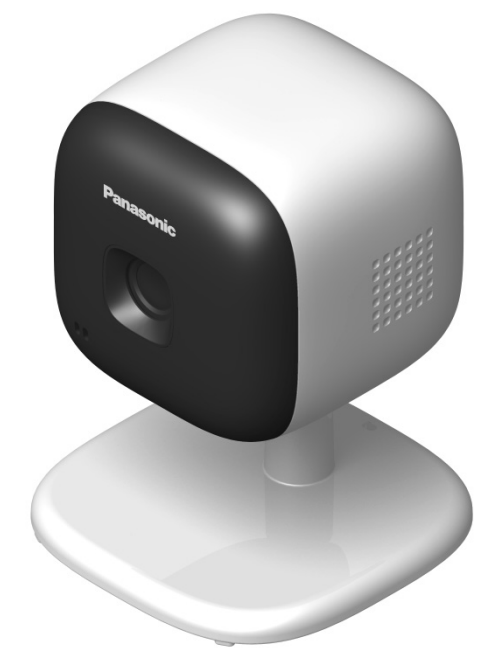
Panasonic Home Network System Indoor Camera KX-HNC200
Introduction
The Panasonic Home Network System Indoor Camera KX-HNC200 is a versatile indoor surveillance camera designed to enhance home security and monitoring through seamless wireless connectivity. This indoor camera integrates with the Panasonic Home Network Hub (KX-HNB600, sold separately) to create a comprehensive smart home monitoring system.
Key benefits of this camera include real-time video streaming directly to your smartphone or tablet, enabling you to watch over your children, pets, or valuables from anywhere. The camera features built-in motion, sound, and temperature sensors that provide instant alerts for unusual activity or environmental changes, enhancing safety and peace of mind. The two-way communication feature—with a built-in microphone and speaker—allows you to talk to family members remotely and even play five types of lullabies for babies.
This device is ideal for parents monitoring infants, pet owners ensuring their pets' safety, and homeowners seeking an accessible, reliable indoor security solution. The KX-HNC200’s compatibility with Panasonic’s broader Home Monitoring Kits (KX-HN6000 series) makes it an excellent choice for users wanting scalable home security.
Available through select retailers and online platforms, the Panasonic Home Network System Indoor Camera KX-HNC200 typically ranges in price from approximately $150 to $200 USD, depending on the seller and bundle options. This product caters to tech-savvy homeowners and families aiming for smart, connected, and proactive home monitoring.
Part names and functions
- Lens unit
- Microphone
- Stand
- LED indicator
- Hole
You can prevent the camera from falling by passing a string through the hole in the stand. - Temperature sensor
- Speaker

Used when registering the camera to the hub.- DC jack

Specifications
- Standards
DECT 6.0 (Digital Enhanced Cordless Telecommunications 6.0) - Frequency range
DECT: 1.92 GHz – 1.93 GHz - RF transmission power
DECT: 115 mW (max.) - Power source
120 V AC, 60 Hz - Power consumption
Standby: 1.3 W
During operation:
1.4 W (when the LED lights are not lit)
2.2 W (when the LED lights are lit) - Operating conditions
0 °C – 40 °C (32 °F – 104 °F) up to 90% relative humidity (non-condensing) - Transmitting range
Approx. 50 m (160 feet) indoors
Approx. 300 m (1,000 feet) outdoors - Image sensor
0.3 megapixel CMOS - Minimum illuminance required
0 lx1 - Focal length
Fixed (0.4 m (1.3 feet) – infinity) - Angular field of view (camera angle)
Horizontal: approx. 70°
Vertical: approx. 50° - Motion detection method
Visual sensor - Motion detection range
Horizontal: approx. 70°
Vertical: approx. 50° - Adjustable mounting angles
Horizontal: ±90°
Vertical: facing forward - facing down approx. 60°(adjustable when mounting) - Dimensions
Approx. 102 mm ´ 75 mm ´ 75 mm (4 inches ´ 2 15/16 inches ´ 2 15/16 inches) - Mass (weight)
Approx. 160 g (0.35 lb)
1 The IR-LED will be lit in the low illuminance conditions.
Accessory information
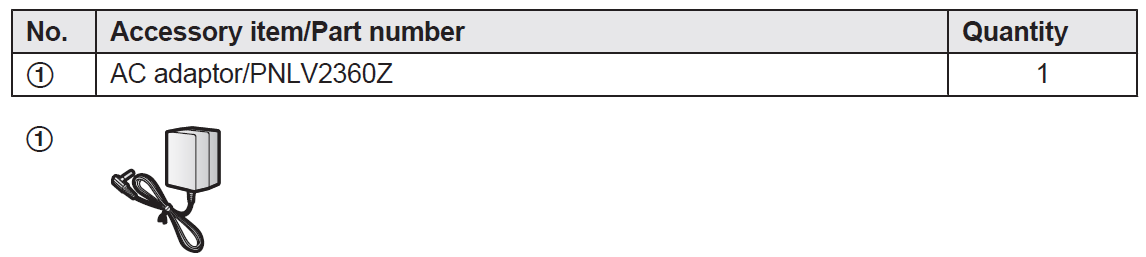
Supplied accessories
Installation
- To prevent the risk of fire or electrical shock, do not expose the product to rain or any type of moisture.
- Do not place or use this product near automatically controlled devices such as automatic doors and fire alarms. Radio waves emitted from this product may cause such devices to malfunction,, resulting in an accident.
- Do not allow the AC adaptor to be excessively pulled, bent,nt or placed under heavy objects.
- Keep small parts, such as microSD cards and screws, out of the reach of children. There is a risk of swallowing. In the event they are swallowed, seek medical advice immediately.
Important safety instructions
When using your product, basic safety precautions should always be followed to reduce the risk of fire, electric shock, and injury to persons, including the following:
- Do not use this product near water, for example, near a bathtub, washbowl, kitchen sink, or laundry tub, in a wet basement, or near a swimming pool.
- Use only the power cord indicated in this document.
About the LED indicator
You can use the LED indicator to confirm the camera’s status.


Setup overview
- Initial setup
Make sure you can access the system using your mobile device. For details, refer to the System Setup Guide included with your hub. - Registration
Required only if the camera was purchased separately (i.e., not as part of a bundle). - Confirm the usage area.
Read the information in this document to confirm that the desired usage area is suitable for proper operation and connection
Place the camera in the desired location and connect it to the power outlet.
Information about sensor features
The camera has 3 sensor features: a visual sensor used for motion detection, a temperature sensor, and a sound sensor. Please read the following information about each sensor before deciding where to install the camera.
Note:
- The camera’s sensor features are not designed to be used in situations that require high reliability. We do not recommend the use of the sensor features in these situations.
- Panasonic takes no responsibility for any injury or damage caused by the use of the camera’s sensor features.
Usage area cautions
Using the camera in the following areas may cause deformation, malfunction, or operational failure.
- In direct sunlight
- Areas exposed to grease or steam, such as kitchens
- Near fire or heating devices
- Near magnetic fields (such as near microwaves and magnets)
- Areas subject to extreme temperature changes, such as those next to air conditioners
- Areas with reflective objects, such as glass, can interfere with the detection of temperature variation
- Areas where the temperature is affected by strong illuminating objects (such as fluorescent lights)
- Near devices that emit strong radio waves, such as mobile phones
Features available when using the [Home Network] app
Some of the features that are available when using the [Home Network] app are listed below. For more information, refer to the User’s Guide (page 13).
- Security system
You can use the app to arm and disarm the security system, confirm the current status of the sensor, and view a log of previous security events. - Live camera monitoring
You can view live images from the camera, even while away from home. - Listen and talk
You can use your mobile device to talk and listen to anyone within range of the camera’s microphone and speaker. - Sensor adjustment
You can adjust the detection range of the visual sensor and the setting levels of the sound sensor and temperature sensor. - Sensor integration
You can configure the camera’s sensor features to trigger other system events, such as camera recording*1, turning on an electric device (such as a lamp), etc.
(Appropriate device required.)- A commercially available microSD card must be inserted into the hub to record images.
Notification
- You can configure the camera to send a notification to the [Home Network] app when the camera’s sensor features are triggered, for example, if a baby is crying (sound sensor) or if the room becomes too warm or too cold (temperature sensor).
Troubleshooting Panasonic Home Network System Indoor Camera KX-HNC200
Common issues with the Panasonic KX-HNC200 indoor camera include connectivity interruptions, delayed notifications, and sensor inaccuracies. Users may experience difficulty pairing the camera with the KX-HNB600 Hub or smartphone app, often due to wireless interference or out-of-range conditions.
- Problem: Camera not connecting to the hub
Solution: Ensure the camera is within approximately 50 meters of the hub indoors; reset the camera and hub and retry pairing. - Problem: No audio communication
Solution: Verify microphone and speaker permissions on the app; reboot the camera and device. - Problem: Delayed or missing motion alerts
Solution: Check sensor sensitivity settings; ensure firmware and app are updated to the latest versions.
Error codes specific to this model are typically displayed within the Panasonic Home Network app, directing users to restart devices or check network status. Preventive measures include placing the camera where it has stable wireless coverage, avoiding physical obstructions, and regularly updating firmware.
The KX-HNC200 comes with a limited warranty covering manufacturing defects. Panasonic offers customer support through their official website and help centers, where users can access manuals, FAQs, and direct contact options for technical assistance.
Warranty (For the United States and Puerto Rico)
Panasonic Home Network System Products Limited Warranty
Limited Warranty Coverage
If your product does not work properly because of a defect in materials or workmanship, Panasonic Corporation of North America (referred to as “the warrantor”) will, for the length of the period indicated on the chart below, which starts with the date of original purchase (“Limited Warranty period”), at its option either (a) repair your product with new or refurbished parts, or (b) replace it with a new or a refurbished equivalent value product, or (c) refund your purchase price. The decision to repair, replace, or refund will be made by the warrantor.
Home Network System Products microSD card (Included model only)
- Parts: One (1) Year 90 days
- Labor: One (1) Year N/A
During the “Labor” Limited War period,,d there will be no charge for labor. During the “Parts” Limited Warranty period, there will be no charge for parts. You must mail in your product prepaid during the Limited Warranty period. This Limited Warranty excludes both parts and labor for batteries, antennas, and cosmetic parts (cabinet). This Limited Warranty only applies to products purchased and serviced in the United States or Puerto Rico. This Limited Warranty is extended only to the original purchaser and only covers products purchased as new.
Pros and Cons of Panasonic Home Network System Indoor Camera KX-HNC200
Pros
- High compatibility: Works seamlessly with Panasonic Home Monitoring Kits for expandable security solutions.
- Real-time alerts: Motion, sound, and temperature sensors provide comprehensive monitoring and timely notifications.
- Two-way communication: Built-in microphone and speaker allow remote interaction, enhancing usability for families.
- Baby monitoring features: Includes lullaby playback and environmental sensors tailored for infant safety.
- Wireless connectivity: DECT wireless technology ensures stable indoor communication with a range of about 50 meters.
Cons
- Dependence on hub: Requires the KX-HNB600 hub, which is sold separately, adding to the overall cost.
- Resolution limitations: Video quality at 640 x 480 pixels may be lower compared to modern HD cameras.
- Indoor use only: Not suitable for outdoor surveillance due to lack of weatherproofing.
- Limited app integration: Works mainly within Panasonic’s ecosystem, limiting third-party smart home compatibility.
Overall, the Panasonic Home Network System Indoor Camera KX-HNC200 provides good value for money for users invested in Panasonic’s home monitorinecosystemte,,m but may be less appealing for those seeking standalone or HD resolution solutions.
Customer Reviews of Panasonic Home Network System Indoor Camera KX-HNC200
Users consistently praise the Panasonic Home Network System Indoor Camera KX-HNC200 for its reliable motion and sound detection, as well as the convenience of two-way communication through the app. Many parents highlight the lullaby feature and temperature alerts as valuable for baby monitoring.
Common complaints include occasional connectivity issues, especially in larger homes or when the camera is placed far from the hub. Some users note that the video resolution feels outdated compared to newer cameras on the market.
Typical star ratings range between 4 and 4.5 out of 5, reflecting strong satisfaction with usability and features but acknowledging limitations in image quality. Customers recommend this camera for those already using or planning to build the Panasonic Home Network System for a coherent smart home experience.
Faqs
How do I set up the panasonic Home Network System Indoor Camera KX-HNC200 for the first time?
What should I do if the panasonic Home Network System Indoor Camera KX-HNC200 is not connecting to the hub or Wi-Fi?
Can I use the panasonic Home Network System Indoor Camera KX-HNC200 with smartphones and tablets for remote monitoring?
What are the key features of the panasonic Home Network System Indoor Camera KX-HNC200 that enhance home security?
How do I maintain and clean the panasonic Home Network System Indoor Camera KX-HNC200 to ensure optimal performance?
What should I do if the panasonic Home Network System Indoor Camera KX-HNC200’s video quality is poor or lagging?
Is the panasonic Home Network System Indoor Camera KX-HNC200 compatible with other Panasonic home monitoring accessories?
How can I securely mount the panasonic Home Network System Indoor Camera KX-HNC200 to prevent it from falling or being damaged?
More panasonic manuals
- How to Use: Panasonic Home Network System HUB UKX-HNB600C Instruction Manual
- How to Use: Panasonic Home Monitoring Camera Front Door-Outdoor KX-HN7001 Instruction Manual
- How to Use: Panasonic Home Monitoring Front Door-Outdoor KX-HN7052C Instruction Manual
- Setup: Panasonic Home Network System HUB KX-HNB600C User Manual
- Setup: Panasonic Home Network System Smart Plug KX-HNA101C User Manual
- Setup & Usage: Panasonic Home Monitoring Camera KX-HN1007 Instruction Guide
Leave a Comment