
How to Use: Panasonic Home Network System HUB UKX-HNB600C Instruction Manual
Content
Panasonic Home Network System HUB UKX-HNB600C
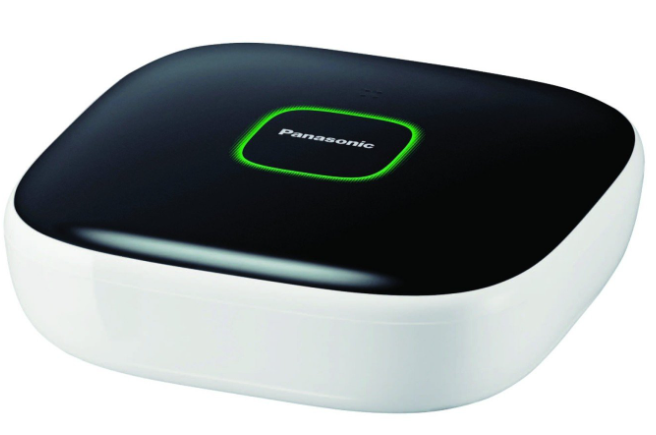
Introduction
The Panasonic Home Network System HUB UKX-HNB600C is a central smart home hub designed to seamlessly integrate and manage multiple security and automation devices within your home network. Utilizing advanced DECT 6.0 technology, this hub creates a reliable wireless network connecting cameras, sensors, smart plugs, and cordless handsets to deliver a comprehensive home monitoring solution.
Key benefits of the UKX-HNB600C include robust wireless communication up to 50 meters indoors, secure WPA2 encryption protocols, and compatibility with a variety of Panasonic smart devices. It supports real-time alerts sent directly to your smartphone or tablet, enabling you to monitor your home remotely and respond promptly to security events such as motion detection or door/window activity.
This hub is ideal for homeowners, small business owners, and tech-savvy users seeking a customizable, expandable smart home system that integrates voice calls via landline connection, video monitoring with HD cameras, and sensor-triggered automation. The device supports up to 16 cameras and multiple sensors, making it scalable for varied security needs.
The estimated price range in the UK market is approximately £150-£200, depending on retailer and bundle options. Availability is generally through official Panasonic distributors and select online technology retailers, though occasional stock shortages may occur due to demand and supply constraints.
Overall, the Panasonic Home Network System HUB UKX-HNB600C combines powerful wireless technology with user-friendly app control to deliver a versatile smart home solution designed for security, convenience, and peace of mind.
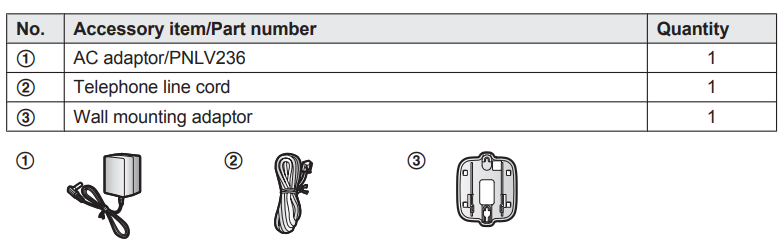
Accessory information
Supplied accessories
Setup
Part names and functions
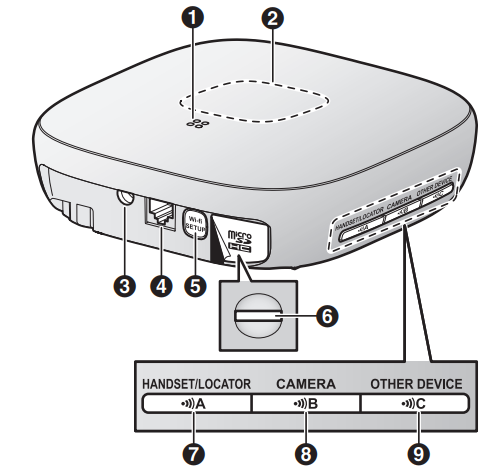
- Speaker
- LED indicator
- DC jack
- LINE jack
- Wi-Fi SETUP
- Used when performing initial setup. microSD card slot
- Used when inserting a microSD card. Remove the label when inserting.
- HANDSET/LOCATORN
- Used when registering a handset. You can also press this button to locate a misplaced handset. mMisplacedhandset.
- CAMERAN
- Used when registering a camera.
- OTHER DEVICE
- Used when registering other devices, such as sensors and smart plugs.
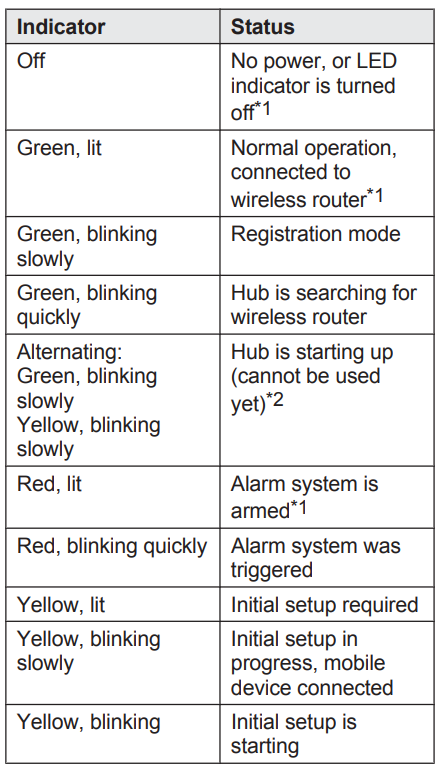
LED indicator
You can use the LED indicator to confirm the hub’s status.
Connections
- Insert the AC adaptor plug firmly into the DC jack.
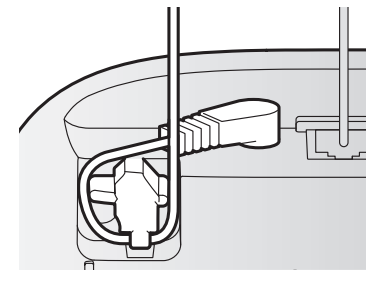
- Secure the AC adaptor cord by wrapping it around the hook.
- Connect the AC adaptor to the power outlet.
- Insert the telephone line cord into the LINE jack and a single-line telephone jack (RJ11C) until you hear a click.*1
- DSL/ADSL service users only: Connect your DSL/ADSL filter (not supplied).*1 Outdoor Camera (KX-HNC600) or Indoor Camera (KX-HNC200) users only: Remove the label covering the card slot and then insert the microSD card (not supplied) into
- the slot with the notched corner ( ) facing upwards ( ) until it clicks into place.
- This step is only necessary if you want to use the landline phone features. For details about the landline phone features, refer to the User’s Guide (page 16).
- Note:
- Use only the supplied Panasonic AC adaptor PNLV236.
- A microSD card (not supplied) is required to record images from cameras. Refer to the information about the available microSD card (page 3).
- To remove the microSD card, push in the microSD card and then remove it.
Wall mounting
- You can use the included wall mounting adaptor to wall mount the hub if desired.
Note:
- Make sure that the wall and the fixing method are strong enough to support the weight of the unit.
- Connect the AC adaptor and the telephone line cord to the hub.
- Secure the AC adaptor cord by wrapping it around the hook..
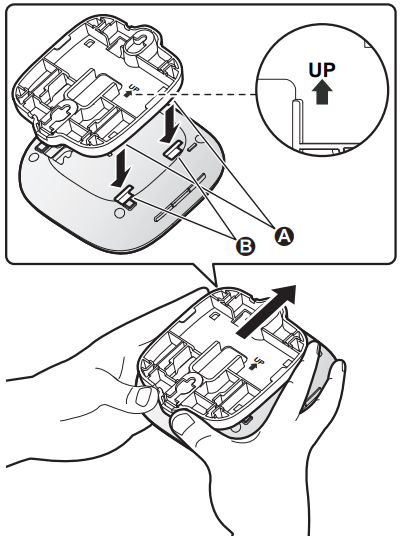
Slide the wall mounting adaptor up until it clicks into place.
- Make sure the “UP” mark on the wall mounting adaptor faces upwards.
- Align and insert the tabs (1) of the wall mounting adaptor to the grooves (2) of the hub.
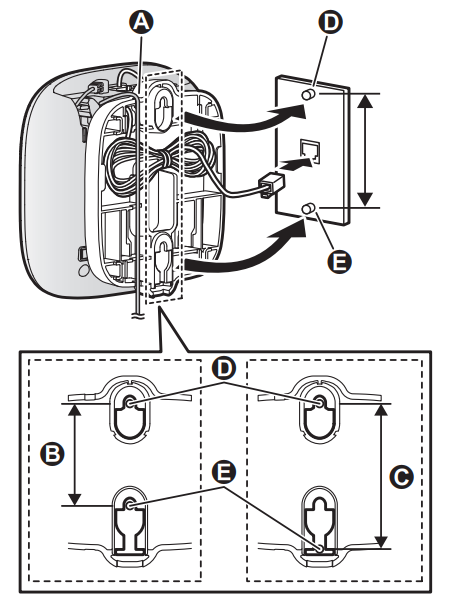
Mount the hub on a wall,, then slide it down to secure in place.
- Pass the AC adaptor cord and the telephone line cord through the groove (1) in the wall mounting adaptor. Wrap up the telephone line cord as shown to prevent the cord from being pinched.
- This product is compliant with the following wall phone plate sizes (2 types).
- 2 83 mm (3 1/4 inches)
- 3 102 mm (4 inches)
- Fit the slots of the hub onto the corresponding wall phone plate tabs for (4) and (5) respectively.
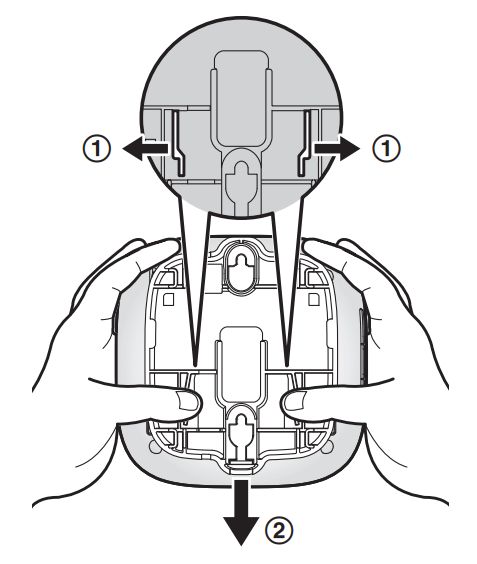
Removing the wall mounting adaptor
While pushing the release levers (A) away from the centre of the wall mounting adaptor, slide the adaptor down (B).
Specifications
Standards
- DECT:
- DECT (Digital Enhanced Cordless Telecommunications)
Wi-Fi:
- IEEE 802.11b/g/n
Frequency range
- DECT:
- 1.92 GHz – 1.93 GHz
- Wi-Fi:
- 2.412 GHz – 2.462 GHz (channels 1 – 11)
RF transmission power
- DECT:
- 115 mW (max.)
- Wi-Fi:
- 100 mW (peak transmission power)
Encryption
- WPA2™-PSK (TKIP/AES), WPA™-PSK
- (TKIP/AES), WEP (128/64 bit)
Simplified configuration
- WPS (PBC)
Power source
- 120 V AC, 60 Hz
Power consumption
- Standby: Approx. 3.5 W
- Maximum: Approx. 4.0 W
Operating conditions
- 0 °C – 40 °C (32 °F – 104 °F)
- 20 % – 80 % relative air humidity (dry)
Alert tone volume
- High alert level: approx. 90 dB
- Low alert level: approx. 73 dB (measured approx. 10 cm (3 15/16 inches) in front of the centre of the unit)
Dimensions (height ´ width ´ depth)
- Approx. 42 mm ´ 130 mm ´ 130 mm (1 21/32 inches ´ 5 1/8 inches ´ 5 1/8 inches)
Mass (weight)
- Approx. 220 g (0.49 lb)
Warranty
- PaPannaassoonniicc CCaannaaddaa IInncc..
- 5770 Ambler Drive, Mississauga, Ontario L4W 2T3
- PANASONIC PRODUCT - LIMITED WARRANTY
- EXCHANGE PROGRAM
- Panasonic Canada Inc. warrants this product to be free from defects in material and workmanship under normal use and for a period as stated below from the date of original purchase agrees to, at its option either (a) repair your product with new or refurbished parts, (b) replace it with a new or a refurbished equivalent value product, or (c) refund your purchase price. The decision to repair, replace,, or refund will be made by Panasonic Canada Inc.
- Home Network System Products – One (1) year
microSD card (Included model only) – One (1) year - This warranty is given only to the original purchaser, or the person for whom it was purchased as a gift, of a Panasonic brand product mentioned abo, ve sold by an authorized Panasonic dealer in Canada and purchased and used in Canada, which product was not sold “as is”, and which product was delivered to you in new condition in the original packaging.
- TO BE ELIGIBLE TO RECEIVE WARRANTY SERVICE HEREUNDER, A PURCHASE RECEIPT OR OTHER PROOF OF DATE OF ORIGINAL PURCHASE, SHOWING AMOUNT PAID AND PLACE OF PURCHASE, IS REQUIRED
LIMITATIONS AND EXCLUSIONS
- This warranty ONLY COVERS failures due to defects in materials or workmanship, and DOES NOT COVER normal wear and tear or cosmetic damage. The warranty ALSO DOES NOT COVER damages which occurred in shipment, or failures which are caused by products not supplied by Panasonic Canada Inc., or failures which result from accidents, misuse, abuse, neglect, mishandling, misapplication, alteration, faulty installation, set-up adjustments, misadjustment of consumer controls, improper maintenance, improper batteries, power line surge, lightning damage, modification, introduction of sand, humidity or liquids, commercial use such as hotel, office, restaurant, or other business or rental use of the product, or service by anyone other than a Authorized Servicer, or damage that is attributable to acts of God.
- Dry cell batteries are also excluded from coverage under this warranty. Rechargeable batteries are warranted for ninety (90) days from the time of original purchase.
- THIS EXPRESS, LIMITED WARRANTY IS INSTEAD OF ALL OTHER WARRANTIES, EXPRESS OR IMPLIED, INCLUDING ANY IMPLIED WARRANTIES OF MERCHANTABILITY AND FITNESS FOR A PARTICULAR PURPOSE. IN NO EVENT WILL PANASONIC CANADA INC. BE LIABLE FOR ANY SPECIAL, INDIRECT,, OR CONSEQUENTIAL DAMAGES RESULTING FROM THE USE OF THIS PRODUCT OR ARISING OUT OF ANY BREACH OF ANY EXPRESS OR IMPLIED WARRANTY.
(As examples, this warranty excludes damages for lost time, travel to and from the Authorized Servicer, loss of or damage to media or images, data,, a or other memory or recorded content. This list of items is not exhaustive, but for illustration only.) - In certain instances, some jurisdictions do not allow the exclusion or limitation of incidental or consequential damages, or the exclusion of implied warranties, so the above limitations and exclusions may not be applicable. This warranty gives you specific legal rights,,hts and you may have other rights which vary depending on your province or territory.
Troubleshooting the Panasonic Home Network System HUB UKX-HNB600C
Common issues users may encounter with the Panasonic Home Network System HUB UKX-HNB600C include connectivity dropouts, sensor communication failures, and app synchronization errors. Typical error indicators are LED signals blinking red on sensors or cameras, or error messages within the Home Network App,, such as "Server Error."
- Connectivity Problems: Ensure the hub is placed centrally with minimal obstacles,s, such as metal doors or concrete walls that can disrupt DECT and Wi-Fi signals. Reboot the hub and router if devices lose connection.
- Sensor Out-of-Range: Devices blinking red indicate out-of-range status. Relocate sensors closer to the hub or add repeaters if available.
- App Errors: Update the Home Network App to the latest version and confirm internet speed meets the minimum 350 kbps requirements. Reset app cache or reinstall if issues persist.
- Error Codes: Refer to the user manual for specific LED codes; a blinking red LED usually denotes communication issues.
Preventive measures include regular firmware updates, optimal device placement,, avoiding physical obstructions, and periodic system restarts.
The Panasonic Home Network System HUB UKX-HNB600C comes with a standard manufacturer warranty covering hardware defects, with support available Monday to Sunday through Panasonic’s official customer service channels. For assistance, users can contact Panasonic support via their website or phone during business hours.
Pros & Cons of the Panasonic Home Network System HUB UKX-HNB600C
Pros
- Robust Wireless Connectivity: Utilizes DECT 6.0 technology,, offering stable connections with up to 50 m indoor range and secure WPA2 encryption.
- Comprehensive Integration: Supports multiple devices,, including cameras, sensors, and cordless handsets, all managed through a centralized hub and app.
- Expandable System: Compatible with up to 16 cameras and various sensors, allowing tailored home security setups.
- Smart Automation Features: Enables event-triggered recording and notifications, enhancing proactive home monitoring.
Cons
- Range Limitations Indoors: Wireless signal can be hindered by metal doors, concrete walls, and multi-floor setups, reducing effective range.
- App and Setup Complexity: Initial configuration may be challenging for non-technical users; app errors have been reported requiring troubleshooting.
- Availability Issues: Occasionally limited stock in some regions, which can delay purchase or replacement parts.
- Value for Money: While feature-rich, pricing might be higher compared to simpler smart hubs lacking DECT support.
Compared to alternatives like standard Wi-Fi-only smart hubs, the UKX-HNB600C offers superior device connectivity and security through DECT but demands more careful device placement and setup expertise.
Customer Reviews of the Panasonic Home Network System HUB UKX-HNB600C
User feedback on the Panasonic Home Network System HUB UKX-HNB600C is generally positive, highlighting the system's reliable wireless connections and comprehensive device integration. Many users praise the real-time alert system and the ease of controlling multiple smart devices from a single app.
Common praises include the robust build quality of the hub, the effective notification system, and the ability to connect various sensors and cameras seamlessly. Star ratings typically range from 4 to 4.5 out of 5.
However, some users have reported occasional connectivity drops caused by physical obstructions or interference, as well as a learning curve associated with the initial setup and app interface. A few complaints mention limited availability and delayed product shipments.
Most reviewers recommend the product for homeowners seeking a scalable and secure smart home network system, especially those who value DECT security and integration with Panasonic's smart home ecosystem.
Faqs
How do I set up the panasonic Home Network System HUB UKX-HNB600C for the first time?
What can I do if my panasonic Home Network System HUB UKX-HNB600C fails to register or connect during setup?
Can the panasonic Home Network System HUB UKX-HNB600C be used with Panasonic cameras like the KX-HNC600 or KX-HNC200?
What are the key features of the panasonic Home Network System HUB UKX-HNB600C that enhance home automation?
How can I optimize the wireless performance of my panasonic Home Network System HUB UKX-HNB600C?
What maintenance steps are recommended to keep the panasonic Home Network System HUB UKX-HNB600C running smoothly?
Is the panasonic Home Network System HUB UKX-HNB600C compatible with both Android and iOS devices?
How do I resolve connectivity issues when the panasonic Home Network System HUB UKX-HNB600C LED indicator blinks yellow continuously?
More panasonic manuals
- How to Use: Panasonic Home Monitoring Front Door-Outdoor KX-HN7052C Instruction Manual
- How to Use: Panasonic Home Network System Indoor Camera KX-HNC200 Instruction Manual
- Setup: Panasonic Home Network System Smart Plug KX-HNA101C User Manual
- How to Use: Panasonic Home Monitoring Camera Front Door-Outdoor KX-HN7001 Instruction Manual
- How to Use: Panasonic UHD LCD TV TH-86CQ1 U User Manual
- Setup: Panasonic Home Network System HUB KX-HNB600C User Manual
Leave a Comment