
Philips 5000 Series TAB5109 Soundbar User Manual
Content
Philips 5000 Series TAB5109 Soundbar: Overview, Features, and User Guide
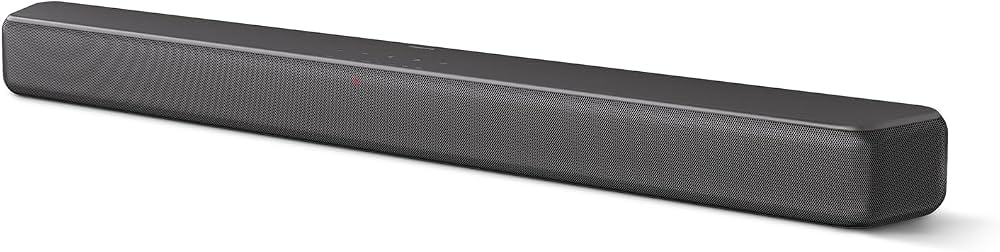
The Philips 5000 Series TAB5109 Soundbar is a compact 2.0-channel audio upgrade designed for users who want clearer TV sound without the complexity of a full home theater system. With a total output of 120W max and 60W RMS, this soundbar is built to improve dialogue clarity, add stronger midrange presence, and deliver a more immersive experience for everyday streaming, gaming, and movie watching. It is especially appealing for apartment living rooms, bedrooms, and secondary TVs where a slim design and simple setup matter most.
One of the biggest advantages of the Philips 5000 Series TAB5109 Soundbar is its flexible connectivity. It supports HDMI ARC, optical input, USB, AUX, Bluetooth 5.4, and wireless networking options, making it easy to connect to modern smart TVs and older devices alike. Audio format support includes Dolby Digital, Dolby Digital Plus, DTS Digital Surround, DTS Virtual:X, and LPCM, which helps create a broader and more dynamic soundstage from compatible content. The unit also includes a compact design measuring 766 x 67.3 x 91 mm and weighing 1.93 kg, so it fits neatly under most televisions or can be wall-mounted.
This soundbar is ideal for users seeking a budget-friendly TV audio enhancement rather than a bass-heavy cinema setup. Estimated street pricing in 2026 generally falls in the entry-level to mid-range category, with availability varying by region and retailer. For shoppers comparing compact soundbars, the Philips TAB5109 stands out for its balance of simple operation, modern wireless support, and practical everyday performance.
Detailed Specifications for Philips TAB5109 2.0 Soundbar
- Audio channels: 2.0 stereo soundbar system
- Total output power: 120W max / 60W RMS
- Frequency response: 60Hz to 20kHz
- Speaker impedance: 8 ohms
- Drivers: 2 full-range front speakers
- Wireless connectivity: Bluetooth 5.4 and Wi-Fi support
- Wired connections: HDMI ARC, optical digital input, USB, 3.5mm AUX
- Supported audio formats: Dolby Digital, Dolby Digital Plus, DTS Digital Surround, DTS Virtual:X, LPCM
- Power consumption: 20W typical operating power
- Standby power: Less than 0.50W in standard standby mode
- Dimensions: 766 x 67.3 x 91 mm
- Weight: 1.93 kg
Compared with many basic budget soundbars, the Philips 5000 Series TAB5109 Soundbar offers stronger wireless flexibility and broader codec support. Against similarly priced compact models, its HDMI ARC and Bluetooth 5.4 connectivity make it easier to integrate into a modern home entertainment setup. While it does not include a dedicated subwoofer in the core 2.0 format, it remains a practical choice for users who prioritize clarity, convenience, and space-saving design over deep bass.
Troubleshooting Philips TAB5109 Soundbar Problems and Fixes
If the soundbar does not power on, check the mains connection, verify the power outlet, and confirm that the adapter is firmly seated. If the TV shows no sound through HDMI ARC, make sure HDMI ARC is enabled in the TV settings, CEC/control features are active, and the correct input mode is selected on the soundbar.
Common audio problems usually come from cable mismatch or incorrect source selection. If sound is distorted, reduce the volume on both the TV and the soundbar, then test with another source such as optical or Bluetooth. If Bluetooth pairing fails, delete the soundbar from the device list, restart both devices, and pair again within close range. If playback is delayed, switch between HDMI ARC and optical to see which connection gives the best sync with your television.
There are no widely reported user-facing error codes for routine operation, but flashing lights or pairing indicators usually point to source or connection issues rather than hardware failure. Preventive care includes keeping firmware updated when available, avoiding cable strain, and placing the unit in a ventilated area. Warranty terms depend on the region and seller, so users should check the purchase invoice and local Philips support policy. For help, contact the retailer, Philips customer support, or the official service center listed in the product documentation.
Pros and Cons of the Philips 5000 Series TAB5109 Soundbar
Pros
- Simple setup with HDMI ARC, which makes it easy to connect to most modern TVs.
- Clearer dialogue and improved everyday TV sound compared with built-in television speakers.
- Bluetooth 5.4 support adds convenient wireless streaming from phones, tablets, and laptops.
- Compact, lightweight design works well in smaller rooms and tight media cabinets.
- Multiple audio formats, including Dolby Digital Plus and DTS Virtual:X, help create a more immersive experience.
- Good value for money for users who want a reliable entry-level soundbar without extra complexity.
Cons
- 2.0-channel design means it lacks the deep bass impact of larger systems with a dedicated subwoofer.
- Best suited for TV enhancement rather than full cinematic surround performance.
- Some buyers may prefer more advanced smart features or app-based tuning found in higher-end alternatives.
- Wireless features are useful, but users focused on bass-heavy music may want a 2.1 system instead.
For shoppers comparing compact soundbars, the Philips TAB5109 offers a strong mix of affordability and everyday usability. It competes well against basic models from other brands, especially when HDMI ARC, Bluetooth 5.4, and Dolby/DTS support are priorities.
Customer Reviews for Philips TAB5109 Soundbar
Customer feedback on the Philips 5000 Series TAB5109 Soundbar is generally positive, with many users praising the easy installation and clearer TV speech. Typical ratings fall around 4 out of 5 stars for value, simplicity, and compact design. One common comment is that the sound upgrade feels immediate, especially for news, dialogue-heavy shows, and streaming content.
Frequently mentioned complaints include limited bass without a separate subwoofer and the desire for a more cinematic soundstage in larger rooms. Users who bought the soundbar for apartments, bedrooms, or secondary TVs often recommend it, while home theater enthusiasts may prefer a larger 2.1 or 3.1 alternative. A typical testimonial is: “Easy to set up, much clearer than my TV speakers, and perfect for everyday viewing.” Another common note is: “Great value, but bass lovers may want more low-end punch.”
Frequently Asked Questions About the Philips 5000 Series TAB5109 Soundbar
Is the Philips 5000 Series TAB5109 Soundbar good for movies? Yes, it improves dialogue and adds more body than built-in TV speakers, but it is best for smaller spaces and casual movie viewing.
Does it support Bluetooth? Yes, it supports Bluetooth 5.4 for wireless audio playback.
Can it connect through HDMI ARC? Yes, HDMI ARC is one of its main connection options and is recommended for the easiest setup.
Is it worth buying? It is a strong choice if you want a compact, affordable soundbar with modern connectivity and better TV sound without a separate subwoofer.
Faqs
How do I set up the philips 5000 Series TAB5109 Soundbar for the first time with an HDMI ARC TV?
What should I do if the philips 5000 Series TAB5109 Soundbar has no sound after connecting to my TV?
Does the philips 5000 Series TAB5109 Soundbar support Bluetooth 5.4 for wireless music streaming?
Which audio formats and TV connections work best with the philips 5000 Series TAB5109 Soundbar?
How can I improve dialogue clarity on the philips 5000 Series TAB5109 Soundbar for movies and news?
Why does the philips 5000 Series TAB5109 Soundbar sound out of sync with the TV picture?
How do I mount or place the philips 5000 Series TAB5109 Soundbar for the best sound performance?
How should I clean and maintain the philips 5000 Series TAB5109 Soundbar to keep it working well?
More philips manuals
- Philips PPM7325 Massge Gun User Manual
- Philips F20 Amara Minimal Contact Full-Face Mask User Manual
- Philips PPM7322DG Fullsize Ergo Massage gun User Manual
- Philips PPM7322 Sports Massage Gun User Manual
- Philips PD9016 Portable DVD Player User Manual
- Philips SHB4205 Wireless Bluetooth Neckband Headphones User Manual
Leave a Comment