
Philips PD9016 Portable DVD Player User Manual
Content
Philips PD9016 Portable DVD Player Review and User Manual Guide
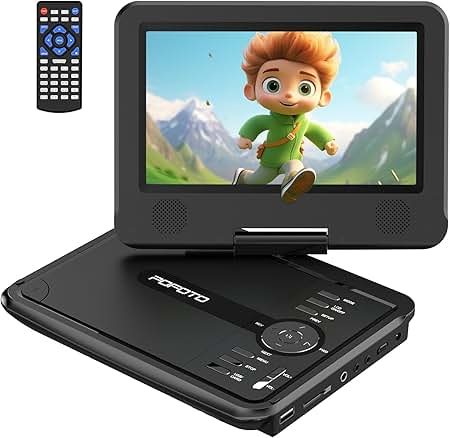
The Philips PD9016 Portable DVD Player is a compact entertainment solution designed for travel, family trips, and everyday viewing away from a television. Built around a 9-inch LCD TFT display, it offers a practical balance of portability, disc compatibility, and simple operation, making it a strong choice for users who still rely on DVDs, CDs, and MP3 discs. The Philips PD9016 Portable DVD Player is especially appealing to parents looking to keep kids entertained in the car, commuters who want offline media playback, and buyers who need a reliable portable disc player for home or on-the-go use.
One of its biggest advantages is broad media support, including DVD, DVD-R/RW, DVD+R/+RW, CD, CD-R/RW, MP3-CD, Picture CD, SVCD, and Video CD. It also supports both NTSC and PAL video systems, which adds flexibility for different disc formats and regions. The built-in speakers, headphone jack, and AV output make it easy to use in personal and shared viewing setups. Depending on the seller, the Philips PD9016 Portable DVD Player is typically found in the estimated price range of about $70 to $120, with used or refurbished units often priced lower. Availability is mostly through online marketplaces, resale listings, and occasional support channels rather than major retail shelves, since this is an older model. For buyers who want a straightforward portable DVD player with dependable basics, the PD9016 remains a practical option.
Philips PD9016 Portable DVD Player Specifications and Key Features
- Display: 9-inch LCD TFT screen with a 640 x 220 resolution on supported versions.
- Playback formats: DVD, DVD-R, DVD-RW, DVD+R, DVD+RW, CD, CD-R, CD-RW, MP3-CD, Picture CD, SVCD, and Video CD.
- Video systems: NTSC and PAL compatibility for flexible disc playback.
- Audio: Built-in speakers rated at 250mW RMS, plus a 3.5mm headphone jack for private listening.
- Signal quality: Signal-to-noise ratio above 80dB for headphones and above 62dB for built-in speakers.
- Connections: Composite AV output and DC input rated at 9V, 1A.
- Audio support: Dolby Digital and MP3 playback with MP3 bit rates from 32 to 320 kbps.
- Physical size: Approximate dimensions around 24 x 7.8 x 18.4 cm, depending on model variant.
- Weight: Roughly 1.6 to 1.7 kg, making it portable but not ultra-lightweight.
- Power: AC/DC adapter support for home and travel use.
Compared with newer portable media players, the Philips PD9016 Portable DVD Player focuses on disc playback rather than streaming, USB playback, or wireless features. That makes it less advanced than modern alternatives, but also more reliable for users who still own a large DVD library.
Pros and Cons of the Philips PD9016 Portable DVD Player
Pros
- Wide disc compatibility, including DVD and recordable formats, makes it useful for older movie collections.
- 9-inch screen is large enough for comfortable viewing in cars, hotel rooms, and small spaces.
- Built-in speakers and headphone output provide flexible listening options.
- NTSC and PAL support improves usability across different disc types.
- Simple controls make it easy for children and older users to operate.
- Good value for money when purchased used or refurbished.
Cons
- No modern streaming, Bluetooth, or Wi-Fi features, so it is limited to physical media.
- Display resolution is modest by current standards.
- Battery life and included accessories can vary significantly by seller and condition.
- Heavier than compact tablet-based entertainment options.
- Availability may be inconsistent because it is an older model.
For shoppers comparing portable DVD players, the PD9016 stands out for its dependable basics, while newer models may offer better battery performance or added media inputs. Its strongest selling point is simplicity rather than advanced features.
Customer Reviews and Feedback for Philips PD9016 Portable DVD Player
Customer feedback for the Philips PD9016 Portable DVD Player is generally positive, with many users giving it an average rating of around 4 out of 5 stars when the unit is in good working condition. Buyers frequently praise the screen size, straightforward setup, and compatibility with a wide range of discs. A common positive testimonial theme is that it works well for road trips and keeps children entertained without requiring internet access.
Typical complaints focus on age-related issues such as worn batteries, missing accessories, and occasional playback problems with some recordable discs. Some users also note that the screen quality is basic compared with modern devices. For best results, purchase from a seller that clearly lists the condition, includes the charger, and confirms DVD playback functionality. The Philips PD9016 Portable DVD Player is a solid recommendation for families, collectors, and anyone who wants a simple portable disc player rather than a modern streaming device.
Faqs
How do I set up the philips PD9016 Portable DVD Player for the first time?
Why is my philips PD9016 Portable DVD Player not reading discs, and how can I fix it?
What video and disc formats work with the philips PD9016 Portable DVD Player?
How long does the battery last on the philips PD9016 Portable DVD Player, and how can I extend playback time?
Can the philips PD9016 Portable DVD Player be used in a car, and what do I need?
How do I improve picture and sound quality on the philips PD9016 Portable DVD Player?
What should I do if the philips PD9016 Portable DVD Player screen is blank or flickering?
How should I clean and maintain the philips PD9016 Portable DVD Player for long-term use?
More philips manuals
Leave a Comment