
Philips 5000 Series TAT5506 Headphones User Manual
Content
Philips 5000 Series TAT5506 Headphones: Complete Product Manual
Introduction
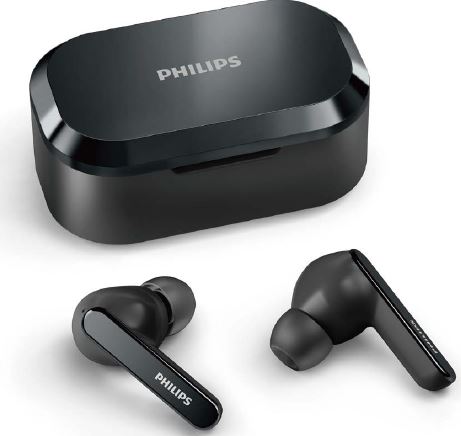
The Philips 5000 Series TAT5506 Headphones are true wireless earbuds built for everyday listening, commuting, calls, and workouts. Designed for users who want a balanced mix of comfort, active noise cancellation, and reliable Bluetooth performance, these earbuds combine a compact in-ear fit with practical features that suit both casual and professional use. The Philips 5000 Series TAT5506 Headphones are especially appealing to listeners who want a clean, easy-to-use audio solution without moving into premium-tier pricing.
Key selling points include active noise cancellation, Bluetooth 5.2 connectivity, AAC and SBC codec support, and a charging case that extends total playback time for all-day use. With IPX5-style sweat and splash resistance commonly associated with this model, they are well suited for gym sessions, walks, travel, and remote work calls. The earbuds also support hands-free calling and a stable wireless range of up to 10 meters, making them a practical choice for Android and iPhone users alike.
Estimated street pricing typically falls in the budget-to-midrange segment, often around $70 to $120 depending on region, retailer, and seasonal promotions. Availability is generally good through online electronics stores, marketplaces, and audio retailers, with black and white versions commonly listed. For shoppers comparing wireless earbuds under $150, this model offers a strong feature set and solid value for money.
Specifications: Philips TAT5506 true wireless earbuds features and performance
- Driver size: 10 mm dynamic drivers for compact yet energetic sound output.
- Impedance: 16 ohms, suited for efficient power use with mobile devices.
- Sensitivity: 105 dB, delivering strong volume levels without needing extra amplification.
- Bluetooth version: 5.2 for improved stability and efficient wireless connection.
- Supported codecs: AAC and SBC for broad compatibility with smartphones, tablets, and laptops.
- Bluetooth profiles: HFP, A2DP, and AVRCP for calling, music streaming, and media control.
- Wireless range: Up to 10 meters in typical open-area use.
- Battery life: Up to 7 hours with ANC on and up to 8 hours with ANC off, with the charging case extending total listening time.
- Charging time: About 2 hours for a full charge in standard use.
- Battery capacity: 55 mAh per earbud and 550 mAh in the charging case.
- Standby time: Around 55 hours.
- Frequency range: 2.402 to 2.480 GHz.
In comparison with similar true wireless earbuds, the Philips 5000 Series TAT5506 Headphones stand out for their strong combination of ANC, Bluetooth 5.2, and efficient battery performance. While some competitors may offer longer battery life or more advanced app customization, this model is competitive for users who want dependable everyday sound quality and straightforward controls.
Troubleshooting Philips TAT5506 headphones: common problems and quick fixes
If the earbuds do not power on, place both units in the charging case and confirm the case has charge. If one earbud sounds quieter than the other, clean the speaker mesh gently and check for ear tip blockage. If Bluetooth pairing fails, remove the earbuds from your device’s saved list, reset Bluetooth, and reconnect from scratch.
- No sound: Make sure the volume is up on both the device and earbuds, then reconnect Bluetooth.
- Charging issue: Use a compatible USB-C cable and inspect the charging contacts for dust or moisture.
- Weak connection: Move closer to the source device and avoid heavy wireless interference.
- ANC not working: Re-seat the earbuds properly and verify ANC mode is enabled on the earbuds.
- Short battery life: Reduce ANC use, lower volume, and fully charge the case regularly.
There are no widely documented error codes for this model in normal consumer use, so most issues are resolved through reset, recharge, and cleaning procedures. To prevent problems, avoid exposing the charging case to water, store the earbuds in the case when not in use, and keep firmware-related behavior in mind if the earbuds are paired with multiple devices.
Warranty terms vary by region, but Philips support typically provides product documentation, replacement guidance, and service assistance through official customer care channels and authorized retailers. For help, contact Philips customer support through the brand’s regional support website or the retailer where the headphones were purchased.
Pros and cons of the Philips 5000 Series TAT5506 Headphones
Pros
- Active noise cancellation helps reduce background noise during travel and office use.
- Bluetooth 5.2 offers stable pairing and responsive wireless performance.
- 10 mm drivers deliver lively sound with clear everyday detail.
- Compact true wireless design makes them easy to carry and wear for long sessions.
- Good value for money compared with many ANC earbuds in the same price class.
- Useful for calls, commuting, workouts, and streaming media.
Cons
- Battery life is solid but not class-leading when ANC is enabled.
- Limited codec support may disappoint advanced audio enthusiasts looking for premium options.
- Sound customization is more basic than some app-driven competitors.
- ANC performance is practical rather than top-tier in very noisy environments.
- Depending on ear shape, fit and seal may require trying different ear tips for best results.
Compared with alternatives from Sony, JBL, and Anker, the Philips 5000 Series TAT5506 Headphones are best for buyers who want a balanced, affordable ANC earbud rather than a feature-heavy flagship model.
Customer reviews: Philips TAT5506 user feedback and star rating overview
Average customer sentiment for the Philips 5000 Series TAT5506 Headphones is typically around 4 out of 5 stars. Many users praise the comfortable fit, simple setup, and dependable sound for music and calls. A common testimonial style comment is: “Easy to pair, light in the ear, and great for daily commuting.”
Frequent complaints usually focus on battery life with ANC turned on and the lack of advanced sound controls. Some buyers note that the noise cancellation is good for everyday environments but less effective than more expensive premium earbuds. Another repeated remark is: “Excellent for the price, but not the strongest ANC I’ve used.”
Purchase recommendation: these earbuds are a smart buy for users who want a reliable, budget-friendly ANC option with modern wireless features. They are especially appealing for students, commuters, and remote workers who want strong everyday performance without paying flagship prices.
Final verdict: is the Philips TAT5506 worth buying?
The Philips 5000 Series TAT5506 Headphones deliver a well-rounded package of comfort, ANC, Bluetooth 5.2 connectivity, and practical battery life. For shoppers searching for true wireless earbuds with active noise cancellation, the Philips 5000 Series TAT5506 Headphones remain a strong everyday choice with dependable performance and broad device compatibility.
Faqs
How do I set up philips 5000 Series TAT5506 Headphones for the first time?
Why are my philips 5000 Series TAT5506 Headphones not pairing with my phone?
What should I do if one philips 5000 Series TAT5506 Headphone has no sound?
How can I improve battery life on philips 5000 Series TAT5506 Headphones?
Are philips 5000 Series TAT5506 Headphones compatible with laptops, tablets, and smart TVs?
How do I reset philips 5000 Series TAT5506 Headphones when they keep disconnecting?
What is the best way to clean and maintain philips 5000 Series TAT5506 Headphones?
How do I get the best sound and call quality from philips 5000 Series TAT5506 Headphones?
More philips manuals
Leave a Comment