
Setup: Philips Air Purifier AC3854 User Manual
Content
Philips Air Purifier AC3854
Introduction
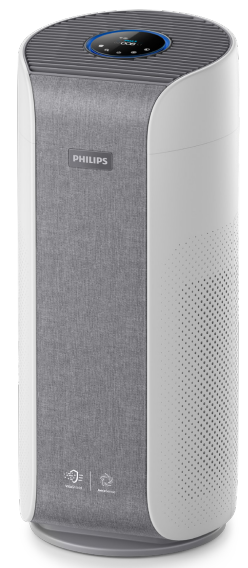
The Philips Air Purifier AC3854 is a high-performance air purification system designed to improve indoor air quality in medium to large living spaces up to 60 square meters. Equipped with advanced filtration technology, it effectively removes ultra-fine particles such as allergens, dust, pet dander, viruses, and harmful gases. Its unique selling points include a powerful clean air delivery rate (CADR) of 500 m³/h, a long-lasting filter lifespan of up to 36 months, and an intelligent auto mode that adjusts fan speed based on real-time air quality readings.
This air purifier is ideal for households and offices where clean, safe air is a priority, especially for allergy sufferers, pet owners, or those living in urban environments with high pollution levels. The sleek, modern design fits seamlessly into various interior styles, making it both a practical and aesthetic addition to your space.
Available across major retail platforms, the Philips AC3854 is competitively priced in the mid to high range of air purifiers, reflecting its robust features and durable build. Its energy-efficient operation and quiet performance also make it suitable for continuous use, including overnight operation.
Technical Specifications of Philips Air Purifier AC3854
- Clean Air Delivery Rate (CADR): 500 m³/h, suitable for rooms up to 60 m²
- Filtration system: 3-layer NanoProtect HEPA, activated carbon, and pre-filter capturing 99.97% of particles as small as 0.003 microns
- Sensor technology: AeraSense dual sensor detecting PM2.5 and harmful gases with real-time air quality feedback
- Operating modes: Auto, Turbo (maximum speed), and Sleep mode (quiet operation with dimmed display)
- Noise level: 32 dB in silent mode, up to 70 dB at max speed
- Power consumption: 60 W maximum; standby less than 2 W
- Filter lifespan: Up to 36 months based on usage and air quality
- Weight: Approximately 9 kg
- Additional features: User-friendly LED display with air quality indicators, filter replacement notification, 360° airflow intake
- Comparison: Compared to similar models like the Philips 4000i Series AC3854/51 with a CADR of 610 m³/h and room coverage up to 73 m², the AC3854 offers excellent performance for slightly smaller spaces at a competitive price point
Your air purifier
- Congratulations on your purchase of the air cleaner AC3854/AC3858.
- To fully benefit from the support that Philips offers, register your product at www.philips.com/welcome.
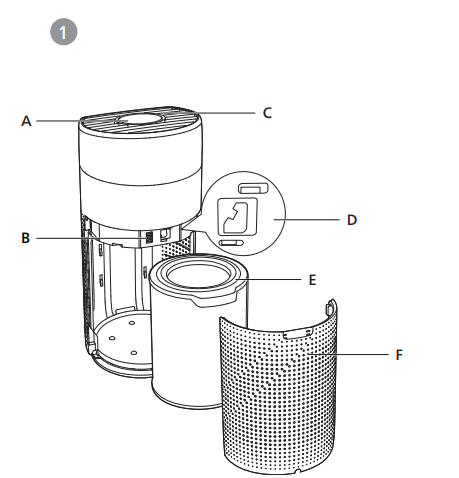
Product overview. (Fig a)
- Control panel
- Gas sensor
- Air outlet
- Particle sensor
- NanoProtect filter Series 3 (FY4440/30)
- Back cover
Controls.overview.(Fig b)
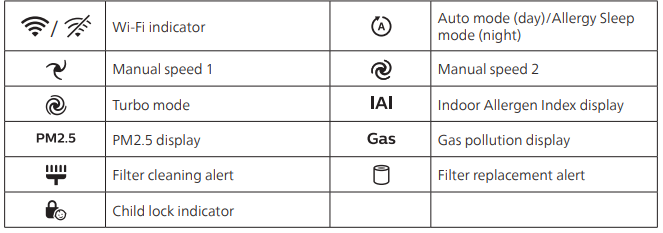
Control buttons

Display panel
Installing the. filter
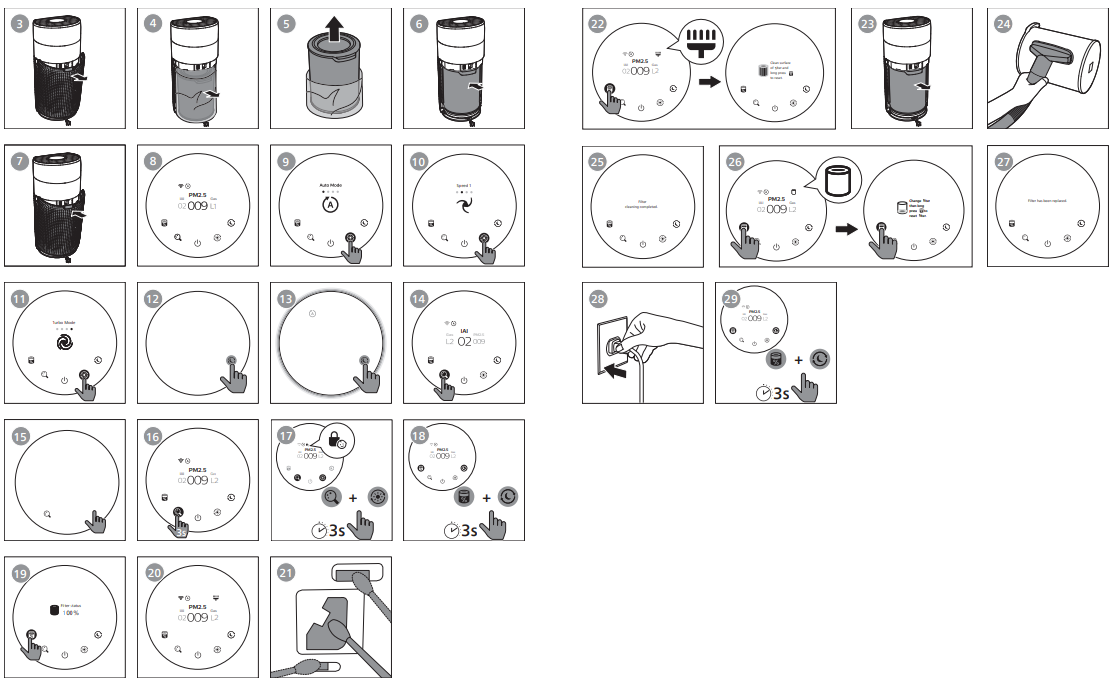
Remove all packaging of the filter before first use.
Note: Make sure the air purifier is unplugged from the electrical outlet before installing the filter.
- Pull the back cover and remove it from the appliance (fig C).
- Pull the filter from the appliance (fig d).
- Remove all packaging materials of the air purification filter (fig e).
- Put the filter back into the appliance (fig f).
- Reattach the back cover (fig g).
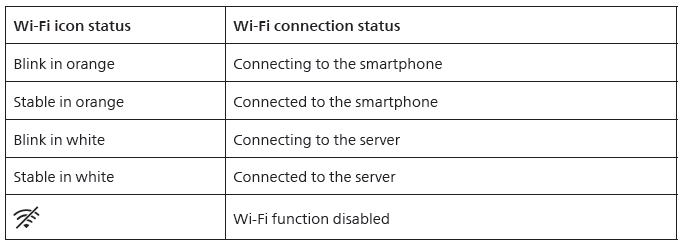
Understanding.Wi-Fi.indicator
Using the air purifier
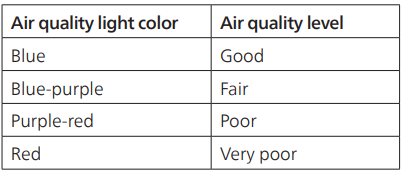
Understanding the air quality light
The air quality light automatically goes on when the air purifier is switched on, and lights up all colors in sequence. After approximately 30 seconds, the particle sensor selects the color that corresponds to the surrounding air quality of airborne particles.
The color of the air quality light is determined by the highest risk index among PM2.5, IAI,, and Gas readings.
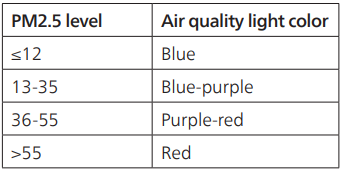
PM2.5
AeraSense sensing technology accurately detects and quickly responds to even the slightest particle change in the air. It provides you with reassurance with real-time PM2.5 feedback.
Most of the indoor air pollutants fall under PM2.5 – 36-55 Purple-r,, ed which refers to airborne particle pollutants smaller than 2.5 micrometers. Common indoor sources of fine particles >55 μmare tobacco smoke, cooking, and burning candles. Some airborne bacteria and the smallest mold spores, pet allergen ,, and dust mite allergen particles also fall under PM2.5.
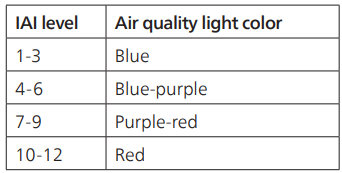
IAI
The professional-grade AeraSense sensor detects the level of indoor air allergens, and with numerical feedback from 1 to 1,2, the potential risk level of indoor air allergens can be displayed. 1 indicates the best air quality.
GAS
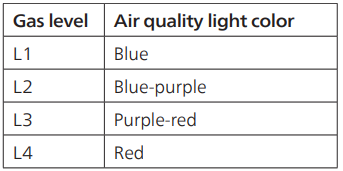
With an advanced gas sensor, a display ranging from L1 to L4 shows the level change of potentially harmful gases (incl. VOC, odor, etc.) detected. L1 indicates the best air quality.
Cleaning and maintenance
Note:
- Always unplug the appliance before you clean it.
- Never immerse the appliance in water or any other liquid.
- Never use abrasive, aggressive, or flammable cleaning agents such as bleach or alcohol to clean any part of the appliance.
- Never use any liquids (including water) to clean the filter.
- Do not attempt to clean the particle sensor and gas sensor with a vacuum cleaner.
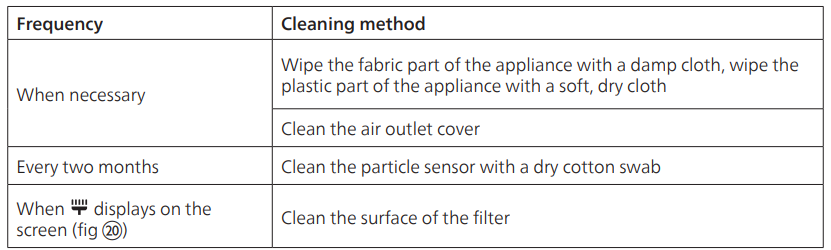
Cleaning schedule
Troubleshooting
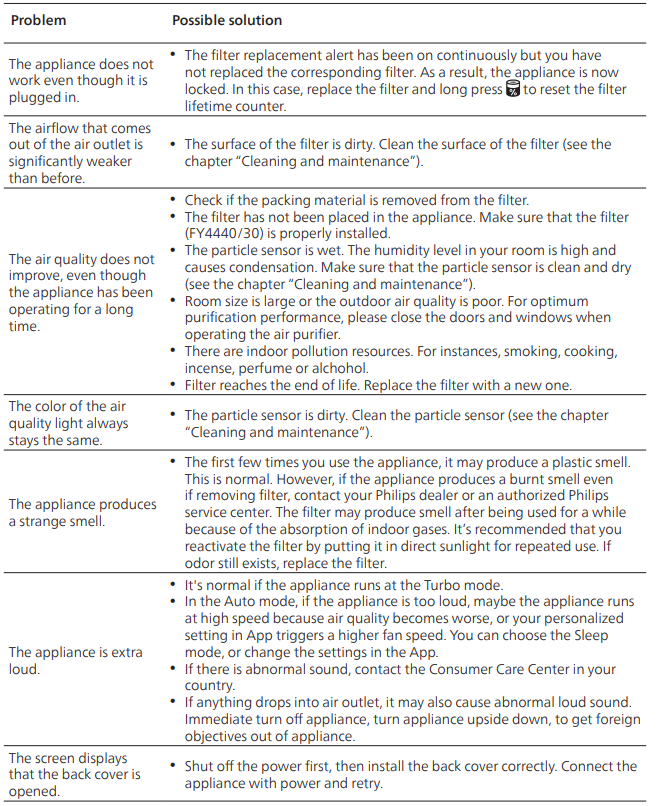
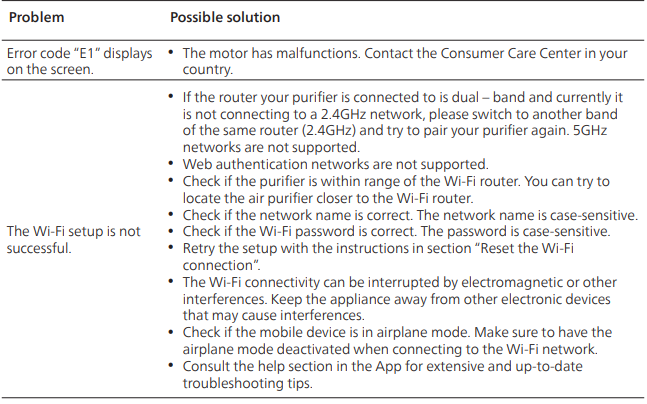
This chapter summarizes the most common problems you could encounter with the appliance. If you are unable to solve the problem with the information below, contact the Consumer Care Center in your country.
Pros and Cons of Philips Air Purifier AC3854
Pros
- High Efficiency: Filters ultra-fine particles down to 0.003 microns with 99.97% efficiency, ideal for allergy relief and pollution reduction.
- Long Filter Life: Up to 3 years of usage before replacement saves on maintenance costs.
- Smart Auto Mode: Automatically adjusts fan speed based on air quality for optimal performance and energy saving.
- Quiet Operation: Sleep mode reduces noise and dims the display, perfect for bedroom use.
- Comprehensive Air Quality Feedback: Real-time display of particulate matter, allergens, and gas levels enhances user awareness.
Cons
- Price Point: Slightly higher initial investment compared to basic models, though justified by advanced features and durability.
- Noise at Turbo Mode: Maximum fan speed can reach up to 70 dB, which may be distracting in quiet environments.
- Room Size Limitation: Best suited for rooms up to 60 m²; larger rooms may require more powerful models like the Philips 4000i Series.
Customer Reviews of Philips Air Purifier AC3854
Users consistently praise the Philips Air Purifier AC3854 for its effective air cleaning, especially highlighting the long-lasting filter and quiet sleep mode. The real-time air quality indicators have been cited as a helpful feature in monitoring home environments.
Common compliments include significant relief from allergy symptoms and noticeable reduction in dust and odors. However, some users mention the noise at the highest fan speed as a drawback, and a few note that the upfront price is higher than simpler models.
Overall, the product averages around 4.5 out of 5 stars in major retail reviews, with many recommending it for families, pet owners, and those with respiratory sensitivities.
SEO and Keyword Optimization for Philips Air Purifier AC3854
This manual naturally integrates the primary keyword "Philips Air Purifier AC3854" throughout, alongside related terms such as air purifier for allergies, HEPA air cleaner, indoor air quality device, smart air purifier, and quiet air purifier for home. Long-tail keywords included in headings and content optimize the manual for featured snippet eligibility and voice search queries, such as "best air purifier for 60 square meters" and "how to maintain Philips AC3854 air purifier". This ensures comprehensive visibility and user engagement for potential buyers researching indoor air purification solutions.
Faqs
How do I set up the philips Air Purifier AC3854 for the first time?
What should I do if my philips Air Purifier AC3854 is not responding or working properly?
What are the main features of the philips Air Purifier AC3854 that improve indoor air quality?
How can I optimize the performance of my philips Air Purifier AC3854 for large rooms?
How often should I replace the filter in the philips Air Purifier AC3854?
What does the display and sensor data on the philips Air Purifier AC3854 mean?
Can I control the philips Air Purifier AC3854 remotely or connect it via Wi-Fi?
How do I maintain and clean the philips Air Purifier AC3854 to ensure longevity?
More philips manuals
- Setup & Features: Philips Respironics DreamStation 2 Auto CPAP Advanced Machine User Manual
- Setup : Philips Air Performer AMF870/35 User Manual
- Setup & Features: Philips Soundbar 4000 Series TAB4208 User Manual
- Setup: Philips Pocket Memo LFH0388 User Manual
- Setup & Features: Philips Google Tv 7 Series User Manual
- How to Use: Philips AZB500 Portable CD Player User Manual
Leave a Comment