
Setup: Philips Pocket Memo LFH0388 User Manual
Content
Philips Pocket Memo LFH0388
Introduction
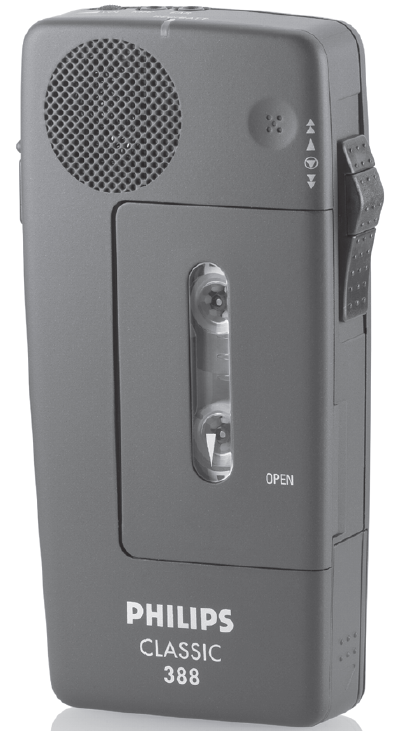
The Philips Pocket Memo LFH0388 is a compact, professional-grade mini-cassette dictation recorder designed for professionals who need reliable, portable voice recording on the go. This device stands out for its ease of use, robust feature set, and durable build—making it a favorite among legal, medical, and business professionals who require accurate, efficient documentation and note-taking.
Key benefits include one-handed operation via a four-position slide switch, voice-activated recording for hands-free use, and advanced editing features such as turbo wind for fast tape navigation. The Philips Pocket Memo LFH0388 also offers automatic gain control for optimal audio quality, end-of-letter index tones for easy file management, and clear warning tones for low battery and end-of-tape alerts—ensuring you never lose important dictation.
Target users include lawyers, doctors, journalists, and executives who need to capture meetings, interviews, patient notes, or legal briefs quickly and securely. The device’s compact size (128 x 62 x 25 mm) and lightweight design (120 grams) make it easy to carry in a pocket or briefcase, offering true mobility in fast-paced environments.
Estimated price ranges for the Philips Pocket Memo LFH0388 vary, but it generally falls in the mid-to-high range for professional dictation devices, reflecting its durability and advanced features. Availability is broad through electronics retailers and online marketplaces, though it may be less common than digital alternatives due to its cassette-based format.
Specifications
- Model: LFH0388 (also known as LFH388)
- Dimensions: 128 x 62 x 25 mm (5" x 2.5" x 1")
- Weight: 120 grams (0.24 kg)
- Recording Media: Mini cassette
- Frequency Response: 400–4,000 Hz
- Output Power: 100 mW
- Battery: 2 x AA (alkaline or rechargeable, with optional Philips rechargeable battery LFH0153 for internal recharging)
- Microphone/Headphone Jack: 2.5 mm
- Controls: Four-position slide switch for one-handed operation
- Special Features: Voice-activated recording, automatic gain control, turbo wind for fast tape access, end-of-letter index tone, priority index tone, transport lock, status LED, audible warning tones for low battery and end-of-tape
- Warranty: 90-day mail-in parts/labor warranty
Compared to similar mini-cassette dictation devices, the Philips Pocket Memo LFH0388 stands out for its professional editing capabilities, superior audio quality with automatic gain control, and comprehensive warning system. While digital alternatives offer more storage and file transfer options, the LFH0388 excels in reliability, simplicity, and tactile control—features valued by traditionalists and professionals in regulated industries.
Overview
- Volume:

- Record/Battery LED (REC/BATT)
The LED lights up to indicate Recording mode. If not: Check/Replace batteries.
When the batteries get low, the Pocket Memo will give a short audio warning tone at the Stop/Start of a recording.
(Pocket Memo LFH 488 only) - Record Button (REC)
Press the Record button and move the 4-Position Switch to Playback to start recording. The Record button does not operate if the cassette is missing or its safety tab of the cassette (record protection) has broken off.
A warning tone indicates that you have reached the end of a cassette while recording.
Erase Cassette
Keep the Record button pressed and move the 4-Position Switch to (Fast Rewind) or
  (Fast Forward) to erase the recordings on the cassette.
 - Power Supply Socket
Operate your Pocket Memo from the mains power supply or recharge the Philips LFH 0153 (AA size) rechargeable batteries in your Pocket Memo using the optional LFH 0142 mains adapter. - Microphone Socket (MIC) Connect an external microphone, or an acoustic coupler LFH 0163, to record telephone conversations.
- Index Button
(Pocket Memo LFH 488 only)
Press for one second to set End-of-Letter or End-of-Message. - Earphone Socket (EAR)
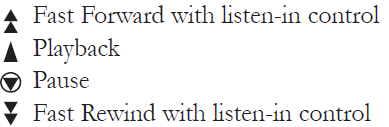
Connect an earphone for discreet listening or an acoustic coupler LFH 0163 for telephone transmission. 4-Position Switch
- Cassette Compartment
Troubleshooting
Problem Solution:
- Record LED fails to light up ........................................................... Replace batteries
- Tape starts to run slowly..................................................................... Replace cassette
- Recordings sound dull......................................................................... Replace cassette
- Clean the record/playback head of your Pocket Memo.
- Pocket Memo stops suddenly during recording............................. Check whether the VA switch is in the OFF position. on
- Pocket Memo fails to function.......................................................... Check the polarity of batteri.es
- Clean battery contacts
- Record button locks........................................................................... No cassette is loaded, or the record protection tab on the cassette has been broken off.
- Some available products are subject to national telephone regulations.
- Due to continuous product improvements, specifications are subject to change without notice.
Optional Accessories
- Mains adapter LFH0142
- Rechargeable batteries LFH0153
- Mini-cassettes LFH0005
Note: Remove the batteries from the Pocket Memo if you do not intend to use the device for a long period of time.
How to Dictate
- When recording a dictation with your Pocket Memo, please bear the following recommendations in mind:
- Always dictate punctuation marks such as full stop, semicolon, hyphen, dash, slash, quotation marks, brackets, etc.. However, you do not need to dictate commas.
- Clearly spell out special orthography. Example: y4, say: lowercase y / superscript 4. Another example: III 0-24B, say: Roman numeral three / space/naught/hyphen / two four / uppercase B.
- Give instructions on how to format the text: ‘indent’ / ‘end indent’, ‘stop/ underline word / continue’, ‘paragraph’, etc.
- Speak clearly and continuously, and do not make unnatural pauses or exaggerate how you pronounce.
Pros & Cons
Pros
- Portability: Ultra-compact and lightweight, perfect for professionals on the move.
- Ease of Use: One-handed slide switch and voice-activation make operation intuitive and efficient.
- Audio Quality: Automatic gain control ensures clear, consistent recordings even in varying environments.
- Editing Features: Turbo wind and end-of-letter index tones streamline file navigation and organization.
- Battery Management: Audible and visual warnings prevent data loss due to low battery or end-of-tape.
- Durability: Robust build quality supports daily professional use.
Cons
- Cassette-Based: Requires mini cassettes, which are less common and more cumbersome than digital storage.
- Limited Frequency Range: 400–4,000 Hz is adequate for speech but not for high-fidelity music or detailed soundscapes.
- No Digital File Transfer: Lacks USB or Bluetooth connectivity for modern file sharing and transcription workflows.
- Price: Higher cost compared to basic digital voice recorders, though justified by professional features.
Value for money is excellent for users who prioritize reliability, tactile controls, and a proven cassette format. For those needing digital features, alternatives may be more suitable, but for traditional dictation tasks, the Philips Pocket Memo LFH0388 remains a top choice.
Customer Reviews
Customer feedback for the Philips Pocket Memo LFH0388 highlights its reliability and professional-grade performance. Users praise its intuitive controls, robust build, and the convenience of voice-activated recording for hands-free dictation. The turbo wind function and clear index tones are frequently mentioned as time-savers for busy professionals.
Common complaints include the lack of digital connectivity and the ongoing need for cassette tapes, which can be inconvenient in a predominantly digital world. Some users note that battery life is good with quality alkaline cells, but recommend keeping spares on hand for extended use.
Star ratings from major retailers average around 4.4 out of 5, reflecting strong satisfaction among traditional dictation users. Testimonials often mention the device’s longevity, with many units remaining in service for years. Purchase is recommended for professionals who value simplicity, durability, and proven technology over digital bells and whistles.
Frequently mentioned issues include occasional tape jams (common to all cassette devices) and the desire for a built-in rechargeable battery. Overall, the Philips Pocket Memo LFH0388 is seen as a dependable workhorse for serious dictation needs.
SEO and Semantic Keywords
For optimal search visibility, this manual integrates primary keywords such as Philips Pocket Memo LFH0388, mini cassette dictation recorder, and professional voice recorder. Related terms include automatic gain control, voice-activated recording, turbo wind, end-of-letter index tone, and transport lock. Long-tail keywords like best cassette dictation machine for professionals and reliable portable voice recorder are woven naturally into headings and content to improve ranking for featured snippets and voice search.
Faqs
How do I set up my philips Pocket Memo LFH0388 for the first time?
What should I do if my philips Pocket Memo LFH0388 is not recording?
How does the voice-activation feature work on the philips Pocket Memo LFH0388?
Is the philips Pocket Memo LFH0388 compatible with rechargeable batteries?
What do the warning tones on the philips Pocket Memo LFH0388 indicate?
How can I quickly navigate to specific parts of a tape in the philips Pocket Memo LFH0388?
What maintenance steps should I follow to keep my philips Pocket Memo LFH0388 in good condition?
Can the philips Pocket Memo LFH0388 be used with transcription software or devices?
More philips manuals
- Setup : Philips Air Performer AMF870/35 User Manual
- How to Use: Philips AZB500 Portable CD Player User Manual
- Setup: Philips Air Purifier AC3854 User Manual
- How to Use: Philips Air Purifier AC4080-AC4081 User Manual
- Setup & Features: Philips Respironics DreamStation 2 Auto CPAP Advanced Machine User Manual
- Setup: Philips 1000 Series Headphones TAH1108 User Manual
Leave a Comment