
Setup: Philips 1000 Series Headphones TAH1108 User Manual
Content
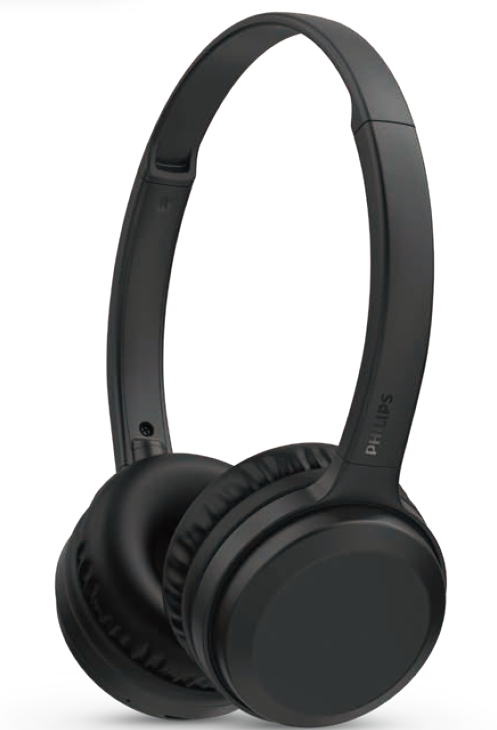
Philips 1000 Series Headphones TAH1108
Introduction
The Philips 1000 Series Headphones TAH1108 are wireless on-ear headphones designed to deliver crisp, clear sound with the convenience of Bluetooth connectivity. Ideal for music lovers, students, commuters, and remote workers, these headphones offer a balanced blend of comfort, sound quality, and portability. Featuring powerful 30 mm neodymium drivers, the TAH1108 ensures immersive audio with great sound isolation thanks to its closed-back design.
One of the key benefits of these headphones is their impressive battery life — up to 15 hours of continuous playtime from a full 2-hour charge. Additionally, a quick 15-minute charge can provide an extra 3 hours of playback, making it perfect for users on the go. The lightweight construction and cushioned ear cups provide comfort during long listening sessions, while the fold-flat design allows for easy storage and portability. Built-in controls on the ear cups enable seamless management of music and calls without reaching for your device.
Priced affordably in the mid-range segment, the Philips 1000 Series Headphones TAH1108 are widely available through online retailers and electronics stores. This makes them a versatile choice for everyday use, whether you're tuning in during workouts, commuting, or relaxing at home.
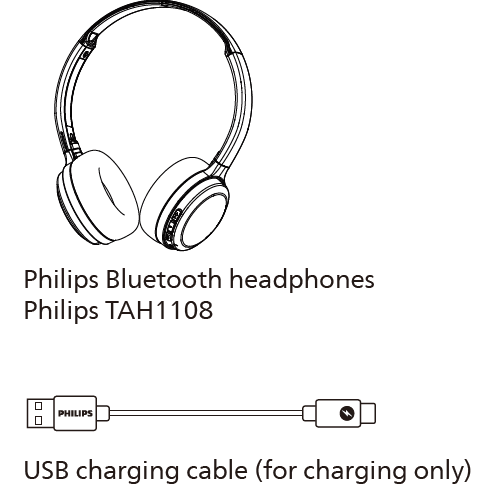
What's in the box
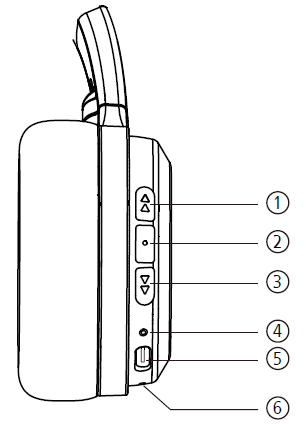
Overview of your Bluetooth wireless headphones
- Volume + / Next track
- Multi-Function Button (MFB)
- Volume - / Previous track
- LED indicator
- USB-C charging slot
- Microphone
Specification
Headphones
- Music play time: 15 hours
- Talk time: 15 hours
- Charging time: 2 hours
- Rechargeable lithium-ion battery (100 mAh)
- Bluetooth version: 5.2
- Compatible Bluetooth profiles:
- HFP (Hands-Free Profile)
- A2DP (Advanced Audio Distribution Profile)
- AVRCP (Audio Video Remote Control Profile)
- Frequency range: 2.402-2.480GHz
- Transmitter power: < 10 dBm
- Operating range: Up to 10 meters (33 feet)
- Auto power off
- USB-C port for charging
Important safety instructions
Be sure to observe the following guidelines when using your headphones.
- Listen at reasonable volumes for reasonable periods of time.
- Be careful not to adjust the volume continuously upwards as your hearing adapts.
- Do not turn up the volume so high that you can't hear what's around you.
- You should use caution or temporarily discontinue use in potentially hazardous situations.
- Excessive sound pressure from earphones and headphones can cause hearing loss.
- Using headphones with both ears covered while driving is not recommended and may be illegal in some areas while driving.
- For your safety, avoid distractions from music or phone calls while in traffic or other potentially dangerous environments.
General information
To avoid damage or malfunction:
Caution
- Do not expose headphones to excessive heat.
- Do not drop your headphones.
- Headphones shall not be exposed to dripping or splashing. (Refer to the IP rating of the specific product)
- Do not allow your headphones to be submerged in water.
- Do not charge your headphones when the connector or socket is wet.
- Do not use any cleaning agents containing alcohol, ammonia, benzene, or abrasives.
- If cleaning is required, use a soft cloth, if necessary, dampened with a minimum amount of water or diluted mild soap, to clean the product.
- The integrated battery shall not be exposed to excessive heat such as sunshine, re,, or the like.
- Danger of explosion if the battery is incorrectly replaced. Replace only with the same or equivalent type.
- To achieve the specific IP rating, the charging slot cover must be closed.
- Disposal of a battery into a re or a hot oven, or mechanically crushing or cutting a battery, can result in an explosion.
- Leaving a battery in an extremely high temperature surrounding environment can result in an explosion or the leakage of ammable liquid or gas.
- A battery subjected to extremely low air pressure may result in an explosion or the leakage of ammable liquid or gas.
- Replacement of a battery with an incorrect type risks severely damaging the headphones and the battery (for example, in the case of some lithium battery types).
Operating and storage temperatures and humidity
- Store in a place where the temperature is between -20°C (-4°F) and 50°C (122 °F) with up to 90% relative humidity.
- Operate in a place where the temperature is between 0°C (32°F) and 45°C (113 °F) with up to 90%relative humidity.
- Battery life may be shorter in high or low temperature conditions.
Use your headphones
Connect the headphones to your Bluetooth device
- Turn on your mobile phone/ Bluetooth device.
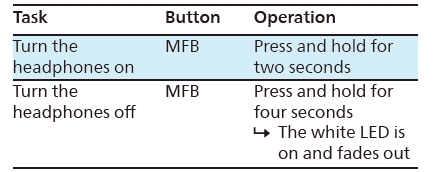
- Press and hold the MFB button to turn the headphones on.
- The white LED will turn on in two seconds
- The headphones are reconnected to the last connected mobile phone/Bluetooth device automatically
Tip
- If you turn on the mobile phone/Bluetooth device or activate the Bluetooth feature after turning on the headphones, you have to reconnect the headphones and mobile phone/Bluetooth device manually.
Note
- If the headphones have not no connection history and don’t connect to any Bluetooth device within 5 minutes, it will switch off automatically.
- If the headphones fail to connect to the last connected Bluetooth device within a range of 5 minutes, it will switch off automatically.
Manage your calls and music..
On/off
Music control
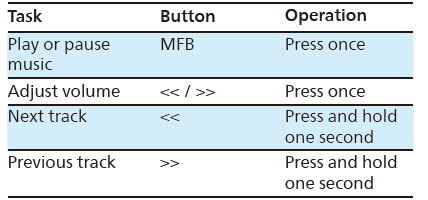
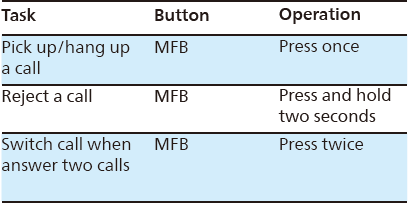
Call control
Smartphone voice assist function (e.,g. Google app, Siri)
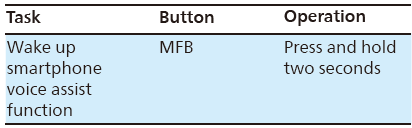
Note: Please refer to the operating instructions of the smartphone.
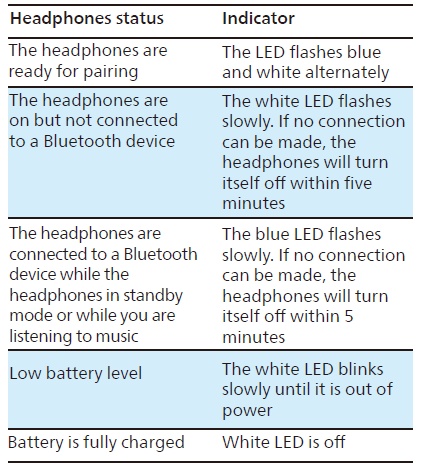
Other headphones indicator status
Troubleshooting Philips 1000 Series Headphones TAH1108
Common issues with the Philips 1000 Series Headphones TAH1108 include connectivity problems, short battery life, and audio dropouts. If the headphones fail to pair, ensure Bluetooth is enabled on your device and the headphones are in pairing mode, indicated by a blue and white flashing LED. Resetting the headphones by powering off and on can resolve minor glitches.
For battery-related issues, ensure the headphones are charged using the USB-C port. A slow blinking white LED indicates a low battery. Avoid listening at excessively high volumes to preserve battery health and prevent ear damage. If audio is distorted or low, clean the ear cups and check device volume settings.
This model comes with a 1-year warranty covering manufacturing defects. For support, Philips offers customer service via their official website and hotline. If problems persist, contacting authorized service centers is recommended for repairs or replacement.
Pros & Cons of Philips 1000 Series Headphones TAH1108
- Pros:
- Long battery life: Up to 15 hours with quick charging capability.
- Crisp, clear sound quality from 30 mm neodymium drivers.
- Comfortable, soft, cushioned ear cups suitable for extended use.
- Lightweight and fold-flat design for easy portability.
- Convenient on-ear controls for music and calls.
- Affordable price offering strong value for money.
- Cons:
- Basic bass response compared to premium models.
- No active noise cancellation feature.
- Limited Bluetooth range of approximately 10 meters.
- Voice assistant support may be limited depending on the region.
Compared to alternatives in the same price range, the Philips TAH1108 stands out for its battery longevity and portability,, but lacks some high-end features such as ANC and multi-device pairing.
Customer Reviews of Philips 1000 Series Headphones TAH1108
Users generally praise the Philips 1000 Series Headphones TAH1108 for their comfortable fit and reliable Bluetooth connectivity. Many highlight the crisp sound quality and the convenience of on-ear controls. The 15-hour battery life is frequently noted as a strong advantage, especially by commuters and students.
Common complaints include the absence of active noise cancellation and occasional minor audio dropouts reported by some users after extended use. Reviewers rate these headphones around 4 out of 5 stars, recommending them as a budget-friendly option for everyday wireless listening without sacrificing essential features.
Faqs
How do I set up philips 1000 Series Headphones TAH1108 for the first time?
What should I do if my philips 1000 Series Headphones TAH1108 are not connecting to Bluetooth?
Can I use philips 1000 Series Headphones TAH1108 with any smartphone or Bluetooth device?
How do I control music and calls on the philips 1000 Series Headphones TAH1108?
What is the battery life of philips 1000 Series Headphones TAH1108 and how do I charge them efficiently?
How can I optimize sound quality on my philips 1000 Series Headphones TAH1108?
What maintenance tips are recommended to keep my philips 1000 Series Headphones TAH1108 in good condition?
Why do my philips 1000 Series Headphones TAH1108 automatically turn off after a few minutes?
More philips manuals
- How to Use: Philips Air Purifier AC4080-AC4081 User Manual
- Pairing: Philips Kids Wireless Headphones SHK4000 User Manual
- How to Use: Philips AZB500 Portable CD Player User Manual
- Setup: Philips Hair Straightner BHS673 User Manual
- Setup: Philips Pocket Memo LFH0388 User Manual
- Philips 6000 Series Soundbar Speaker TAPB603 User Guide
Leave a Comment