
How to Use: Philips Air Purifier AC4080-AC4081 User Manual
Content
Philips Air Purifier AC4080-AC4081
Introduction
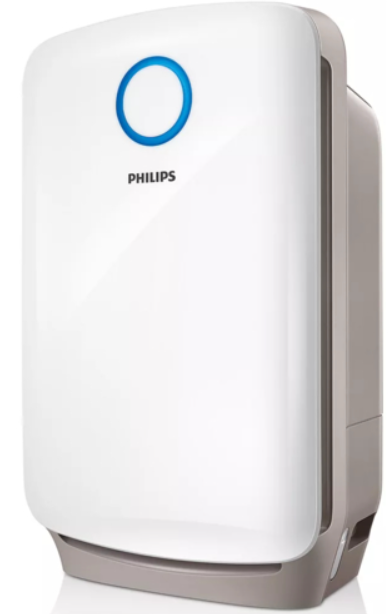
The Philips Air Purifier AC4080-AC4081 is an innovative combi 2-in-1 air purifier and humidifier designed to deliver healthier indoor air quality efficiently. Leveraging advanced VitaShield IPS filtration combined with NanoCloud humidification technology, this device not only purifies but also refreshes air by maintaining optimal humidity without causing wet patches or white dust accumulation. Ideal for medium-sized rooms up to 43 m² (approximately 460 sq. ft.), it targets households, offices, and environments where allergy sufferers or individuals sensitive to pollutants reside.
Key benefits include the removal of ultrafine particles as small as 0.02 microns—including dust, pollen, bacteria, viruses, and harmful gases like formaldehyde and toluene—with over 99% efficiency. The smart sensors continuously monitor and indicate indoor air quality and humidity, automatically adjusting settings for optimal comfort. The built-in timer (1/4/8 hours) and multiple fan speeds provide convenience and customizable operation.
With an estimated price range of around $350-$450, depending on region and model variant, the Philips Air Purifier AC4080-AC4081 is widely available through online retailers and select appliance stores. Its combination of German technology filtration and user-friendly features makes it a compelling choice for consumers seeking reliable air purification coupled with effective humidification.
Use the appliance
Understand the air quality light.t
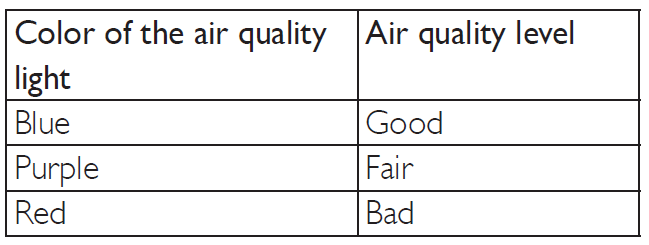
The air quality light automatically goes on when the appliance is switched on, and shows all colors repeatedly. In a short while, let the air quality light select the color that corresponds to the ambient air quality.
Note
The built-in air quality sensor measures the air quality and automatically selects the appropriate color of the air quality light. When the air is clean, the color of the air quality light is in blue. When the air quality deteriorates, the color of the air quality light changes to purple or red.
Switch on and off the appliance.
The appliance operates under air purification combined with humidification by default.
Put the plug into the power supply.
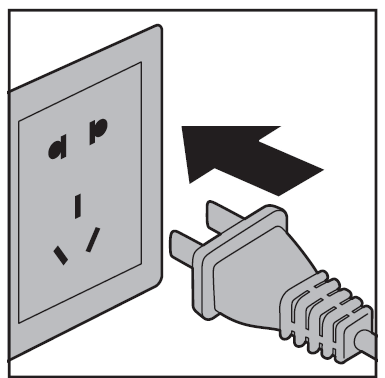
- All the lights go on once and then go out again.
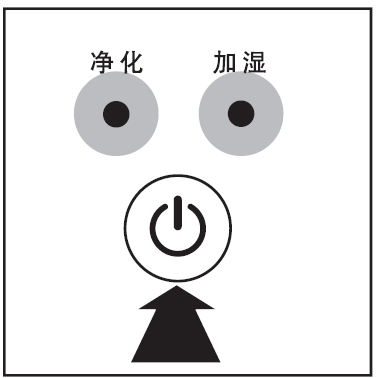
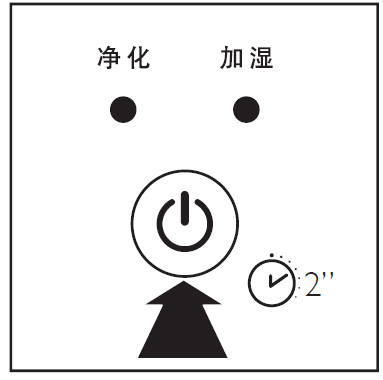
- Press to switch on the appliance.
The purifier and humidifier lights are on.
After measuring the air quality for a short while, the air quality sensor automatically selects the appropriate color of the air quality light.
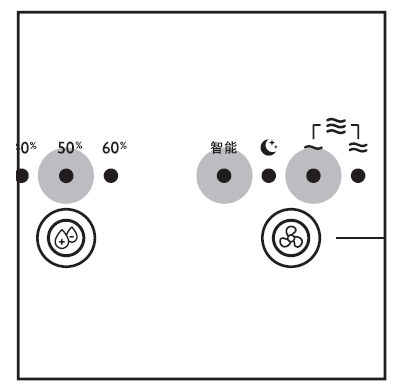
The appliance enters AUTO mode, and the target humidity level is 50%. - Press or 2 seconds to switch off the appliance.
Note
After the appliance is switched off by the on/off button , if the plug is still in the power socket, the appliance will resume work based on the last settings when it is switched on again.
Change the working mode.
Besides operating under air purification combined with humidification, the appliance can also work under air purification-only mode.
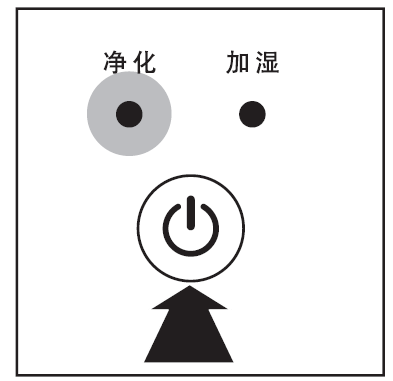
- After the appliance is switched on, press once, and the humidification indicator goes out with the humidity level indicator. The humidification function is deactivated. The appliance works under the air purification only mode.
- Press again to activate the humidification function again.
Set the sensitivity of the air quality sensor.
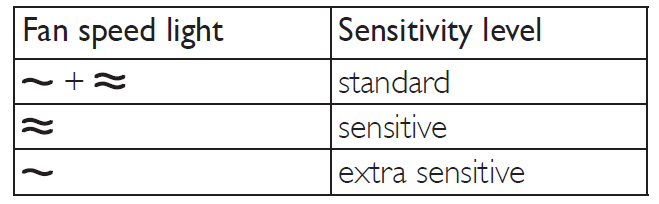
This appliance allows you to adjust the sensitivity of the air quality sensor. There are three sensitivity levels:
- standard (default setting)
- sensitive
- extra sensitive
- You can adjust the sensitivity of the air quality sensor in the following way:
Note
When the appliance is set to a higher sensitivity, the purifier becomes more sensitive to the pollutants in the air. When the purifier is in AUTO mode, it is more likely to choose a higher fan speed than the standard mode. The air quality sensor selects the appropriate color of the air quality light in accordance with the higher sensitivity.
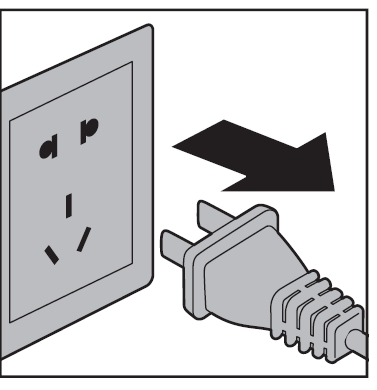
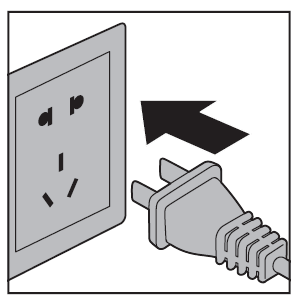
- Unplug the appliance.
- After a short while, put the plug in the wall socket again.
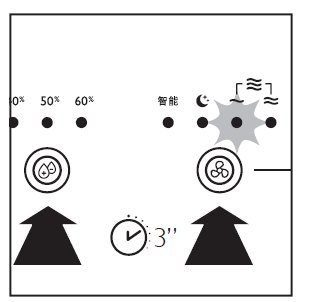
- Press
 and hold the fan speed button anthe d humidifier button
 simultaneously for 3 seconds.
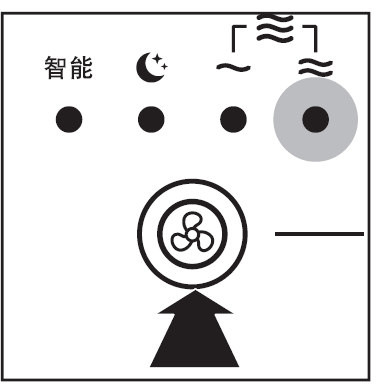
One or more fan speed lights flash to show the current sensitivity level of the air quality sensor. - Press the fan speed button to adjust the sensitivity level of the air quality sensor.
- Press and hold for 2 seconds to save the setting and switch off the appliance.
Note
- When you are changing the sensitivity level, if you do not change any settings, or if you do not press
 for 2 seconds after you have changed any settings, the appliance will resume normal work without saving any changes.
 - After the sensitivity is changed and saved, the appliance automatically starts operating at the preset sensitivity level whenever you switch on the appliance.
Cleaning
Cleaning schedule
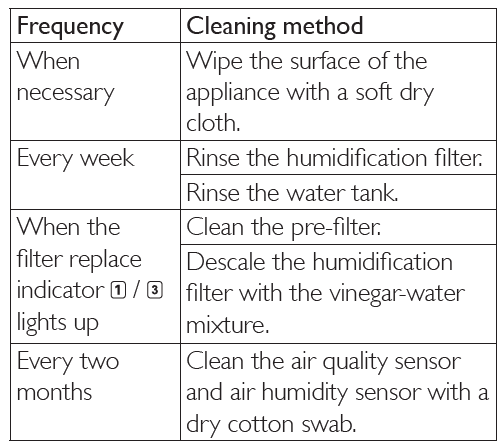
Clean the body of the appliance
Regularly clean the inside and outside of the appliance to prevent dust from collecting.
- Wipe away dust with a soft dry cloth from the body of the appliance.
- Clean the air inlet and the air outlet with a soft dry cloth.
Clean the air quality sensor.
Clean the air quality sensor every two months for optimal functioning of the appliance. Clean it more frequently if you use the appliance in a dusty environment.
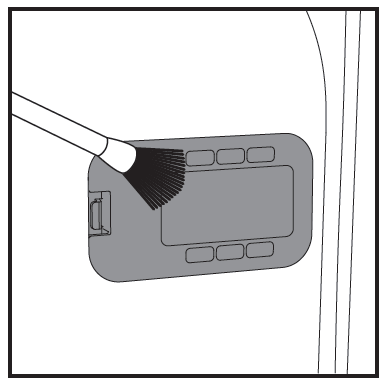
- Clean the inlet and outlet of the air quality sensor with a soft brush.
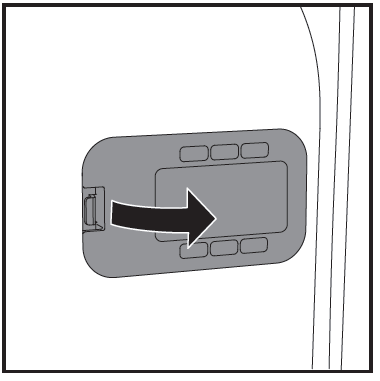
- Remove the cover of the air quality sensor.
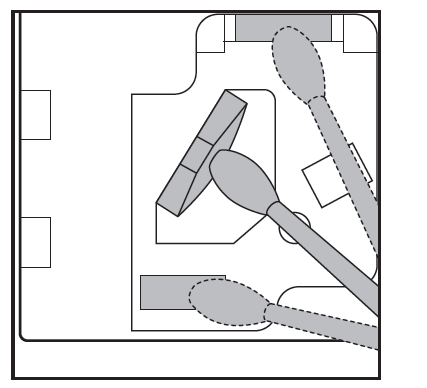
- Clean the sensor, the dust inlet, and the dust outlet with a lightly moistened cotton swab.
- Dry them with a dry cotton swab.
- Reattach the sensor cover.
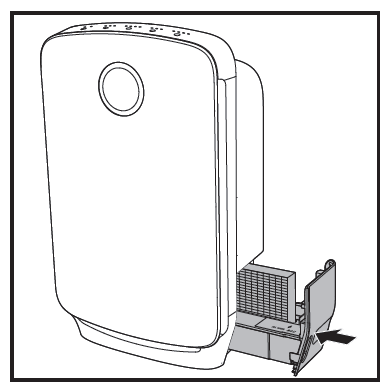
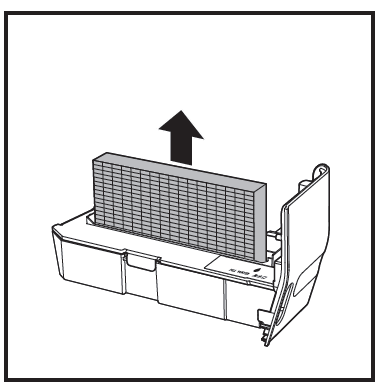
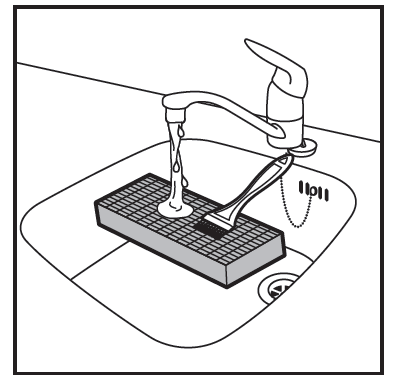
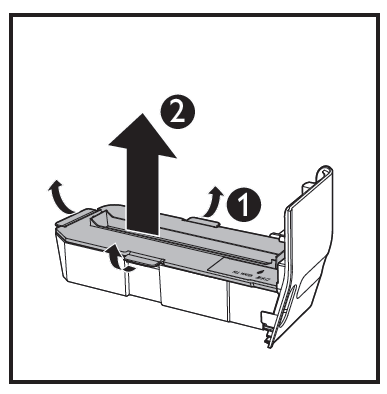
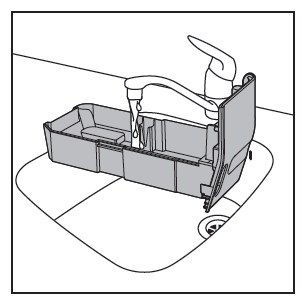
Clean the water tank and humidification filter
Clean the water tank and humidification filter every week to keep them hygienic.
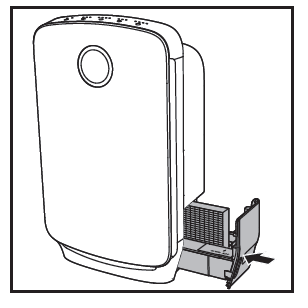
- Pull the water tank from the side of the appliance.
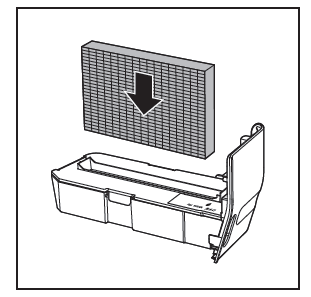
- Remove the humidification filter from the
- Rinse the humidification filter under a running tap.
- Unfasten the locks on the edge of the water tank lid, and remove it from the water tank.
- Rinse the water tank under a running tap.
Note
If necessary, use a mild detergent to clean the water tank. In this case, rinse the water tank thoroughly. - Dry the water tank and its lid with a soft, dry cloth.
- Put the lid back onto the water tank and fasten the locks.
- Put the humidification filter back into the water tank.
- Put the water tank back into the appliance.
Clean the pre-filter and descale the humidification filter
Note
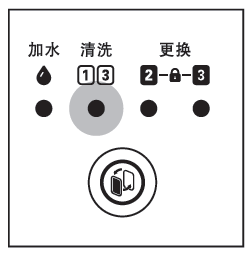
Only the pre-filter and humidification filter are washable. Filter 2 is not washable. Filter light 1 / 2 goes on.
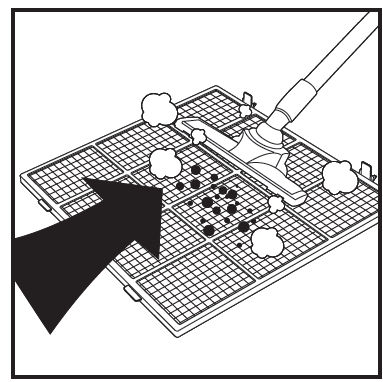
- Wash the pre-filter under a running tap. If the pre-filter is very dirty, use a soft brush to brush away the dust.
- Air-dry the pre-filter.
Note
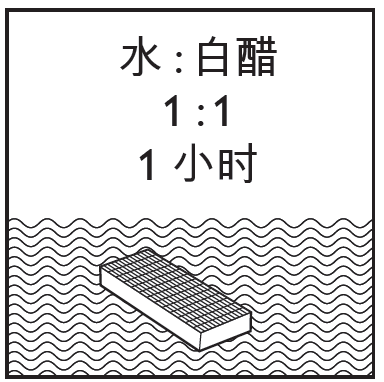
Make sure that the pre-filter is completely dry. If it is still wet, bacteria may multiply in it and shorten the lifetime of the pre-filter. - Mix the white vinegar with an equal amount of tap water in a container that is large enough to soak the humidification filter in.
- White vinegar has 5% acetic acid.
If there are white deposits (limescale) on the filter, make sure that the side with the white deposits is immersed in the water. - Let the humidification filter soak in the solution for one hour.
- Discard the water-vinegar solution.
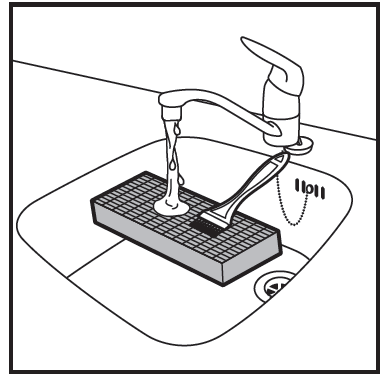
- Rinse the humidification filter under the tap to rinse away vinegar residues. During rinsing, turn the humidification filter so that both the front and back sides are rinsed.
- Let excess water drip off the humidification filter.
- After the pre-filter and humidification filter are put back in the appliance, reset the filter lifetime counter. (Refer to chapter ,9, "Reset the filter lifetime counter")
Troubleshooting
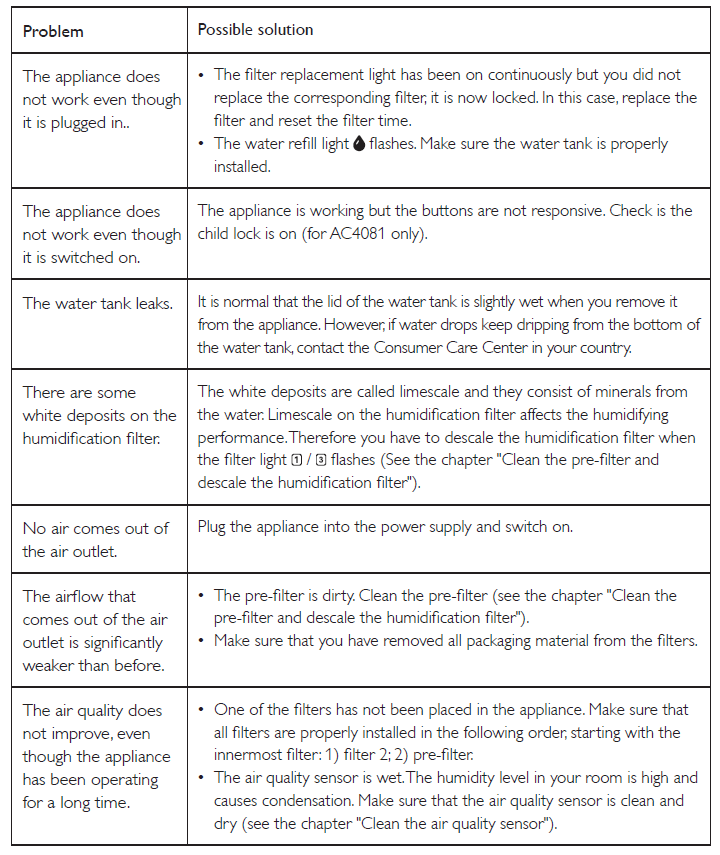
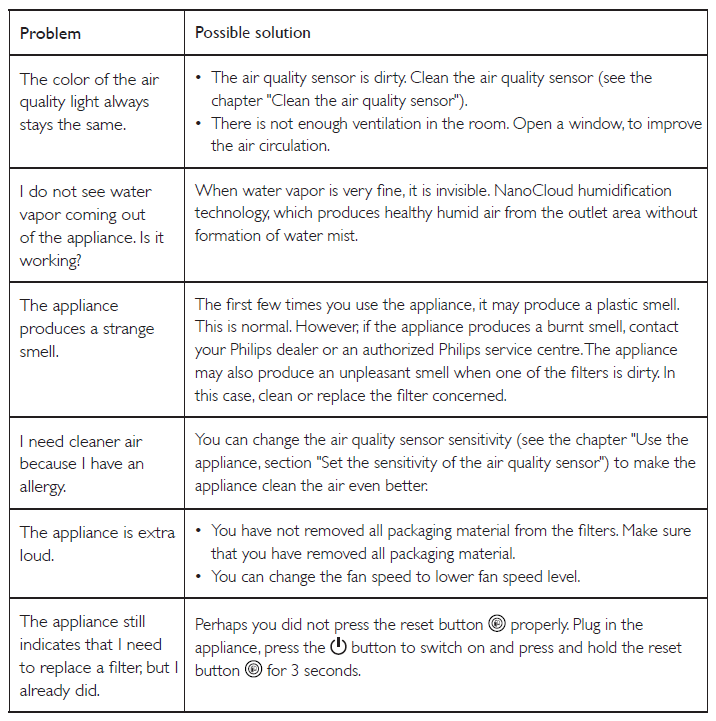
This chapter summarizes the most common problems you could encounter with the appliance. If you are unable to solve the problem with the information below, contact the Consumer Care Center in your country.
Guarantee and service
If you need information or if you have a problem, please visit the Philips website at www.philips.com or contact the Philips Consumer Care Center in your country (you can find its phone number in the worldwide guarantee leaflet). If there is no Consumer Care Centre in your country, go to your local Philips dealer.
Order parts or accessories
- If you have to replace a part or want to purchase an additional part, go to your Philips dealer or visit www.philips.com/support.
- If you have problems obtaining the parts, please contact the Philips Consumer Care Center in your country (you can find its phone number in the worldwide guarantee leaflet).
Specifications of Philips Air Purifier AC4080-AC4081
- Filtration Technology: VitaShield IPS with HEPA and Active Carbon combined filters
- Humidification Technology: NanoCloud humidifier minimizing bacterial spread by 99%
- Room Coverage: Up to 43 m² (approx. 460 sq. ft.)
- Clean Air Delivery Rate (CADR): 223 m³/h (cigarette smoke)
- Particle Size Removal: Removes particles as small as 0.02 μm (ultrafine particles)
- Filter Efficiency: >99% removal of PM2.5, bacteria, viruses; >90% removal of formaldehyde
- Fan Speeds: 3 to 5 adjustable fan speed settings, depending on model (AC4081 offers 5 speeds)
- Noise Level: Approximately 36 dB(A) in sleep mode
- Power Consumption: 68 W at 220-240 V, 50 Hz frequency
- Dimensions: 210 x 365 x 605 mm (W x D x H)
- Weight: 8.3 kg
- Additional Features: Smart particle and humidity sensors, 1/4/8 hour timer, LED air quality indicators, child lock, auto mode
Compared to similar products, the AC4080-AC4081 stands out with its integrated humidification feature and advanced sensor technology,y providing hassle-free automation and dual air quality plus humidity control, an advantage over purifiers without built-in humidifiers.
Pros & Cons of Philips Air Purifier AC4080-AC4081
Pros
- Effective Filtration: Removes ultrafine particles, bacteria, viruses, and harmful gases with high efficiency, improving overall air quality significantly.
- Integrated Humidification: The NanoCloud humidifier adds comfortable moisture without white dust, enhancing health benefits and comfort.
- Smart Sensor Technology: Automatically adjusts purification and humidification based on real-time indoor air quality and humidity levels.
- User Convenience: Multiple timer and fan speed options, child lock feature, and clear LED indicators make operation simple and safe.
- Quiet Operation: Low noise levels in sleep mode make it suitable for bedrooms and offices.
Cons
- Price Point: Slightly higher price compared to standalone air purifiers or humidifiers, reflecting its dual functionality.
- Filter Replacement Cost: Replacement filters can be relatively costly, requiring regular maintenance for optimal performance.
- Room Size Limit: Best suited for medium rooms; may not be sufficient for large open spaces or commercial environments.
- Availability: Some variants may be discontinued or limited in stock, depending on the n region.
Overall, the Philips Air Purifier AC4080-AC4081 offers excellent value for those seeking combined air purification and humidification, outperforming many competitors that require separate devices.
Customer Reviews of Philips Air Purifier AC4080-AC4081
Users consistently praise the Philips Air Purifier AC4080-AC4081 for its effective purification and comfortable humidification, noting a noticeable improvement in allergy symptoms and indoor air freshness. The smart auto mode and quiet operation are frequently highlighted as standout features, especially for nighttime use. The 3-step LED air quality indicator provides clear, real-time feedback that users find helpful.
Common complaints include the relatively high cost of replacement filters and occasional confusion about timer settings during initial setup. Some users also mention that the humidification output may need adjustment to avoid over-humidifying smaller rooms. Despite these issues, the overall star rating averages around 4.3 to 4.5 out of 5 stars.
Many reviewers recommend the product for households with children, allergy sufferers, or those living in urban areas with pollution concerns, emphasizing its dual functionality and ease of use as major selling points.
Faqs
How do I set up the philips Air Purifier AC4080-AC4081 for the first time?
What should I do if the philips Air Purifier AC4080-AC4081 is not responding or functioning properly?
How does the smart sensor system work on the philips Air Purifier AC4080-AC4081?
Can the philips Air Purifier AC4080-AC4081 be used in rooms larger than 43 square meters?
What maintenance is required to keep the philips Air Purifier AC4080-AC4081 performing optimally?
How do I optimize the performance of the philips Air Purifier AC4080-AC4081 for allergy relief?
What are the key differences between the philips Air Purifier AC4080 and AC4081 models?
Why does the philips Air Purifier AC4080-AC4081 sometimes make a noise, and how can I reduce it?
More philips manuals
- How to Use: Philips AZB500 Portable CD Player User Manual
- Setup: Philips 1000 Series Headphones TAH1108 User Manual
- Setup: Philips Pocket Memo LFH0388 User Manual
- Pairing: Philips Kids Wireless Headphones SHK4000 User Manual
- Setup : Philips Air Performer AMF870/35 User Manual
- Setup: Philips Hair Straightner BHS673 User Manual
Leave a Comment