
Pairing: Philips Kids Wireless Headphones SHK4000 User Manual
Content
Wearing the Headset
Adjust the headset to your head. Philips Kids Wireless Headphones SHK4000
Introduction
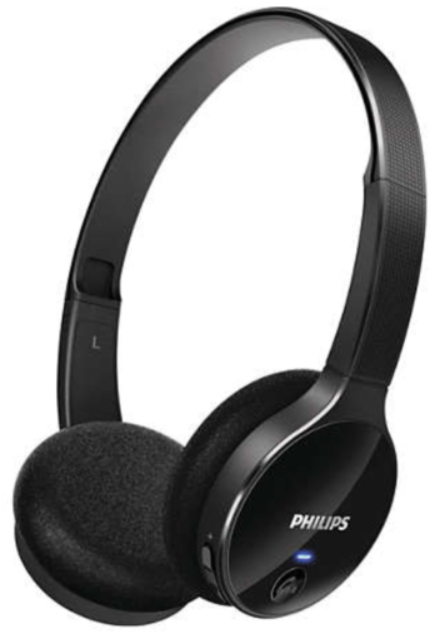
The Philips Kids Wireless Headphones SHK4000 are specially designed to provide a safe, comfortable, and enjoyable listening experience for children. Featuring an ultra-lightweight build with soft foam cushions and a tailor-sized adjustable headband, these headphones are perfect for growing kids who want to enjoy their favorite music, audiobooks, or educational content without being tethered by wires.
One of the standout benefits of the Philips SHK4000 is its built-in volume limiter,r capped at 85 dB, ensuring young ears are protected from excessive loudness while still delivering clear sound quality. The headphones support Bluetooth 3.0 connectivity with a wireless transmission range of up to 15 meters, offering kids the freedom to move around without interruptions. With up to 9 hours of continuous playback and an impressive standby time of 200 hours, they are ideal for long car rides, school use, or home entertainment.
Designed with portability and ease of use in mind, these headphones are compatible with a wide range of portable electronics, including tablets, smartphones, and laptops. They come in a kid-friendly design and weigh only 76 grams, making them comfortable for extended use. The estimated price range is moderate, typically between $30 and $50, making them accessible for parents seeking quality children’s headphones. Available through major electronic retailers and online stores, the Philips Kids Wireless Headphones SHK4000 combine safety, convenience, and fun for the perfect audio companion for kids.
Charging theHeadphonese
Warning
- Before using the headphone for the first time, charge the battery for about 4 hours for optimum battery capacity and life.
Use only the genuine USB charging cable to avoid any damage.
While charging your headphones, the power goes out - Connect the headset to a powered on USB port with a USB charging cable.
- The LED turns white during the charge and turns off when charging is complete.
Useful Tip
- It takes three hours to fully charge the device fully charged.
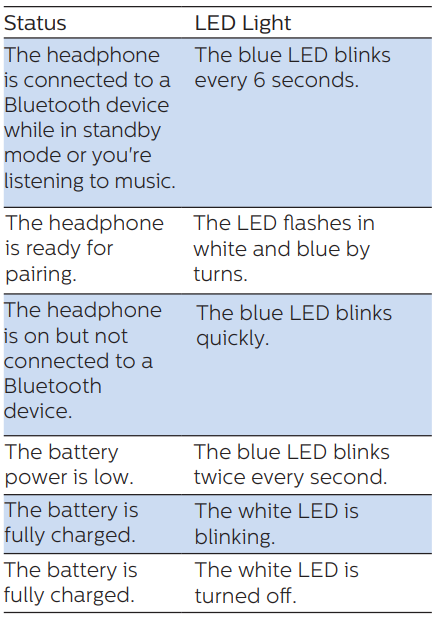
Pairing Headphones with Your Phone
The first time you use the headphones with your phone, you must pair them.
If pairing is successful, you will have a unique password link between the headphone and your phone. The eight most recently used devices are stored in the memory. If you try to make a pairing after the eight devices have already been paired, the new device replaces the first paired one.
- Make sure the headphone is fully charged and powered off.
- Press and hold the button for about six seconds until it flashes in blue and red by turns. The headphone remains in pairing mode for five minutes.
- Make sure the phone is turned on and the Bluetooth function is enabled.
Have headphones paired with your phone. See your smartphone's user manual for more information.
The following example shows how to pair the headphones with your phone.- Enable the Bluetooth function on your phone and select Philips SHB4405.
When being prompted for the headset password, enter "0000" (four zeros). If your phone supports Bluetooth
2.1+EDR or higher, you don’t need to enter a password.
- Enable the Bluetooth function on your phone and select Philips SHB4405.
Using the Headphones
Connecting headphones to a Bluetooth device
- Make sure the phone is turned on and the Bluetooth function is enabled.
- Press and hold to turn on the headset.
- The blue LED blinks.
The headphone will automatically reconnect to the phone/Bluetooth device last time you connected. If the headphone fails to connect to the last connected device, it reconnects to the second last connected device.
- The blue LED blinks.
- Useful Tip
- If you turn on the phone/Bluetooth device or activate the Bluetooth function after turning on the headphone, you must manually reconnect the headphone and the phone/Bluetooth device.
- Note
- If the headphone is not connected to a Bluetooth device within 5 minutes, it is automatically turned off to save battery.
Call and Music Management
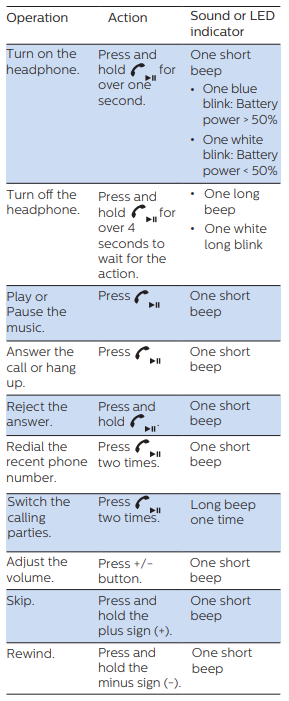
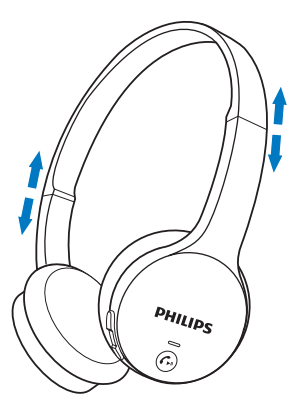
Wearing the Headset
Adjust the headset to your head.
Technical Specification
- Up to 9 hours for play or call
- Up to 200 hours for standby
- Normal time taken for full charge: 3 hours
- Rechargeable lithium-polymer battery (200mAh)
- Bluetooth 3.0, Bluetooth Mono support (Headset Profile - HSP, Hands-Free Profile - HFP), Bluetooth Stereo support (Advanced Audio Distribution Profile - A2DP, Audio Video Remote Control Profile - AVRCP) Frequency range: 2.402 - 2.480GHz
- Transmitter output: < 20dBm
- Operation range: Up to 15 meters (50feet)
- Adjustable flat folding headband
- Noise blocked by slow noise restoration
- Digital echo/Noise cancellation
- Automatic power off
- Checking out the battery condition
Troubleshooting Philips Kids Wireless Headphones SHK4000
Common issues with the Philips Kids Wireless Headphones SHK4000 usually involve connectivity, battery life, and audio output:
- No Bluetooth connection: Ensure the headphones are charged and in pairing mode. Reset by turning off and on, then re-pair with the device. Confirm the device supports Bluetooth 3.0 or higher.
- Audio delay or dropouts: Keep within the 15-meter Bluetooth range and avoid obstacles like walls. Restart both headphones and the nd source device to reset the wireless link.
- Low or no sound: Check volume settings on both headphones and the source device. Verify the volume limiter is active to avoid exceeding 85 dB.
- Battery charging issues: Use the supplied 0.6 m USB cable and connect to a power source. Charge fully before first use (about 2-3 hours). If charging fails, inspect the cable and port for damage.
Preventive measures include regularly charging the headphones, avoiding extreme temperatures, and storing them in a protective case when not in use. Philips provides a limited warranty covering manufacturing defects, typically lasting 1 year. For further support, customers can contact Philips customer service through their official website or via phone, ensuring prompt assistance with troubleshooting or replacements.
Pros & Cons of Philips Kids Wireless Headphones SHK4000
Pros
- Child-safe volume limit: Caps sound at 85 dB to protect young ears without compromising audio clarity.
- Lightweight and comfortable design: Soft foam earpads and an adjustable headband tailored for kids enhance wearability.
- Wireless freedom: Bluetooth 3.0 connectivity with a 15-meter range allows unrestricted movement.
- Long battery life: Up to 9 hours of playback and 200 hours of standby ensure extended use between charges.
- Compatible with various devices: Supports HSP, HFP, A2DP, and AVRCP Bluetooth profiles for versatile use.
Cons
- Bluetooth version 3.0: While reliable, it offers a shorter wireless range and slightly more latency compared to newer versions.
- Sound quality: Good for children’s content but less detailed for audiophiles or older users.
- Build materials: Predominantly plastic components may feel less durable over long-term heavy use.
- Limited color options: May restrict personalization compared to some competitors with more vibrant designs.
Overall, the Philips Kids Wireless Headphones SHK4000 offer excellent value for money in the children’s wireless headphone segment, balancing safety features and ease of use. When compared to alternatives like JBL JR 310BT or Puro Sound Labs BT2200, they provide competitive comfort and battery life but with simpler Bluetooth tech.
Customer Reviews of Philips Kids Wireless Headphones SHK4000
Parents and caregivers appreciate the Philips Kids Wireless Headphones SHK4000 for their lightweight comfort and effective volume limiting, frequently rating them 4 to 4.5 stars out of 5. Many highlight how well the headphones fit smaller heads and how the wireless feature helps reduce cable tangles during play or study time. The 9-hour battery life is often praised for lasting through full school days or travel sessions.
Some common complaints include occasional Bluetooth pairing difficulties and a desire for more vibrant color choices. A few users note that sound quality, while suitable for children’s media, lacks bass depth for older users’ tastes. Nevertheless, the majority recommend these headphones for children aged 4-10 years, especially for safe, casual listening at home or on the go.
Overall, reviewers recommend purchasing the Philips Kids Wireless Headphones SHK4000 due to their comfort, safety features, and reliable wireless performance, making them a top choice in the kid-friendly headphone market.
Faqs
How do I set up philips Kids Wireless Headphones SHK4000 for the first time?
What can I do if philips Kids Wireless Headphones SHK4000 are not pairing with my device?
Are philips Kids Wireless Headphones SHK4000 compatible with all Bluetooth devices?
How does the volume limit feature work on philips Kids Wireless Headphones SHK4000?
What is the battery life of philips Kids Wireless Headphones SHK4000 and how do I charge them?
How do I clean and maintain my philips Kids Wireless Headphones SHK4000?
Why is the philips Kids Wireless Headphones SHK4000 designed with an adjustable headband?
What should I do if the sound quality or Bluetooth connection of philips Kids Wireless Headphones SHK4000 is poor?
More philips manuals
- Setup: Philips 1000 Series Headphones TAH1108 User Manual
- Setup: Philips Hair Straightner BHS673 User Manual
- How to Use: Philips Air Purifier AC4080-AC4081 User Manual
- Philips 6000 Series Soundbar Speaker TAPB603 User Guide
- How to Use: Philips AZB500 Portable CD Player User Manual
- Philips Norelco Tripleheader Shaver AT810 Instruction Manual
Leave a Comment