
How to Use: Philips AZB500 Portable CD Player User Manual
Content
Philips AZB500 Portable CD Player
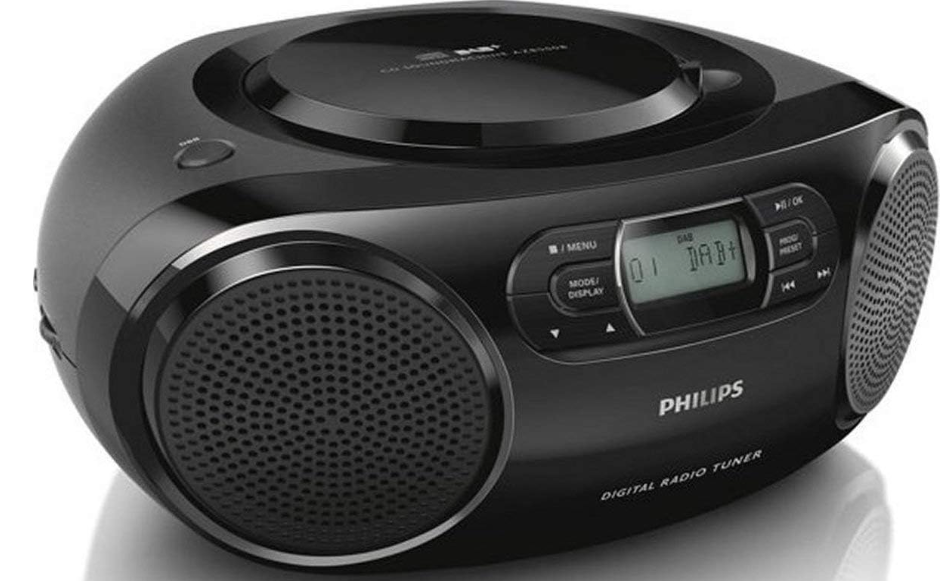
Introduction
The Philips AZB500 Portable CD Player is a versatile and dynamic music system designed to bring big sound on the go. This portable stereo system supports DAB, DAB+, and FM radio, along with CD playback, making it an ideal choice for music enthusiasts who want to enjoy a wide range of audio formats. With its built-in speakers and Dynamic Bass Boost feature, the AZB500 ensures rich and clear sound, even at lower volumes. The system is easy to use, featuring a programmable CD player that allows users to select up to 20 tracks for playback.
Targeted at individuals who value portability and versatility in their music systems, the Philips AZB500 is perfect for outdoor gatherings, travel, or everyday use at home. The estimated price range for this product is around $100 to $150, depending on the retailer and location. It is widely available online and in electronics stores.
Specifications
Amplifier
- Rated Output Power 2 x 1 W RMS
- Frequency Response 125 -16000 Hz, -3dB
- Signal to Noise Ratio >55 dBA
- Total Harmonic Distortion <1 %
- Audio-in Input 650 mV RMS
Disc
- Laser Type Semiconductor
- Disc Diameter 12cm/8cm
- Support Disc CD-DA, CD-R,
- CD-RW
- Audio DAC 24Bits / 44.1kHz
- Total Harmonic
- Distortion<1%
- Frequency Response 125 -16000 Hz,-3dB
- S/N Ratio >55 dBA
Tuner
- Tuning Range FM: 87.5 - 108MHz DAB: 174.928 -239.200 MHz
Sensitivity:
- Mono, 26dB S/N Ratio <22 dBf
- Stereo, 46dB S/N Ratio <43 dBf
- Search Selectivity 50KHz(FM)
- Total Harmonic Distortion <3%
- Signal to Noise Ratio >50 dBA
General
- Power supply 220-240V~,
- AC Power 50/60 Hz;
- Battery DC 9 V, 6 x 1.5 V type: R14/UM2/C CELL
- Operation Power 10 W
- ConsumptionStandby Power Consumption <0.5 W
- Dimensions
- Main Unit (W x H x D) 300 x 134 x 240 mm
- Weight (Main Unit)1.4 kg
Important
Safety
- Read these instructions.
- Follow all instructions.
- Do not block any ventilation openings. Install in accordance with the manufacturer's instructions.
- Do not install near any heat sources such as radiators, heat registers, stoves, or produce heat.
- Protect the power cord from being walked on or pinched, particularly at plugs, convenience receptacles, and the point where they exit from the unit. By the manufacturer.
- Unplug this unit during lightning storms or when unused for long periods of time.
- Recording is permissible insofar as copyright or other rights of third parties are not infringed upon.
Personnel. Servicing is required when the unit has been damaged in any way, such as power-supply cord or plug is damaged, liquid has been spilled or objects have fallen into the apparatus, the unit has been exposed to rain or moisture, does not operate normally, or has been dropped. - Battery usage CAUTION – To prevent battery leakage, which may result in bodily injury, property damage, or damage to the unit:
- Install all batteries correctly, + and - as marked on the unit.
- Do not mix batteries (old and new or carbon and alkaline, etc.).
- Remove batteries when the unit is not used for a long time.
- Batteries (battery pack or batteries installed) shall not be exposed to excessive heat.e
- CAUTION: Danger of explosion if battery is incorrectly replaced. Replace only with the same or equivalent type.
- The unit shall not be exposed to dripping or splashing.
- Do not place any sources of dangenearon candles).
- Where the MAINS plug or an appliance coupler is used as the disconnect device, the disconnect device shall remain readily operable.
What's in the box
Check and identify the contents of the package:
- Main unit
- Power cord
- Short User Manual
- Safety sheet
Overview of the main unit
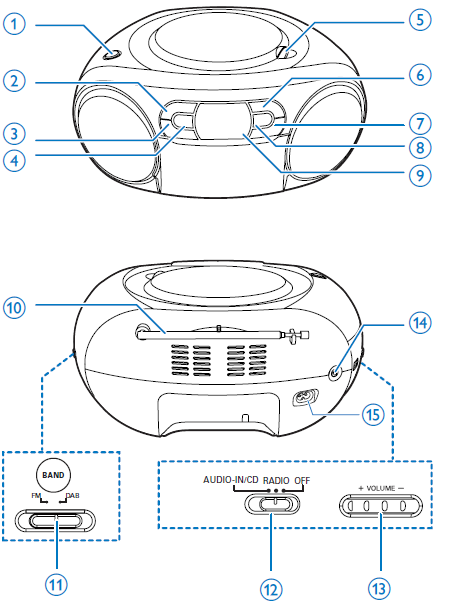
Use system menus
With the system menus, you can:
- [RESET]: Reset the product to factory default status.
- [UPGRADE]: Upgrade the software.
- [SW VER]: Check the version of the current software of this product.
Reset the product
- Press OK to display the options.
- Press
 to select an option.
 - [N]: Return to the previous menu.
- [Y]: Reset the product to factory default status.
- Press OK to confirm the option.
Check the current software version.
Press OK to display the version of the current software.
Maintenance
Clean the cabinet
- Use a soft cloth slightly moistened with a mild detergent solution. Do not use a solution containing alcohol, spirits, ammonia , , or abrasives.
Clean discs
When a disc becomes dirty, clean it with a cleaning cloth. Wipe the disc from the centre out.
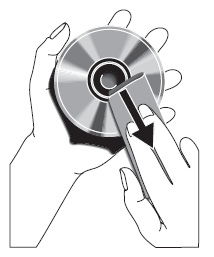
- Do not use solvents such as benzene, thinner, commercially available cleaners, or antistatic spray intended for analogue records.
Clean the disc lens
- After prolonged use, dirt or dust may accumulate on the disc lens. To ensure good play quality, clean the disc lens with Philips CD lens cleaner or any commercially available cleaner. Follow the instructions supplied with the cleaner.
Troubleshooting
Warning
- Never remove the casing of this device.
To keep the warranty valid, never try to repair the system yourself.
If you encounter problems when using this device, check the following points before requesting service. If the problem remains unsolved, go to the Philips Web page. Make sure that the device is nearby and the model number and serial number are available.
No power
- Ensure that the Mains cord is connected securely.
- Ensure that there is power at the AC Mains.
- Ensure that the batteries are inserted correctly.
No sound or poor sound
- Adjust the volume.
No response from the unit
- Disconnect and reconnect the AC power plug, then turn on the system again.
- As a power-saving feature, the unit switches off automatically 15 minutes after the track play reaches the end and no control is operated.
No disc detected
- Insert a disc.
- Check if the disc is inserted upside down.
- Wait until the moisture condensation at the lens has cleared.
- Replace or clean the disc.
- Use a finalized CD or correctly formatted disc.
Poor radio reception
- Increase the distance between the unit and your TV or VCR.
- Fully extend the FM antenna.
Pros and Cons of the Philips AZB500 Portable CD Player
Pros
- Portability and Versatility: Lightweight and battery-powered, making it easy to take anywhere.
- Dynamic Bass Boost: Enhances bass levels for deeper sound, even at low volumes.
- Multi-Format Playback: Supports CD, CD-R, CD-RW, DAB, DAB+, and FM radio.
- Programmable Tracks: Allows users to program up to 20 tracks for personalized playback.
Cons
- Power Output: Rated at 2 x 1 W RMS, which may not be sufficient for large gatherings.
- Battery Life: Requires six LR14 batteries, which can be cumbersome for frequent travelers.
- Size and Weight: While portable, it may not fit in smaller bags or backpacks due to its dimensions.
Customer Reviews and Feedback
Users praise the Philips AZB500 for its ease of use and the quality of sound it produces. Many appreciate the Dynamic Bass Boost feature, which enhances music listening experiences. However, some users have noted that the system's volume can be limited for larger spaces. Overall, the product is well-regarded for its value-for-money proposition.
Common praises include the system's portability and the variety of playback options. Complaints often focus on the battery life and the need for more powerful speakers. On average, users give this product a 4-star rating, recommending it for personal use or small gatherings.
Conclusion
The Philips AZB500 Portable CD Player is an excellent choice for those seeking a versatile music system that combines portability with a rich audio experience. With its Dynamic Bass Boost and programmable CD playback features, it offers a unique listening experience. While it may have some limitations, its value-for-money proposition makes it a compelling option for music enthusiasts.
Faqs
How do I set up the philips AZB500 Portable CD Player for the first time?
What should I do if the philips AZB500 Portable CD Player is not working properly?
Can I use the philips AZB500 Portable CD Player with external devices like smartphones?
How often should I maintain the philips AZB500 Portable CD Player?
What are the key features that make the philips AZB500 Portable CD Player different?
How do I program tracks on the philips AZB500 Portable CD Player?
Can I use the philips AZB500 Portable CD Player in outdoor environments?
What are the compatibility requirements for using the philips AZB500 Portable CD Player?
More philips manuals
- Setup: Philips Pocket Memo LFH0388 User Manual
- How to Use: Philips Air Purifier AC4080-AC4081 User Manual
- Setup : Philips Air Performer AMF870/35 User Manual
- Setup: Philips 1000 Series Headphones TAH1108 User Manual
- Setup: Philips Air Purifier AC3854 User Manual
- Pairing: Philips Kids Wireless Headphones SHK4000 User Manual
Leave a Comment