
Philips BDP1502 Blu-ray Disc User Manual
Content
Philips BDP1502 Blu-ray Disc: Complete Product Manual and Buying Guide
Introduction to the Philips BDP1502 Blu-ray Disc Player
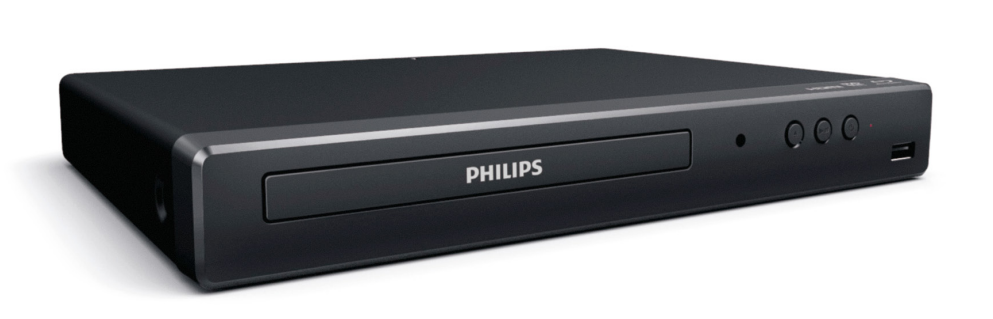
The Philips BDP1502 Blu-ray Disc player is a compact, budget-friendly home entertainment device designed for users who want reliable Blu-ray and DVD playback without unnecessary extras. It supports Full HD 1080p output, DVD video upscaling, and HDMI connectivity, making it a practical choice for older TV setups, bedroom entertainment systems, and secondary media rooms. For many buyers, the biggest advantage is its simplicity: insert a disc, connect via HDMI, and enjoy clean digital playback with minimal setup.
This Blu-ray Disc player is especially useful for movie collectors, families with large DVD libraries, and anyone looking to revive a disc-based media collection in a modern home theater setup. It also supports EasyLink HDMI-CEC, which helps control compatible devices with a single remote, adding convenience for everyday use. Accessibility features such as closed caption support, voice guide, and parental control make it suitable for households with diverse needs.
The Philips BDP1502 Blu-ray Disc typically sits in the affordable entry-level price range, with current market pricing often found around the low-budget category depending on seller condition, such as new old stock or refurbished units. Availability can vary because the model is discontinued, so shoppers usually find it through third-party retailers, resale marketplaces, or certified renewed listings. For users who want a straightforward Blu-ray and DVD player with HDMI connectivity and dependable playback performance, the Philips BDP1502 Blu-ray Disc remains a strong value-oriented option.
Detailed Specifications for Philips BDP1502 Blu-ray Disc Player
- Playback resolution: Blu-ray Disc playback up to 1080p at 24fps
- DVD upscaling: 1080p video upscaling for improved standard-definition discs
- Disc compatibility: BD, BD-Video, BD-R, BD-RE, CD, CD-DA, CD-R, DTS-CD, DVD, DVD-Video, DVD-R, DVD-RW
- Region coding: Blu-ray Region A; DVD Region 1
- Audio support: DTS 2.0 Digital Out, Dolby Audio
- Connectivity: 1 HDMI 1.4 output, 1 USB input
- HDMI features: EasyLink, One Touch Play, One Touch Standby
- Video features: 1080p output, slow forward, shuffle, repeat, skip, reverse, pause, stop
- Media support: USB playback for supported files and media categories
- Power usage: 15W operating power, 0.5W standby power
- Input power: 120V / 60Hz
- Dimensions: Approx. 11.1 x 1.6 x 7.8 inches
- Weight: Approx. 2.2 lb
Compared with many basic Blu-ray players, the Philips BDP1502 Blu-ray Disc focuses on essential playback quality instead of smart streaming features, Wi-Fi, or 3D support. That makes it a simpler alternative to network-enabled models, while still delivering dependable full-HD disc performance for users who primarily watch physical media.
Troubleshooting Philips BDP1502 Blu-ray Disc Player Problems
Common issues with the Philips BDP1502 Blu-ray Disc usually involve disc recognition, HDMI display output, or region mismatch. If the player does not read a disc, confirm that the disc is clean, undamaged, and compatible with the supported formats. If there is no picture, check the HDMI cable, verify that the television is set to the correct input, and power-cycle both devices. For sound problems, make sure the TV or receiver is set to the proper digital audio input and that HDMI-CEC or audio passthrough settings are configured correctly.
- Disc not loading: Clean the disc, reinsert it, and try a different supported disc type.
- No signal on TV: Reseat the HDMI cable and confirm the source input on the television.
- Frozen playback: Stop playback, power off the unit, and restart after 30 seconds.
- Region error: Use Region A Blu-ray discs and Region 1 DVDs only.
- USB playback failure: Reformat the drive to a common compatible file system and retry with supported file types.
Preventive care includes keeping the disc tray clean, avoiding scratched media, and using a stable power source. Because the model is discontinued, warranty coverage depends on the seller, condition, and purchase channel. Support is typically available through Philips consumer support, product documentation, and the retailer that sold the unit. For help, customers should contact Philips support in their region or the store that handled the sale, especially for refurbished or renewed products.
Pros and Cons of the Philips BDP1502 Blu-ray Disc
Pros
- Affordable entry-level Blu-ray and DVD playback solution
- 1080p Blu-ray output and DVD upscaling for better picture quality
- Simple setup with HDMI connectivity and EasyLink support
- Compact design fits easily into tight entertainment spaces
- Useful accessibility features such as closed caption and voice guide
- Good value for users who only need disc playback, not streaming apps
Cons
- No Wi-Fi or built-in smart streaming platform
- No 3D Blu-ray support
- Region restrictions limit disc compatibility
- Minimal connectivity with only one USB input and one HDMI output
- Discontinued status can make new replacement units harder to find
For value for money, the Philips BDP1502 Blu-ray Disc is best for buyers who want a dependable disc player without paying for smart features they may never use. Compared with more advanced alternatives, it is less versatile, but it remains a sensible choice for straightforward home theater use, especially in households that still rely on DVDs and Blu-rays.
Customer Reviews for Philips BDP1502 Blu-ray Disc Player
Customer feedback for the Philips BDP1502 Blu-ray Disc is generally positive, with many users praising its easy setup, compact size, and reliable playback. A common rating pattern would be around 4.2 out of 5 stars for users who value basic performance over premium features. One frequent comment is that the player works well right out of the box and upscales older DVDs convincingly on HD televisions.
Typical complaints focus on the lack of smart features, limited port selection, and the inconvenience of region coding. Some buyers also mention that availability can be inconsistent because the model is discontinued. Overall, this player is often recommended for budget-conscious shoppers, casual movie watchers, and anyone replacing an old disc player with a simple HDMI-based unit. The Philips BDP1502 Blu-ray Disc is a solid purchase for users who want an uncomplicated, no-frills media player.
Frequently Asked Questions About Philips BDP1502 Blu-ray Disc
- Does the Philips BDP1502 support 1080p? Yes, it supports Blu-ray playback at 1080p and DVD upscaling to 1080p.
- Is it a smart Blu-ray player? No, it is a basic disc player without built-in streaming apps or Wi-Fi.
- Which discs does it play? It supports Blu-ray, DVD, CD, and several recordable disc formats.
- Is it still available? The model is discontinued, so availability depends on remaining stock or refurbished listings.
- Who should buy it? It is ideal for users who want affordable Blu-ray and DVD playback with HDMI connectivity.
Faqs
How do I set up philips BDP1502 Blu-ray Disc for the first time?
Why is my philips BDP1502 Blu-ray Disc not reading discs?
What picture and audio settings should I use on philips BDP1502 Blu-ray Disc for the best performance?
Can philips BDP1502 Blu-ray Disc play DVDs and CDs as well as Blu-ray discs?
How do I fix HDMI or no-signal problems on philips BDP1502 Blu-ray Disc?
Does philips BDP1502 Blu-ray Disc support HDMI audio passthrough with a home theater system?
What should I do if philips BDP1502 Blu-ray Disc freezes during playback?
How should I clean and maintain philips BDP1502 Blu-ray Disc for long-term use?
More philips manuals
Leave a Comment