
Philips Remstar Plus CPAP therapy device DS260S User Manual
Content
Philips Remstar Plus CPAP Therapy Device DS260S: Complete Product Manual and Review
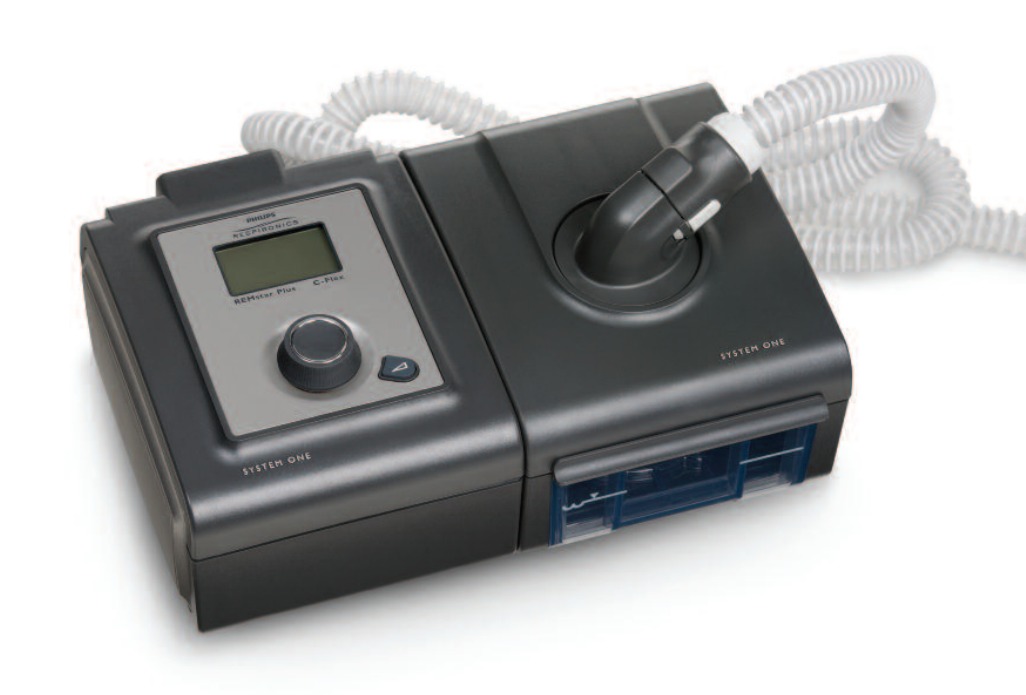
The Philips Remstar Plus CPAP therapy device DS260S is a classic fixed-pressure sleep apnea machine designed to deliver reliable airway support for users diagnosed with obstructive sleep apnea. It is built for home and clinical use, offering steady CPAP therapy, pressure comfort features, and basic usage tracking for patients who need a simple and dependable treatment solution. The device is especially suitable for first-time CPAP users, long-term therapy patients, and sleep clinics looking for a straightforward machine with proven performance.
One of the main benefits of the Philips Remstar Plus CPAP therapy device DS260S is its combination of comfort and practicality. It includes pressure relief technology, ramp settings for easier sleep onset, and compatibility with humidification accessories on supported configurations. The machine is valued for its durable design, quiet operation, and ease of use, which makes it a strong option for users who prefer a no-frills device over more advanced auto-adjusting models. In real-world use, it is often chosen by patients who want consistent therapy without complicated menus or excessive setup steps.
Estimated pricing for the Philips Remstar Plus CPAP therapy device DS260S varies widely depending on condition, whether it is new old stock, refurbished, or used. Typical market availability is usually in the range of about $150 to $800, with certified used units often appearing at the lower end and specialty medical resellers charging more for tested equipment. Availability is generally strongest through medical equipment retailers, refurbished device sellers, and secondary marketplaces. This model remains relevant for buyers seeking an affordable CPAP machine, especially when replacing an older unit or shopping for a backup therapy device.
Philips Remstar Plus CPAP Therapy Device DS260S Troubleshooting Guide
Common problems with the Philips Remstar Plus CPAP therapy device DS260S usually involve airflow, power, mask leaks, or humidifier performance. If the device does not turn on, check the power cord, outlet, and power supply connection first. If pressure feels too strong or too weak, confirm that the prescribed setting matches the device configuration. For air leaks, inspect the mask cushion, headgear fit, and tubing connections. If the ramp feature seems ineffective, make sure ramp time is enabled and not set too short.
Some units may display service-related alerts or fault indicators rather than detailed error codes. In those cases, the best fix is to power-cycle the device, replace filters, and verify tubing and humidifier placement. If the humidifier is not warming properly, ensure the chamber is seated correctly and the compatible power setup is being used. Preventive care includes cleaning the mask and tubing regularly, replacing air filters on schedule, and keeping the machine away from excess moisture and dust.
Warranty coverage depends on whether the unit is new, refurbished, or sold through a private reseller. Many older DS260S units are outside original manufacturer warranty, so support often comes from the seller or a certified respiratory equipment provider. For help, contact the seller directly or reach out to Philips Respironics customer support and an authorized CPAP service center. If you use the device for prescription therapy, consult your sleep clinic before changing pressure settings.
Pros and Cons of the Philips Remstar Plus CPAP Therapy Device DS260S
Pros
- Simple fixed-pressure CPAP design that is easy to learn and use.
- Comfort features such as pressure relief and ramp support can improve sleep onset.
- Durable construction makes it a practical choice for long-term therapy.
- Quiet operation is helpful for light sleepers and bed partners.
- Often better value for money than newer premium auto-adjusting CPAP machines.
Cons
- No advanced auto-adjusting pressure algorithm, unlike many newer APAP alternatives.
- Basic interface and reporting compared with modern smart CPAP devices.
- Older replacement parts and accessories may be harder to source.
- Used units can vary in condition, so buying from a reputable seller matters.
- May feel limited for users who want app connectivity or detailed sleep analytics.
Compared with newer alternatives such as travel CPAPs or smart APAP devices, the Philips Remstar Plus CPAP therapy device DS260S stands out for reliability and simplicity rather than advanced features. It is a strong budget-conscious choice for users who want proven therapy performance without paying for extra technology.
Customer Reviews of the Philips Remstar Plus CPAP Therapy Device DS260S
Customer feedback for the Philips Remstar Plus CPAP therapy device DS260S is generally positive, especially among users who prioritize dependable therapy and easy operation. Average satisfaction trends around 4 out of 5 stars, with many owners praising the machine’s quiet motor, comfortable ramp feature, and straightforward setup. One common testimonial is, “It does exactly what I need every night without complicated settings.”
Frequent complaints focus on the age of the model, limited modern features, and occasional difficulty finding compatible accessories. Some buyers also mention that used units can show cosmetic wear or require replacement parts sooner than expected. Despite that, many reviewers still recommend it as a practical buy for basic sleep apnea treatment, especially when price matters more than smart features. For shoppers seeking a dependable, affordable CPAP machine, this model remains a sensible option if sourced from a trusted medical equipment seller.
Faqs
How do I set up philips Remstar Plus CPAP therapy device DS260S for the first time?
What should I do if philips Remstar Plus CPAP therapy device DS260S is blowing weak air or not reaching my prescribed pressure?
Why does philips Remstar Plus CPAP therapy device DS260S make noise at night, and how can I reduce it?
Can I use philips Remstar Plus CPAP therapy device DS260S with any CPAP mask and tubing?
How do I clean and maintain philips Remstar Plus CPAP therapy device DS260S properly?
What does the ramp feature do on philips Remstar Plus CPAP therapy device DS260S?
How can I improve comfort when using philips Remstar Plus CPAP therapy device DS260S every night?
What should I check if philips Remstar Plus CPAP therapy device DS260S turns on but does not start therapy correctly?
More philips manuals
- Philips Sonic Expert Clean 7500 Toothbrush HX9690 User Manual
- Philips 5000 Series Headphones TAH5209 User Manual
- Philips Sonicare Diamond Clean Toothbrush User Manual
- Philips HX3211 Sonicare electric toothbrush User Manual
- Philips 5OLED911 TV Ambilight User Manual
- Setup: Philips 6 Series Roku TV User Manual
Leave a Comment