
Philips Sonicare Diamond Clean Toothbrush User Manual
Content
Philips Sonicare DiamondClean Toothbrush Review and Manual
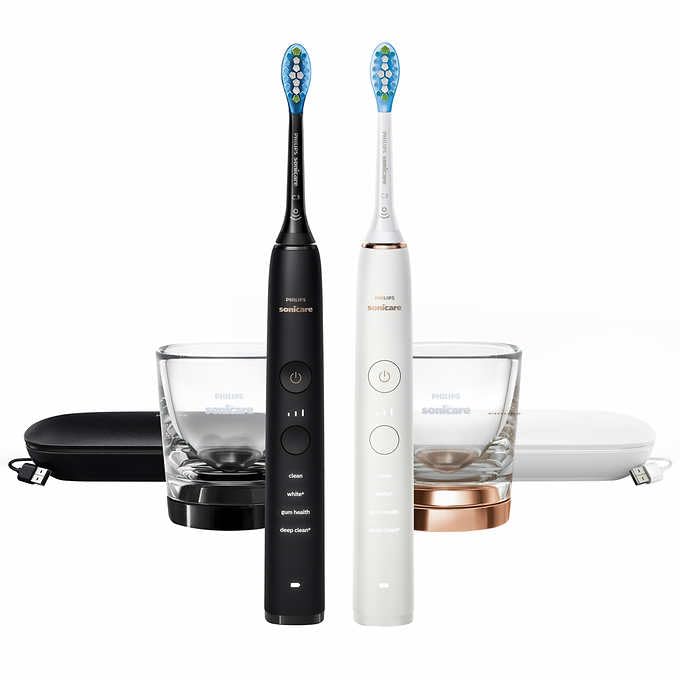
The Philips Sonicare DiamondClean Toothbrush is a premium sonic electric toothbrush designed for users who want a deeper clean, whiter-looking teeth, and a more refined brushing experience. It stands out for its high-speed sonic technology, multiple brushing modes, sleek design, and travel-friendly accessories, making it a strong choice for daily home use and frequent travelers. Many users choose the Philips Sonicare DiamondClean Toothbrush for its gentle yet effective cleaning action, built-in timer, and long battery life, all of which support better oral hygiene habits.
This model is especially appealing to people with sensitive gums, plaque-control needs, or stain concerns from coffee, tea, or wine. It is also popular with shoppers looking for a luxury electric toothbrush that feels polished and convenient. Depending on the seller and bundle, the estimated price range is typically around $100 to $200, though premium bundles and newer editions can cost more. Availability is broad through major retailers and dental product stores, with frequent discounts online.
Compared with standard electric toothbrushes, the Philips Sonicare DiamondClean Toothbrush offers a more premium experience with features such as multiple modes, a rechargeable travel case on some versions, and a stylish charging glass or puck-style charger. For users upgrading from a manual toothbrush or an entry-level electric model, it delivers a noticeable step up in comfort and performance. It is best suited for adults who value design, convenience, and advanced brushing support rather than the lowest possible price.
Specifications for Philips Sonicare DiamondClean Toothbrush
- Sonic brushing technology with up to 31,000 brush movements per minute on DiamondClean-style models
- Multiple cleaning modes, commonly including Clean, White, Sensitive, Gum Care, and Deep Clean
- Built-in two-minute timer with 30-second quadrant pacing alerts
- Rechargeable lithium-ion battery with long-lasting runtime between charges
- Premium charging options, including a glass charger or compact charging base depending on version
- Travel case included in many packages, with USB charging support on select models
- Compatible with a wide range of Sonicare replacement brush heads
- Designed for plaque removal, stain reduction, and gentle gum care
- Typical user rating is strong, with many buyers praising cleaning power and battery life
In real-world use, the Philips Sonicare DiamondClean Toothbrush competes closely with other premium sonic brushes such as the Sonicare ProtectiveClean and newer DiamondClean Smart versions. Compared with budget electric toothbrushes, it typically feels quieter, more polished, and more effective at consistent plaque removal. Compared with the DiamondClean 9000 and Smart models, the original DiamondClean usually offers fewer app-based features but remains attractive for users who want premium cleaning without paying top-tier flagship prices.
Troubleshooting Philips Sonicare DiamondClean Toothbrush Problems
If your toothbrush does not turn on, first check whether it needs charging. A dead battery is the most common cause of startup failure. Place the handle on the charger for several hours and confirm the charging base is connected correctly. If the brush vibrates weakly or stops during use, inspect the brush head for wear, clean the metal charging contacts, and replace the head if bristles are bent or discolored.
Common issues include button response problems, charging interruptions, and water buildup around the handle or charger. Some users report that dirt or moisture can affect the button functions, so keep the handle dry and avoid storing it in damp areas. If you notice repeated shutdowns, reset by removing the brush head, fully charging the unit, and trying another outlet or charger. Error codes vary by model, but flashing lights typically indicate battery, charger, or brush head connection issues rather than serious failure.
To prevent problems, rinse the brush head thoroughly, wipe the handle after each use, and replace the head every three months or sooner if worn. The Philips Sonicare DiamondClean Toothbrush usually includes a limited warranty, commonly two years on many versions. For support, contact Philips customer service through the official support line or the product help section on the Philips website, and keep your model number ready for faster troubleshooting.
Pros and Cons of the Philips Sonicare DiamondClean Toothbrush
Pros
- Excellent cleaning performance with sonic technology that feels powerful yet gentle
- Premium design that looks and feels more luxurious than many competing brushes
- Multiple brushing modes for whitening, sensitive teeth, and daily cleaning
- Strong battery life and convenient charging accessories
- Travel case included in many bundles, making it ideal for frequent travelers
- Good value for shoppers who want flagship-style performance at a discounted price
Cons
- Higher price than basic electric toothbrushes
- Replacement brush heads can be expensive over time
- Some users need time to adjust to the vibration intensity
- Fewer smart features than newer DiamondClean Smart and premium app-connected models
- Luxury accessories may be unnecessary for users focused only on basic cleaning
Overall, the Philips Sonicare DiamondClean Toothbrush offers strong value if premium feel, reliable cleaning, and travel convenience matter more than entry-level pricing. Compared with cheaper alternatives, it provides a more refined brushing experience. Compared with newer premium alternatives, it is often the better buy when found on sale.
Customer Reviews of Philips Sonicare DiamondClean Toothbrush
Customer feedback is generally very positive, with many buyers giving the Philips Sonicare DiamondClean Toothbrush around 4.5 to 4.8 out of 5 stars across major retail listings. Users frequently praise the long battery life, stylish design, easy handling, and noticeably cleaner-feeling teeth after regular use. A common testimonial theme is that it feels like a major upgrade from a manual toothbrush.
Frequent complaints focus on price, replacement head costs, and the need to get used to the vibration. Some users also mention that the charger setup feels less portable than expected, depending on the bundle. Even with these concerns, many reviewers still recommend it for adults who want a high-quality electric toothbrush with dependable performance and premium features.
Faqs
How do I set up philips Sonicare Diamond Clean Toothbrush for the first time?
Why is my philips Sonicare Diamond Clean Toothbrush not turning on, and what should I check first?
Which brush heads are compatible with the philips Sonicare Diamond Clean Toothbrush?
How do I use the different cleaning modes on the philips Sonicare Diamond Clean Toothbrush effectively?
Why does my philips Sonicare Diamond Clean Toothbrush feel weak or lose power during brushing?
How often should I replace the brush head on my philips Sonicare Diamond Clean Toothbrush?
What is the best way to clean and maintain a philips Sonicare Diamond Clean Toothbrush?
How can I improve battery life on my philips Sonicare Diamond Clean Toothbrush?
More philips manuals
- Philips 5OLED911 TV Ambilight User Manual
- Philips Sonic Expert Clean 7500 Toothbrush HX9690 User Manual
- Philips SHC3200 Headphones User Manual
- Philips Remstar Plus CPAP therapy device DS260S User Manual
- Setup: Philips Efficia CM12 Patient Monitor User Manual
- Philips 5000 Series Headphones TAH5209 User Manual
Leave a Comment