
Philips SHC3200 Headphones User Manual
Content
Philips SHC3200 Headphones Review and Product Manual
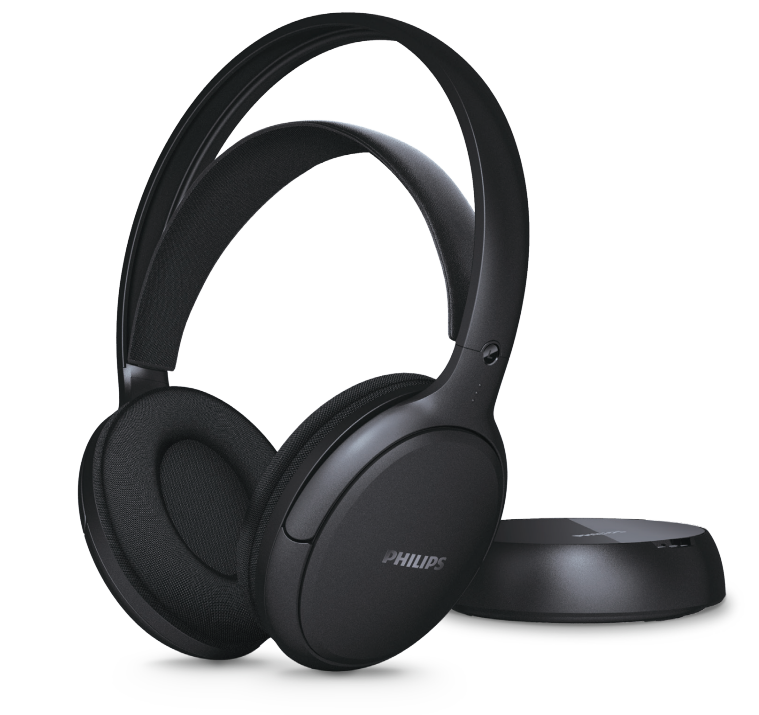
The Philips SHC3200 headphones are wireless TV headphones designed for comfortable home listening, with a closed acoustic design, 2.4 GHz wireless connectivity, and an operating range of up to 30 meters. They are a practical choice for watching television, streaming movies, gaming, or listening to music without disturbing others, making them especially useful for families, late-night viewers, and users who want freedom from cables. The lightweight over-ear design, 32 mm drivers, and soft fit make the Philips SHC3200 headphones suitable for extended listening sessions, while the rechargeable lithium-polymer battery offers up to 30 hours of playback from a single charge. Fast charging is another strong advantage, giving around 4 hours of listening from just 15 minutes of charging. The headphones typically fall into the budget-to-midrange category, with an estimated price range of about $35 to $70 depending on region, retailer, and stock availability. The Philips SHC3200 headphones are widely available through electronics stores, online marketplaces, and Philips support channels, though pricing and packaging can vary by country. For users searching for a simple wireless TV audio solution, Philips SHC3200 headphones deliver a strong mix of comfort, range, battery life, and ease of use.
Troubleshooting Philips SHC3200 Headphones: Common Problems and Fixes
If your Philips SHC3200 headphones are not working correctly, most issues can usually be solved with basic checks. If there is no sound, confirm that the transmitter is powered on, the audio source is connected properly through the 3.5 mm input, and the headphones are charged. If audio cuts out or sounds weak, move closer to the transmitter and make sure there are no strong wireless interference sources nearby. The SHC3200 uses a 2.4 GHz wireless connection, so routers and other wireless devices may occasionally affect performance. If the headphones do not charge, inspect the USB-C charging cable, check the adapter connection, and verify that the battery is not fully depleted. There are no common user-facing error codes for this model, so issues are usually resolved through hardware and connection checks rather than code-based fixes. To prevent problems, keep the headphones charged regularly, store them in a dry place, and avoid bending the cable or damaging the charging port. Philips support provides warranty assistance, repairs, and replacement options depending on region and purchase terms. For help, use the official Philips support website or contact local Philips customer service through the phone and email options listed for your country.
Pros and Cons of Philips SHC3200 Headphones
Pros
- Long battery life with up to 30 hours of playback, which is excellent for TV viewing and daily use.
- Fast charging support that provides about 4 hours of listening from a 15-minute charge.
- Wireless range of up to 30 meters, giving users freedom to move around the house.
- Comfortable closed-back design with 32 mm drivers for balanced home audio.
- Simple setup with a 3.5 mm input and easy wireless pairing for TV use.
- Good value for money compared with premium wireless TV headphones.
Cons
- No active noise cancellation, so outside sounds are still audible.
- Not ideal for users who want Bluetooth headphone compatibility.
- Sound quality is practical rather than audiophile-grade.
- Best suited for home entertainment, not sport or outdoor use.
- Compared with higher-end alternatives, the feature set is basic.
Overall, Philips SHC3200 headphones are a solid budget-friendly wireless TV option. They compare well against entry-level alternatives from other brands when battery life and range matter more than advanced features.
Customer Reviews of Philips SHC3200 Headphones
User feedback for the Philips SHC3200 headphones is generally positive, with many buyers rating them around 4 out of 5 stars for comfort, battery life, and ease of setup. Common praise includes the long playback time, stable wireless range, and lightweight design, especially for evening TV use. One frequent comment is that they are “easy to set up and comfortable for long movies.” Another typical positive review notes that the headphones are “great value for the price and work well across the room.”
Common complaints mention that the sound is not as rich as more expensive wireless headphones and that interference can occur in busy wireless environments. Some users also note that the model is best suited for TV and casual listening rather than music-focused audiophile use. Despite these limitations, many customers recommend the Philips SHC3200 headphones for families, older users, and anyone wanting a simple wireless listening solution without spending much.
Faqs
How do I set up philips SHC3200 Headphones for the first time?
Why is my philips SHC3200 Headphones signal cutting out or sounding weak?
Can philips SHC3200 Headphones work with a TV, PC, or smartphone?
How do I improve sound quality on philips SHC3200 Headphones?
What should I do if philips SHC3200 Headphones are not charging or powering on?
How far can I use philips SHC3200 Headphones from the transmitter?
What are the main features of philips SHC3200 Headphones that users should know about?
How should I clean and maintain philips SHC3200 Headphones for long-term use?
More philips manuals
- Setup: Philips Efficia CM12 Patient Monitor User Manual
- Philips 5OLED911 TV Ambilight User Manual
- Philips 5000 Series Soundbar TAB530X User Manual
- Philips Sonicare Diamond Clean Toothbrush User Manual
- Philips 3000 Series Headphone TAH3209 User Manual
- Philips Sonic Expert Clean 7500 Toothbrush HX9690 User Manual
Leave a Comment