
Philips 3000 Series Headphone TAH3209 User Manual
Content
Philips 3000 Series Headphone TAH3209: Complete Product Manual and Buyer Guide
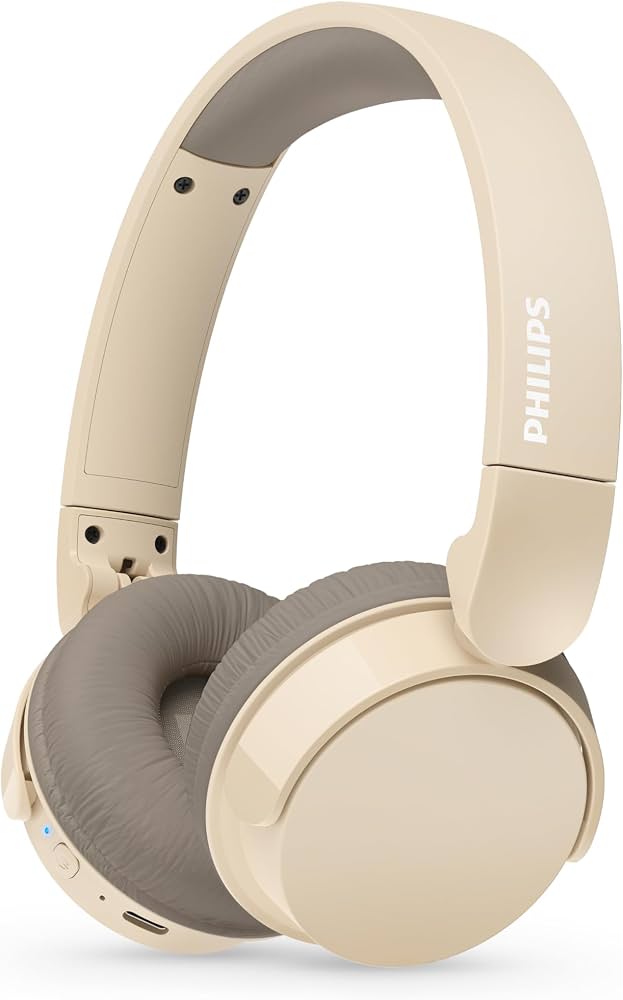
The Philips 3000 Series Headphone TAH3209 is a lightweight, wireless on-ear headphone designed for everyday listening, calls, and commuting. Built around 32 mm dynamic drivers, Bluetooth 5.3, and a comfortable foldable design, it delivers a practical balance of portability, simplicity, and solid sound quality for casual users. The Philips 3000 Series Headphone TAH3209 is especially appealing for students, remote workers, and first-time wireless headphone buyers who want easy connectivity without paying a premium for advanced noise cancellation.
Key benefits include up to 25 hours of battery life, USB-C charging, a 10-meter wireless range, and a built-in microphone for hands-free calling. The on-ear fit keeps the headphone compact and easy to carry, while the foldable structure makes it suitable for travel, office bags, and daily commutes. It is a strong fit for music streaming, online meetings, podcasts, and video calls. Typical pricing usually falls in the budget-to-midrange category, often around $20 to $50 depending on region, seller, and color variant, with broad availability through electronics retailers and online marketplaces. If you want an affordable Bluetooth headset with modern essentials, the Philips 3000 Series Headphone TAH3209 is a sensible, well-rounded option.
Troubleshooting Guide for Philips 3000 Series Headphone TAH3209
Common Problems and Quick Fixes
- Headphones will not pair: Turn Bluetooth off and on again, forget the device from your phone, and re-enter pairing mode. Keep the headphones within 10 meters of the source device.
- No sound or weak audio: Check volume on both the headphones and your device, confirm the correct playback device is selected, and recharge the battery if the sound cuts out.
- Microphone not working during calls: Make sure the headset is connected in hands-free mode and that call permissions are enabled in your phone or PC settings.
- Charging problems: Use a USB-C cable and a reliable power adapter. Clean the charging port gently if the battery does not respond.
- Audio lag or dropouts: Move closer to the source device, reduce wireless interference, and close unused Bluetooth connections.
There are no user-facing error codes typically associated with this model, so most issues are solved through reset, re-pairing, or charging checks. Preventive care includes avoiding moisture, storing the headset folded in a case, and charging before the battery is completely drained. Warranty coverage and support options depend on the country of purchase, so customers should check the seller invoice and regional Philips support portal. For help, use Philips customer service through the official support website or contact the retailer where the product was purchased.
Pros and Cons of Philips 3000 Series Headphone TAH3209
What Makes It a Good Buy
- Affordable value: Offers Bluetooth 5.3, USB-C charging, and long battery life at a budget-friendly price.
- Lightweight and portable: The foldable on-ear design is easy to pack for travel or daily commuting.
- Good battery performance: Up to 25 hours of playback is useful for workdays, school, and weekend listening.
- Simple controls: On-headphone buttons make playback and call management straightforward.
- Clear everyday audio: The 32 mm drivers deliver balanced sound for music, podcasts, and video calls.
Limitations to Consider
- No active noise cancellation: Not ideal for very noisy buses, flights, or open offices.
- On-ear comfort: Some users may prefer over-ear cushions for longer sessions.
- Basic feature set: Competes well against other budget wireless headphones, but lacks premium extras like app EQ or advanced noise controls.
- Best for casual use: Strong value for money, but not positioned as a high-end audiophile headset.
Compared with alternatives in the same price range, the Philips 3000 Series Headphone TAH3209 stands out for its modern Bluetooth version, long battery life, and compact design. It is a strong pick if you want practical features rather than premium tuning or flagship-level comfort.
Customer Reviews and User Feedback on Philips 3000 Series Headphone TAH3209
Most customer feedback for the Philips 3000 Series Headphone TAH3209 is positive, especially from buyers looking for a low-cost everyday wireless headset. A common rating pattern is around 4 out of 5 stars, with praise for easy pairing, reliable battery life, and a lightweight build. One typical comment is: “Great for work calls and podcasts, and the battery lasts several days of casual use.” Another common review says: “Very good value, but I wish the ear cushions were softer for longer listening sessions.”
Frequent compliments focus on portability, simple operation, and stable Bluetooth connectivity. Common complaints include the lack of noise cancellation and the on-ear pressure during extended wear. These points matter most to buyers comparing it with over-ear options or more expensive wireless headphones. For shoppers who want an affordable, practical headset for commuting, study, and calls, the Philips 3000 Series Headphone TAH3209 is usually recommended. Buyers who need stronger isolation or more advanced sound customization may want to consider higher-tier models instead.
Faqs
How do I set up philips 3000 Series Headphone TAH3209 for the first time?
Why is my philips 3000 Series Headphone TAH3209 not connecting to Bluetooth?
What devices are compatible with philips 3000 Series Headphone TAH3209?
How can I improve sound quality on philips 3000 Series Headphone TAH3209?
What should I do if philips 3000 Series Headphone TAH3209 has no sound but is connected?
How do I charge philips 3000 Series Headphone TAH3209 safely and know when it is fully charged?
How do I clean and maintain philips 3000 Series Headphone TAH3209 for long-term use?
Can I use philips 3000 Series Headphone TAH3209 for calls, meetings, and gaming?
More philips manuals
Leave a Comment