
Philips HTL2150 Soundbar and Subwoofer User Manual
Content
Philips HTL2150 Soundbar and Subwoofer: Compact Home Audio Upgrade for TV and Movies
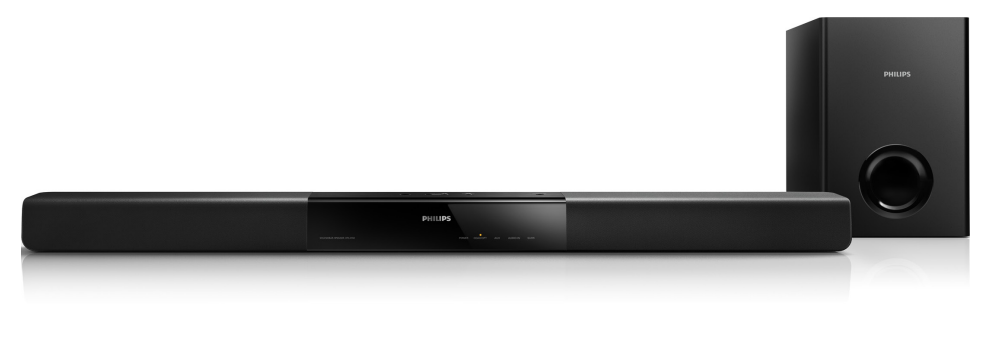
The Philips HTL2150 Soundbar and Subwoofer is designed for users who want a simple, affordable way to improve TV sound without a full home theater setup. With a 60W RMS total output, a dedicated 30W passive subwoofer, and dual 15W soundbar channels, this Philips soundbar delivers clearer dialogue, fuller bass, and a more immersive listening experience than most built-in TV speakers. It is a practical choice for small to medium living rooms, bedroom setups, apartments, and budget-conscious buyers who want better movie nights, sports broadcasts, and everyday streaming audio.
One of the biggest advantages of the Philips HTL2150 Soundbar and Subwoofer is its straightforward design. It offers common connection options such as optical digital input, coaxial digital input, AUX, and stereo RCA, making it easy to connect to many televisions and older media devices. The system also supports Dolby Digital, which can help create a more cinematic sound profile when watching supported content. Its separate subwoofer adds deeper low-end response, making action scenes, music, and games sound more powerful.
In terms of price, this model typically falls in the budget to lower mid-range category, often estimated around $80 to $150 depending on retailer, region, and stock condition. Availability may vary because the HTL2150 is an older model, so it is commonly found through online marketplaces, clearance sellers, refurbished listings, and remaining retail stock rather than major new-product shelves. For shoppers searching for an entry-level soundbar and subwoofer combo with decent connectivity and solid everyday performance, the Philips HTL2150 remains a sensible value option.
Pros and Cons of the Philips HTL2150 Soundbar and Subwoofer
Pros
- Easy TV audio upgrade: The 60W RMS output improves speech clarity and adds more presence than standard television speakers.
- Dedicated bass unit: The passive 5.25-inch subwoofer gives movies and music a fuller low end, especially for action scenes and bass-heavy tracks.
- Flexible connectivity: Optical, coaxial, AUX, and RCA inputs make it compatible with many TVs and older entertainment systems.
- Good value for money: For buyers seeking an affordable soundbar with subwoofer support, it delivers a strong feature set for the price.
- Compact design: The soundbar fits neatly under most televisions and works well in smaller rooms where space is limited.
Cons
- Not ideal for large rooms: The 60W output is enough for casual viewing, but it may struggle to fill bigger spaces with theater-like volume.
- Passive subwoofer limits flexibility: The subwoofer needs proper placement and is less versatile than wireless subwoofers found in newer alternatives.
- No modern smart features: It lacks Bluetooth streaming, Wi-Fi, app control, and voice assistant support, which are common in newer soundbars.
- Older model availability: Since it is no longer a current flagship-style product, replacement stock and pricing can be inconsistent.
Compared with newer budget alternatives, the Philips HTL2150 Soundbar and Subwoofer focuses on essential audio improvement rather than smart features. Buyers who want Bluetooth, HDMI ARC, or wireless surround expansion may prefer newer models, but those who prioritize simple setup and reliable wired connections may still find this Philips system appealing.
Customer Reviews for Philips HTL2150 Soundbar and Subwoofer
Customer feedback for the Philips HTL2150 Soundbar and Subwoofer is generally positive, with many users rating it around 4 out of 5 stars for everyday home entertainment. Reviewers frequently praise the clearer dialogue, improved bass response, and easy installation. A common testimonial style comment is: “Great sound upgrade for the price, and movies feel much more engaging now.”
Frequent complaints include the lack of Bluetooth, the limited power for large rooms, and the fact that the subwoofer is passive rather than wireless. Some users also mention that the older design feels less convenient than modern soundbars with HDMI ARC and app control. Even so, many buyers recommend it for budget setups, secondary rooms, and anyone upgrading from TV speakers for the first time.
Overall, user sentiment suggests that the Philips HTL2150 Soundbar and Subwoofer is a smart purchase if you want simple, wired, and affordable audio enhancement without paying for premium features you may not need.
Philips HTL2150 Soundbar and Subwoofer Specifications at a Glance
- Total output power: 60W RMS
- Soundbar output: 2 x 15W
- Subwoofer output: 30W
- Subwoofer type: Passive
- Subwoofer driver: 5.25-inch woofer
- Subwoofer frequency range: 45 Hz to 200 Hz
- Speaker impedance: 4 ohms
- Subwoofer impedance: 8 ohms
- Inputs: Optical, coaxial, AUX, RCA
- Audio format support: Dolby Digital
Who Should Buy the Philips HTL2150 Soundbar and Subwoofer?
This model is best suited to viewers who want an affordable soundbar and subwoofer combo for TV, movies, and casual music listening. It is a strong fit for apartments, bedrooms, smaller living rooms, and secondary entertainment spaces. If you need a simple wired sound upgrade with better bass and clearer voices, the Philips HTL2150 Soundbar and Subwoofer remains a practical choice. If you want wireless streaming, HDMI ARC, or smart home integration, a newer soundbar may be a better match.
Faqs
How do I set up the Philips HTL2150 Soundbar and Subwoofer for the first time?
Why is my Philips HTL2150 Soundbar and Subwoofer not producing sound from the TV?
What is the best way to connect the Philips HTL2150 Soundbar and Subwoofer to a Smart TV?
Why does the wireless subwoofer on the Philips HTL2150 Soundbar and Subwoofer keep disconnecting?
How can I improve bass and audio quality on the Philips HTL2150 Soundbar and Subwoofer?
Which devices are compatible with the Philips HTL2150 Soundbar and Subwoofer?
What should I do if the Philips HTL2150 Soundbar and Subwoofer sounds delayed during movies or gaming?
How do I clean and maintain the Philips HTL2150 Soundbar and Subwoofer safely?
More philips manuals
- Setup: Philips HTS3541 Blue-ray 3D User Manual
- Setup: Philips 6262 series TV 43PUS6262 User Manual
- Setup: Philips 6050 Series Television 24PHS6050 User Manual
- Setup: Philips Sports Massage Gun PPM7721 User Manual
- Philips 5000 Series Rechargeable sonic toothbrush User Manual
- Philips 3000 Series Headphone TAH3209 User Manual
Leave a Comment