
Setup: Philips HTS3541 Blue-ray 3D User Manual
Content
Philips HTS3541 Blu-ray 3D Product Manual and Review
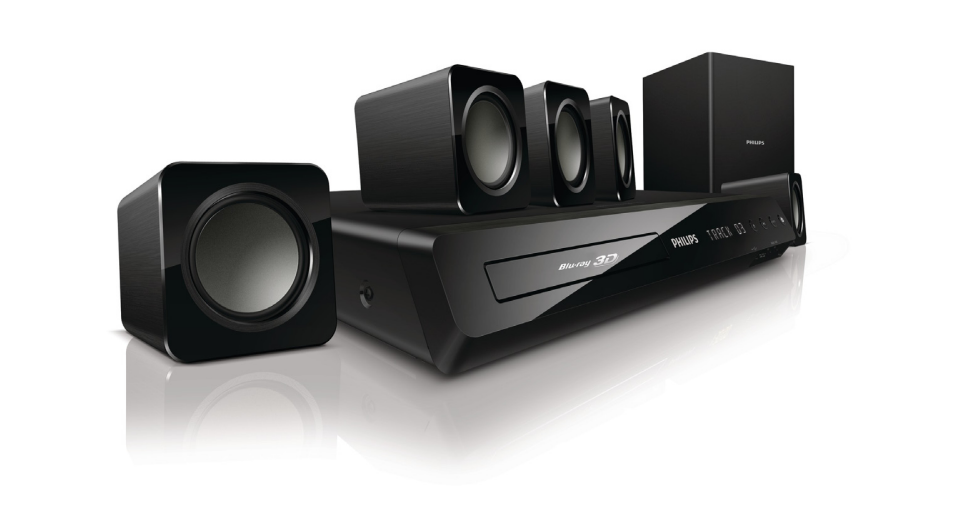
The Philips HTS3541 Blue-ray 3D is a 5.1-channel home theater system designed for users who want cinematic sound, Blu-ray playback, and easy connectivity in one compact package. Built around a total RMS output of 300 W, it combines a center speaker, four satellite speakers, and a passive subwoofer to deliver surround sound for movies, games, sports, and music. The system supports Full HD 1080p Blu-ray playback and 3D movie viewing, making it a strong choice for home entertainment setups that prioritize immersion without requiring a separate AV receiver.
One of the main advantages of the Philips HTS3541 Blue-ray 3D is its straightforward all-in-one design. It includes HDMI output with ARC support, digital optical and coaxial inputs, Ethernet, USB playback, FM radio, and Easy-Fit speaker jacks for simplified installation. Audio support includes Dolby Digital, Dolby Digital Plus, Dolby TrueHD, DTS Digital Surround, and DTS-HD, which helps the system handle both standard and high-definition soundtracks effectively. For users upgrading from a basic TV speaker setup, the HTS3541 offers a noticeable improvement in clarity, bass response, and surround imaging.
This model is best suited for small to medium living rooms, first-time home theater buyers, and budget-conscious users looking for a Blu-ray home cinema system rather than a modular component system. Typical availability is now limited because the product has been discontinued in many markets, but refurbished and second-hand units are still found on online marketplaces. Estimated pricing varies widely by condition, region, and included accessories, with used units often falling in the low-budget to mid-range category depending on seller and completeness.
Pros and Cons of Philips HTS3541 Blue-ray 3D
Pros
- Powerful 5.1 surround sound: The 300 W RMS output is strong enough for everyday movie viewing and family entertainment, especially in compact rooms.
- Full HD Blu-ray and 3D support: Ideal for users who want a single player-and-speaker package for Blu-ray discs and 3D content.
- Wide format compatibility: Supports popular audio and video formats, making it practical for mixed media playback from discs and USB devices.
- Simple setup: Easy-Fit speaker jacks and a compact main unit make installation easier than many receiver-based alternatives.
- Good value for money: For buyers seeking an affordable home theater system, it offers features often found in more expensive setups.
Cons
- Limited upgrade path: Unlike an AV receiver system, speaker expansion and customization are restricted.
- Modest subwoofer performance: The passive subwoofer delivers decent bass, but heavy bass lovers may prefer a larger separate subwoofer.
- Older platform: As a discontinued model, it lacks newer streaming features found in modern soundbars and smart home theater systems.
- Best for small rooms: In larger spaces, the output may feel less impactful than newer 500 W+ alternatives.
Compared with modern soundbars, the Philips HTS3541 Blue-ray 3D usually offers better traditional surround separation, but it is less convenient and less connected. Compared with newer budget 5.1 systems, it can still be a solid option if found at a fair used price and if the buyer values disc playback over streaming.
Customer Reviews and User Feedback on Philips HTS3541 Blue-ray 3D
Customer feedback for the Philips HTS3541 Blue-ray 3D is generally positive among budget home theater buyers, with many users praising the clear dialogue, easy setup, and reliable Blu-ray playback. A common rating pattern is around 3.5 to 4 out of 5 stars, especially from users who bought it for casual movie nights and TV sound upgrades.
Typical praise includes comments like: “Great for the price, and the surround effect is much better than TV speakers,” and “Easy to connect and works well with Blu-ray discs and USB playback.” Common complaints focus on the limited bass from the passive subwoofer, lack of modern smart features, and the fact that replacement parts or new units can be harder to find. Buyers frequently recommend it for users who want a simple, affordable 5.1 home theater system rather than a premium wireless setup.
For shoppers considering the Philips HTS3541 Blue-ray 3D today, the best purchase is a well-maintained used or refurbished unit with all speakers, cables, and the remote included. If the goal is basic Blu-ray surround sound at a sensible price, it remains a practical option.
Philips HTS3541 Blue-ray 3D Specifications at a Glance
- 5.1-channel home theater system
- Total RMS power: 300 W
- Center speaker output power: 50 W
- Satellite speaker output power: 4 x 50 W
- Subwoofer output power: 50 W
- HDMI output with ARC support
- Digital optical input and digital coaxial input
- USB playback support
- FM radio
- Passive subwoofer design
- Blu-ray and 3D disc playback support
Buying Advice for Philips HTS3541 Blue-ray 3D
If you want a compact, all-in-one Blu-ray home theater system for movies, music, and TV audio, the Philips HTS3541 Blue-ray 3D is still worth considering on the used market. It is best for users who value simple setup, dependable 5.1 surround sound, and Blu-ray playback more than smart streaming or wireless convenience. For larger rooms, heavy bass use, or future-proof features, a newer soundbar or AV receiver package may be a better long-term investment.
Faqs
How do I set up philips HTS3541 Blue-ray 3D for the first time and get the best picture and sound?
Why is my philips HTS3541 Blue-ray 3D not reading Blu-ray discs, and what can I do to fix it?
Does philips HTS3541 Blue-ray 3D work with non-3D TVs, and what features will I still be able to use?
What should I do if philips HTS3541 Blue-ray 3D has no sound from the speakers?
How can I connect philips HTS3541 Blue-ray 3D to a TV, game console, or streaming device?
What are the main features of philips HTS3541 Blue-ray 3D that users should know before buying?
How do I improve playback performance and reduce lag on philips HTS3541 Blue-ray 3D?
How should I clean and maintain philips HTS3541 Blue-ray 3D to extend its lifespan?
More philips manuals
- Setup: Philips 6050 Series Television 24PHS6050 User Manual
- Philips HTL2150 Soundbar and Subwoofer User Manual
- Philips 5000 Series Rechargeable sonic toothbrush User Manual
- Setup: Philips 6262 series TV 43PUS6262 User Manual
- Philips HTS6600 DVD Home Theater System User Manual
- Setup: Philips Sports Massage Gun PPM7721 User Manual
Leave a Comment