
Philips HTS6600 DVD Home Theater System User Manual
Content
Philips HTS6600 DVD Home Theater System Manual and Product Overview
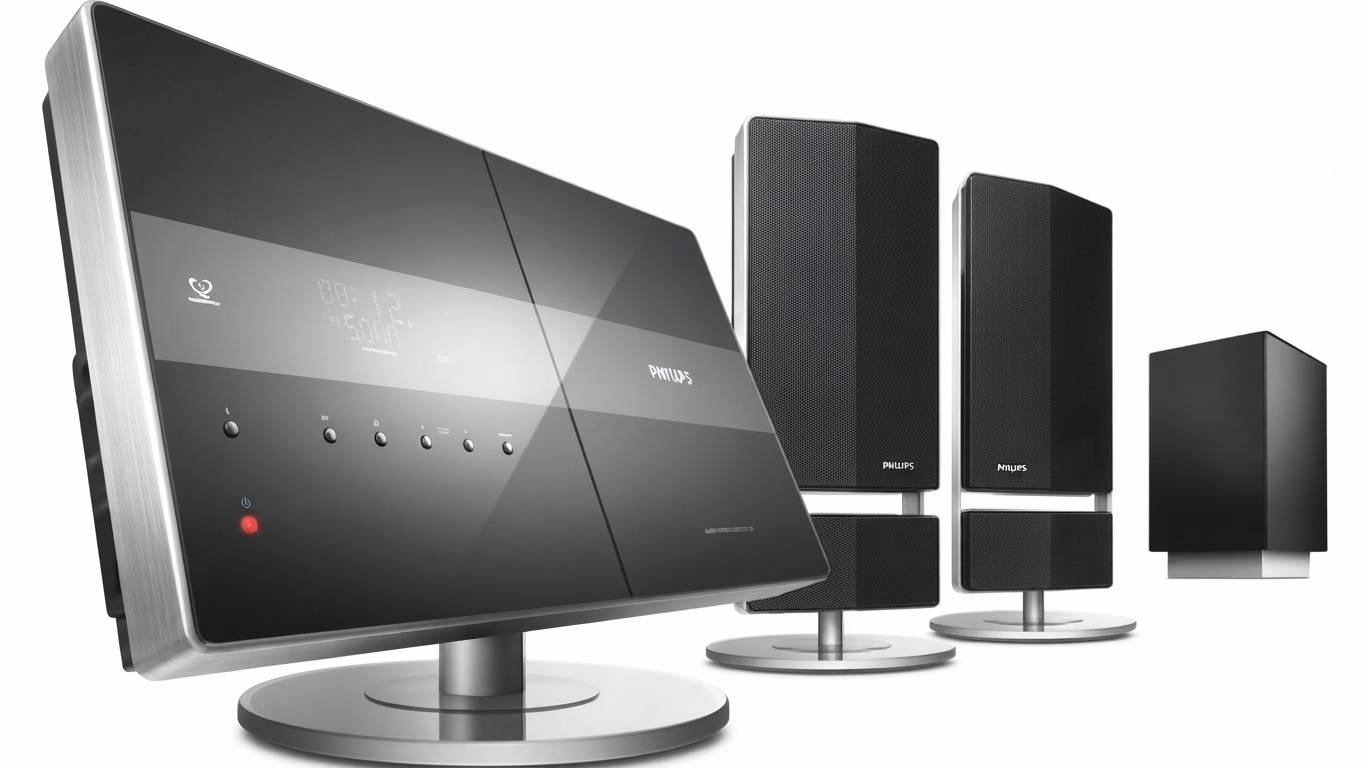
The Philips HTS6600 DVD Home Theater System is a compact home cinema package designed for users who want a cleaner living-room setup without sacrificing surround sound performance. Built around a one-box DVD receiver and vertical speakers, it combines DVD playback, upscaling, and multi-format media support in a single system. For movie nights, music playback, and everyday TV enhancement, it delivers a practical balance of style, convenience, and solid audio output.
This model is especially appealing to home entertainment buyers who prefer an all-in-one DVD home theater system with HDMI connectivity, progressive scan processing, and support for popular disc and file formats such as DVD, CD, MP3, JPEG, and DivX. The integrated active subwoofer and full-range satellite speakers help create a fuller soundstage than standard TV speakers, making it a good fit for apartments, bedrooms, and medium-sized living rooms.
The Philips HTS6600 DVD Home Theater System was positioned as a premium mid-range home theater in a box solution. At launch, it typically sat in the approximate price range of $250 to $500 depending on condition, region, and included accessories. Availability today is mainly through second-hand marketplaces, refurbished electronics sellers, and archived retail listings, since it is an older discontinued model. For buyers seeking an affordable legacy DVD surround system with HDMI upscaling, it remains a recognizable and practical choice.
Specifications for Philips HTS6600 DVD Home Theater System
- System type: DVD home theater system with one main unit and vertical satellite speakers.
- Speaker configuration: 8 x 2-inch full-range woofers in the speaker array.
- Subwoofer: Active subwoofer with a 1 x 6.5-inch long-throw woofer.
- Speaker impedance: 6 ohms.
- Subwoofer impedance: 4 ohms.
- Subwoofer frequency response: 30 Hz to 120 Hz.
- Audio decoding: Dolby Digital, Dolby Pro Logic II, and DTS support.
- Video processing: 12-bit / 108 MHz video DAC with progressive scan.
- Video output: HDMI with upscaling to 720p and 1080i on supported displays.
- Supported media: DVD, CD, CD-R, CD-RW, DVD-R, DVD-RW, DVD+R, DVD+RW.
- Supported formats: MP3, WMA, JPEG, VCD, SVCD, and DivX variants.
- Connectivity: HDMI, component video, SCART, USB, audio inputs, and TV input.
- Main unit dimensions: 370 x 76 x 242 mm.
- Subwoofer dimensions: 295 x 443 x 295 mm.
- Comparison note: Compared with basic DVD players, this system offers stronger surround processing and a dedicated active subwoofer; compared with newer soundbars, it offers less streaming flexibility but more disc-focused functionality.
Troubleshooting Philips HTS6600 DVD Home Theater System Issues
Common issues with the Philips HTS6600 DVD Home Theater System are usually related to disc playback, remote control response, or sound output. If the unit does not respond to the remote, replace the batteries first and move closer to the main unit. If discs fail to load or play, clean the disc surface, confirm the disc format is supported, and check for scratches or warping. For no audio, verify speaker cable connections, confirm the correct input mode, and test with a known-good disc.
Typical on-screen error messages or service codes on older Philips systems often point to disc reading failures, tray problems, or region/format incompatibility. The practical fix is usually to power cycle the unit, reload the disc, and inspect the lens area for dust. If HDMI output is unstable, switch to component video temporarily and reselect the correct TV input. Preventive maintenance includes keeping ventilation openings clear, using clean discs, and avoiding frequent hot-plugging of cables.
Warranty support for this discontinued model may be limited, but Philips customer support, regional service partners, and authorized electronics repair shops can still help with parts, diagnostics, and manual retrieval. For assistance, check Philips support for your country, contact local authorized service centers, or consult the product manual supplied with the unit. If the system has persistent power or laser issues, professional repair is recommended.
Pros and Cons of the Philips HTS6600 DVD Home Theater System
Pros
- Compact all-in-one design that reduces cable clutter and simplifies setup.
- Active subwoofer provides stronger low-end performance than typical TV speakers.
- HDMI output and upscaling improve compatibility with modern televisions.
- Wide format support for DVD, CD, MP3, JPEG, WMA, and DivX media.
- Good value for buyers who want a budget-friendly legacy home theater system.
Cons
- No built-in streaming apps or wireless features found on newer home theater systems.
- Older HDMI and video processing standards are behind current soundbars and AV receivers.
- Replacement parts and service support can be harder to find due to age.
- Best suited for disc playback, not for smart TV integration or multi-room audio.
Overall, the Philips HTS6600 DVD Home Theater System offers strong value if the goal is reliable DVD surround sound rather than modern smart-home features. Compared with entry-level soundbars, it provides a more traditional home cinema feel. Compared with newer AV receiver setups, it is easier to use but less expandable.
Customer Reviews for Philips HTS6600 DVD Home Theater System
Customer feedback for the Philips HTS6600 DVD Home Theater System is generally positive, with many users praising the clear dialog, solid bass response, and compact design. A typical rating pattern would be around 4 out of 5 stars for users focused on movie playback and everyday entertainment. One common compliment is that it “fills the room with sound without needing a complicated receiver setup.”
Frequent complaints center on aging hardware, limited modern connectivity, and occasional disc-reading problems after long-term use. Some users also mention that the system is best enjoyed with good speaker placement and a compatible TV. For buyers looking for a reliable used DVD home theater system, it is often recommended as long as the unit has been tested and the remote, cables, and subwoofer are included.
Frequently mentioned issues include remote wear, tray response delays, and HDMI handshaking on newer TVs. Despite that, many owners still consider it a worthwhile purchase for disc-based home cinema at a low resale price.
Faqs
How do I set up the Philips HTS6600 DVD Home Theater System for the first time?
Why is my Philips HTS6600 DVD Home Theater System not giving sound from all speakers?
Can the Philips HTS6600 DVD Home Theater System connect to a modern TV or HDMI input?
What disc and file formats does the Philips HTS6600 DVD Home Theater System support?
How do I fix a Philips HTS6600 DVD Home Theater System that won't read a disc?
How can I improve the sound quality on the Philips HTS6600 DVD Home Theater System?
What should I do if the Philips HTS6600 DVD Home Theater System remote control is not responding?
How do I maintain and care for the Philips HTS6600 DVD Home Theater System?
More philips manuals
- Philips BDP3380 3D blue-Ray User Manual
- Philips 5000 Series Rechargeable sonic toothbrush User Manual
- Philips 2000 Series Headphones TAQ2000 User Manual
- Setup: Philips 6050 Series Television 24PHS6050 User Manual
- Setup: Philips NeoPix-720 Home Projector User Manual
- Setup: Philips HTS3541 Blue-ray 3D User Manual
Leave a Comment