
Philips BDP3380 3D blue-Ray User Manual
Content
Philips BDP3380 3D Blu-ray Product Manual and Buyer Guide
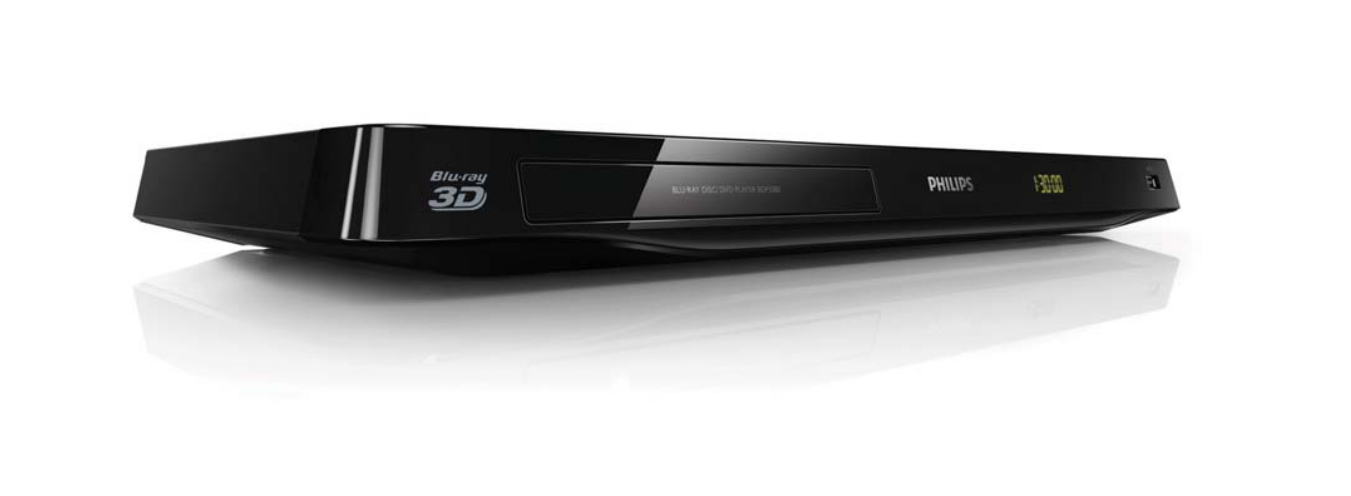
Introduction to the Philips BDP3380 3D Blue-Ray
The philips BDP3380 3D blue-Ray is a compact Blu-ray Disc/DVD player designed for users who want reliable full-HD playback, 3D movie support, and flexible connectivity in a simple home entertainment setup. Built as part of Philips’ 3000 series, it supports Blu-ray, DVD, CD, and a wide range of digital formats, making it a practical choice for film collectors and families who still use physical media. Its 3D playback, Wi-Fi Ready support, HDMI output, and USB front port make it easy to integrate into a modern living room without complicated setup.
One of the key strengths of the philips BDP3380 3D blue-Ray is its balance of convenience and format compatibility. It supports Full HD output up to 1080p, progressive scan, video upscaling, and common codecs such as DivX Plus HD, H.264, MPEG formats, and XviD. Audio support is equally strong, with Dolby Digital 5.1, Dolby Digital Plus, Dolby TrueHD, and DTS 2.0 digital output. For users with older AV equipment, the player also includes analogue audio, composite video, coaxial digital output, Ethernet, and a USB 2.0/Wi-Fi dongle connection.
This model is well suited to home theater beginners, budget-conscious buyers, and users who want a dependable disc player for Blu-ray movies, DVDs, and media files stored on USB drives. As a discontinued but still commonly available unit on the second-hand and refurbished market, its estimated price range typically falls around $40 to $120 depending on condition, accessories, and seller. It remains attractive for buyers looking for an affordable 3D Blu-ray player with broad media support and straightforward operation.
Pros and Cons of the Philips BDP3380 3D Blu-ray Player
Pros
- Excellent format support: Plays Blu-ray discs, DVDs, CDs, and many file types, including AVCHD, DivX Plus HD, H.264, MPEG, and XviD.
- 3D Blu-ray playback: Good choice for users with a 3D TV who want a simple disc-based movie experience.
- Strong connectivity: HDMI, Ethernet, coaxial digital audio, composite video, analogue audio, and USB give it flexibility with both new and older systems.
- Compact design: The slim chassis fits easily into entertainment centers without taking much space.
- Good value for money: Compared with newer 4K players, it is often much cheaper while still offering reliable HD and 3D playback.
Cons
- Not a 4K player: It is limited to Blu-ray and DVD playback, so it will not upscale to true Ultra HD like newer alternatives.
- Older network features: Wi-Fi is adapter-based and internet features are basic compared with modern smart Blu-ray players.
- No advanced streaming ecosystem: Buyers looking for built-in apps and modern smart TV integration may prefer a newer Sony or Samsung model.
- Used-market condition varies: Since it is an older model, reliability depends heavily on the seller and previous usage.
For buyers comparing it with newer alternatives, the philips BDP3380 3D blue-Ray is best viewed as a practical disc player rather than a premium home theater hub. It offers solid value if your main goal is watching Blu-rays and DVDs affordably.
Customer Reviews and Real-World Feedback
Customer feedback for the philips BDP3380 3D blue-Ray is generally positive, with many users praising its simple setup, fast disc loading, and reliable playback. Typical ratings fall around 4.0 out of 5 stars among owners who value straightforward performance over smart features.
Common praise includes the player’s compact size, broad codec support, and smooth 1080p output. One frequent comment is that it “does exactly what a Blu-ray player should do” and works well for older film collections and USB media playback. Users also like the multiple connection options, especially HDMI and coaxial audio for integration with home theater receivers.
Common complaints focus on its dated interface, lack of modern streaming apps, and the need for a Wi-Fi dongle in some setups. Some users also note that this model is less appealing if you want 4K or advanced smart-TV features. For buyers who need a dependable 3D Blu-ray player without paying for extras they will not use, it is still a sensible purchase.
Philips BDP3380 3D Blue-Ray Specifications at a Glance
- Playback: Blu-ray, DVD, CD, AVCHD, BD-R/BD-RE, and multiple digital formats
- Video output: Full HD 1080p, progressive scan, video upscaling
- Audio support: Dolby Digital 5.1, Dolby Digital Plus, Dolby TrueHD, DTS 2.0 digital output
- Connections: HDMI, Ethernet, USB 2.0, coaxial digital audio, composite video, analogue audio
- Network: Wi-Fi Ready with adapter support
- Best for: Blu-ray movie playback, 3D home cinema, DVD collections, and USB media viewing
Who Should Buy the Philips BDP3380 3D Blue-Ray?
This model is ideal for users who want a budget-friendly Blu-ray player for an existing TV or home theater system. It is especially useful for people with large disc collections, older AV receivers, or a need for simple playback without complicated setup. If your priority is dependable movie playback, broad disc compatibility, and 3D support, the philips BDP3380 3D blue-Ray remains a practical option.
Faqs
How do I set up philips BDP3380 3D blue-Ray for the first time on a TV and home theater system?
Why is my philips BDP3380 3D blue-Ray not reading discs, and what should I check first?
Does philips BDP3380 3D blue-Ray support 3D playback, and what do I need for it to work properly?
What video and audio formats are most reliable on philips BDP3380 3D blue-Ray?
How do I fix no sound or low sound output on philips BDP3380 3D blue-Ray?
What should I do if philips BDP3380 3D blue-Ray freezes during playback or takes too long to load?
How can I improve picture quality on philips BDP3380 3D blue-Ray for Blu-ray and DVD movies?
How do I clean and maintain philips BDP3380 3D blue-Ray so it lasts longer?
More philips manuals
- Philips 2000 Series Headphones TAQ2000 User Manual
- Philips HTS6600 DVD Home Theater System User Manual
- Setup: Philips NeoPix-720 Home Projector User Manual
- Philips 5000 Series Rechargeable sonic toothbrush User Manual
- Philips PPM7501 Sports Mini Massage Gun User Manual
- Setup: Philips 6050 Series Television 24PHS6050 User Manual
Leave a Comment