
Philips 2000 Series Headphones TAQ2000 User Manual
Content
Philips 2000 Series Headphones TAQ2000 Product Manual
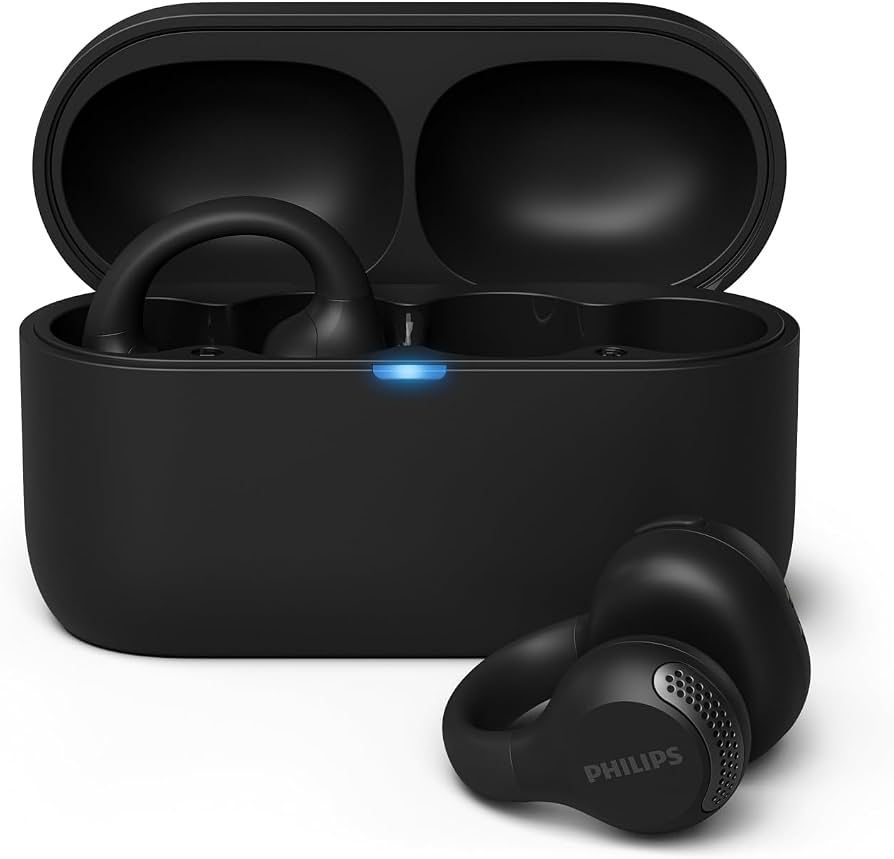
The Philips 2000 Series Headphones TAQ2000 is an open-ear, ear-cuff style true wireless headphone designed for users who want comfortable everyday listening without blocking ambient sound. This makes the Philips 2000 Series Headphones TAQ2000 a strong fit for commuting, office work, walking, light workouts, and hands-free calling. Its open-ear fit helps reduce pressure on the ear canal, while Bluetooth 5.4, multipoint support, and mono mode add flexibility for modern daily use.
Key features include 12 mm dynamic drivers, a 20 Hz to 20,000 Hz frequency range, SBC codec support, and up to 28 hours of total playback with the charging case. Fast charging is also useful for busy users, delivering about 1 hour of playback from a 15-minute charge. The earbuds are splash-resistant with an IPX4 rating, making them suitable for light sweat and everyday weather exposure. The companion app support and firmware update capability add extra convenience for users who want better control over sound and connectivity.
The Philips 2000 Series Headphones TAQ2000 is aimed at listeners who prefer awareness of their surroundings, especially commuters, office professionals, students, and casual fitness users. Pricing typically falls in the budget-to-midrange category, with estimated availability around $30 to $70 depending on region, retailer, color, and bundle. It is commonly available through electronics retailers and online marketplaces in black and white variants.
Troubleshooting Guide for Philips 2000 Series Headphones TAQ2000
If the Philips 2000 Series Headphones TAQ2000 will not pair, first confirm Bluetooth is enabled on the phone or laptop, then place both earbuds back in the case and try again. If audio cuts out, move closer to the source device and remove interference from crowded wireless environments. For charging problems, clean the charging contacts on both the earbuds and case with a dry, soft cloth.
Common issues may appear as pairing failures or firmware update interruptions rather than formal error codes. If the earbuds do not respond after a reset, perform a full power cycle by returning them to the case for several seconds before reconnecting. Preventive care includes keeping the case charged, avoiding moisture buildup, and storing the earbuds in a cool, dry place. Because the model supports firmware updates, checking the Philips headphones app periodically can help prevent bugs and improve stability.
If problems continue, use the product warranty through the retailer or Philips support channel in your region. For assistance, contact Philips customer support via the official Philips headphones support page, retailer service desk, or the documentation included with the product. Always keep the purchase receipt, model number TAQ2000, and serial details ready when requesting help.
Pros & Cons of Philips 2000 Series Headphones TAQ2000
Pros
- Open-ear, ear-cuff design improves comfort for long listening sessions and reduces in-ear pressure.
- Bluetooth 5.4 with multipoint connection makes switching between devices easier.
- IPX4 splash resistance adds practical protection for workouts and commuting.
- Up to 28 hours total battery life offers solid value for the price.
- Fast charging is useful for users who need quick top-ups during the day.
- Philips headphones app support adds extra control and firmware updates.
Cons
- Open-ear sound leaks more than sealed earbuds, so it is not ideal for noisy places.
- SBC codec only may disappoint users seeking higher-resolution Bluetooth audio.
- Low-frequency bass is less powerful than with in-ear or over-ear alternatives.
- Noise isolation is limited by design, which can reduce immersion for music lovers.
For value for money, the Philips 2000 Series Headphones TAQ2000 competes well against budget open-ear earbuds from brands like JBL, Soundcore, and Xiaomi. It is especially appealing if comfort and awareness matter more than deep bass or active noise cancellation.
Customer Reviews of Philips 2000 Series Headphones TAQ2000
Customer feedback for the Philips 2000 Series Headphones TAQ2000 is generally positive, with many users rating it around 4.3 out of 5 stars for comfort, fit, and battery life. A common testimonial theme is that the ear-cuff style feels light and secure during long daily use. One frequent comment is, “I can wear them all day without ear fatigue.”
Praises often mention clear voice calls, easy pairing, and the convenience of multipoint connectivity. Common complaints usually focus on limited bass and the lack of strong noise isolation. Some users also note that open-ear listening works best in quiet or moderately busy environments. Overall, it is a recommended purchase for users who prioritize comfort, ambient awareness, and practical battery life over bass-heavy sound.
Quick Specification Summary
- Type: Open-ear true wireless ear-cuff headphones
- Bluetooth: 5.4
- Driver: 12 mm dynamic
- Frequency response: 20 Hz to 20,000 Hz
- Codec: SBC
- Battery life: About 7 hours in earbuds plus 21 hours from the case
- Charging time: About 2 hours
- Fast charge: 15 minutes for about 1 hour of playback
- Protection: IPX4 splash resistance
- Connectivity features: Multipoint, mono mode, app support, firmware updates
Faqs
How do I set up philips 2000 Series Headphones TAQ2000 for the first time?
Why is my philips 2000 Series Headphones TAQ2000 not connecting to Bluetooth?
What can I do if the sound quality on philips 2000 Series Headphones TAQ2000 is low or distorted?
Are philips 2000 Series Headphones TAQ2000 compatible with iPhone, Android, laptop, and smart TV?
How do I improve battery life and runtime on philips 2000 Series Headphones TAQ2000?
How do I clean and maintain philips 2000 Series Headphones TAQ2000 without damaging them?
What should I check if philips 2000 Series Headphones TAQ2000 audio keeps cutting out during calls or music?
How do I use philips 2000 Series Headphones TAQ2000 safely for long listening sessions?
More philips manuals
Leave a Comment