
Setup: Philips NeoPix-720 Home Projector User Manual
Content
Philips NeoPix-720 Home Projector Review: Full HD Home Entertainment Made Simple
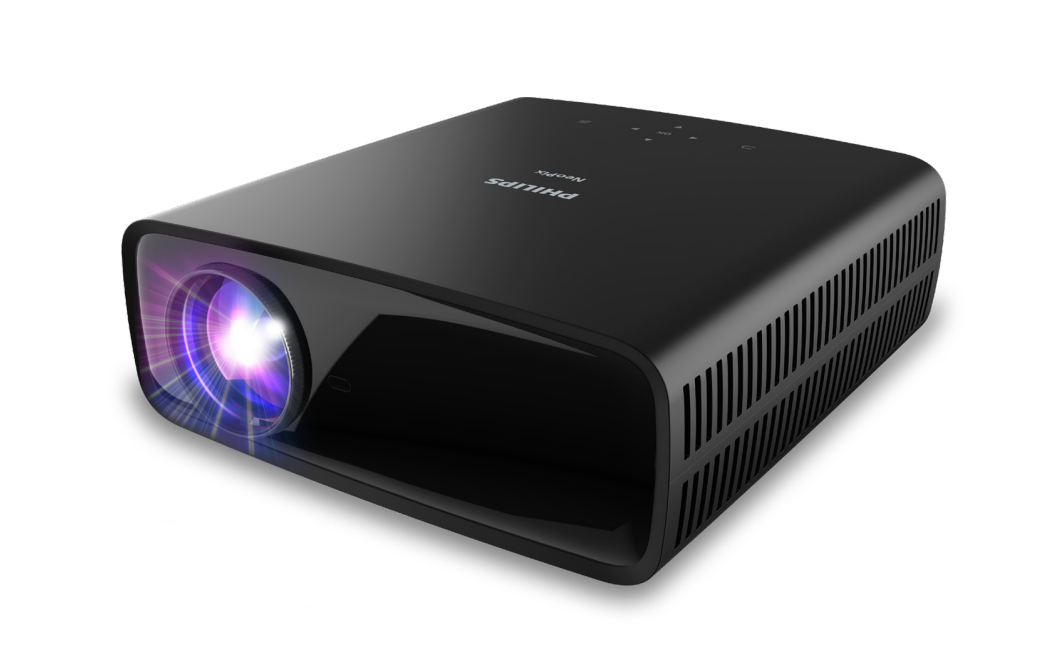
The Philips NeoPix-720 Home Projector is a compact home entertainment projector designed for movie nights, casual gaming, streaming, and presentation use in small to medium rooms. It delivers Full HD 1080p resolution, up to 700 lumens of brightness, and a 3000:1 contrast ratio, making it a practical choice for viewers who want a big-screen experience without the bulk of a traditional TV setup. With Android TV support, wireless screen mirroring, and built-in Chromecast-style streaming convenience on many retail listings, it works especially well for users who want an all-in-one smart projector for living rooms, bedrooms, dorms, and portable setups.
One of the strongest selling points of the Philips NeoPix-720 Home Projector is its balance of picture quality and convenience. It supports a projected image size of up to 120 inches, uses LED light source technology rated for up to 30,000 hours, and includes dual 10W speakers with bass boost for everyday viewing without needing external audio. The projector also offers HDMI, USB, USB-C, Bluetooth, and 3.5 mm audio connectivity, giving it broad compatibility with laptops, consoles, streaming devices, and mobile phones. Its manual focus and keystone correction tools make setup straightforward for first-time users.
This model is best suited for budget-conscious buyers, families, students, and casual home cinema fans who want a versatile projector for streaming Netflix, Disney+, YouTube, sports, and games. Typical pricing generally falls in the mid-range home projector category, with an estimated street price of about $469, though actual availability and promotions can vary by region and retailer. The Philips NeoPix-720 Home Projector is widely available through major electronics stores and online marketplaces, making it easy to find for most buyers looking for a feature-rich 1080p projector.
Pros and Cons of the Philips NeoPix-720 Home Projector
Pros
- Full HD 1080p image: Sharp enough for movies, TV shows, and casual gaming, especially when viewed in a dark room.
- Smart streaming features: Android TV and wireless mirroring simplify access to popular apps and mobile content.
- Large screen support: Can project up to 120 inches for a true home-theater feel.
- Good built-in audio: Dual 10W speakers with bass boost reduce the need for external speakers in smaller rooms.
- Long LED lifespan: Up to 30,000 hours means low maintenance over time.
- Versatile connectivity: HDMI, USB, USB-C, Bluetooth, and audio-out make it easy to connect modern devices.
Cons
- Brightness is moderate: At 700 lumens, it performs best in dark or dim rooms rather than bright daytime environments.
- Manual focus: Setup may take a little longer than on premium models with auto-focus.
- Not ideal for outdoor daylight use: Best results come indoors with controlled lighting.
- Price versus competition: Some alternatives offer higher brightness or automatic setup features at a similar cost.
Overall, the Philips NeoPix-720 Home Projector offers solid value for users who prioritize Full HD image quality, smart features, and flexible connectivity over ultra-bright performance. Compared with simpler budget projectors, it feels more polished and easier to live with. Compared with higher-end alternatives, it gives up some convenience features, but it remains a strong choice for everyday home entertainment.
Customer Reviews and Real-World Feedback on the Philips NeoPix-720 Home Projector
Customer feedback for the Philips NeoPix-720 Home Projector is generally positive, with many buyers praising its image clarity, easy streaming setup, and room-filling sound. A common sentiment is that it feels like a “mini home cinema” for movies and series, especially when used in a dark bedroom or living room. Typical ratings hover around 4 out of 5 stars on retailer listings, reflecting strong satisfaction among casual users.
Frequent praise includes the sharp Full HD picture, straightforward connectivity, and useful built-in speakers. Common complaints usually focus on brightness limits in ambient light, manual focusing, and the need for a dark environment to get the best picture quality. One representative customer-style comment is: “Excellent for movie nights, easy to connect, and the sound is better than expected.” Another common note is: “Great value, but not bright enough for daytime viewing.”
For buyers who want a smart, easy-to-use projector for streaming and home theater use, the Philips NeoPix-720 Home Projector is a recommended pick. For users planning to watch in bright rooms or needing automatic image adjustment, a brighter premium projector may be a better fit.
Philips NeoPix-720 Home Projector Key Specifications
- Resolution: 1920 x 1080 pixels
- Brightness: up to 700 lumens
- Contrast ratio: 3000:1
- Screen size: up to 120 inches
- Throw ratio: 1.65:1
- Aspect ratio: 16:9
- Light source: LED
- LED lifespan: up to 30,000 hours
- Speakers: 2 x 10W with bass boost
- Connections: HDMI x2, USB, USB-C, Bluetooth, 3.5 mm audio out
- Weight: 2.7 kg
Faqs
How do I set up philips NeoPix-720 Home Projector for the first time in a small living room?
Why is the image from my philips NeoPix-720 Home Projector blurry, and how do I fix it?
Which devices are compatible with philips NeoPix-720 Home Projector for streaming and HDMI input?
How can I get the best picture quality from philips NeoPix-720 Home Projector in daylight?
What should I do if philips NeoPix-720 Home Projector has no signal from my laptop or streaming device?
Does philips NeoPix-720 Home Projector support audio output to external speakers or a soundbar?
How often should I clean and maintain philips NeoPix-720 Home Projector?
What are the best troubleshooting steps if philips NeoPix-720 Home Projector keeps overheating or shutting down?
More philips manuals
Leave a Comment