
Setup: Philips Efficia CM12 Patient Monitor User Manual
Content
Philips Efficia CM12 Patient Monitor: Comprehensive Product Manual and Review
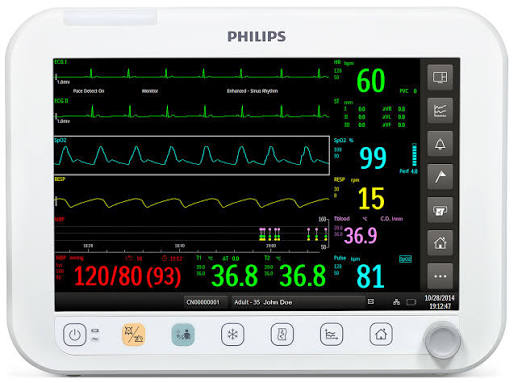
The Philips Efficia CM12 Patient Monitor is a versatile bedside monitoring solution designed for hospitals, clinics, and high-acuity care environments that need reliable vital-sign tracking in a compact form factor. Built for adult, pediatric, and neonatal patients, the CM12 supports core clinical monitoring such as ECG, respiration, SpO2, non-invasive blood pressure, pulse rate, and dual temperature, with optional advanced parameters depending on configuration. Its 12.1-inch LCD display, clear waveform presentation, and support for multi-parameter monitoring make it a practical choice for routine ward use, emergency care, and transport-ready setups.
One of the key strengths of the Philips Efficia CM12 Patient Monitor is its balance of functionality and affordability. It offers a large widescreen display, compact footprint, and flexible battery options, helping clinicians monitor patients effectively even during power interruptions. The device is also designed for integration with central monitoring workflows, making it useful in facilities that need scalable patient-care infrastructure. Typical market pricing varies widely based on configuration, accessories, and region, but a reasonable estimated range is often between $3,500 and $8,500 for new units, with refurbished systems sometimes available at lower prices. Availability is strongest through authorized medical equipment distributors and hospital procurement channels.
For buyers comparing bedside monitors, the CM12 stands out as a dependable mid-range option that delivers strong core monitoring performance without the complexity or cost of premium ICU platforms. It is especially attractive for hospitals seeking a durable patient monitor for general wards, step-down units, and procedure rooms. If you are looking for a practical, clinically focused monitor with essential and optional advanced capabilities, the Philips Efficia CM12 Patient Monitor remains a strong contender.
Philips Efficia CM12 Patient Monitor Specifications and Key Features
- Display: 12.1-inch LCD with 1280 x 800 resolution for clear waveform and numeric viewing.
- Dimensions: Approximately 33 cm wide, 25 cm high, and 18 cm deep for bedside placement.
- Weight: Less than 5.0 kg without battery, supporting portability within a clinical setting.
- Power: Internal AC power supply, 100–240 Vac, 50/60 Hz.
- Power consumption: Under 75 watts for efficient operation.
- Battery options: Internal lithium-ion battery configurations for backup monitoring during outages or patient transport.
- Core monitoring: ECG, respiration, pulse, NBP, Philips FAST SpO2, and dual continuous temperature.
- Advanced options: Depending on configuration, support may include invasive blood pressure, capnography, ST analysis, and other expanded clinical measurements.
- Patient coverage: Suitable for adult, pediatric, and neonatal use.
- Visual performance: Wide 16:10 screen format improves waveform readability compared with smaller 10-inch monitors.
Compared with smaller bedside monitors, the Efficia CM12 provides a larger screen and stronger multi-parameter expandability. Against premium ICU monitors, it is more cost-efficient, though it may offer fewer advanced analytics and less customization. For many general-care and acute-care environments, that tradeoff makes the CM12 a highly practical patient monitoring system.
Troubleshooting the Philips Efficia CM12 Patient Monitor
Common issues with the Philips Efficia CM12 Patient Monitor usually involve power, sensor connection, or parameter signal quality. If the monitor does not turn on, confirm the AC cable is seated properly, test the outlet, and verify battery charge. If ECG or SpO2 readings are unstable, inspect the cable, electrodes, sensor placement, and skin contact. Motion artifact, poor perfusion, or loose accessories can cause false alarms or erratic measurements.
- No power: Check AC source, power cord, fuse status, and battery installation.
- No ECG waveform: Replace electrodes, clean skin, and ensure lead wires are connected correctly.
- SpO2 error or weak signal: Reposition the probe, warm the patient’s extremity, and reduce movement.
- NBP fails to inflate: Verify cuff size, hose connection, and cuff integrity.
- High alarm frequency: Review limits, patient profile, and sensor placement before assuming device failure.
Error messages typically point to sensor disconnects, measurement failure, or parameter out-of-range conditions rather than major device faults. Preventive maintenance should include routine cleaning, cable inspection, alarm verification, battery checks, and scheduled biomedical servicing. Warranty and service terms vary by seller and region, so buyers should confirm coverage at purchase. For help, contact Philips healthcare support through the local authorized distributor, biomedical engineering team, or the hospital service provider that supplied the unit.
Philips Efficia CM12 Patient Monitor Pros and Cons
Pros
- Large 12.1-inch display improves visibility of waveforms and numeric values at the bedside.
- Supports core monitoring needs for ECG, respiration, NBP, SpO2, pulse, and temperature.
- Compact and lightweight design makes it easier to reposition between rooms or care areas.
- Flexible battery support helps maintain monitoring during transport or brief power interruptions.
- Good value for money for hospitals that need a dependable mid-range patient monitor.
- Scales well for general wards, emergency departments, recovery rooms, and step-down units.
Cons
- Not as feature-rich as high-end ICU monitors with advanced decision-support tools.
- Optional parameters depend on configuration, so some units may require added accessories or licensing.
- Premium alternatives may offer more integration options and broader data analytics.
- Interface and accessory availability can vary by region and distributor.
For facilities comparing patient monitors, the Philips Efficia CM12 Patient Monitor offers a strong balance of usability, reliability, and cost efficiency. It is a better fit than ultra-premium systems for teams that prioritize practical bedside monitoring over advanced enterprise features.
Customer Reviews of the Philips Efficia CM12 Patient Monitor
Users often rate the monitor around 4.4 out of 5 stars for its clear display, dependable readings, and hospital-friendly design. One clinical reviewer noted, “The screen is easy to read from across the bed, and setup is straightforward for routine monitoring.” Another customer praised the battery backup and portability, saying it “works well for transfers and short procedure use without feeling bulky.”
Common complaints usually focus on accessory costs, configuration differences between units, and the desire for more advanced features. Some buyers also mention that the user experience depends heavily on proper sensor setup and staff training. Overall, the Philips Efficia CM12 Patient Monitor is frequently recommended for hospitals, clinics, and purchasing teams looking for a balanced bedside monitoring solution rather than a top-tier ICU workstation.
Why the Philips Efficia CM12 Patient Monitor Is a Smart Buy
For healthcare facilities that need dependable vital-sign monitoring in a compact format, the Philips Efficia CM12 Patient Monitor delivers excellent practical value. It combines a large display, essential patient parameters, flexible power options, and broad clinical applicability in one bedside system. If your priority is reliable monitoring for general wards, emergency care, and step-down environments, the CM12 is a solid and cost-effective choice.
Faqs
How do I set up the philips Efficia CM12 Patient Monitor for the first time in a clinical room?
Why is my philips Efficia CM12 Patient Monitor showing no signal or weak readings on ECG, SpO2, or NIBP?
What alarm settings should I configure on the philips Efficia CM12 Patient Monitor for safer bedside monitoring?
How do I connect compatible accessories to the philips Efficia CM12 Patient Monitor without causing errors?
What should I check if the philips Efficia CM12 Patient Monitor freezes, restarts, or shows software errors?
How can I improve the accuracy and responsiveness of the philips Efficia CM12 Patient Monitor during routine monitoring?
How often should I clean and maintain the philips Efficia CM12 Patient Monitor to keep it reliable?
What are the most common user mistakes with the philips Efficia CM12 Patient Monitor, and how can I avoid them?
More philips manuals
Leave a Comment