
Philips Sonicare Digital Toothbrush HX992W User Manual
Content
Philips Sonicare Digital Toothbrush HX992W Review and Manual
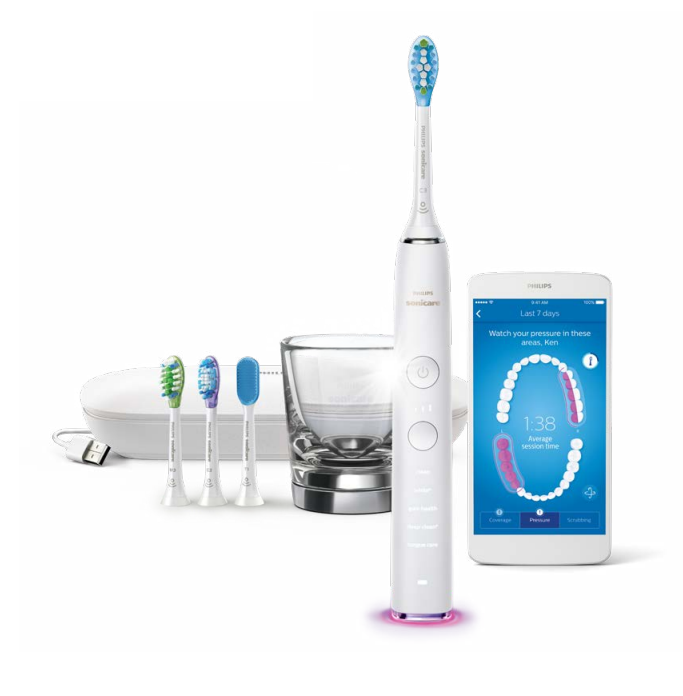
The Philips Sonicare Digital Toothbrush HX992W is a premium sonic electric toothbrush designed for users who want deeper cleaning, smarter brushing guidance, and a more polished daily oral care routine. As part of the Sonicare DiamondClean Smart family, it combines high-frequency sonic action, app-connected coaching, multiple brushing modes, and pressure-sensing protection to help improve brushing technique and overall gum care. This makes it especially appealing to people who want a high-end rechargeable toothbrush that does more than basic cleaning.
One of the biggest selling points is its personalized brushing support. The connected brushing app can track habits, provide progress updates, and help users improve technique over time. It also includes smart brush head recognition, multiple intensity settings, and a pressure alert system that helps prevent overbrushing. In everyday use, this can make a real difference for people with sensitive gums, plaque buildup, staining from coffee or tea, or those who simply want a cleaner feel after brushing.
The Philips Sonicare Digital Toothbrush HX992W is a strong fit for adults looking for an advanced electric toothbrush for daily use, travel, or gum-health focused routines. It is commonly positioned in the premium segment, with typical prices ranging from about $150 to $300 depending on the seller, included accessories, and condition. Availability is generally good through major online retailers, dental product stores, and marketplace listings, though pricing can vary widely.
Detailed Specifications for Philips Sonicare Digital Toothbrush HX992W
- Product type: Sonic rechargeable electric toothbrush
- Series: Philips Sonicare DiamondClean Smart family
- Cleaning technology: Sonic vibration with high-speed brushing action and fluid-driven cleaning support
- Brush movement rate: Up to 62,000 bristle movements per minute
- Cleaning modes: 4 brushing modes, commonly including Clean, White+, Deep Clean+, and Gum Health
- Intensity levels: 3 settings for a softer or stronger brushing experience
- Pressure sensor: Built-in alert system helps warn when brushing too hard
- Smart features: Bluetooth connectivity, app-guided coaching, and brushing progress tracking
- Brush head support: Smart brush head sensors that adapt recommendations based on the selected head
- Charging: Rechargeable handle with premium charging accessories depending on package
- Design focus: Ergonomic, premium handle designed for daily comfort and travel convenience
In performance terms, this model is built for users who want a more advanced experience than a standard sonic toothbrush. Compared with entry-level Sonicare models, the HX992W adds more personalization, more intensity control, and app connectivity. Compared with mid-range electric toothbrushes, it stands out for its coaching tools and premium accessory ecosystem. For users comparing it with similar premium brushers, the main advantage is the combination of deep-cleaning power, smart feedback, and a travel-friendly luxury feel.
Pros and Cons of the Philips Sonicare Digital Toothbrush HX992W
Pros
- Excellent cleaning performance: Sonic action helps remove plaque effectively and leaves teeth feeling polished.
- Smart brushing guidance: App connectivity and progress tracking can help users improve brushing habits over time.
- Pressure protection: Helpful for people with sensitive gums or those who tend to brush too aggressively.
- Multiple modes and intensities: Useful for switching between gentle daily cleaning, whitening, and gum-focused routines.
- Premium design: Comfortable, modern, and well suited for users who value a high-end oral care device.
- Travel-friendly appeal: A strong choice for frequent travelers who want a reliable rechargeable toothbrush.
Cons
- Higher price: It costs significantly more than basic electric toothbrushes, which may limit value for budget shoppers.
- App features may feel unnecessary: Some users prefer a simpler brush and may not use the connected coaching tools often.
- Replacement heads add cost: Premium brush heads can make long-term ownership more expensive.
- Learning curve: Users upgrading from manual brushing may need time to adapt to sonic brushing technique.
- Not the cheapest alternative: Comparable cleaning can sometimes be found in lower-priced Sonicare models with fewer smart features.
For buyers focused on value for money, the HX992W is best suited to people who will actually use the smart features, pressure sensor, and mode customization. If you only want basic cleaning, a simpler Philips Sonicare or another mid-range electric toothbrush may be a better fit.
Customer Reviews and Real-World Feedback on the Philips Sonicare Digital Toothbrush HX992W
Customer feedback for the Philips Sonicare Digital Toothbrush HX992W is generally positive, with many users praising the powerful clean, smooth brushing feel, and premium build quality. Typical ratings often fall around 4.4 to 4.7 out of 5 stars across marketplace-style listings and retail reviews.
- Praise: “My teeth feel cleaner after every use, and the pressure alert helped me stop brushing too hard.”
- Praise: “The app coaching is surprisingly helpful, especially for improving my brushing routine.”
- Complaint: “It is expensive compared with other electric toothbrushes, and replacement heads cost more than I expected.”
- Complaint: “The smart features are useful, but not everyone will use the app regularly.”
Common purchase recommendations suggest this model for adults who want premium cleaning, gum-care support, and a connected brushing experience. Buyers looking for a simple, low-cost toothbrush may be happier with a more basic model, while those wanting advanced oral care features will likely find strong long-term satisfaction here.
Should You Buy the Philips Sonicare Digital Toothbrush HX992W?
If you want a premium sonic toothbrush with smart coaching, multiple cleaning modes, and strong plaque-removal performance, the Philips Sonicare Digital Toothbrush HX992W is an excellent option. It offers a well-rounded combination of convenience, technology, and daily cleaning power that makes it stand out in the premium electric toothbrush category.
For users who value advanced features and a personalized brushing experience, this model is easy to recommend. For shoppers who care mostly about price, a simpler Philips Sonicare toothbrush may provide better value.
Faqs
How do I set up philips Sonicare Digital Toothbrush HX992W for the first time?
Why is my philips Sonicare Digital Toothbrush HX992W not vibrating or turning on?
What brushing modes and intensity settings does philips Sonicare Digital Toothbrush HX992W support?
How does the pressure sensor on philips Sonicare Digital Toothbrush HX992W work?
Which brush heads are compatible with philips Sonicare Digital Toothbrush HX992W?
How do I connect philips Sonicare Digital Toothbrush HX992W to the app?
What should I do if philips Sonicare Digital Toothbrush HX992W feels too strong or uncomfortable?
How do I clean and maintain philips Sonicare Digital Toothbrush HX992W for long-term performance?
More philips manuals
- Insallation & Features: Philips Monitor 24E1N1100A User Manual
- Philips HealthyWhite 700 Series Rechargeable Sonic ToothBrush User Manual
- Philips Soundbar TAB5309 User Manual
- Features & Specs: Philips DreamStation 2 Auto CPAP Advanced User Manual
- Philips Mini massage gun PPM3103GDG User Manual
- Features & Setup: Philips Avent Essential Single Electric Breast Pump SCF323 User Manual
Leave a Comment