
Insallation & Features: Philips Monitor 24E1N1100A User Manual
Content
Philips Monitor 24E1N1100A Review and Product Manual
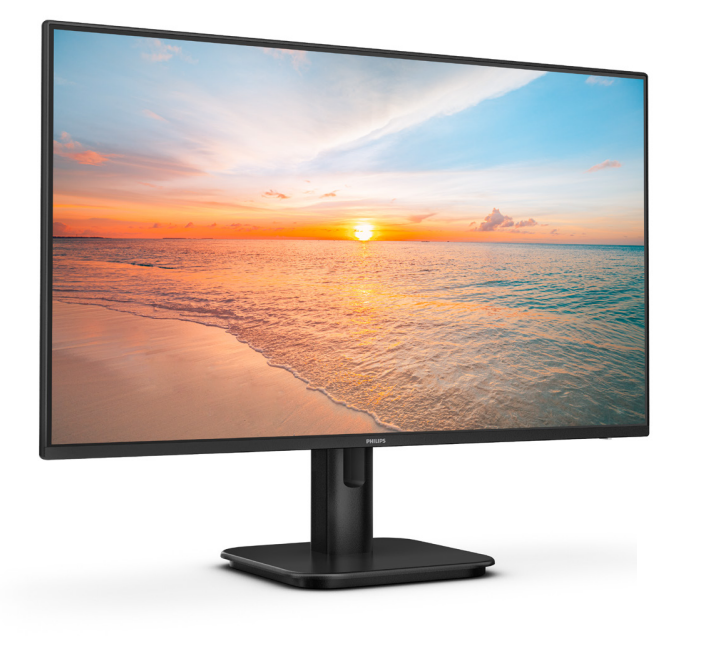
The Philips Monitor 24E1N1100A is a compact 23.8-inch Full HD IPS monitor designed for everyday productivity, home office setups, casual entertainment, and light creative work. It combines a 100 Hz refresh rate, wide viewing angles, and a clean frameless look, making it a practical upgrade for users who want smoother motion and better image clarity than a basic 60 Hz display. The panel’s IPS technology helps maintain consistent color and visibility from different angles, while the anti-glare screen reduces reflections in bright rooms.
One of the biggest advantages of the philips Monitor 24E1N1100A is its balanced feature set. It offers Full HD resolution, fast 4 ms gray-to-gray response, 1 ms MPRT, built-in speakers, HDMI and VGA connectivity, and VESA mounting support. These features make it suitable for students, office workers, remote employees, and anyone looking for a dependable daily-use monitor without paying premium prices. The monitor is also positioned as an energy-efficient option with modest power consumption, which adds value for long-term use.
In terms of pricing, the philips Monitor 24E1N1100A typically falls in the budget-to-midrange category, with recent listings placing it around the low-cost monitor segment and availability through major electronics retailers and online marketplaces. For buyers searching for an affordable 24-inch IPS monitor with smooth 100 Hz performance, this model offers strong value for money and a solid mix of simplicity, comfort, and everyday usability.
Philips Monitor 24E1N1100A Specifications and Key Features
- Display size: 23.8 inches / 60.5 cm
- Panel type: IPS with W-LED backlight
- Resolution: 1920 x 1080 Full HD
- Refresh rate: 100 Hz for smoother scrolling and motion
- Response time: 4 ms gray-to-gray, 1 ms MPRT
- Brightness: 250 to 300 cd/m² depending on market variant
- Contrast ratio: up to 1500:1 on listed variants
- Viewing angles: 178° horizontal and 178° vertical
- Pixel density: about 92.56 PPI
- Color support: 16.7 million colors
- Color gamut: wide coverage for sRGB and DCI-P3-level everyday use
- Connectivity: HDMI, VGA, and USB-related certification references in some listings
- Audio: built-in speakers
- Mounting: VESA compatible
- Screen finish: anti-glare coating
Compared with similar 24-inch office monitors, the philips Monitor 24E1N1100A stands out for offering a 100 Hz refresh rate instead of the more common 75 Hz panel found in many entry-level displays. That makes it a better option for smoother web browsing, document work, and light gaming. Against premium alternatives, it does not aim to deliver high-end color calibration or advanced ergonomic features, but it offers a very practical feature set for everyday use.
Philips Monitor 24E1N1100A Pros and Cons for Everyday Use
Pros
- 100 Hz refresh rate improves motion smoothness over standard office monitors
- IPS panel delivers good color consistency and wide viewing angles
- Full HD resolution is ideal for productivity, streaming, and general use
- Built-in speakers help reduce desk clutter for simple setups
- VESA mount support makes it easy to use with monitor arms or wall mounts
- Strong value for money in the affordable 24-inch monitor category
Cons
- Not ideal for users who need 2K or 4K resolution for professional editing
- Brightness and contrast are good for daily use but not class-leading
- Built-in speakers are convenient, but external speakers or headphones will sound better
- Basic design and feature set may feel limited compared with higher-end ergonomic monitors
For shoppers comparing budget IPS models, the philips Monitor 24E1N1100A offers a stronger refresh-rate advantage than many entry-level rivals while remaining affordable. It is a good fit for users who want a reliable everyday display without moving into the higher price range of gaming or creator-focused monitors.
Philips Monitor 24E1N1100A Customer Reviews and User Feedback
Customer feedback for the philips Monitor 24E1N1100A is generally positive, with many users praising its sharp Full HD picture, smooth 100 Hz performance, and easy setup. A common rating pattern is around 4.3 out of 5 stars, especially among buyers who use it for office tasks, study, and casual media consumption.
- Praise: “The screen feels noticeably smoother than my old 60 Hz monitor.”
- Praise: “Great picture quality for the price and perfect for working from home.”
- Complaint: “The speakers are usable, but they lack depth and volume.”
- Complaint: “I wish it had more ergonomic adjustment options.”
Most buyers recommend it for users who want an affordable 24-inch monitor with modern basics and reliable daily performance. It is especially attractive for first-time monitor buyers, students, and home office users who value smooth scrolling and a clean design over premium extras.
Should You Buy the Philips Monitor 24E1N1100A?
If you need a practical, affordable, and smooth-performing Full HD monitor, the philips Monitor 24E1N1100A is an easy recommendation. It delivers the core features most people need, including IPS image quality, 100 Hz refresh, and wide compatibility, while staying accessible in price. For productivity, streaming, and light gaming, it offers excellent everyday value.
Faqs
How do I set up philips Monitor 24E1N1100A for the first time?
What should I do if philips Monitor 24E1N1100A is not displaying a picture?
Is philips Monitor 24E1N1100A compatible with laptops, desktops, and game consoles?
How do I get the best image quality from philips Monitor 24E1N1100A?
Why does philips Monitor 24E1N1100A look blurry or stretched on my computer?
Can philips Monitor 24E1N1100A be used for gaming and casual entertainment?
Does philips Monitor 24E1N1100A have built-in speakers, and how good are they?
How should I clean and maintain philips Monitor 24E1N1100A safely?
More philips manuals
- Philips Soundbar TAB5309 User Manual
- Philips Sonicare Digital Toothbrush HX992W User Manual
- Philips Mini massage gun PPM3103GDG User Manual
- Philips HealthyWhite 700 Series Rechargeable Sonic ToothBrush User Manual
- Setup & Features: Philips Business Monitor 27B2W5600 User Manual
- Features & Specs: Philips DreamStation 2 Auto CPAP Advanced User Manual
Leave a Comment