
Specs & Setup: Philips VoiceTracer DVT2050 Audio Recorder User Manual
Content
Philips VoiceTracer DVT2050 Audio Recorder: Full Product Manual and Buying Guide
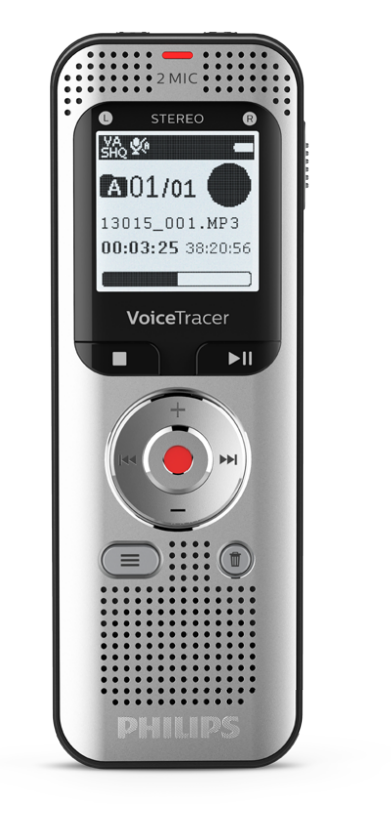
The Philips VoiceTracer DVT2050 Audio Recorder is a compact digital recorder designed for clear voice capture, everyday dictation, interviews, meetings, and lecture recording. It combines 8 GB of built-in storage, microSD expansion up to 32 GB, stereo microphones, and recording formats such as WAV and MP3 to deliver flexible performance for students, professionals, journalists, and content creators. With a rechargeable lithium-ion battery and up to 50 hours of recording time in MP3 mode, it is built for users who need long battery life and dependable audio in a portable body.
This model stands out for its simple controls, lightweight design, and practical recording modes, including PCM, HQ, SP, and LP, which let users choose between audio quality and file size. The VoiceTracer DVT2050 also supports line-in recording and USB 2.0 connectivity, making it useful for transferring files quickly or capturing audio from external sources. Its 1.3-inch-class display and compact dimensions make it easy to carry in a pocket, laptop bag, or presenter kit. For anyone searching for a reliable philips VoiceTracer DVT2050 Audio Recorder for note-taking, meeting documentation, or voice memos, it offers a strong balance of usability and storage capacity.
In the current market, the estimated price range is typically in the mid-budget segment, often around $70 to $130 depending on seller, region, and bundled accessories. Availability may vary by country, but the device is still commonly found through electronics retailers, office supply stores, and online marketplaces. For users comparing digital voice recorders, the philips VoiceTracer DVT2050 Audio Recorder remains appealing because it offers straightforward operation without the complexity of advanced studio gear.
Troubleshooting Philips VoiceTracer DVT2050 Audio Recorder Problems
Common issues and solutions
- Recorder does not power on: Fully charge the battery for about 3 hours, then try again. If the unit still does not start, check the USB cable and power source.
- No audio recorded: Confirm that the microphone is not muted, the file is not full, and the correct recording mode is selected.
- File transfer problems: Reconnect the USB cable, try a different USB port, and confirm that the recorder is recognized by the computer.
- microSD card not detected: Reinsert the card, verify that it is compatible up to 32 GB, and format it only after backing up important files.
- Low playback volume or distorted sound: Clean the microphone area, reduce background noise, and test another recording mode such as HQ or PCM.
If an error appears on the screen, restart the device first, then remove and reinsert the memory card. Repeated freezes are often resolved by a full charge, a file backup, and a factory reset if supported in the menu. Preventive care includes keeping the firmware or user settings stable, avoiding full memory cards, and storing the recorder in a dry case. Philips support typically offers warranty service through authorized channels, with retailer assistance and manufacturer service options depending on region. For help, contact Philips dictation or audio recorder support through the official product support page, your local distributor, or the retailer where the device was purchased.
Pros and Cons of the Philips VoiceTracer DVT2050 Audio Recorder
Pros
- 8 GB internal storage plus microSD expansion up to 32 GB, which is useful for long meetings and lecture notes.
- Up to 50 hours of battery life in MP3 recording mode, making it practical for travel and field use.
- Stereo microphones and multiple recording modes provide flexible sound quality settings.
- Lightweight and compact design makes it easy to carry every day.
- Line-in recording adds value for users who need to capture audio from external devices.
Cons
- The interface is functional but less advanced than premium recorders with touchscreens or smart noise processing.
- Internal storage may feel limited for users who record in higher-quality PCM mode often.
- Best suited for voice recording rather than music production or professional studio work.
- Compared with newer alternatives, it may lack modern connectivity and app integration.
For value for money, the philips VoiceTracer DVT2050 Audio Recorder is a solid choice if the goal is dependable voice capture at a reasonable price. Compared with entry-level alternatives, it offers stronger battery life and more flexible storage than many basic digital recorders. Users who need advanced editing, AI transcription, or wireless syncing may prefer newer premium models, but for straightforward recording it remains competitive.
Customer Reviews for Philips VoiceTracer DVT2050 Audio Recorder
Overall customer feedback tends to be positive, with many users rating it around 4.2 out of 5 stars for ease of use, battery performance, and clear speech recording. Buyers often praise the compact design, long recording time, and reliable voice pickup in meetings and classrooms. A typical testimonial is: “Easy to use, holds plenty of recordings, and the sound is clear for lectures.”
Common complaints include the limited onboard display size, occasional confusion with file transfer, and the fact that it is not designed for professional music capture. Some users also mention that the menu system feels basic compared with newer digital voice recorders. Despite that, many recommend it as a dependable everyday recorder for students, office workers, and interviewers. If the priority is simple, portable, and affordable recording, the philips VoiceTracer DVT2050 Audio Recorder is often seen as a smart purchase.
Faqs
How do I set up the philips VoiceTracer DVT2050 Audio Recorder for the first time?
What should I do if the philips VoiceTracer DVT2050 Audio Recorder is not recording any sound?
How do I get better voice clarity from the philips VoiceTracer DVT2050 Audio Recorder in meetings or lectures?
Which file format and storage setup works best with the philips VoiceTracer DVT2050 Audio Recorder?
Can I transfer recordings from the philips VoiceTracer DVT2050 Audio Recorder to my computer?
Why does the philips VoiceTracer DVT2050 Audio Recorder keep stopping early during long recordings?
How should I maintain and clean the philips VoiceTracer DVT2050 Audio Recorder for long-term use?
What are the most useful features of the philips VoiceTracer DVT2050 Audio Recorder for everyday recording?
More philips manuals
- Features & Setup: Philips Avent Essential Single Electric Breast Pump SCF323 User Manual
- Features: Philips Sonicare DailyClean Sonic Electric Toothbrush HX3411/04 User Manual
- Features & Specs: Philips DreamStation 2 Auto CPAP Advanced User Manual
- How to Connect: Philips Soundbar 8000 Series TAB8947 User Manual
- Philips HealthyWhite 700 Series Rechargeable Sonic ToothBrush User Manual
- How to Use: Philips Blu-ray Disc™ / DVD Player BDP1502 User Manual
Leave a Comment