
How to Use: Philips Blu-ray Disc™ / DVD Player BDP1502 User Manual
Content
Philips Blu-ray Disc™ / DVD Player BDP1502: Overview and Buying Guide
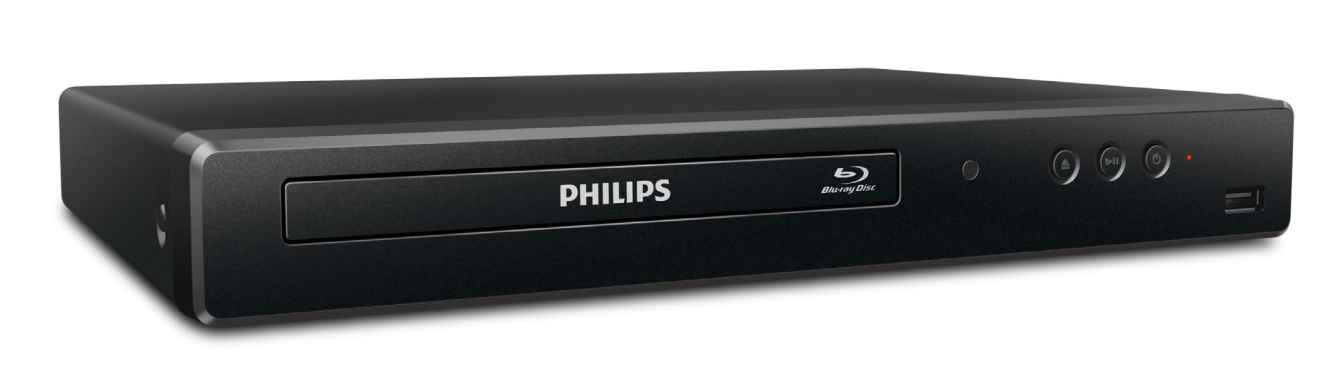
The philips Blu-ray Disc™ / DVD Player BDP1502 is a compact home entertainment player designed for users who want dependable Blu-ray and DVD playback without the complexity of a modern streaming box. It delivers Full HD 1080p output, HDMI connectivity, and DVD upscaling, making older disc collections look sharper on compatible HDTVs. This player is a strong fit for households that still rely on physical media, secondary TVs, guest rooms, classrooms, or anyone looking for a simple disc player with straightforward operation.
One of the biggest advantages of the philips Blu-ray Disc™ / DVD Player BDP1502 is its no-fuss setup. Connect it to a TV with HDMI, insert a disc, and it is ready to play with minimal configuration. It supports Blu-ray, DVD, CD, and recordable disc formats, plus region compatibility for Blu-ray Region A and DVD Region 1 in the North American version. Its low power consumption and compact footprint also make it practical for smaller entertainment centers.
Estimated pricing for the BDP1502 typically falls in the budget-friendly range, often around the low-cost refurbished or renewed market depending on condition and seller availability. New stock may be limited in some regions, so availability can vary across major retailers and marketplace listings. For buyers seeking an affordable Blu-ray player with HDMI output and reliable disc playback, this model remains a sensible value option.
Specifications for Philips BDP1502 Blu-ray Disc / DVD Player
- Product type: Blu-ray Disc and DVD player
- Disc playback: Blu-ray, BD-Video, BD-R, BD-RE, DVD, DVD-Video, DVD-R, DVD-RW, CD, CD-DA, CD-R, DTS-CD
- Video output: Up to 1080p, including 1080p/24 playback
- DVD upscaling: Yes, converts standard DVDs to near-HD output through HDMI
- Audio support: DTS 2.0 Digital Out and Dolby Audio
- Connectivity: 1 HDMI output, 1 USB Type-A input
- HDMI version: HDMI 1.4
- Power: 120V AC, 60Hz
- Power consumption: 15W; standby approximately 0.5W
- Dimensions: about 11.1 x 1.7 x 7.9 inches
- Weight: about 2.21 lb
- Color system: NTSC
- Region coding: Blu-ray Region A, DVD Region 1
Compared with many entry-level Blu-ray players, the BDP1502 stands out for its straightforward feature set rather than smart streaming apps or premium audiophile outputs. It is best compared with compact budget players from Sony or Samsung that focus on basic disc playback, HDMI output, and easy integration with modern TVs.
Detailed Product Description
The philips Blu-ray Disc™ / DVD Player BDP1502 is built for users who want a simple, reliable disc player that connects cleanly to today’s televisions. The unit supports Blu-ray video for high-definition movies and DVD upscaling for sharper playback of standard-definition discs. That makes it especially useful for movie libraries that include both older DVDs and newer Blu-ray titles. Playback controls include play, pause, stop, skip, fast-forward, reverse, slow forward, repeat, and shuffle/random mode.
The player’s slim chassis and lightweight build make it easy to place in an entertainment cabinet, and its black finish gives it a neutral look that blends with most setups. The HDMI connection handles both audio and video, which reduces cable clutter and simplifies installation. USB playback adds convenience for compatible media files, depending on file format support and device formatting.
In real-world use, the BDP1502 is well suited for movie nights, classroom video playback, vacation homes, and secondary rooms where a streaming device is not needed. Users typically appreciate the quick startup, quiet operation, and dependable disc loading. It is not a feature-heavy media hub, but that is part of its appeal for people who want a straightforward Blu-ray player with dependable performance.
Setup Guide: How to Install and Use the Philips BDP1502
- Place the player on a flat, stable surface with enough ventilation on all sides.
- Connect the HDMI cable from the player to an available HDMI input on your TV.
- Plug the power cord into a standard 120V AC outlet.
- Turn on the TV and select the correct HDMI input source.
- Power on the player and follow the on-screen setup prompts if they appear.
- Insert a Blu-ray disc, DVD, or CD to begin playback.
- Use the remote control to adjust playback, language, subtitle, and audio options when available.
For best results, use a high-quality HDMI cable and set the TV to the native resolution supported by your display. If the picture does not appear, confirm the TV input source and check that the disc is inserted correctly. If the player does not respond, unplug it for a few minutes and reconnect it.
Safety precautions include keeping the unit away from heat sources, avoiding covered ventilation openings, and not using damaged power cords. Do not place liquids on top of the player, and avoid moving the unit while a disc is spinning. For region-locked discs, confirm that the disc region matches the player’s supported region before troubleshooting deeper issues.
Troubleshooting Common Philips BDP1502 Problems
- No picture on TV: Check the HDMI cable, switch the TV to the correct input, and verify the player is powered on.
- Disc will not play: Confirm the disc is clean, unmarked, and compatible with Blu-ray Region A or DVD Region 1 if applicable.
- No sound: Make sure the TV volume is up, HDMI audio is enabled, and the connected TV supports the selected audio output.
- Player freezes or skips: Clean the disc, power-cycle the device, and check for scratches or warping.
- USB media not recognized: Reformat the drive if needed and verify the file type is supported by the player.
There are no widely used consumer-facing error codes documented for this model in typical home use, so most issues are resolved through connection checks, disc compatibility checks, and a full power reset. Preventive care includes keeping discs clean, storing the player in a dust-free area, and avoiding repeated forced disc loading.
For warranty or service questions, contact Philips support through the official support channel listed with the product documentation or the retailer where the unit was purchased. Support availability may depend on whether the player is new, refurbished, or renewed.
Pros and Cons of the Philips BDP1502
Pros
- Compact and lightweight design that fits easily into small entertainment setups.
- Full HD 1080p Blu-ray playback with DVD upscaling for older disc collections.
- Simple HDMI connection reduces setup time and cable clutter.
- Low power use makes it efficient for everyday home viewing.
- Good value for users who need a basic disc player without streaming extras.
Cons
- No built-in smart TV apps or wireless streaming features.
- Limited to Region A Blu-ray and Region 1 DVD compatibility in the North American model.
- Basic feature set compared with newer premium Blu-ray players.
- Availability may be inconsistent in retail channels.
For value for money, the philips Blu-ray Disc™ / DVD Player BDP1502 performs well as an affordable home disc player. It is especially attractive when compared with higher-priced models that add streaming functions many buyers may not need. Users who want Dolby and DTS support, HDMI output, and easy DVD upscaling will find it practical, while heavy home theater enthusiasts may prefer a more advanced alternative.
Customer Reviews and User Feedback
Typical customer feedback for the philips Blu-ray Disc™ / DVD Player BDP1502 trends positive, with many users rating it around 4 out of 5 stars for ease of use, compact size, and dependable disc playback. Buyers often praise the player for being easy to set up and for improving the look of older DVDs on modern TVs.
Common compliments include quiet operation, fast loading, and simple remote controls. Common complaints usually focus on the lack of smart features, limited region support, and occasional compatibility issues with scratched discs or certain media files. A frequent testimonial theme is that the player does exactly what it promises: plays discs reliably without unnecessary extras.
For shoppers who want a straightforward Blu-ray player for movies and DVDs, this model is a solid recommendation. It is best for users who prioritize dependable performance and budget-friendly pricing over streaming and advanced home theater features.
Faqs
How do I set up philips Blu-ray Disc™ / DVD Player BDP1502 for the first time on a TV and home entertainment system?
Why is my philips Blu-ray Disc™ / DVD Player BDP1502 not reading discs, and how can I fix it?
What disc formats and media types are compatible with philips Blu-ray Disc™ / DVD Player BDP1502?
How do I improve picture and sound quality on philips Blu-ray Disc™ / DVD Player BDP1502?
Can philips Blu-ray Disc™ / DVD Player BDP1502 work with older TVs that do not have HDMI?
What should I do if philips Blu-ray Disc™ / DVD Player BDP1502 freezes during playback or menu navigation?
How often should I clean and maintain philips Blu-ray Disc™ / DVD Player BDP1502 for reliable performance?
Does philips Blu-ray Disc™ / DVD Player BDP1502 support region-locked discs and how can I avoid compatibility problems?
More philips manuals
- How to Connect: Philips Soundbar 8000 Series TAB8947 User Manual
- How to Use: Philips Massage Gun Sports Massage Gun PPM7323 User Manual
- Features: Philips Sonicare DailyClean Sonic Electric Toothbrush HX3411/04 User Manual
- Setup & Features: Philips Monitor 1000 Series User Manual
- Specs & Setup: Philips VoiceTracer DVT2050 Audio Recorder User Manual
- How to Use: Philips Blu-ray Player BDP2205 User Manual
Leave a Comment