
How to Use: Philips Blu-ray Player BDP2205 User Manual
Content
Philips Blu-ray Player BDP2205 Manual and Product Overview
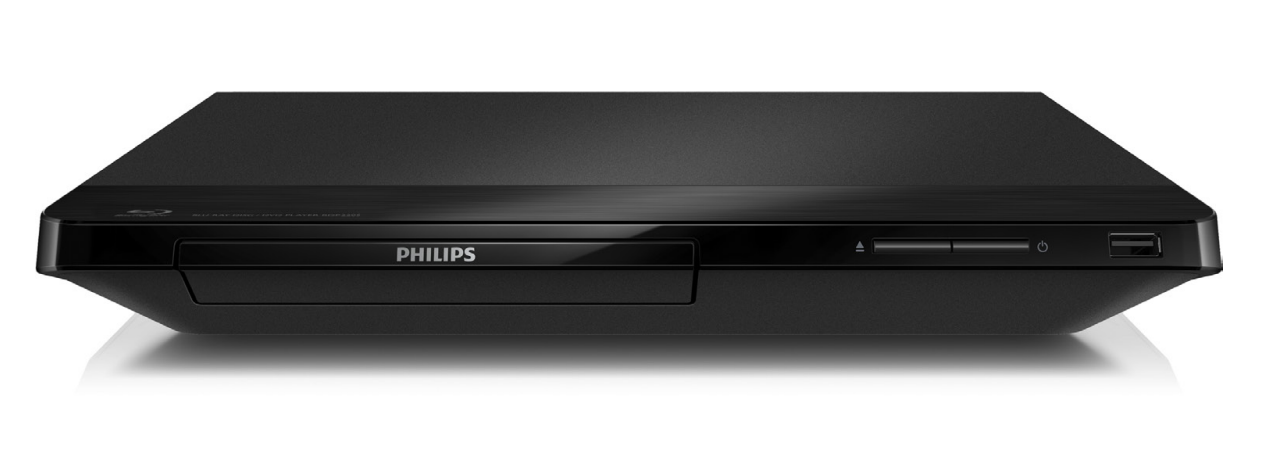
Introduction to the Philips Blu-ray Player BDP2205
The Philips Blu-ray Player BDP2205 is a compact Blu-ray Disc and DVD player designed for home entertainment users who want reliable playback, simple operation, and broad disc compatibility. It supports Blu-ray discs, DVDs, CDs, and several recordable formats, making it a practical choice for anyone upgrading an older DVD setup or adding a secondary player for a bedroom, den, or media room. The player also offers HD upscaling, progressive scan, and wireless connectivity on supported versions, helping standard-definition content look cleaner on modern HDTVs.
One of the main benefits of the Philips Blu-ray Player BDP2205 is its balance of affordability and essential features. It includes HDMI output for digital video and audio, USB media playback, and firmware upgrade support. Some regional variants also include built-in Wi-Fi and access to online streaming apps such as Netflix and YouTube, which increases its versatility for users who want more than disc playback. This makes the player appealing to families, casual movie watchers, and budget-conscious buyers looking for a dependable Blu-ray solution.
Estimated pricing for the Philips Blu-ray Player BDP2205 typically falls in the budget to entry-level range on the resale and refurbished market, usually around $30 to $90 depending on condition, region, and included accessories. New stock may be limited because this is an older model, but it is still found through online marketplaces, used electronics sellers, and Philips support channels in select regions.
Specifications for Philips Blu-ray Player BDP2205
- Disc compatibility: Blu-ray, DVD, CD, CD-R/CD-RW, DVD-R/RW, DVD+R/+RW, AVCHD, VCD, and SVCD.
- Video features: 720p, 1080i, and 1080p output support, progressive scan, video upscaling, and Deep Color on supported variants.
- Audio support: Dolby Digital Plus, Dolby TrueHD, DTS 2.0 digital output, and Night Mode.
- Connectivity: HDMI output, Ethernet, digital coaxial audio out, front USB 2.0, and built-in Wi-Fi on selected models.
- USB support: USB mass storage playback with FAT16 and FAT32 file systems.
- Power consumption: approximately 10 W to 11 W during operation and less than 0.5 W to 1 W in standby.
- Dimensions: about 310 x 40 x 217 mm, with a lightweight chassis around 1.1 kg to 1.2 kg.
- Included accessories: remote control, AAA batteries, quick start guide, registration card, and user manual.
- Comparison: Compared with basic DVD players, it offers Blu-ray HD playback, stronger audio support, and better upscaling; compared with newer 4K players, it lacks Ultra HD Blu-ray and HDR.
For users searching for a compact Blu-ray player with HDMI and USB playback, the Philips Blu-ray Player BDP2205 remains a solid entry-level option, especially if 1080p playback is the main goal.
Setup Guide: How to Install and Connect the Philips Blu-ray Player BDP2205
Start by placing the unit on a flat, ventilated surface and keep it away from heat sources and moisture. Connect the HDMI cable from the player to your TV’s HDMI input, then plug in the power cord. If you use an AV receiver, route audio through HDMI or the coaxial output for better sound control. Insert the batteries into the remote control and power on both the player and the TV.
Use the TV input menu to select the correct HDMI source. On first launch, follow the on-screen setup prompts to choose language, screen resolution, audio output, and network settings if your model includes Wi-Fi or Ethernet. For the best picture, use 1080p output if your television supports it. If you plan to play files from USB, insert a FAT16 or FAT32 formatted drive into the front USB port.
Troubleshooting tip: if the screen stays blank, confirm the HDMI cable is secure and try another HDMI input. If a disc will not load, check for scratches, fingerprints, or unsupported disc formats. Safety warning: do not open the casing, block ventilation holes, or connect the unit to unstable power sources. Allow the player to cool before moving it after extended use.
Troubleshooting Philips Blu-ray Player BDP2205 Common Problems
Common playback problems usually come from disc condition, cable issues, or incorrect settings. If a disc freezes, eject it and clean it with a soft cloth from the center outward. If the player shows no signal, verify the TV input and HDMI connection. If USB media does not appear, make sure the drive is formatted as FAT16 or FAT32 and does not require more power than the player can provide.
- Problem: No picture. Solution: Reseat the HDMI cable, test another HDMI port, or lower the output resolution.
- Problem: No sound. Solution: Check TV volume, receiver input, and audio output format settings.
- Problem: Disc not supported. Solution: Confirm the disc region, format, and whether it is scratched or damaged.
- Problem: Frozen menu. Solution: Power off the player, unplug it for 60 seconds, then restart.
- Problem: USB not detected. Solution: Use a compatible file system and remove unsupported files.
Error messages on Philips Blu-ray players are often tied to disc reading, network access, or incompatible media rather than a specific code. Prevent issues by keeping firmware updated, using quality HDMI cables, and storing discs properly. Warranty and support options vary by region, but Philips product support pages typically provide manuals, FAQs, and service guidance. For help, visit the official Philips support portal for your region or contact the retailer that sold the unit.
Pros and Cons of the Philips Blu-ray Player BDP2205
Pros
- Affordable Blu-ray playback for users who do not need 4K features.
- Compact design fits easily into small entertainment spaces.
- HD upscaling improves the look of DVDs on modern TVs.
- USB playback adds flexibility for photos, music, and video files.
- Built-in Wi-Fi on some versions supports streaming and online features.
- Good value for money compared with newer premium disc players.
Cons
- No Ultra HD Blu-ray or HDR support.
- Feature set varies by region, which can confuse buyers.
- Older stock may show wear or missing accessories.
- Streaming app support may be limited on some regional models.
- Not ideal for users building a high-end home theater system.
Compared with basic DVD players, the Philips Blu-ray Player BDP2205 offers a major upgrade in picture quality and disc compatibility. Compared with newer 4K players, it is best for buyers who want a simple, low-cost disc player rather than a premium media hub.
Customer Reviews and User Feedback on Philips Blu-ray Player BDP2205
User feedback is generally positive, especially from buyers who want a straightforward Blu-ray player at a low price. Many customers rate it around 4 out of 5 stars for easy setup, dependable disc playback, and solid upscaling performance. One common praise is that it works well with older DVD collections while also handling Blu-ray discs without complications.
Common complaints include limited advanced features, slower startup compared with newer players, and occasional region-specific differences in app support. A typical testimonial reads: “Simple, compact, and perfect for movie nights.” Another frequent comment is that it delivers good value for casual home viewing but is not intended for high-end AV enthusiasts.
For most buyers seeking a budget-friendly disc player, the Philips Blu-ray Player BDP2205 is a sensible purchase. It is especially recommended for users who want reliable 1080p playback, USB media support, and an easy setup experience.
Faqs
How do I set up philips Blu-ray Player BDP2205 for the first time?
Why is my philips Blu-ray Player BDP2205 not reading discs, and how can I fix it?
What video and audio formats work with philips Blu-ray Player BDP2205?
How do I improve picture quality on philips Blu-ray Player BDP2205?
Can philips Blu-ray Player BDP2205 connect to older TVs without HDMI?
What should I do if philips Blu-ray Player BDP2205 freezes or stops during playback?
How often should I clean and maintain philips Blu-ray Player BDP2205?
What are the most useful settings to adjust on philips Blu-ray Player BDP2205 after installation?
More philips manuals
- Setup & Features: Philips Monitor 1000 Series User Manual
- How to Use: Philips Respironics PR System One CPAP or BiPAP Machine Paired User Manual
- How to Use: Philips Massage Gun Sports Massage Gun PPM7323 User Manual
- Setup & Features: Philips EasyKey 6000 Series Smart Lever Door Lock DDL61S-SHBS User Manual
- How to Use: Philips Blu-ray Disc™ / DVD Player BDP1502 User Manual
- Setup & Features: Philips RokuTV Series 7875 User Manual
Leave a Comment