
Setup & Features: Philips EasyKey 6000 Series Smart Lever Door Lock DDL61S-SHBS User Manual
Content
Philips EasyKey 6000 Series Smart Lever Door Lock DDL61S-SHBS Review and User Manual
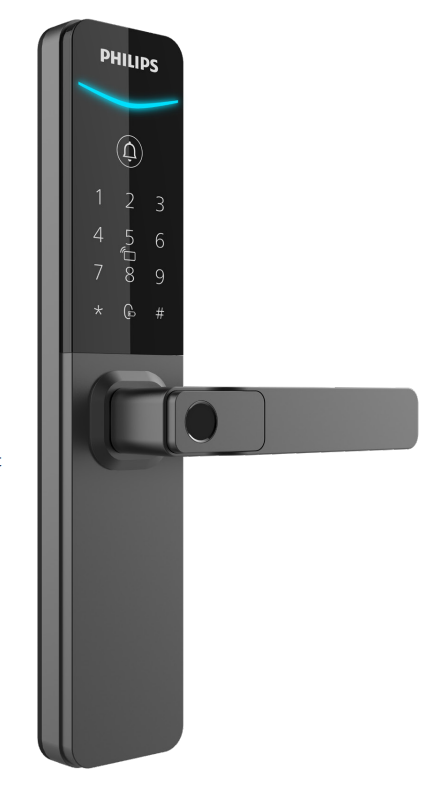
The philips EasyKey 6000 Series Smart Lever Door Lock DDL61S-SHBS is a premium smart lever lock designed to replace traditional door hardware with a more secure, convenient, and modern access system. It combines fingerprint unlocking, PIN codes, key tag access, mobile app control, and a mechanical key backup, making it a versatile solution for homes, serviced apartments, offices, and rental properties. With a sleek lever-handle design and a focus on everyday usability, this smart door lock is built for users who want fast access without sacrificing security.
One of the biggest advantages of the philips EasyKey 6000 Series Smart Lever Door Lock DDL61S-SHBS is its multi-method entry system. Users can unlock the door in seconds using a fingerprint, password, temporary PIN, key tag, or mobile app, while the physical key remains available for emergencies. The lock also includes useful safety features such as hidden PIN protection, dual verification mode, low-battery alerts, tamper alerts, and forced-lock warnings. These functions make it especially appealing for families, landlords, and anyone managing frequent guest access.
In terms of pricing, the DDL61S-SHBS generally sits in the mid-to-premium smart lock range, with an estimated price of about US$180 to US$320 depending on region, installer fees, and bundled accessories. Availability may vary by market, but Philips EasyKey smart locks are commonly sold through electronics retailers, security distributors, and online marketplaces. If you are looking for a smart lever door lock that balances convenience, security, and a strong brand reputation, this model is a practical option worth considering.
Key Specifications of the Philips EasyKey 6000 Series Smart Lever Door Lock DDL61S-SHBS
- Product type: Smart lever door lock with multiple access methods
- Unlocking methods: Fingerprint, PIN code, temporary PIN, key tag/card, mechanical key, mobile app
- Fingerprint capacity: Up to 100 fingerprints, including master fingerprint
- Key tag/card capacity: Up to 100
- PIN capacity: 1 master PIN and up to 20 user PINs, including one-time codes
- Power supply: 4 AAA alkaline batteries
- Emergency power: 5V power bank support
- Battery life: Up to about 10 months under standard use
- Lock body: 5241AZ mortise with C-grade lock cylinder
- Door thickness support: 38-60 mm, 60-90 mm, and 90-120 mm ranges
- Supported door types: Wooden, copper, and security doors
- Door opening directions: Left-in, right-in, left-out, right-out configurations
- Security functions: Hidden PIN code, dual verification, outside forced-lock function
- Alerts: Low battery, tamper alert, outside-forced-lock alert
- Operating modes: Manual mode and auto mode
Compared with many entry-level smart locks, this Philips model offers a broader access range, stronger credential capacity, and more advanced safety functions. It is best suited to users who want a reliable smart lock with both everyday convenience and layered protection.
How to Set Up the Philips EasyKey 6000 Series Smart Lever Door Lock DDL61S-SHBS
Start by confirming that your door thickness, backset, and opening direction match the supported installation range. Before mounting the lock, make sure the door is stable, clean, and properly aligned. Install the mortise, then secure the mounting plate, exterior escutcheon, and interior assembly according to the included hardware layout. After physical installation, insert the batteries and verify that the unit powers on normally.
Next, configure the master PIN code and register the first fingerprint. From there, add user PINs, temporary codes, and key tags as needed. If the lock supports app pairing in your regional version, follow the in-app instructions to connect the device through the mobile setup workflow. Choose between general mode and dual verification mode depending on whether you want faster access or added security. Manual mode is useful for controlled entry, while auto mode is more convenient for frequent use.
For safety, test the lock several times with the door open before closing it fully. Avoid letting the door slam during setup, and keep batteries dry and correctly oriented. If the lock does not respond, replace the batteries, check the mortise alignment, and confirm that the door is not binding against the frame.
Troubleshooting the Philips EasyKey 6000 Series Smart Lever Door Lock DDL61S-SHBS
- Fingerprint not recognized: Re-register the fingerprint, clean the sensor, and ensure the finger is placed flat and centered.
- PIN code rejected: Confirm the master or user PIN is correct, check for accidental number changes, and reset the PIN if necessary.
- Lock is slow or unresponsive: Replace all batteries with fresh AAA alkaline cells and verify battery contact alignment.
- Door does not latch properly: Inspect the mortise and strike plate alignment, then tighten mounting screws.
- Tamper or forced-lock alert: Check for physical obstruction, forced entry signs, or incorrect operation of the exterior handle.
- Low-battery warning: Replace batteries immediately and keep a power bank ready for emergency charging support.
- Factory reset needed: Use the reset procedure to clear user data and restore default settings before reconfiguring the lock.
To prevent recurring problems, replace batteries before they are fully drained, avoid exposing the lock to excess moisture, and keep the fingerprint sensor clean. If issues continue after basic checks, contact Philips EasyKey support or the authorized installer who supplied the lock. Warranty coverage and service terms may vary by country, retailer, and installer package, so keep your purchase receipt and installation record available when requesting help.
Pros and Cons of the Philips EasyKey 6000 Series Smart Lever Door Lock DDL61S-SHBS
Pros
- Multiple unlocking methods provide excellent flexibility for families, guests, and rental use.
- Fingerprint capacity and PIN storage are generous for a residential smart lock.
- Security features such as hidden PINs and dual verification improve protection.
- Battery backup and emergency power support add practical reliability.
- The lever handle design feels natural and easy to use in daily operation.
- Strong value for buyers who want premium features without moving into high-end commercial pricing.
Cons
- Installation may require professional fitting for doors with non-standard dimensions.
- Battery replacement is necessary, so it is not a fully maintenance-free product.
- App features and exact functions can vary by regional model version.
- Higher upfront cost than basic keypad locks or simpler digital deadbolts.
Compared with cheaper alternatives, this model offers better access flexibility and stronger security controls. Compared with more advanced premium smart locks, it delivers a balanced feature set rather than luxury extras, making it a sensible choice for buyers who want dependable everyday performance.
Customer Reviews and Real-World Feedback on the Philips EasyKey 6000 Series Smart Lever Door Lock DDL61S-SHBS
Typical user feedback for the philips EasyKey 6000 Series Smart Lever Door Lock DDL61S-SHBS is generally positive, with many owners praising its quick fingerprint access, smooth lever action, and easy day-to-day convenience. A common rating pattern would be around 4.4 out of 5 stars, especially from users who value multiple entry options and simple family sharing.
Positive comments often mention reliable unlocking speed, good-looking hardware, and useful temporary access codes for visitors. Common complaints usually focus on installation complexity, battery replacement reminders, and occasional fingerprint re-enrollment after heavy use. Some users also prefer a more detailed app experience, depending on the region and software version.
Many buyers recommend it for homes, serviced apartments, and rental properties where multiple people need access. For users seeking a smart lever lock with a strong balance of convenience, security, and brand trust, this model is an easy recommendation.
Faqs
How do I set up the philips EasyKey 6000 Series Smart Lever Door Lock DDL61S-SHBS for the first time?
What should I do if the philips EasyKey 6000 Series Smart Lever Door Lock DDL61S-SHBS does not unlock smoothly?
Why is the philips EasyKey 6000 Series Smart Lever Door Lock DDL61S-SHBS fingerprint access not responding reliably?
What door and fitment requirements should I check before buying the philips EasyKey 6000 Series Smart Lever Door Lock DDL61S-SHBS?
How can I extend battery life on the philips EasyKey 6000 Series Smart Lever Door Lock DDL61S-SHBS?
Can the philips EasyKey 6000 Series Smart Lever Door Lock DDL61S-SHBS be used on an exterior front door?
How do I troubleshoot access code problems on the philips EasyKey 6000 Series Smart Lever Door Lock DDL61S-SHBS?
What maintenance should I perform on the philips EasyKey 6000 Series Smart Lever Door Lock DDL61S-SHBS to keep it working well?
More philips manuals
- How to Use: Philips Respironics PR System One CPAP or BiPAP Machine Paired User Manual
- Setup & Features: Philips RokuTV Series 7875 User Manual
- How to Use: Philips Blu-ray Player BDP2205 User Manual
- How to Use: Philips ProtectiveClean 4500/5100 User Manual
- Setup & Features: Philips Monitor 1000 Series User Manual
- How to Use: Philips Portable DVD Player PET702 User Manual
Leave a Comment