
How to Connect: Philips Soundbar 8000 Series TAB8947 User Manual
Content
Philips Soundbar 8000 Series TAB8947: Complete Product Manual and Buying Guide
Introduction
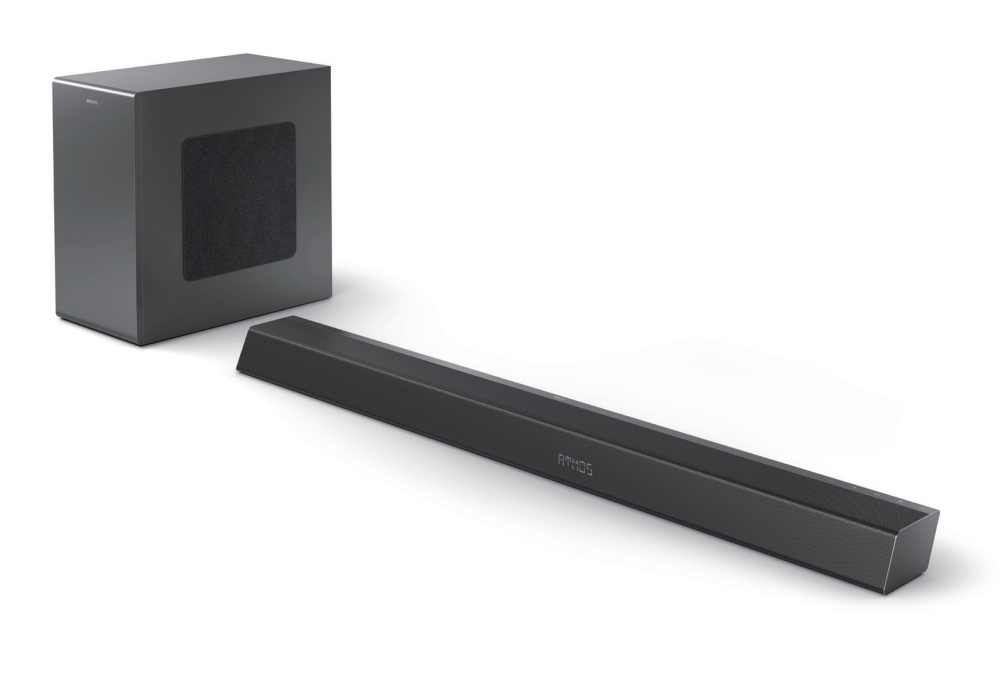
The philips Soundbar 8000 Series TAB8947 is a premium home audio system built for users who want cinematic sound without the complexity of a full surround setup. Designed as a 3.1.2-channel soundbar with a wireless subwoofer, it delivers a powerful 660W max output and supports Dolby Atmos for more immersive height and directional effects. This makes it a strong choice for movie lovers, gamers, and sports fans who want clearer dialogue, stronger bass, and a wider soundstage from a single compact system.
The philips Soundbar 8000 Series TAB8947 is especially appealing to households looking to upgrade a modern TV with HDMI eARC, optical input, Bluetooth 5.0, and smart audio tuning options. It suits medium to large living rooms, wall-mounted TV setups, and users who stream music from smartphones or tablets. The wireless subwoofer adds deep bass without cluttering the room with extra cables, while the up-firing drivers help create a more three-dimensional listening experience.
In most markets, the estimated price range is typically in the mid-premium segment, often around $250 to $400 depending on region, promotions, and retailer stock. Availability may vary by country and model variant, but the soundbar remains widely listed through electronics retailers and online stores. For buyers seeking a feature-rich Dolby Atmos soundbar with strong value for money, this model stands out as a practical alternative to more expensive home theater systems.
Specifications: philips Soundbar 8000 Series TAB8947 technical details
- System configuration: 3.1.2-channel soundbar with wireless subwoofer
- Output power: 660W max, 330W RMS
- Audio drivers: 2 mid-low drivers, 2 tweeters, 2 up-firing full-range drivers, 1 center speaker section, 1 x 8-inch wireless subwoofer
- Sound formats: Dolby Atmos support for more spatial and overhead effects
- Frequency response: Soundbar 150 Hz to 20 kHz; subwoofer 35 Hz to 150 Hz
- Connectivity: HDMI IN, HDMI eARC/ARC out, optical input, Bluetooth 5.0, USB playback, auxiliary input on some variants
- Wireless features: Stable wireless music streaming and wireless subwoofer connection
- Controls: Bass, treble, audio sync, and sound mode adjustments
- Common sound modes: Movie, Music, Voice, Stadium, and Custom
Compared with entry-level soundbars, the philips Soundbar 8000 Series TAB8947 offers much stronger bass response, higher output power, and a more immersive 3.1.2 layout. Compared with many similarly priced Dolby Atmos models, it stands out for its wireless subwoofer and practical HDMI eARC support, making it a solid choice for TV and streaming use.
Setup guide for the philips Soundbar 8000 Series TAB8947
1. Unbox the soundbar, wireless subwoofer, remote control, power cord, wall-mount kit, and included cables.
2. Place the soundbar below the TV or mount it on the wall using the supplied brackets, ensuring the up-firing speakers are not blocked.
3. Position the subwoofer near the front of the room for balanced bass response and plug it into power.
4. Connect the soundbar to the TV using HDMI eARC/ARC for the best audio quality, or use optical if your TV does not support ARC.
5. Turn on the TV and soundbar, then select the correct input source from the remote or onboard controls.
6. Pair Bluetooth by switching to Bluetooth mode and connecting from your phone, tablet, or laptop.
7. Adjust bass, treble, and sound mode settings to match movies, music, or voice content.
For safety, keep the soundbar away from heat sources, ensure ventilation, and avoid placing objects on top of the unit. If no sound is heard, confirm the TV audio output is set to external speakers and that HDMI CEC or ARC is enabled in the TV menu.
Troubleshooting the philips Soundbar 8000 Series TAB8947
No sound from the TV: Check the HDMI ARC connection, select the correct TV audio output, and verify the soundbar input source.
Bluetooth will not pair: Clear previous connections, restart both devices, and make sure the soundbar is in Bluetooth mode.
Weak bass: Move the wireless subwoofer away from corners or walls, then increase subwoofer level using the remote.
Audio delay or lip-sync issues: Use the audio sync function and make sure your TV is set to pass-through or auto audio mode.
Intermittent wireless dropouts: Keep the subwoofer and soundbar within recommended range and avoid interference from routers or large metal objects.
This model does not typically rely on visible error codes for normal home use, so most issues are solved through source checks, cable replacement, or reset procedures. Prevent problems by keeping firmware and TV settings updated where possible, and by using certified HDMI cables.
For warranty help, contact the Philips consumer support team in your country through the official support channel, retailer service desk, or authorized service center. Keep your proof of purchase, model number, and serial number ready when requesting assistance.
Pros and cons of the philips Soundbar 8000 Series TAB8947
Pros
- Powerful 660W output delivers room-filling sound for movies and gaming
- 3.1.2-channel design adds height effects and clearer dialogue
- Wireless subwoofer reduces cable clutter and improves bass flexibility
- HDMI eARC/ARC makes setup simple with modern TVs
- Bluetooth 5.0 supports stable wireless music streaming
- Good value for users who want Dolby Atmos without buying a full surround system
Cons
- Not as expansive as a true multi-speaker surround setup
- Best performance depends on TV compatibility and correct ARC settings
- Large rooms may still benefit from additional rear speakers
- Some buyers may prefer a soundbar with more advanced app-based tuning
Overall, the philips Soundbar 8000 Series TAB8947 offers a strong balance of performance, features, and price. It compares favorably with competing mid-range soundbars from Samsung, LG, and Sony when the goal is cinematic audio and easy daily use rather than full theater expansion.
Customer reviews summary for the philips Soundbar 8000 Series TAB8947
Average user sentiment is generally positive, with many buyers rating it around 4.3 out of 5 stars. Customers often praise the punchy bass, wide soundstage, and easy TV integration. One common testimonial theme is that dialogue sounds much clearer than with built-in TV speakers, especially during action movies and streaming shows.
Frequent complaints focus on occasional setup confusion with HDMI ARC, plus the size of the subwoofer in smaller rooms. Some users also note that the best Atmos effect depends on ceiling height and room layout. Despite these points, most reviewers recommend it for anyone upgrading from a basic soundbar or TV audio system.
Frequently asked questions about the philips Soundbar 8000 Series TAB8947
Is the philips Soundbar 8000 Series TAB8947 good for movies? Yes, its Dolby Atmos support, wireless subwoofer, and 3.1.2-channel layout make it well suited for film and streaming content.
Can it connect to any TV? It works best with TVs that support HDMI ARC/eARC, but optical input provides compatibility with many older models.
Is it worth buying in 2026? Yes, for users who want a high-power Dolby Atmos soundbar with simple setup and strong value, it remains a competitive option.
Faqs
How do I set up philips Soundbar 8000 Series TAB8947 for the first time with my TV?
Why is my philips Soundbar 8000 Series TAB8947 not producing sound from the TV?
What are the best connection options for philips Soundbar 8000 Series TAB8947 to get the clearest sound?
How can I fix lip sync delay on philips Soundbar 8000 Series TAB8947 during movies and streaming?
Does philips Soundbar 8000 Series TAB8947 work with smart TVs, gaming consoles, and streaming devices?
How do I get the best bass and surround effect from philips Soundbar 8000 Series TAB8947?
How do I update firmware or reset philips Soundbar 8000 Series TAB8947 when it acts unstable?
How should I clean and maintain philips Soundbar 8000 Series TAB8947 for long-term performance?
More philips manuals
- Features: Philips Sonicare DailyClean Sonic Electric Toothbrush HX3411/04 User Manual
- How to Use: Philips Blu-ray Disc™ / DVD Player BDP1502 User Manual
- Specs & Setup: Philips VoiceTracer DVT2050 Audio Recorder User Manual
- How to Use: Philips Massage Gun Sports Massage Gun PPM7323 User Manual
- Features & Setup: Philips Avent Essential Single Electric Breast Pump SCF323 User Manual
- Setup & Features: Philips Monitor 1000 Series User Manual
Leave a Comment