
Setup: Popglory P22 Smart Watch User Manual
Content
popglory P22 Smart Watch
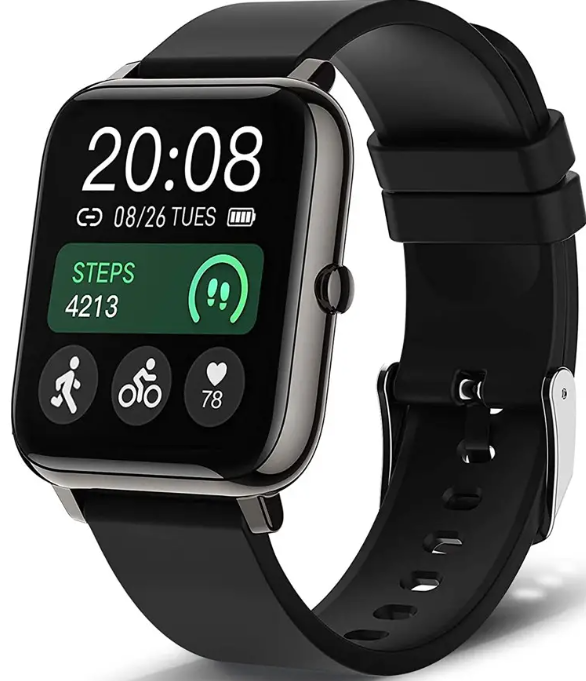
Introduction
The Popglory P22 Smart Watch is a feature-packed, budget-friendly wearable designed for fitness enthusiasts, busy professionals, and anyone seeking a stylish yet functional smartwatch. Combining a vibrant 1.3-inch color touchscreen with advanced health sensors, the P22 offers heart rate, blood pressure, and blood oxygen monitoring—all accessible at a glance. With up to 10 days of battery life and 30 days in standby, it’s built for all-day use without constant recharging.
Targeted at Android and iOS users, this fitness tracker records steps, calories, distance, and detailed sleep patterns, including deep and light sleep phases.It'sIt'ss seven to eight sport modes, such as walking, running, cycling, skipping, swimming, badminton, basketball, and football, —make it a versatile companion for diverse workouts. Notifications for calls, texts, and apps keep you connected, while handy tools like a timer, stopwatch, and music control add everyday convenience.
Priced under $30, the Popglory P22 Smart Watch delivers exceptional value for those seeking essential smart features without the premium price tag.ag Available through major online retailers, it’s an ideal entry-level wearable for fitness tracking, health monitoring, and basic smart notifications.
Specifications
- Display: 1.3-inch IPS color touchscreen, 240x240 resolution
- Health Sensors: Heart rate, blood pressure, blood oxygen (SpO2), sleep monitoring
- Sports Modes: 7–8 modes (walking, running, cycling, skipping, swimming, badminton, basketball, football)
- Connectivity: Bluetooth 4.0, compatible with Android 4.4+ and iOS 9.0+
- Battery Life: Up to 10 days of usage, 30 days of standby, 2.5-hour charging time
- Memory: 32MB
- Water Resistance: IP67 (splash and rain resistant)
- Weight: 118g
- Customization: 100+ watch faces, customizable via the HeroBand III app
- Smart Features: Notifications (calls, texts, apps), timer, stopwatch, music control, weather, sedentary reminders, DND mode, find phone
Compared to similar budget smartwatches, the Popglory P22 stands out for its comprehensive health monitoring, long battery life, and customizable interface. However, it lacks built-in GPS (relies on phone GPS), and notifications are limited compared to more expensive models
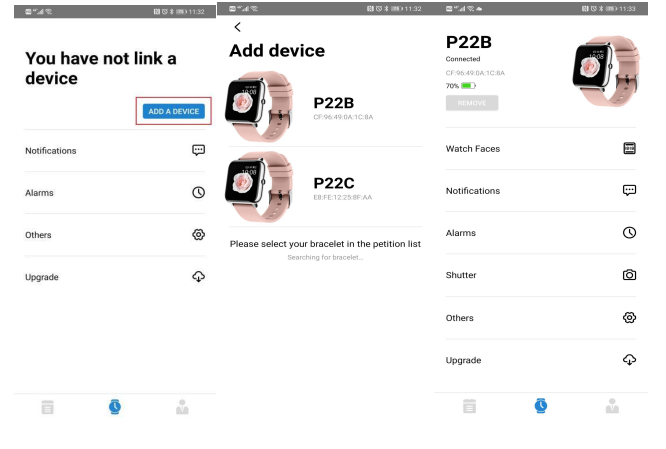
How to connect the smart watch with the app?
- Download the HeroBandIII (you can scan the QR code or search for HeroBandIII in the app store to download)
- Turn on the Bluetooth of your mobile phone, and then put the watch close to the phone.
- Open the App and click ‘Bind Device’, select ‘P22’ in the list.
- Then it's done, you can set personal information in the App.
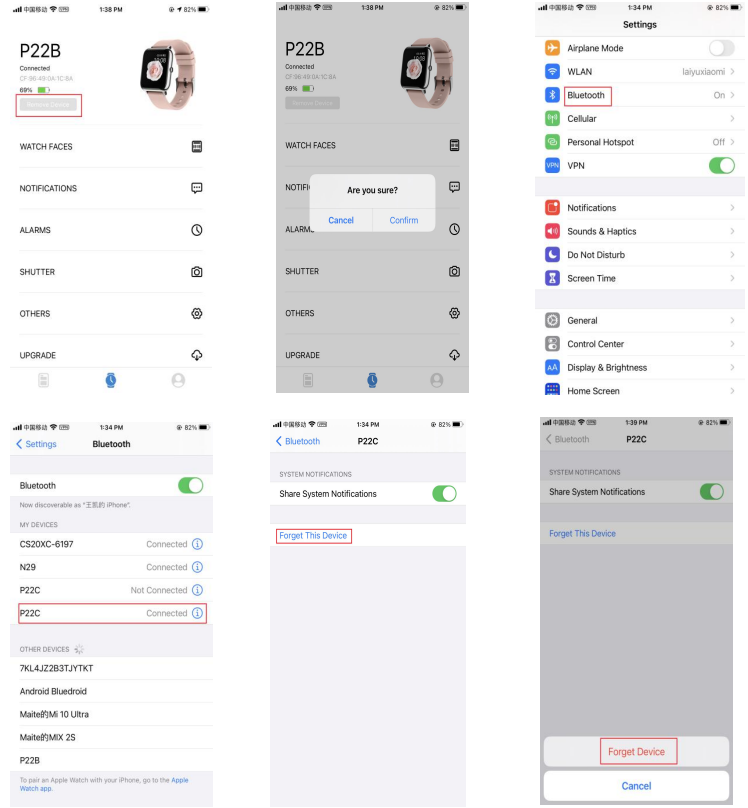
How to reconnect the smart watch with smartphones?
For iPhone:
Click ‘remove device’ in HeroBandIII→Open ‘phone settings’ → Click ‘Bluetooth’→Select ‘P22’ →Click ’(i)’ →Click ‘Forget Device’, then reconnect it in App.
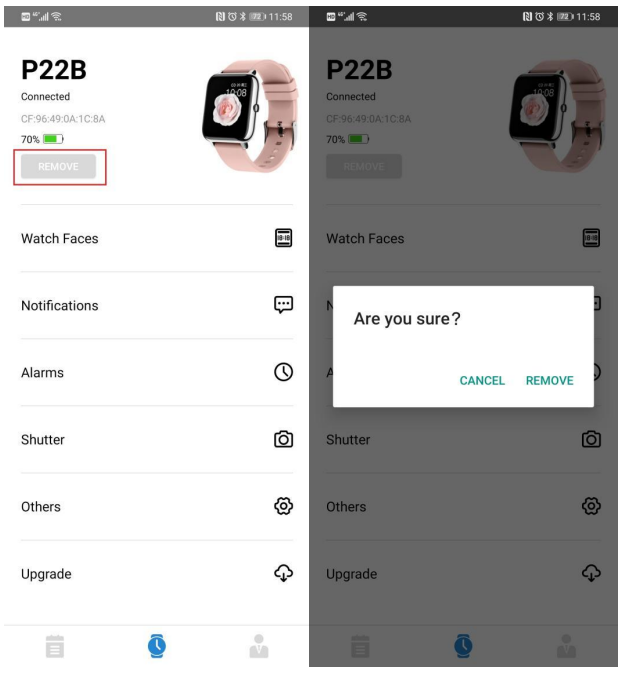
For Android:
Remove 'P22' in the HeroBandIII App→Reconnect the smart watch in the App.
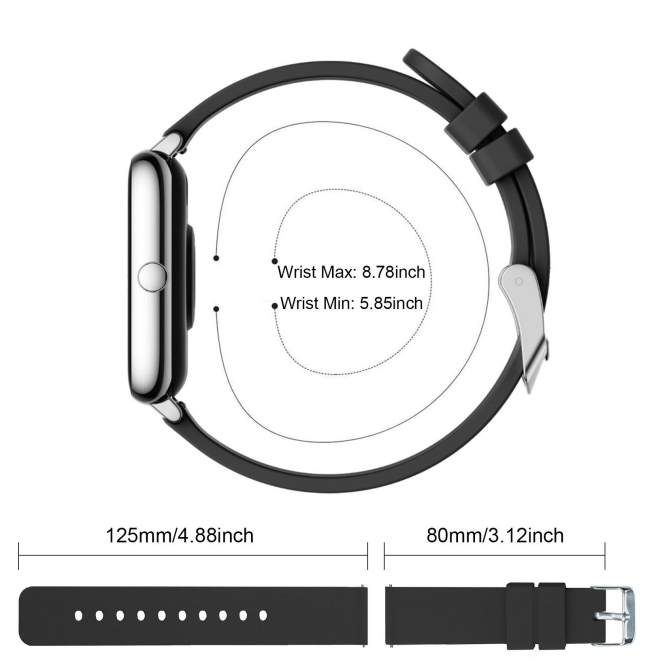
The length of the watch and its strap
The total length of the watch is 26cm/10.24in.
Please refer to the following figure for specific dimensions
Setup Guide
Step-by-Step Setup
- Charge the Watch: Use the included magnetic charger to fully charge your Popglory P22 Smart Watch.
- Download the App: Install the HeroBand III app from the Google Play Store or Apple App Store..
- Pair Your Device: Enable Bluetooth on your smartphone, open the app, and follow the in-app instructions to pair the watch.
- Customize Settings: Adjust watch faces, notifications, health targets, and other preferences via the app.
- Sync Data: Allow the app to sync your activity, sleep, and health data for comprehensive tracking.
Configuration Options
Customize your popglory P22 Smart Watch with over 100 watch faces, set daily fitness goals (steps, sleep, calories), and enable notifications for your favorite apps. The app also lets you view detailed statistics and sync data with Apple Health.
Pairing and Connectivity
Ensure your smartphone’s Bluetooth is on and the watch is nearby during pairing. If pairing fails, restart both devices and try again. For persistent issues, check for app updates or reinstall the app.
Safety Warnings and Precautions
- Do not use the Popglory P22 Smart Watch for medical diagnosis; health data is for general fitness purposes only..
- Avoid exposing the watch to extreme temperatures or submerging it in water despite its IP67 rating.
- If you experience skin irritation, discontinue use and consult a healthcare professional.
Troubleshooting
Common Problems and Solutions
- Watch Not Pairing: Ensure Bluetooth is enabled, devices are close, and the app is updated. Restart both devices if needed.
- Time Not Updating: Sync the watch with the app; some users report issues with manual time setting—relying on app sync is recommended.
- Notifications Not Working: Check app permissions and notification settings on both the watch and phone. Some apps (e.g., WhatsApp) may not be fully supported.
- Battery Drain: Reduce screen brightness, disable unnecessary notifications, and update the app for optimal performance.
Error Codes and Fixes
No specific error codes are documented for the tPopgloryory P22 Smart Watch. Most issues can be resolved by restarting, re-pairing, or reinstalling the app.
Preventive Measures
- Regularly update the HeroBand III app for bug fixes and new features.
- Clean the watch and strap to prevent skin irritation.
- Charge the device before it fully depletes to maintain battery health.
Warranty and Support
The Popglory P22 Smart Watch typically comes with a limited manufacturer's warranty. For support, consult the retailer’s return policy or contact the manufacturer directly. Community forums and app reviews may also offer helpful tips..
Pros & Cons
Advantages
- Affordable Price: Exceptional value for under $30, making it accessible for budget-conscious buyers
- Comprehensive Health Tracking: Monitors heart rate, blood pressure, blood oxygen, and sleep with detailed app statistics
- Long Battery Life: Up to 10 days of usage minimizes charging frequency
- Customizable Interface: Choose from 100+ watch faces and personalize fitness goals
- Lightweight and Stylish: Comfortable for all-day wear with a modern design
Limitations
- No Built-in GPS: Relies on smartphone GPS for location tracking during workouts
- Limited Notification Support: Not all apps (e.g., WhatsApp) are fully supported; message reading is basic.
- Accuracy Variability: Health metrics are generally close,, but not medically certified
- Occasional Syncing Issues: Some users report difficulties with time updates and pairing
- Basic Build Quality: The strap may cause skin irritation for some users
Compared to pricier alternatives, the PoPopglorygloryy P22 Smart Watch excels in core fitness and health tracking but lacks advanced smart features and premium build quality.
Customer Reviews
Users praise the Popglory P22 Smart Watch for its accurate health metrics, with many noting that heart rate and blood oxygen readings closely matched professional devices. Battery life and the variety of watch faces are frequently highlighted as strengths. However, some customers report issues with time synchronization and occasional pairing difficulties, emphasizing the need for clearer setup instructions. Skin irritation from the strap has also been mentioned. Overall, the device earns positive marks for value, functionality, and ease of use, making it a recommended choice for entry-level fitness tracking and basic notifications.
Star ratings on app stores average around 4 out of 5, reflecting a solid user experience with room for improvement in software reliability and support. Buyers seeking a simple, affordable fitness companion will find the popglory P22 Smart Watch a worthwhile investment, especially when compared to more expensive alternatives
Faqs
How do I set up my popglory P22 Smart Watch for the first time?
What should I do if my popglory P22 Smart Watch is not syncing with my phone?
Can I use the popglory P22 Smart Watch with both iOS and Android devices?
How do I get accurate heart rate, blood pressure, and blood oxygen measurements on my popglory P22 Smart Watch?
What are the key features that make the popglory P22 Smart Watch different?
How often should I charge my popglory P22 Smart Watch?
Can I use the popglory P22 Smart Watch while swimming or in water?
How do I maintain and clean my popglory P22 Smart Watch?
Tags
More popglory manuals
Leave a Comment