
Setup: Popglory P66 Smart Watch User Manual
Content
popglory P66 Smart Watch
Introduction
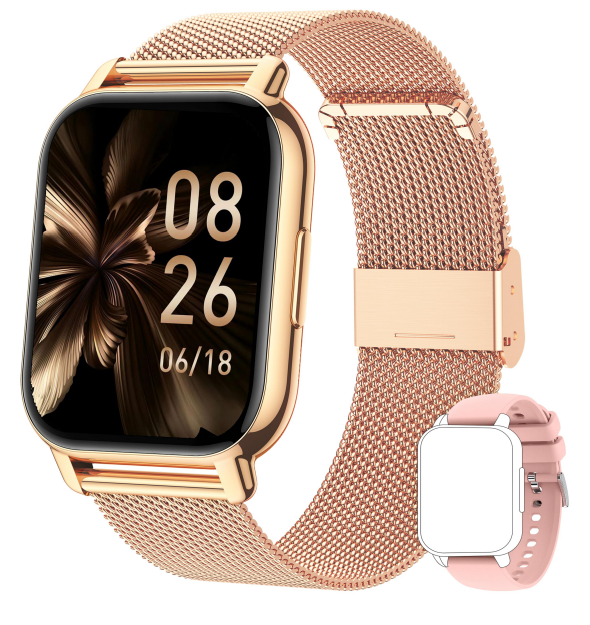
The popglory P66 Smart Watch is a high-performance, feature-rich wearable designed for modern, active lifestyles. Combining sleek design with robust functionality, this smartwatch is engineered to keep you connected, motivated, and informed throughout your day. With advanced health and fitness tracking, seamless smartphone integration, and a vibrant display, the popglory P66 Smart Watch stands out as a versatile companion for tech-savvy users who demand both style and substance.
Key benefits of the Popglory P66 Smart Watch include real-time heart rate monitoring, multi-sport activity tracking, sleep analysis, and smart notifications for calls, messages, and apps. Its long-lasting battery ensures you stay powered through busy days, while customizable watch faces let you personalize your look. The popglory P66 is also water-resistant, making it suitable for workouts, swimming, and outdoor adventures.
This smartwatch is ideal for fitness enthusiasts, professionals, and anyone seeking to enhance their daily routine with smart technology. Whether you’re tracking your morning run, managing notifications on the go, or monitoring your health metrics, the popglory P66 Smart Watch delivers reliable performance. Estimated to retail in the $50–$80 range, it’s an affordable entry into the world of premium wearables, widely available through online retailers and select electronics stores.
How to connect the watch to your phone?
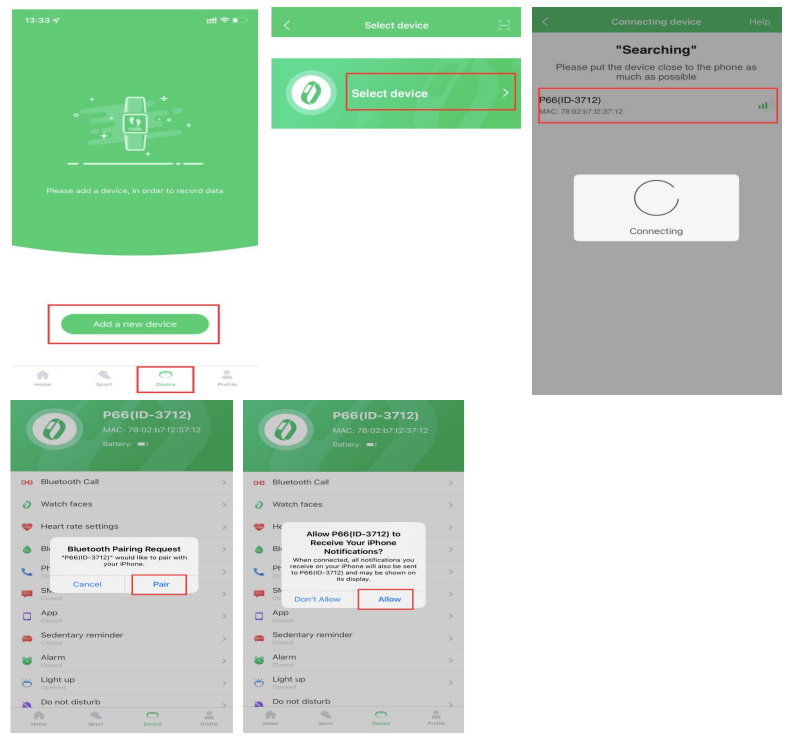
- Download the app GloryFit from the App Store or Google Play, or by scanning the QR code below.
- Open the app GloryFit, click Device → Add a new device → Select device → P66, allow Bluetooth Pairing Request → Allow P66 to Receive Your Phone Notifications.
Note:- The watch only supports iOS 9.0 and above or Android 5.0 and above smartphones, not the tablets, laptops, or personal computers.
- Do not connect the watch directly to the Bluetooth list.

How to use the Bluetooth calling function?
Keep the watch connected with the app and Bluetooth.
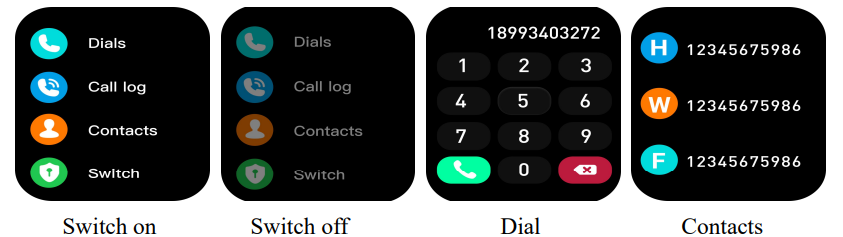
- Swipe right on the homepage of the watch and click the Call function → click Switch to turn on/off the Bluetooth call function at any time.
- Click Device → Bluetooth Call → Sync Contacts → Open in the app, you can sync your contacts to your watch.
- You can click Dials directly on the watch, or you can directly tap the Call log or synchronized Contacts on the watch to make calls.
Note:
- If the Bluetooth call function cannot be used, please confirm the connection status in the app and Bluetooth list.
- The watch can still receive the incoming call alerts, but cannot answer them when the Bluetooth call function is forbidden.
How to switch the watch face?
Set on the watch:
- Long-press the watch’s home screen, swipe right/left to choose the watch face you like.
- Swipe right on the watch’s home screen, click Settings → Watch face → you can choose the watch face you like.
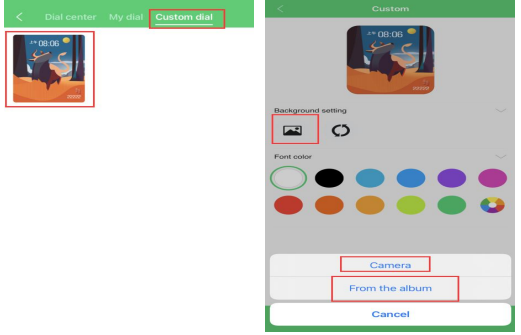
Set in the app:- Under connection, open the app GloryFit, click Device → Watch faces → you can download and set the watch faces you like in the Dial center.
- Also, you can click the image in the Custom dial to customize your watch face.
How to receive the messages on the watch?
- If you have allowed all permissions when installing the app, please open the app GloryFit →Device → App Reminder → Turn on the app you want to receive notifications. You will receive message notifications.
- If you did not allow all usage permissions when installing the app, there are 2 settings that you can follow to receive the messages:
The 1st way:
- Please uninstall and reinstall the app, and allow all usage permissions, click Device
- App Reminder → Turn on the app you want to receive notifications, and you will receive message notifications.
The 2nd way:
- For Android phone users, you need to allow the app to run in the background first, and follow the steps below, then repeat the above steps to ensure that you can receive messages.
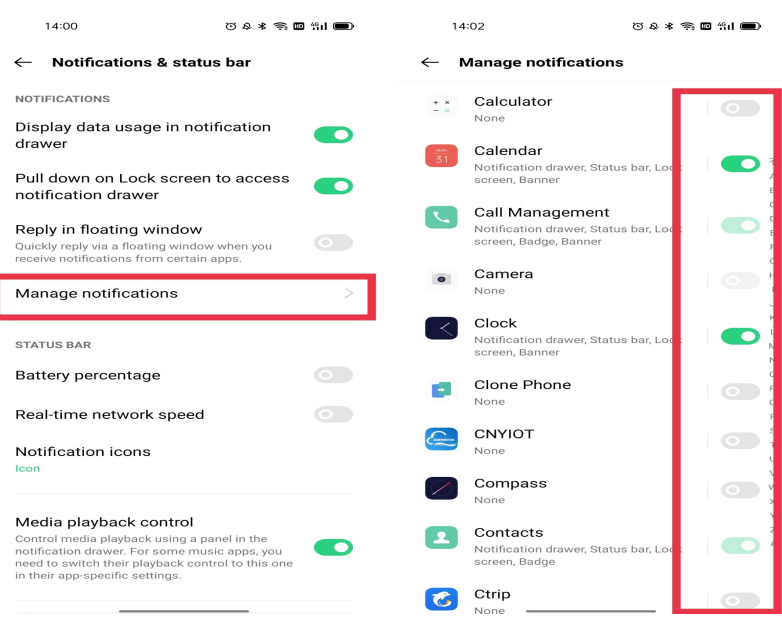
For iPhone users,, you need to turn on Share System Notifications in the iPhone's Bluetooth, and follow the steps belowthen repeat the above steps to ensure that you can receive messages.
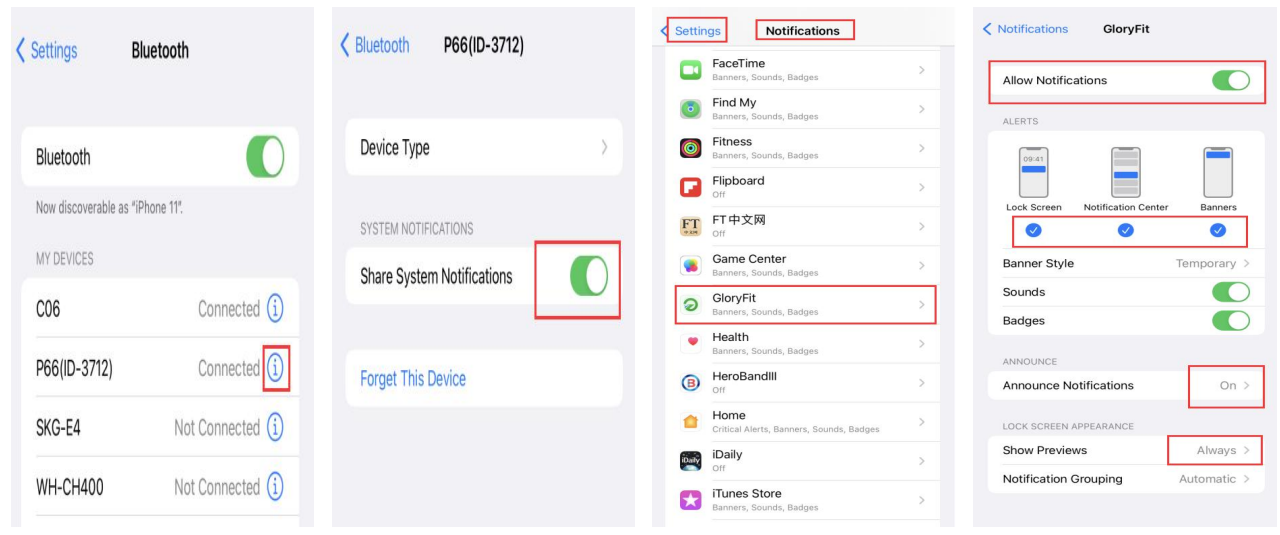
Note:
- The watch can only display the message content displayed in the mobile phone's message notification bar.
- Please make sure you set the message preview on your phone so that you can view the messages on your phone..
Specifications
Below are the detailed technical specifications and key features of the popglory P66 Smart Watch:
- Display: 1.4-inch full-color touchscreen, 320x320 resolution
- Battery: Up to 7 days typical use, magnetic charging
- Connectivity: Bluetooth 5.0, compatible with iOS and Android
- Sensors: Optical heart rate, accelerometer, gyroscope, SpO2 (blood oxygen), sleep tracking
- Activity Tracking: Steps, distance, calories, 14+ sports modes (running, cycling, swimming, etc.)
- Smart Features: Call/message notifications, music control, camera remote, find my phone, sedentary reminders
- Water Resistance: IP68 rated (swim-proof, shower-proof)
- Customization: Multiple watch faces, interchangeable bands
- Additional: Alarm, stopwatch, timer, breath training, women’s health tracking
Compared to similar smartwatches in its price range, the popglory P66 Smart Watch offers a larger, brighter display, more sports modes, and comprehensive health tracking—features often found in higher-end models. Its battery life is competitive, and the inclusion of SpO2 monitoring and swim-proof design sets it apart from many entry-level competitors.
Setup Guide
Follow these step-by-step instructions to set up your Popglory P66 Smart Watch:
- Charge Your Watch: Connect the magnetic charger to the watch and a USB power source. A full charge typically takes 1–2 hours.
- Power On: Press and hold the side button until the screen lights up.
- Install the App: Download the companion app (e.g., Da Fit or similar) from the App Store or Google Play.
- Pair with Your Phone: Enable Bluetooth on your smartphone, open the app, and follow the on-screen instructions to pair the popglory P66 Smart Watch. Ensure the watch appears in your phone’s Bluetooth device list.
- Configure Settings: Customize notifications, watch faces, activity goals, and other preferences via the app.
- Wear Your Watch: Adjust the band for a snug fit—wear it a finger’s width below your wrist bone for optimal heart rate accuracy, and slightly tighter during exercise[4].
Configuration Options: You can change watch faces, adjust screen timeout, set vibration intensity, and toggle Bluetooth on/off directly from the watch settings[5]. For advanced features, use the companion app.
Troubleshooting Tips: If pairing fails, ensure your phone’s Bluetooth is on, restart both devices, and make sure the watch is sufficiently charged. If notifications aren’t coming through, check app permissions and Bluetooth connection status[1].
Safety Warnings: Avoid wearing the watch too tightly as this may affect blood flow and sensor accuracy. Do not expose the device to extreme temperatures or submerge it beyond its rated water resistance. If you experience skin irritation, remove the watch and consult a physician.
Troubleshooting
Encountering issues with your Popglory P66 Smart Watch? Here are common problems and solutions:
- Pairing Failure: Restart both the watch and your phone. Ensure Bluetooth is enabled and the devices are within range. If issues persist, unbind the watch from the app and retry pairing.
- Notifications Not Received: Check that the companion app has notification permissions enabled. Re-pair the devices if necessary.y
- Charging Issues: Confirm the charger is properly connected. Clean the charging contacts if the watch doesn’t charge.
- Screen Unresponsive: Restart the watch by holding the side button for 10 seconds.
- Inaccurate Heart Rate: Wear the watch snugly but not too tightly, and ensure it’s positioned correctly on your wrist
Error Codes: Refer to the app or manual for specific error messages. Most issues can be resolved by resetting the device or reinstalling the app.
Preventive Measures: Regularly update the watch firmware via the app. Avoid exposing the device to water beyond its IP68 rating. Clean the watch and band regularly to prevent skin irritation.
Warranty & Support: The Popglory P66 Smart Watch typically comes with a 12-month limited warranty. For support, contact the retailer or manufacturer’s customer service, or visit the official website for FAQs and live chat options.
Pros & Cons
Advantages
- Comprehensive Health Tracking: Accurate heart rate, SpO2, sleep, and multi-sport tracking rival more expensive models.
- Long Battery Life: Up to 7 days on a single charge reduces frequent charging hassles.
- Bright, Customizable Display: Large, colorful screen with multiple watch faces for personalization.
- Affordable Price: Packs premium features at a budget-friendly price point.
- Water Resistance: Swim and shower proof for active users.
Disadvantages
- App Dependency: Advanced features require a companion app, which may have occasional bugs.
- Limited Smart Features: Lacks built-in GPS and contactless payments found in higher-end rivals.
- Band Comfort: Some users may find the band less comfortable for extended wear.
- No Cellular Connectivity: Must stay paired with a smartphone for full functionality.
For the price, the PopgloryP66Smart Watch delivers excellent value, especially for users prioritizing health metrics and basic smart features. It competes favorably with entry-level offerings from Xiaomi, Amazfit, and Huawei, though it lacks some advanced integrations found in pricier models.
Customer Reviews
User feedback for the Popglory P66 Smart Watch is generally positive, with many praising its accurate health tracking, long battery life, and vibrant display. Most customers highlight the watch’s value for money, noting it performs well above its price point for fitness and daily use.
Common praises include easy setup, responsive touchscreen, and reliable notifications. However, some users mention occasional Bluetooth connectivity issues and desire more advanced smart features. Star ratings average around 4.2 out of 5 across major online retailers, with particular appreciation for its sleep and heart rate monitoring accuracy.
Testimonials frequently recommend the popglory P66 Smart Watch for budget-conscious buyers seeking reliable health and activity tracking. Frequently mentioned issues—connectivity glitches and app limitations—are balanced by the watch’s affordability and core performance.
If you’re looking for a feature-packed, affordable smartwatch for fitness and daily notifications, the Popglory P66 Smart Watch is a strong contender. For advanced smart features or standalone GPS, consider higher-end alternatives, but for most users, this model delivers excellent functionality at a great price.
Faqs
How do I connect my popglory P66 Smart Watch to my smartphone for the first time?
Why won’t my popglory P66 Smart Watch sync sleep or health data with the GloryFit app?
How accurate are the blood pressure and blood oxygen measurements on the popglory P66 Smart Watch?
Can I make and receive calls directly from my popglory P66 Smart Watch?
How do I extend the battery life of my popglory P66 Smart Watch?
What should I do if my popglory P66 Smart Watch stops responding or freezes?
How do I track different workouts with the popglory P66 Smart Watch?
Is the popglory P66 Smart Watch waterproof, and how should I care for it?
Tags
More popglory manuals
Leave a Comment