
Setup: Remington G4 Graphite Series Personal Groomer PG4000 User Manual
Content
Remington G4 Graphite Series Personal Groomer PG4000
Introduction
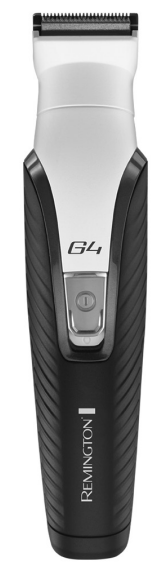
The Remington G4 Graphite Series Personal Groomer PG4000 is a premium multi-grooming solution designed for men who demand precision, comfort, and versatility in their daily grooming routine. Featuring advanced graphite-coated blades and comfort tip technology, this all-in-one grooming kit delivers a smooth, irritation-free experience for beard, hair, and body trimming. Whether you’re shaping your beard, edging your hairline, or maintaining facial and body hair, the Remington G4 Graphite Series Personal Groomer PG4000 offers professional results at home.
Key benefits include a durable 30mm main trimmer, a mini foil shaver, and specialised trimmers for nose, ear, and eyebrow grooming. The device is corded and cordless, providing flexibility for use anywhere. With a long battery life and easy cleaning, it’s ideal for busy lifestyles. The Remington G4 Graphite Series Personal Groomer PG4000 is suitable for men of all ages and grooming needs, from casual maintenance to detailed styling.
Available at major retailers and online stores, the Remington G4 Graphite Series Personal Groomer PG4000 typically retails between $50 and $80, depending on region and included accessories. It’s widely available in North America, Europe, and Asia, making it a reliable choice for global users.
Specifications of the Remington G4 Graphite Series Personal Groomer PG4000
- Model Number: PG4000 U51
- Type Number: PG04A
- Power Input: 100-240V~ 50/60Hz
- Battery Life: Up to 60 minutes of cordless use
- Charging Time: 10 hours for a full charge
- Weight: 236g
- Noise Level: Less than 75 dB
- Main Trimmer Width: 30mm
- Mini Foil Shaver Width: 18mm
- Blade Type: Graphite-coated, self-sharpening, comfort tip
- Combs Included: 2 x blending combs (1.5mm, 3mm), 1 x dual adjustable comb (2-20mm in 2mm increments)
- Additional Trimmers: Linear nose, ear, and eyebrow trimmer; TST precision trimmer
- Washable Heads: Yes
- Storage: Premium storage pouch
- Warranty: 1 year
The Remington G4 Graphite Series Personal Groomer PG4000 outperforms many competitors with its durable graphite blades, versatile comb system, and comprehensive trimmer set. It’s comparable to high-end grooming kits but offers better value for money due to its all-in-one design and long-lasting battery.
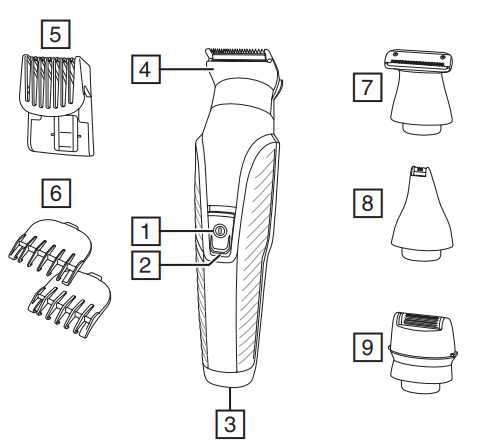
PARTS
- On/Off switch
- Charging indicator light
- Charging connector
- Wide trimmer
- Adjustable comb
- Attachment guide combs
- Precision trimmer
- Nose, ear, eyebrow trimmer
- Mini foil shaver
Not shown- Adaptor
- Storage pouch
CHARGING YOUR APPLIANCE
This appliance can be used “cordless” by powering it from its internal rechargeable battery, or “corded” by connecting it to the charging adaptor and then the mains power supply. Powering the appliance from the charging adaptor is useful if the rechargeable battery does not have enough charge. Be aware, however, that frequent use of the cordless mode will reduce the life of the rechargeable battery.
Before using your trimmer for the first time, chargeit for 10 hours.
- Ensure the product is switched off.
- Connect the charging adaptor to the product and then to the mains.
- When charging, the charge indicator light will light up. The light will go out when charging is complete.
- Run time from a fully charged battery is up to 60 minutes.
- Your trimmer cannot be overcharged. However, if it is not going to be used for an extended period of time (2-3 months), unplug it from the mains and store.
- To preserve the life of your batteries, let them run out every 6 months, then recharge for 10 hours.
CORDED USE
- Connect the charging adaptor to the product and then to the mains.
- Switch the product on by pressing the on/off switch.
ATTACHMENTS
TO FIT AND REMOVE ATTACHMENTS (FIG. A)
Ensure that the device is switched off before fitting or removing attachments.
- To remove, rotate the attachment anti-clockwise until it unlocks and then lift it off.
- To fit, place the desired attachment on top of the device and rotate the attachment clockwise to lock it into place.
FITTING AND REMOVING FIXED GUIDE COMBS
To Fit
- Hook the front of the guide comb over the teeth of the wide trimmer.
- Press the back of the guide comb down until it clicks into place.
To Remove
- Lift the tab on the back of the guide comb upwards until it comes free from the wide trimmer head.
FITTING AND REMOVING THE ADJUSTABLE COMB
- To fit, line up the rails on the comb with the slots on the sides of the groomer and slide the comb downwards onto the groomer.
- To adjust, press and hold the adjustment button on the back of the comb and slide the comb up or down. Release the button to lock the comb at that position. The length of the cut is indicated by the scale on the side of the trimmer.
INSTRUCTIONS FOR USE
- Comb facial hair with a fine comb before you start trimming.
- Comb your hair in the direction that it grows so that the hairs are at their maximum height and facing in the same direction.
- After trimming, lightly go over the trimmed areas with the foil to get a smooth, clear finish.
- Since all hairs do not grow in the same direction, you may want to try different trimming positions (i.e. upwards, downwards or across) for better results.
- Hair should be dry and free from any waxes or lotions.
- If hair builds up during use, switch the unit off, remove any attachment in use and clean any excess hair clippings from the attachment and groomer.
3-DAY STUBBLE, AND BODY HAIR MAINTENANCE
Attachments
- Wide trimmer with 1.5 mm fixed comb
3-day stubble look:
Let your stubble grow to a length that is slightly longer than the look you are trying to achieve.
- Fit the 1.5 mm fixed comb to the wide trimmer attachment.
- Run your trimmer through your beard against the direction of hair growth.
- Tidy the edges of the stubble using the precision trimmer attachment.
- For more control over the length of your stubble, you can use the adjustable comb and trim your stubble down in increments, starting at a longer length setting until you get the desired look.
Body hair maintenance
- Let your hair grow to a length that is slightly longer than the look you are trying to achieve.
- Fit the 3 mm fixed comb to the wide trimmer attachment.
- Run your trimmer through your body hair against the direction of hair growth.
HAIR CLIPPING
Attachments
- Wide trimmer with adjustable comb
Step 1: Nape of the neck
- Fit the wide trimmer and adjustable comb.
- Set the adjustable comb to the desired length.
- Hold the clipper with the blade teeth pointing upwards. Begin starting at the centre of the head at the base of the neck.
- Slowly lift the clipper, working upwards and outwards through the hair, trimming just a little at a time.
Step 2: Back of the head
- With the comb set at 12mm or 18mm, cut the hair at the back of the head.
Step 3: Side of the head
- Adjust the comb to a shorter length setting for the areas around the ears.
- Increase the length setting on the adjustable comb to gradually transition the length of hair on the side of the head to the longer hair on the top of the head.
Step 4: Top of the head
- Adjust the comb to the longer length settings (up to 20 mm,), then cut the hair on top of the head against the direction in which the hair normally grows.
- Always work from the back of the head.
Trim the sideburns
- To trim the sideburns, adjust the comb to the desired length setting, or use one of the fixed guide combs.
SHORT/LONG BEARD TRIMMING
Attachments
- Wide trimmer with adjustable comb
Precision trimmer
- Fit the wide trimmer and adjustable comb.
- Set the adjustable comb to the desired length.
- Start trimming under the chin, following the line of the jaw.
- Work upwards towards the ear and upper beard line.
- Tidy the beard edges using the precision trimmer attachment.
CONTOUR EDGING AND CLOSE HAIR CUTTING
Attachments
- Wide trimmer
Contour edging:
- Hold the device with the cutting blade (teeth) facing you and at 90 degrees to the skin.
- Start with the edge of the beard/moustache line and, with the blade resting lightly against the skin, use slow,,w controlled movements to create contoured lines.
Close hair cutting:
- Use the fingers of one hand to lift the hair at the base of your head up off your neck.
- Your index finger should be covering the roots of the hairs you are lifting to prevent them from being accidentally cut.
- Hold the trimmer to the base of your neck with the blade facing up. Move the trimmer up the neck until it touches your index finger,ge,r which is protecting the hair roots.
- Move your trimmer slowly and keep the hair roots at the base of your head out of the way of the trimmer.
DETAILED NOSE, EYEBROW AND EAR HAIR TRIMMING
Attachments
- Nose, ear and eyebrow trimmer
Nose and ear:
- Fit the nose, ear and eyebrow trimmer.
- Insert the attachment gently into the nostril or ear.
- Gently move the attachment in and out while rotating the groomer at the same time.
- Don’t insert the attachment more than 6 mm into the nostril or ear.
Eyebrow:
- Carefully guide the attachment to remove any stray or longer hairs from the eyebrow.
- To completely remove hair, let the attachment touch the skin , then move over the desired area.
MICRO STUBBLE AND PRECISION TRIMMING
Attachments
- Precision trimmer
Micro stubble:
The attachment has Trim Shave Technology, which trims hair down to 0.2 mm to leave a micro stubble finish.
- Fit the precision trimmer.
- Hold the attachment so that the guide on the lower edge of the blade contacts the skin (in a the same way you as you would hold a wet razor). The guide on the lower edge of the blade helps to stretch the skin during trimming.
- Use motions similar to wet shaving.
Precision trimming:
- Hold the precision trimmer attachment perpendicular to the skin.
- Move it towards or away from the beard hair to achieve the desired result. Use gentle pressure and controlled movements.
CLEAN SHAVEN EDGING
Attachments
- Mini Foil Shaver
- Hold the groomer so the mini foil shaver gently touches your face.
- Use short, well-controlled movements to shave around your beard moustache. Use your free hand to stretch your skin. This encourages the hair to stand upright, making it easier to shave.
- Note: The mini foil shaver was designed to shave the detail areas around your beard/moustache/sideburns. It was not designed to shave your entire face. For a close , comfortable shave, guaranteed, use one of Remington’s electric shavers.
CARE FOR YOUR GROOMER
- Care for your product to ensure a long-lasting performance. We recommend that you clean your groomer after each use.
AFTER EACH USE
- Brush any accumulated hair from the groomer and attachment heads.
- The easiest and most hygienic way to clean the groomer is by detaching the head from the ggroomer'sbody and rinsing the head with warm water.
- The groomer's body should not be rinsed.
- Place one or two drops of cutter oil or sewing machine oil on the blades.
- Turn the clipper on to distribute the oil evenly, and wipe off any excess oil.
Common Troubleshooting
It won’t power on
- Make sure it’s fully charged — the PG4000 can run up to ~60 min after a full ~10 hr charge.
- Check the charging cable/adapter: if it’s damaged, the trimmer may not charge or turn on.
- Ensure the power button is pressed firmly — sometimes the switch won’t engage if pressed lightly.
Blades don’t cut properly / pull hair.
- Clean under the blade head after every use. Hair buildup can jam the blades and reduce performance.
- Rinse removable blades under warm running water (since many heads are washable).
- If performance is still poor, remove and re-attach heads to ensure correct mounting.
Attachments don’t click on securely.y
- Some owners report the comb attachments (1.5 mm & 3 mm) wear at the clips, making them hard to snap on/off after repeated use.
- Try aligning the comb carefully before pressing — forcing it when misaligned increases wear.
Short battery life or won’t hold a charge
- The built-in rechargeable battery can degrade over time — after many charge cycles, it might run shorter than ~60 min.
- If battery issues become severe, professional replacement isn’t supported (battery is non-replaceable).
Cleaning & Maintenance tips
- Always use the supplied brush to remove hair from blades after trimming.
- Do not submerge the main body in water — only remove and wash removable heads.
- Only use the original charger supplied with the device.
Pros
- Versatile all-in-one grooming tool — trims beard, hair, body, nose/ear hair, and fine detailing.
- Good battery life — around 60 minutes on a full charge.
- Washable attachments make cleaning easy.
- Graphite-coated, self-sharpening blades glide smoothly over skin for comfort.
- Multiple attachments (7 total) give flexibility for different grooming styles.
- Can be used corded or cordless.
- Generally good price/quality for a multi-trimmer.
Cons
- Attachment clips can wea,,r and combs may stop snapping on securely after repeated use.
- No included oil — some users have wished a bladeoverwound wass in the box for maintenance.
- Battery not replaceable — once it degrades, you need a new unit.
- Charging can take a long time (~10 hours).
- Not a professional salon tool — designed for personal use only
Faqs
How do I set up the Remington G4 Graphite Series Personal Groomer PG4000 for the first time?
What should I do if my Remington G4 Graphite Series Personal Groomer PG4000 is not charging?
Can I use the Remington G4 Graphite Series Personal Groomer PG4000 cordlessly after charging?
How do I attach and remove the guide combs on the Remington G4 Graphite Series Personal Groomer PG4000?
What are the key features that make the Remington G4 Graphite Series Personal Groomer PG4000 different from other trimmers?
How often should I clean and maintain the Remington G4 Graphite Series Personal Groomer PG4000?
Can I use attachments other than those supplied with the Remington G4 Graphite Series Personal Groomer PG4000?
How do I adjust the cutting length on the Remington G4 Graphite Series Personal Groomer PG4000?
More remington manuals
- Setup: Remington G4 Graphite Series Personal Groomer PG4005 User Manual
- Setup: Remington G3 Graphite Series Personal Groomer PG3000 User Manual
- Setup: Remington G5 Graphite Series Personal Groomer PG5000 Owner Manual
- Setup: Remington G2 Graphite Series Personal Groomer PG2000 User Manual
- Setup: Remington Heritage Personal Groomer PG9100 User Manual
- Setup: Remington MyGroom Rotary Shaver R0050 User Manual
Leave a Comment