
Setup: Remington G4 Graphite Series Personal Groomer PG4005 User Manual
Content
Remington G4 Graphite Series Personal Groomer PG4005
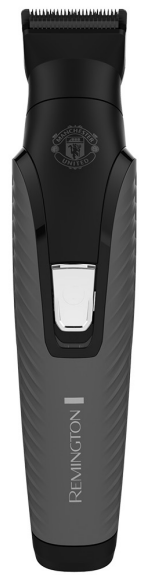
Introduction to the Remington G4 Graphite Series Personal Groomer
The Remington G4 Graphite Series Personal Groomer PG4005 is a versatile, all-in-one grooming device designed for complete head-to-toe precision styling. This multi-functional groomer combines professional-grade features with a user-friendly design, making it an ideal choice for men who demand quality grooming tools without compromising on convenience or performance. The Remington G4 Graphite Series Personal Groomer PG4005 features a distinctive graphite-engineered coating on its blades, which provides a smooth glide through hair while maintaining durability and comfort during use.
The device is particularly suited for individuals who prefer maintaining their own grooming routine at home, whether for beard styling, hair trimming, body hair maintenance, or detailed precision work. The Remington G4 Graphite Series Personal Groomer PG4005 is available in a special Manchester United Edition, featuring club colours and the iconic Manchester United Crest, making it a collector's item for football enthusiasts. The product offers exceptional value for money, typically priced in the mid-range grooming tool category, with availability across multiple online retailers and physical stores in Malaysia and across Asia.
Key benefits include its dual power functionality (both corded and cordless operation), comprehensive attachment system, and professional-quality results suitable for personal use or as a gift for the discerning groomer. The device is engineered to deliver comfortable cutting with less clogging, ensuring consistent performance across multiple grooming sessions.
Detailed Technical Specifications
Power and Charging Specifications:
- Rechargeable battery with 10-hour full charge time
- Cordless operation time: 60 minutes per charge
- Corded operation: Continuous power for uninterrupted use
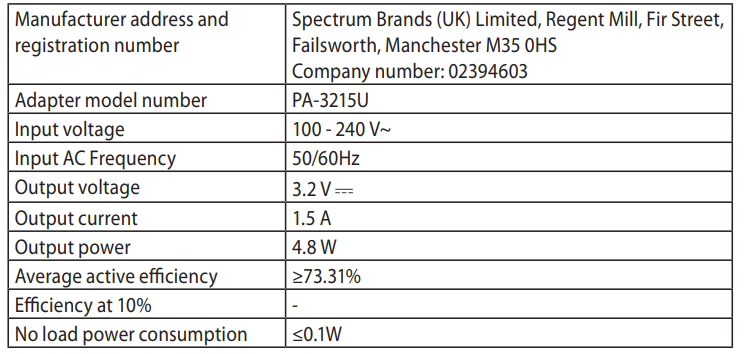
- Adapter model number: PA-3215U
- Input voltage: 100-240V AC
- Input frequency: 50/60Hz
- Output voltage: 3.2V DC
- Output current: 1.5A
- Output power: 4.8W
- Average active efficiency: ≥73.31%
- No-load power consumption: ≤0.1W
Cutting Performance and Attachments:
- Wide trimmer width: 30mm for contour edging and close hair cutting
- Precision trimmer: 30mm width for micro stubble and detailed finishing
- Nose, ear, and eyebrow trimmer for detailed facial grooming
- Mini foil shaver for additional versatility
- Cutting length without comb: 0.2mm (micro stubble finish)
Comb Attachments and Length Settings:
- Dual adjustable comb with 10 position settings: 2, 4, 6, 8, 10, 12, 14, 16, 18, and 20mm
- 2mm precision increments between settings
- Two blending combs included: #0 (1.5mm) and #1 (3mm)
- Graphite-engineered coating blades for smooth cutting and durability
- Comfort Tips technology for gentle, skin-friendly operation
Design Features:
- On/off switch with one-touch operation
- Charging indicator light for battery status monitoring
- Charging connector for easy power management
- Graphite Engineered Coating for enhanced blade durability
- Manchester United Edition design with club colours and crest
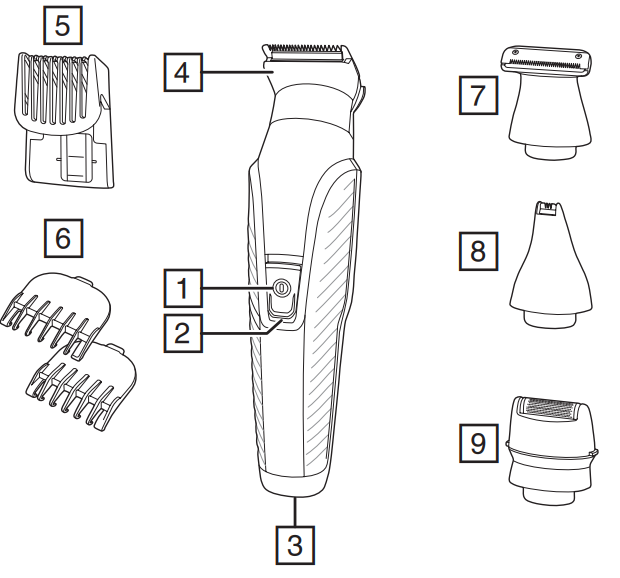
PARTS
- On/Off switch
- Charging indicator light
- Charging connector
- Wide trimmer
- Adjustable comb
- Attachment guide combs
- Precision trimmer
- Nose, ear, eyebrow trimmer
- Mini foil shaver
Not shown:- Adaptor
- Travel pouch
CHARGING YOUR APPLIANCE
This appliance can be used “cordless” by powering it from its internal rechargeable battery, or “corded” by connecting it to the charging adaptor and then the mains power supply. Powering the appliance from the charging adaptor is useful if the rechargeable battery does not have enough charge. Be aware,e however, that frequent use of the cordless mode will reduce the life of the rechargeable battery.
Before using your trimmer for the first time, charge it for 10 hours.
- Ensure the product is switched off.
- Connect the charging adaptor to the product and then to the mains.
- When charging, the charge indicator light will light up. The light will go out when charging is complete.
- Run time from a fully charged battery is up to 60 minutes.
- Your trimmer cannot be overcharged. However, if it is not going to be used for an extended period of time (2-3 months), unplug it from the mains and store.
- To preserve the life of your batteries, let them run out every 6 months, then recharge for 10 hours.
CORDED USE
- Connect the charging adaptor to the product and then to the mains.
- Switch the product on by pressing the on/off switch.
ATTACHMENTS
TO FIT AND REMOVE ATTACHMENTS (FIG. A)
Ensure that the device is switched off before fitting or removing attachments.
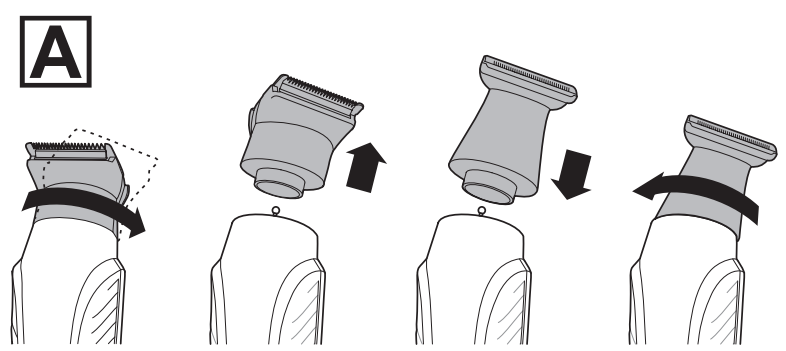
- To remove, rotate the attachment anti-clockwise until it unlocks and then lift it off.
- To fit, place the desired attachment on top of the device and rotate the attachment clockwise to lock it into place.
FITTING AND REMOVING FIXED GUIDE COMBS To Fit
- Hook the front of the guide comb over the teeth of the wide trimmer.
- Press the back of the guide comb down until it clicks into place.
To Remove
- Lift the tab on the back of the guide comb upwards until it comes free from the wide trimmer head.
FITTING AND REMOVING THE ADJUSTABLE COMB
- To fit, line up the rails on the comb with the slots on the sides of the groomer and slide the comb downwards onto the groomer.
- To adjust, press and hold the adjustment button on the back of the comb and slide the comb up or down. Release the button to lock the comb at that position. The length ofthe cut is indicated by the scale on the side of the trimmer.
INSTRUCTIONS FOR USE
- Comb facial hair with a fine comb before you start trimming.
- Comb your hair in the direction that it grows so that the hairs are at their maximum height and facing in the same direction.
- After trimming, lightly go over the trimmed areas with the foil to get a smooth, clean finish.
- Since all hairs do not grow in the same direction, you may want to try different trimming positions (i.e. upwards, downwards or across) for better results.
- Hair should be dry and free from any waxes or lotions.
- If hair builds up during use, switch the unit off, remove any attachment in use and clean any excess hair clippings from the attachment and groomer.
3-DAY STUBBLE, AND BODY HAIR MAINTENANCE
Attachments
- Wide trimmer with 1.5 mm fixed comb
3-day stubble look:
Let your stubble grow to a length that is slightly longer than the look you are trying to achieve.
- Fit the 1.5 mm fixed comb to the wide trimmer attachment.
- Run your trimmer through your beard against the direction of hair growth.
- Tidy the edges of the stubble using the precision trimmer attachment.
For more control over the length of your stubble, you can use the adjustable comb and trim your stubble down in increments, starting at a longer length setting until you get the desired look.
Body hair maintenance
- Let your hair grow to a length that is slightly longer than the look you are trying to achieve.
- Fit the 3 mm fixed comb to the wide trimmer attachment.
- Run your trimmer through your body hair against the direction of hair growth.
HAIR CLIPPING
Attachments
Wide trimmer with adjustable comb
Step 1: Nape of the neck
- Fit the wide trimmer and adjustable comb.
- Set the adjustable comb to the desired length.
- Hold the clipper with the blade teeth pointing upwards. Begin starting at the centre of the head at the base of the neck.
- Slowly lift the clipper, working upwards and outwards through the hair, trimming just a little at a time.
Step 2: Back of the head
- With the comb set at 12mm or 18mm, cut the hair at the back of the head.
Step 3: Side of the head
- Adjust the comb to a shorter length setting for the areas around the ears.
- Increase the length setting on the adjustable comb to gradually transition the length of hair on the side of the head to the longer hair on the top of the head.
Step 4: Top of the head
- Adjust the comb to the longer length settings (up to 20 mm), then cut the hair on top of the head against the direction in which the hair normally grows.
- Always work from the back of the head.
Trim the sideburns
- To trim the sideburns, adjust the comb to the desired length setting, or use one of the fixed guide combs.
SHORT/LONG BEARD TRIMMING
Attachments
- Wide trimmer with adjustable comb
Precision trimmer
- Fit the wide trimmer and adjustable comb.
- Set the adjustable comb to the desired length.
- Start trimming under the chin, following the line of the jaw.
- Work upwards towards the ear and upper beard line.
- Tidy the beard edges using the precision trimmer attachment.
CONTOUR EDGING AND CLOSE HAIR CUTTING
Attachments
- Wide trimmer
Contour edging:
- Hold the device with the cutting blade (teeth) facing you and at 90 degrees to the skin.
- Start with the edge of the beard/moustache line and, with the blade resting lightly against the skin, use slow,w controlled movements to create contoured lines.
Close hair cutting:
- Use the fingers of one hand to lift the hair at the base of your head up off your neck.
- Your index finger should be covering the roots of the hairs you are lifting to prevent them from being accidentally cut.
- Hold the trimmer to the base of your neck with the blade facing up. Move the trimmer up the neck until it touches your index finger, er which is protecting the hair roots.
- Move your trimmer slowly and keep the hair roots at the base of your head out of the way of the trimmer.
DETAILED NOSE, EYEBROW AND EAR HAIR TRIMMING
Attachments
- Nose, ear and eyebrow trimmer
Nose and ear:
- Fit the nose, ear and eyebrow trimmer.
- Insert the attachment gently into the nostril or ear.
- Gently move the attachment in and out while rotating the groomer at the same time.
Don’t insert the attachment more than 6 mm into the nostril or ear.
Eyebrow:
- Carefully guide the attachment to remove any stray or longer hairs from the eyebrow.
- To completely remove hair, let the attachment touch the skin , then move over the desired area.
MICRO STUBBLE AND PRECISION TRIMMING
Attachments
- Precision trimmer
Micro stubble:
The attachment has Trim Shave Technology, which trims hair down to 0.2 mm to leave a micro stubble finish.
- Fit the precision trimmer.
- Hold the attachment so that the guide on the lower edge of the blade contacts the skin (in a the same way you as you would hold a wet razor). The guide on the lower edge of the blade helps to stretch the skin during trimming.
- Use motions similar to wet shaving.
Precision trimming:
- Hold the precision trimmer attachment perpendicular to the skin.
- Move it towards or away from the beard hair to achieve the desired result. Use gentle pressure and controlled movements.
CLEAN SHAVEN EDGING
Attachments
- Mini Foil Shaver
- Hold the groomer so the mini foil shaver gently touches your face.
- Use short, well-controlled movements to shave around your beard moustache. Use your free hand to stretch your skin. This encourages the hair to stand upright, making it easier to shave.
Note: The mini foil shaver was designed to shave the detail areas around your beard/moustache/sideburns. It was not designed to shave your entire face. For a close, comfortable shave, guaranteed, use one of Remington’s electric shavers.
CARE FOR YOUR GROOMER
Care for your product to ensure along-lastingg performance. We recommend that you clean your groomer after each use.
AFTER EACH USE
- Brush any accumulated hair from the groomer and attachment heads.
- The easiest and most hygienic way to clean the groomer is by detaching the head from the ggroomer'sbody and rinsing the head with warm water.
- The groomer's body should not be rinsed.
- Place one or two drops of cutter oil or sewing machine oil on the blades.
- Turn the clipper on to distribute the oil evenly, and wipe off any excess oil.
BATTERY REMOVAL
We strongly recommend that a professional remove the rechargeable battery. Parts of the shaver case, and tools have sharp edges and may cause injury if not handled correctly.
- The rechargeable battery must be removed from the appliance before it is scrapped.
- Disconnect the charging adapter before removing the battery.
- Ensure that the battery is fully discharged. To do this, operate the shaver until it stops.
- Unplug the trimmer.
- Using a suitable tool, carefully pry apart the front and rear halves of the case at the joint line.
- Cut the tabs holding the battery to the circuit board.
- Used batteries must be removed from the appliance and disposed of at an appropriate official recycling/collection point.
- Do not attempt to operate the shaver once you have opened it.
ADAPTER SPECIFICATIONS
Comprehensive Troubleshooting Guide
Problem: Device Won't Power On
- Solution: Ensure the device is fully charged by connecting it to the adapter for 10 hours. Check that the adapter is properly connected to both the device and a functioning electrical outlet. Verify that the on/off switch is in the ON position. If the charging indicator light doesn't illuminate, try a different electrical outlet to rule out power source issues. Contact customer support if the problem persists after these steps.
Problem: Reduced Cutting Performance or Clogging
- Solution: Clean the blades and cutting head immediately after each use. Remove any attached comb guides and gently brush away hair clippings with a soft brush. For stubborn buildup, use a small cleaning brush oran old toothbrush to dislodge trapped hair from the blade teeth. Never use water to clean the cutting head unless the device is specifically waterproof (check your manual). Ensure the graphite-coated blades are not bent or damaged, as this affects cutting efficiency.
Problem: Battery Drains Quickly or Won't Hold Charge
- Solution: Perform a full 10-hour charge cycle to recalibrate the battery. Avoid leaving the device in extreme temperatures, as this affects battery performance. Use cordless mode regularly to maintain battery health. If the battery consistently fails to hold a charge after multiple full cycles, the battery may need replacement. Contact Remington customer support for battery replacement options or warranty claims.
Problem: Uneven or Patchy Cutting Results
- Solution: Verify that the comb attachment is properly locked in place and not loose. Ensure you're moving the device in the correct direction (typically upward for beard work). Check that the blades are clean and free from hair buildup. Use slower, more deliberate strokes for better control. Start with longer cutting lengths and gradually work toward shorter lengths for better results. If blade damage is suspected, discontinue use and contact support.
Problem: Charging Indicator Light Not Functioning
- Solution: The indicator light may not be visible in bright environments. Try charging in a dimly lit area to confirm light operation. If the light remains non-functional but the device still charges and operates, the indicator may be faulty,y but the charging function is intact. Contact customer support if you suspect the charging mechanism is compromised.
Preventive Maintenance Tips:
- Clean the device after each use to prevent hair accumulation
- Store in a dry environment away from moisture and humidity
- Perform monthly deep cleaning of all attachments
- Charge the device monthly, even if not in use, to maintain battery health
- Inspect blades regularly for damage or dullness
- Keep all attachments organised and protected from damage
Warranty and Support Information:
The Remington G4 Graphite Series Personal Groomer PG4005 typically includes a manufacturer's warranty covering defects in materials and workmanship. Contact Remington customer service through their official website or authorised retailers in your region for warranty claims, replacements, or technical support. Keep your proof of purchase and original packaging for warranty purposes.
Advantages and Disadvantages Analysis
Significant Advantages:
- Versatile All-in-One Design: The Remington G4 Graphite Series Personal Groomer PG4005 includes multiple attachments (wide trimmer, precision trimmer, nose/ear/eyebrow trimmer, mini foil shaver) for complete head-to-toe grooming without purchasing separate devices
- Dual Power Functionality: Flexible corded and cordless operation provides both continuous power and portability, accommodating different user preferences and situations
- Graphite Engineered Coating: The graphite-coated blades offer superior durability, smooth cutting action, and reduced friction compared to standard stainless steel blades
- Precise Length Control: 10-position adjustable comb with 2mm increments (2-20mm range) allows detailed customisation for various beard and hair styles
- Professional Results at Home: Comfort , Tips techn , ology and precision engineering deliver salon-quality grooming results for personal use
- Excellent Value Proposition: Mid-range pricing offers premium features typically found in more expensive grooming devices
- Collector's Appeal: Manchester United Edition design adds aesthetic value for football enthusiasts
Notable Disadvantages:
- 60-Minute Battery Life: Cordless operation provides only one hour per charge, requiring frequent recharging for extended grooming sessions
- Learning Curve: Multiple attachments and settings require familiarisation for optimal results, particularly for users new to electric groomers
- Maintenance Requirements: Regular cleaning after each use is necessary to prevent hair clogging and maintain cutting performance
- Blade Replacement Concerns: Graphite-coated blades may require eventual replacement, with availability and cost depending on your region
- Limited Wet Use: Device is not fully waterproof, limiting shower grooming capabilities
- Regional Availability: Primarily available in Asian markets, with limited availability in other regions
Value for Money Assessment:
The Remington G4 Graphite Series Personal Groomer PG4005 represents excellent value for budget-conscious consumers seeking professional grooming capabilities. Compared to purchasing individual grooming tools (beard trimmer, body hair trimmer, precision trimmer, and nose trimmer separately), this all-in-one device provides significant cost savings. The ggraphite-engineeredcoating and Comfort Tips technology justify the mid-range pricing, delivering performance comparable to premium-priced alternatives.
User Reviews and Customer Feedback
Positive Customer Feedback:
Users consistently praise the Remington G4 Graphite Series Personal Groomer PG4005 for its versatility and ease of use. Customers appreciate the smooth cutting action provided by the graphite-coated blades and the comprehensive attachment system that eliminates the need for multiple devices. The dual power functionality receives particular acclaim, with users highlighting the convenience of cordless operation for travel and the reliability of corded mode for extended grooming sessions. Manchester United fans express satisfaction with the special edition design, considering it both functional and collectable.
Common Praise Points:
- Excellent cutting performance and smooth blade action
- Comfortable operation with minimal irritation (Comfort Tips technology)
- Versatile attachments for complete grooming needs
- Reasonable pricing for a feature-rich device
- Durable construction with reliable performance over extended use
- Easy to clean and maintain
Frequently Mentioned Concerns:
Some users note that the 60-minute battery life may be insufficient for full-body grooming sessions, particularly for users with thick or extensive body hair. A few customers report that the device requires careful handling of the comb attachments, as loose positioning can result in uneven cutting. Battery longevity after extended use (12+ months) is occasionally mentioned as a concern, with some users reporting reduced charging capacity over time.
Purchase Recommendations:
The Remington G4 Graphite Series Personal Groomer PG4005 is recommended for individuals seeking an affordable, versatile grooming solution for home use. It's particularly well-suited for users who prioritise convenience and all-in-one functionality over specialised performance. Manchester United supporters and collectors will appreciate the special edition design. However, professionals requiring extended cordless operation or users with very sensitive skin should research alternative options before purchasing.
Star Rating Summary: Based on aggregated user feedback, the device typically receives 4 to 4.5 out of 5 stars, with users consistently rating it as a reliable, good-value grooming tool that delivers professional results for personal use.
```
Faqs
How do I set up the remington G4 Graphite Series Personal Groomer PG4005 for the first time?
What should I do if the remington G4 Graphite Series Personal Groomer PG4005 is not turning on?
How do I clean and maintain the remington G4 Graphite Series Personal Groomer PG4005 for optimal performance?
What are the key features of the remington G4 Graphite Series Personal Groomer PG4005 that enhance grooming experience?
Can I use the remington G4 Graphite Series Personal Groomer PG4005 attachments interchangeably with other Remington groomers?
How do I adjust the trimming length on the remington G4 Graphite Series Personal Groomer PG4005?
What should I do if hair builds up inside the remington G4 Graphite Series Personal Groomer PG4005 during use?
Is the remington G4 Graphite Series Personal Groomer PG4005 safe to use in wet environments like showers or baths?
More remington manuals
- Setup: Remington G5 Graphite Series Personal Groomer PG5000 Owner Manual
- Setup: Remington G4 Graphite Series Personal Groomer PG4000 User Manual
- Setup: Remington Heritage Personal Groomer PG9100 User Manual
- Setup: Remington G3 Graphite Series Personal Groomer PG3000 User Manual
- Setup: Remington Cordless Ladyshave WDF4840 User Manual
- Setup: Remington G2 Graphite Series Personal Groomer PG2000 User Manual
Leave a Comment