
How to Use: Remington HC5900 PrecisionCut Hair Clipper User Manual
Content
Remington HC5900 PrecisionCut Hair
Introduction
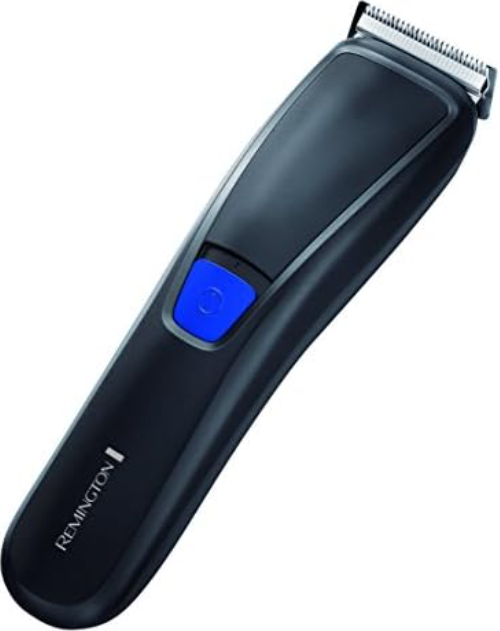
The Remington HC5900 PrecisionCut Hair Clipper represents the pinnacle of at-home grooming technology, delivering salon-quality results with the convenience and flexibility modern users demand. Engineered for both precision and ease of use, this cordless hair clipper is ideal for men seeking professional-grade haircuts, beard trims, and all-over styling without leaving home. Its advanced blade geometry and AcuAngle blades ensure a cleaner, smoother cut every time, reducing the need for multiple passes and minimizing irritation.
Among its standout features are a robust 90-minute cordless runtime, quick-charge capability for emergency top-ups, and a user-friendly LED fuel gauge for battery monitoring. The HC5900 also supports both corded and cordless operation, making it versatile for travel or home use. With adjustable cutting lengths and a comprehensive set of guide combs, it caters to a wide range of styles—from buzz cuts to textured fades—ensuring the Remington HC5900 PrecisionCut Hair Clipper is a one-stop solution for personal grooming.
Designed for the style-conscious and practical user, this clipper is perfect for DIY enthusiasts, frequent travelers, and anyone who values a sharp, maintained look. The estimated price range is mid-tier, offering excellent value for the features provided, and it is widely available through major online retailers and electronics stores. Whether you’re a grooming novice or an experienced DIY barber, the Remington HC5900 PrecisionCut Hair Clipper elevates your routine with professional results at your fingertips.
Specifications
- Blade Type: Advanced AcuAngle Titanium-Coated Blades for precision and durability
- Cutting Lengths: Adjustable from 1mm up to 44mm with included guide combs
- Power Source: Rechargeable lithium-ion battery (cordless) and corded operation via adaptor
- Cordless Runtime: Up to 90 minutes on a full charge
- Quick Charge: 10-minute charge provides emergency runtime
- Charging Options: Standard electrical socket or micro USB (USB charging is for battery only, not corded operation)
- LED Indicator: Displays battery level and charging status
- Weight & Design: Ergonomic, lightweight, and travel-friendly
- Accessories: Multiple guide combs, cleaning brush, charging adaptor, USB cable, storage pouch
- Maintenance: Easy-to-clean design; blades are self-sharpening for long-term performance
Performance & Comparison: The Remington HC5900 PrecisionCut Hair Clipper outperforms many competitors with its extended cordless runtime and versatile charging options. Compared to similar models like the Remington HC5350AM (40-minute runtime, USB charging), the HC5900 offers nearly double the cordless use and a broader range of cutting lengths, making it better suited for users who need flexibility and endurance. Its AcuAngle blade technology also provides a noticeably smoother cut, reducing the risk of snagging and uneven results.
KEY FEATURES
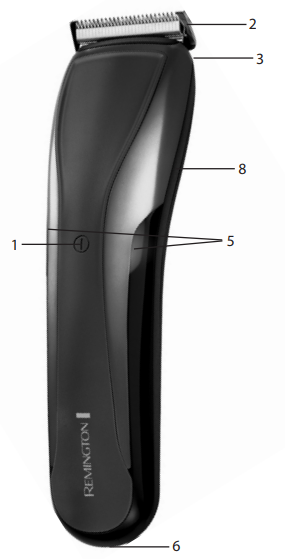
- On/Off/Turbo Switch
- Blade set
- 2 attachment guide combs 1-21mm and 24-44mm (not shown)
- Blade release button
- LED fuel gauge
- Micro USB port
- Adaptor (not shown)
- Slide select adjustable comb switch
GETTING STARTED
CHARGING YOUR APPLIANCE
- Before using your hair clipper for the first time, charge it for 4 hours.
- Ensure the product is switched off.
- Connect the charging adaptor to the product and then to the mains.
- If the product is not going to be used for an extended period of time (2 – 3 months), unplug it from the mains and store it.
- Fully recharge your hair clipper when you would like to use it again.
- Allow 4 hours for a complete charge.
- The clipper features an LED fuel gauge to show remaining charge and charging status. Please see the tables below:
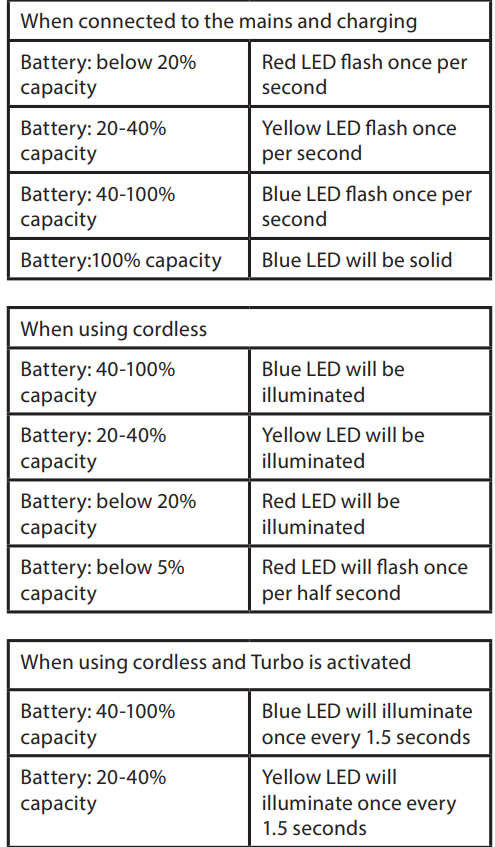
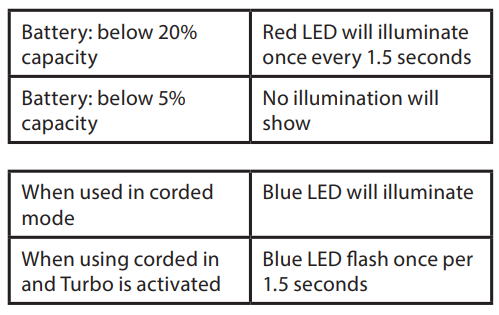
- To preserve the life of your batteries, let them run out every 6 months, then recharge for 4 hours.
- The clipper comes with a quick charge function; 10 minutes of charging will give an emergency burst of run time.
CHARGING VIA STANDARD ELECTRICAL SOCKET
- Ensure the product is switched off.
- Connect the charging adaptor to the product and then to the mains.
USB
- Connect the Micro USB to the appliance, and the USB connector to any standard USB port or charger.
- The product will only charge through USB and will not run in corded mode.
CORDED USE
- Connect the charging adaptor to the product, then to the mains.
CAUTION
- Extended mains-only use will result in the reduction of the battery life.
CORDLESS USE
- When the product is switched on and fully charged, it can be used in cordless mode for up to 90 minutes.
INSTRUCTIONS FOR USE
BEFORE STARTING THE CUT
- Inspect the clipper, making sure that it is free from hair and dirt.
- Seat the person so that their head is approximately at your eye level.
- Before cutting, always comb the hair so it is tangle-free and dry.
TO ATTACH A COMB
- Hold the comb with its teeth upward.
- To attach a comb, align the legs of the comb with the holes in the top of the clipper on each side of the blade, and slide the legs into the trimmer until the click.
- To remove, firmly pull the comb straight up away from the clipper.
HAIR CLIPPER COMB SETTINGS
- The clipper comes with two adjustable combs, a short length adjustable comb (indicated by 1-21mm on the back of the comb) and a longer length adjustable comb (indicated by 24-44mm on the back of the comb).
- Please see the table below for the different cutting lengths available on each comb:
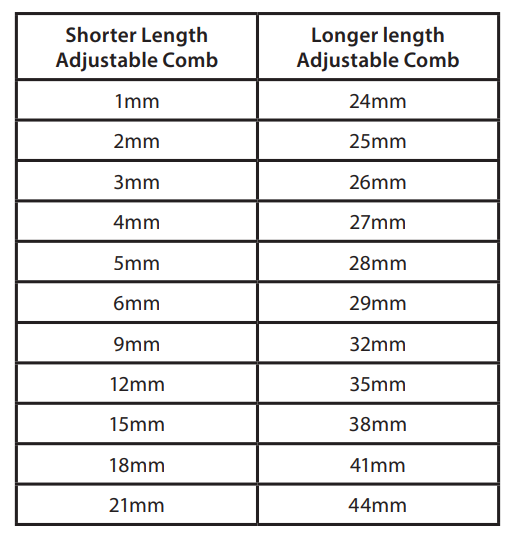
- On the slide select switch, there is a silver indicator which, when the short length adjustable comb is on the product, shows the corresponding length setting on the left of the slide select switch. On the other side of the slide, select switch H. There is another silver indicator that shows the corresponding length setting when the longer length adjustable comb is on the product. On the right side of the slide, select the switch.
- To adjust the length settings, you must press the upper half of the slide select switch to release the locking mechanism, then apply force upwards on the slide select switch to increase the length setting. To decrease the length settings press the upper part of the slide switch down and slide downwards.
- Use the clipper without any fixed combs for trimming hair close to the skin.
- This will trim hair to 1mm. Holding the clipper so the blades are perpendicular to the skin will trim hair to 0.5mm.
INSTRUCTIONS FOR CUTTING HAIR
- To turn the product on or off, press the On OFF button. To locate the On/Off button please refer to the key features section.
- For even cutting, allow the comb attachment/blade to cut its way through the hair. Do not force it through quickly. If you are cutting for the first time, start with the maximum comb attachment.
STEP 1 – Nape of the neck
- Set the comb to 3mm or 6mm.
- Hold the clipper with the blade teeth pointing upwards. Begin starting at the centre of the head at the base of the neck.
- Slowly lift the clipper, working upwards and outwards through the hair, trimming just a little at a time.
STEP 2 – Back of the head
- With the comb set at 12mm or 18mm, cut the hair at the back of the head.
STEP 3 – Side of the head
- With the comb set at 3mm or 6mm, trim sideburns. Then change to the longer 9mm guide comb and continue to cut the top of the head.
STEP 4 – Top of the head
- Use the longer length comb attachment and set it to 24mm or 27mm, then cut hair on top of the head against the direction in which the hair normally grows.
- For longer hair on top, use the longer length comb attachment (24 – 44mm) to achieve the desired style.
- Always work from the back of the head.
STEP 5 – The finishing touches
- Use the clipper without an attachment comb for close trimming around the base and sides of the neck.
- To produce a clean, straight line at the sideburns, reverse the hair clipper.
- Place the reversed clipper at right angles to the head, tips of the blades lightly touching the skin, and then work downwards.
AUTO TURBO SYSTEM
- Push the power button, and the appliance runs in Normal Mode. The Auto Turbo will automatically activate when the clipper senses it needs more power.
- To run in Turbo mode, hold down the power button for 2 seconds, and the clipper will run in boost until it is turned off.
CARE FOR YOUR HAIRCLIPPER
- Your clipper is fitted with high-quality blades.
- To ensure the long-lasting performance of your clipper, clean the blades and unit regularly.
- Always keep the attachment guide comb on the trimmer blade.
AFTER EACH USE
- Ensure the appliance is switched off and unplugged from the mains before cleaning.
- Brush the accumulated hair from the blades and body of the clipper.
- To clean the unit, wipe with a damp cloth and dry immediately.
- Place a few drops of cutter or sewing machine oil onto the blades. Wipe off excess oil.
WASHABLE BLADE CLEANING
This clipper is fully washable and therefore can be rinsed under a running tap. However, avoid getting the micro USB port wet.
- To remove the blades, ensure the unit is off. Press the blade release button on the back of the clipper when it meets the blade and push away from the clipper.
- To reattach once the blades are cleaned and dry, align the bottom of the blade with the bottom blade housing tab and slide the cartridge back into place until you hear a click.
- Do not run the entire unit under the tap only the blade set is meant to be submerged in water.
EVERY SIX MONTHS
- Remove the 2 screws retaining the fixed blade with a screwdriver. Do not remove the blade set.
- Brush out hair from between the blades with a soft cleaning brush. Do not remove the lubricating grease from the blades. It is not necessary to remove the small moving blade from the unit.
- If the moving blade has been removed, this can be re-fitted by slotting the coated blade holder over the pin in the centre of the interior product head.
- The groove on the coated blade, just below the teeth, rests on a metal plate at the opposite side to the screw holes. The fixed blade is fitted with the raised profile pointing outwards and fixed with the 2 screws.
- If the blades are not correctly aligned, cutting efficiency will be impaired.
CLEANING CAUTIONS
- Ensure the appliance is switched off and unplugged from the mains before cleaning.
- Do not use harsh or corrosive cleaners on the units or their blades.
Troubleshooting
Common Problems & Solutions
- Clipper Not Turning On: Ensure the battery is charged. If using corded mode, check the power connection. If issues persist, try a different outlet or charger.
- Reduced Cutting Performance: Clean the blades and remove trapped hair. Check for dull blades—replace if necessary, though the self-sharpening design should minimize this.
- Battery Not Holding Charge: Fully discharge the battery every 6 months, then recharge for 4 hours to preserve battery life. Avoid leaving the clipper plugged in for extended periods.
- LED Indicators Not Working: Refer to the manual for LED status meanings. If the LED does not illuminate during charging, try a different power source.
Error Codes: The HC5900 does not display error codes but uses LED indicators for battery status (red for low battery, blue for corded mode, flashing blue for turbo mode)
Preventive Measures: Regularly clean the blades and body, avoid dropping the device, and store it in a dry place. Use only the provided charging accessories.
Warranty & Support: TheRemingtonn HC5900 PrecisionCut Hair Clipper typically comes with a manufacturer’s warranty. For assistance, contact Remington customer support via their official website. Keep your proof of purchase for warranty claims.
Pros & Cons
Pros
- Long Cordless Runtime: Up to 90 minutes of use on a single charge, ideal for multiple haircuts or travel
- Versatile Charging: Supports both wall outlet and USB charging for convenience.
- Precision Cutting: AcuAngle titanium-coated blades deliver smooth, even cuts with minimal irritation
- Adjustable Lengths: Wide range of cutting lengths for diverse styles
- LED Battery Gauge: Clear visual feedback for battery status and charging
Cons
- USB Charging Limitation: USB charging only replenishes the battery; corded operation requires the wall adaptor.
- Battery Maintenance: Requires occasional full discharge to maintain battery health
- Accessory Quality: Some users may find the included combs less durable than professional-grade alternatives.
Value for Money: The Remington HC5900 PrecisionCut Hair Clipper offers excellent value for users seeking a reliable, feature-rich grooming tool without the salon price tag. It competes favorably with higher-end models while remaining accessible to most budgets.
Customer Reviews
Users consistently praise the Remington HC5900 PrecisionCut Hair Clipper for its long battery life, ease of use, and professional-quality results. Many highlight the convenience of both corded and cordless operation, as well as the quick-charge feature for last-minute touch-ups. The AcuAngle blades receive particular acclaim for delivering smooth, snag-free cuts—even on thick or coarse hair.
Common complaints are rare but include occasional issues with the durability of accessories and a desire for even longer cordless runtime. Most customers rate the HC5900 highly, with average star ratings of 4.5 out of 5 across major retailers. Testimonials frequently mention that the clipper is a worthwhile investment for anyone seeking a reliable, versatile grooming tool at home.
For those considering a purchase, the Remington HC5900 PrecisionCut Hair Clipper is recommended for its performance, convenience, and value. It is especially suited for users who prioritize cordless flexibility and precise cutting over ultra-premium accessories.
Faqs
How do I properly attach and adjust the comb on my remington HC5900 PrecisionCut Hair Clipper?
What should I do if my remington HC5900 PrecisionCut Hair Clipper is not cutting smoothly?
Can I use the remington HC5900 PrecisionCut Hair Clipper for both wet and dry hair?
How do I clean and maintain the remington HC5900 PrecisionCut Hair Clipper for long-lasting performance?
What are the different comb length settings available on the remington HC5900 PrecisionCut Hair Clipper?
How do I troubleshoot a red LED battery indicator on my remington HC5900 PrecisionCut Hair Clipper?
Is the remington HC5900 PrecisionCut Hair Clipper suitable for trimming sideburns and necklines?
What safety precautions should I follow when using the remington HC5900 PrecisionCut Hair Clipper?
More remington manuals
- Setup: Remington HC5780 Lithium Powered Hair Clipper User Manual
- How to Use: Remington Indestructible Hairclipper HC5880 User Manual
- Setup: Remington Easy Fade Hair Clipper HC500 User Manual
- How to Use: Remington Precision Cut Hair Clipper HC5500 User Manual
- How to Use: Remington QuickCut Pro Hair Clipper HC4300 User Manual
- How to Use: Remington Easy Fade Pro Hair Clipper HC550 User Manual
Leave a Comment