
How to Use: Remington Heritage Hair Clipper HC9100 User Manual
Content
Remington Heritage Hair Clipper HC9100

Introduction
The Remington Heritage Hair Clipper HC9100 is a premium grooming tool that flawlessly blends vintage design with modern cutting technology. Inspired by Remington’s original electric razor from 1937, this hair clipper boasts a stylish retro aesthetic with chrome accents, making it as visually appealing as it is functional. Ideal for individuals seeking professional-grade haircuts at home, barbers, and grooming enthusiasts, the HC9100 delivers precise trimming performance with its high-quality stainless steel blades.
Key benefits include a powerful cutting speed of 300 mm/s and six times the cutting performance of Remington’s standard clippers, ensuring fast, clean cuts. The clipper offers versatile cutting lengths from 1.5 mm to 25 mm, supported by 11 adjustable length settings to suit various styles and hair types. Its dual power capability allows the use of both corded and cordless, with a robust 60-minute cordless runtime powered by a lithium-ion battery. The package includes useful accessories such as a storage bag and a cleaning brush, enhancing convenience.
Currently, the Remington Heritage Hair Clipper HC9100 is available at an estimated price range of $65 to $90, accessible through various online retailers and specialist grooming stores. With its blend of classic design, powerful performance, and user-friendly features, it is well-suited for anyone wanting salon-quality haircuts without professional visits.
Specifications of Remington Heritage Hair Clipper HC9100: Detailed Features and Performance
- Blade Material: Stainless steel blades for durability and sharpness
- Cutting Speed: 300 millimeters per second, providing professional-grade efficiency
- Cutting Length Range: Adjustable from 1.5 mm to 25 mm with 11 length settings
- Power Source: Dual operation via mains (corded) or lithium-ion battery (cordless)
- Battery Runtime: Approximately 60 minutes of cordless use per full charge
- Charging Time: Around 4 hours for a full battery recharge
- Weight and Dimensions: Lightweight at 0.894 kg; dimensions 254 x 162 x 84 mm
- Design: Retro aesthetics with chrome details, inspired by the 1937 Remington electric razor
- Accessories Included: Storage bag and cleaning brush for maintenance
- Warranty: 5-year warranty plus 1 additional year with online registration
Compared to similar models like the Remington Pro Power Titanium Ultra HC7170, the HC9100 offers shorter maximum cutting length (25 mm vs. 44 mm) but boasts a superior cutting speed and classic styling. Its stainless steel blades, while not titanium-coated like some competitors, deliver six times the cutting performance of standard Remington clippers, making it a balanced choice for quality and value.
PARTS

- On/off switch
- Detachable blade set
- Taper lever
- #0—#8 professional grade guide combs (1.5-25mm)
- Left and Right ear taper combs
- Charging indicator
- Blade release button.. Not shown:
- Storage pouch
- Adaptor
- Oil
- Cleaning brush
GETTING STARTED
CHARGING YOUR APPLIANCE
- Ensure the product is switched off.
- Connect the shaver to the adapter and then to the mains.
Charging indicator
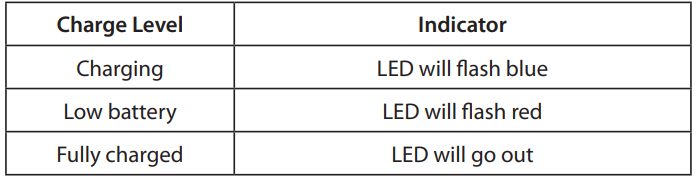
- Run time from a fully charged battery is up to 60 minutes.
- Charge time from empty is 4 hours.
- To preserve the life of your batteries, let them run out every 6 months, then recharge for 4 hours.
CORDED USE
- Connect the charging adaptor to the product,t then to the mains.
- When the cord is connected to the mains, the charging indicator light will turn off if the product is turned on.
CAUTION
Extended mains-only use will result in the reduction of the battery life.
INSTRUCTIONS FOR USE
Before starting the cut
- Inspect the clipper,, making sure that it is free from hair and dirt.
- Seat the person so that their head is approximately at your eye level.
- Before cutting, always comb the hair so it is tangle-free and dry.
TO ATTACH A COMB
- Hook the front side of the attachment comb on the front side of the teeth.
- Press the back side of the comb downwards, until the tab clicks into place.
TO REMOVE THE COMB
- Press upward on the tab to release the comb.
- With the tab released, pull the comb away from the clipper and unhook the front of the blade. INSTRUCTIONS FOR CUTTING HAIR
- For even cutting, allow the comb attachment/blade to cut its way through the hair. Do not force it through quickly. If you are cutting for the first time, start with the maximum comb attachment.
STEP 1 – Nape of the neck
- Attach the 3mm or 6mm fixed comb.
- Hold the clipper with the blade teeth pointing upwards. Begin starting at the centre of the head at the base of the neck.
- Slowly lift the clipper, working upwards and outwards through the hair, trimming just a little at a time.
STEP 2 – Back of the head
- With the 12mm or 16mm guide comb attached, cut the hair at the back of the head. STEP 3 – Side of the head
- With the 3mm or 6mm guide comb attached, trim sideburns. Then change to the longer 9mm guide comb and continue to cut the top of the head.
STEP 4 – Top of the head
- Use the longer length fixed combs of 22mm or 25mm to cut hair on top of the head against the direction in which the hair normally grows.
- Always work from the back of the head.
STEP 5 – The finishing touches
- Use the clipper without an attachment comb for close trimming around the base and sides of the neck.
- To produce a clean, straight line at the sideburns, reverse the hair clipper. Place the reversed clipper at right angles to the head, tips of the blades lightly touching the skin,, and then work downwards.
SHORT TAPERED STYLES – “FLAT TOPS” & SHORT CUTS
- Starting with the longest fixed comb (25mm), cut from the back of the neck to the crown. Hold the guide comb flat against the head and slowly move the clipper through the hair.
- Use the same procedure from the lower side to the upper side of the head. Then cut the hair against the direction in which it grows and level with the sides.
- To give a “flat top” look, the hair on top of the head must be cut over the top of a flat comb.
- Use a closer guide comb to taper the hair down to the neckline as desired.
CARE FOR YOUR HAIRCLIPPER
AFTER EACH USE
- Ensure the appliance is switched off and unplugged from the mains before cleaning.
- Brush the accumulated hair from the blades. The blades and product unit can be rinsed under the tap. Please see the cleaning section below on this.
- It is recommended that the blades should be removed, and any accumulated hair be brushed out after each use. 1 or 2 drops of clipper oil should be added to the tip of the blades, and a drop on the back gliding surfaces.
REMOVING AND FITTING THE BLADE SET
- The blades can be released by placing your finger or thumb into the push release point and sliding the blade off the product unit.
- To reattach, place the blade set on top of the product unit and slide this gently into place until you hear and feel it click into place.
CLEANING CAUTIONS
- This clipper is fully washable. The clipper and blade set can be rinsed under the tap for cleaning. Only rinse the blades when needed.
- For a deep clean, let the blades run while rinsing under the tap.
- Please ensure the product is fully dried after, especially the blade set surfaces.
- Caution: do not wash when plugged into the mains power.
- Once the blade set is fully dried, to enhance performance and prolong the life of your clipper, we strongly recommend that you to oil the blades. To be properly oiled, the blade set needs to be removed, so drops of oil can be added to the back gliding surface.
EVERY SIX MONTHS
- At regular intervals, the blade set should be removed and cleaned.
- Remove the 2 screws retaining the fixed blade with a hex screwdriver. Do not remove the blade set.
- Brush the hair from between the blades with a soft cleaning brush. Do not remove the lubricating grease from the plastic components. It is not necessary to remove the small moving blade from the unit.
- If the blades are not correctly aligned, cutting efficiency will be impaired.
- Place a few drops of oil onto the blade’s gliding surface. Wipe off excess oil.
CLEANING CAUTIONS
- Ensure the appliance is switched off and unplugged from the main outlet before cleaning.
- Only the attachment guide, comb,s and blade set may be removed from the product for cleaning.
- Do not use harsh or corrosive cleaners on the units or their blades.
- Suitable for cleaning under an open water tap
Troubleshooting Guide for Remington Heritage Hair Clipper HC9100
- Clipper not turning on: Check battery charge; if cordless, plug in to charge for 4 hours. Verify power connection when in corded mode.
- Reduced cutting performance: Clean and oil blades regularly using the included brush and recommended oil to prevent hair buildup.
- Blade overheating: Avoid continuous use beyond 60 Allow the lipper to cool down before resuming.
- Battery not holding charge: Fully discharge and recharge the battery; if the problem persists, contact Remington support for battery replacement options.
- Error codes: The HC9100 does not display digital error codes; persistent issues should be addressed by authorized service centers.
- Preventive care: Always clean blades after use, store them in the supplied bag, and avoid exposure to moisture beyond wet cleaning recommendations.
The Remington Heritage Hair Clipper HC9100 comes with a reliable 5-year warranty with an extra year when registered online. For support, users can contact Remington customer service via their official website or authorized retail outlets.
Pros & Cons of Remington Heritage Hair Clipper HC9100
- Pros:
- High cutting speed of 300 mm/s ensures quick, efficient grooming
- Retro-inspired design with durable stainless steel blades offers both style and performance
- Versatile cutting lengths from 1.5 to 25 mm with 11 settings accommodate various hairstyles
- Corded and cordless operation provides flexibility and convenience
- Long 60-minute battery runtime supports extended use without interruption
- Comes with essential accessories and a generous warranty for peace of mind
- Cons:
- The maximum cutting length is capped at 25 mm, which may not suit those needing longer trim.s
- Does not support ultra-close trimming or precise edging due to bladeTheechargingg time of 4 hours is moderate, but not fast-charge capable.
- Stainless steel blades, while efficient, lack the titanium coating found on some competitors.
- Value for Money: The HC9100 offers a strong balance of vintage aesthetics, professional performance, and durability at a competitive price point, outperforming many standard clippers in both speed and build quality.
Customer Reviews of Remington Heritage Hair Clipper HC9100
Users consistently praise the Remington Heritage Hair Clipper HC9100 for its fast cutting speed and sleek retro design. Positive feedback highlights its solid build quality and the convenience of cordless use. Many appreciate the 60-minute runtime and the ease of cleaning the washable blades. The 11 length settings receive compliments for providing sufficient versatility in hair length options.
Common complaints include the clipper’s inability to achieve very close shaves or precise edging, which can limit styling options for some users. A few reviews mention the 4-hour charging time as a drawback compared to faster-charging models. Overall, the product holds a strong 4 to 4.5-star rating among buyers and is recommended for home users and barbecue enthusiasts who value design and cutting efficiency.
Customers advise potential buyers to consider the HC9100 primarily for standard haircuts and trimming rather than detailed precision work, emphasizing solid performance and long-lasting battery life as key purchase drivers.
Faqs
How do I set up the Remington Heritage Hair Clipper HC9100 for the first time?
What should I do if the Remington Heritage Hair Clipper HC9100 is not cutting hair evenly?
Can I use the Remington Heritage Hair Clipper HC9100 while it is charging?
How do I properly maintain and clean the Remington Heritage Hair Clipper HC9100 blades?
What are the key features of the Remington Heritage Hair Clipper HC9100 that improve haircutting accuracy?
How do I attach and remove the guide combs on the Remington Heritage Hair Clipper HC9100?
Why does my Remington Heritage Hair Clipper HC9100 stop working suddenly during use?
Are the guide combs of the Remington Heritage Hair Clipper HC9100 compatible with other Remington models?
More remington manuals
- How to Use: Remington Easy Fade Pro Hair Clipper HC550 User Manual
- How to Use: Remington Pro Power Hair Clipper HC5350 User Manual
- How to Use: Remington Precision Cut Hair Clipper HC5500 User Manual
- Setup: Remington Wet & Dry Foil Shaver F5500AU Owner Manual
- How to Use: Remington Indestructible Hairclipper HC5880 User Manual
- Startup: Remington Pro Foil Shaver PF7500 Instruction Manual
Leave a Comment