
How to Use: Remington Pro Power Hair Clipper HC5350 User Manual
Content
Remington Pro Power Hair Clipper HC5350
Introduction
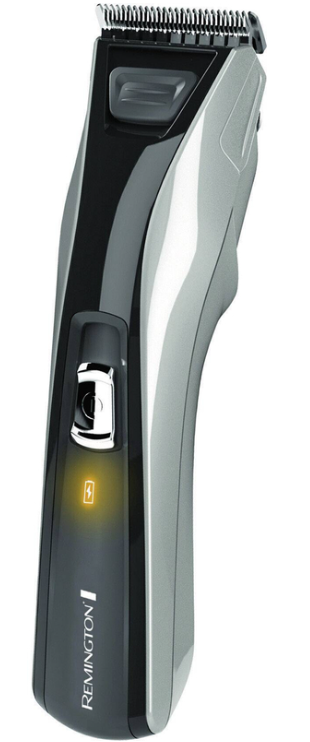
The Remington Pro Power Hair Clipper HC5350 is a professional-grade grooming tool designed to deliver precision haircuts and styling right at home. Featuring titanium-coated blades that ensure a smooth, salon-quality cut, this clipper stands out for its blend of powerful performance and user-friendly design. Its self-sharpening blades eliminate the need for oiling, while the exclusive Click N™ Wash system makes cleaning effortless, enhancing longevity and hygiene.
Ideal for men and barbers seeking reliable cordless or corded versatility, the HC5350 suits a wide range of hair types, from thick to fine. It offers 15 lock-in length settings (1mm to 42mm) for customizable cuts, plus a stubble comb for facial styling. Ergonomically crafted with reduced vibration and a high-performance DC motor, it ensures comfort and control during use.
With a convenient USB charging feature and an impressive 40-minute cordless runtime, this clipper is perfect for quick touch-ups or full grooming sessions anywhere. It typically ranges from $50 to $70, is widely available through online retailers and Remington’s official website. Whether you're a home grooming enthusiast or a professional on a budget, the Remington Pro Power Hair Clipper HC5350 offers powerful, precise trimming with excellent value.
Specifications of Remington Pro Power Hair Clipper HC5350
- Blade Technology: Titanium-coated, self-sharpening blades for durability and precision
- Motor: High-performance DC motor delivering powerful cutting action with reduced vibration
- Length Settings: 15 lock-in, no-slip settings ranging from 1mm to 42mm for versatile styling
- Combs Included: Two adjustable combs plus a stubble comb for detailed facial trimming..
- Power Source: Corded and cordless operation with USB charging capability
- Battery Life: Up to 40 minutes of cordless runtime after full charging
- Cleaning: Exclusive Click N™ Wash feature allows easy blade detachment and rinsing under water
- Ergonomics: Designed for a comfortable grip and reduced handling vibration
- Warranty: 3-year limited warranty for peace of mind
Compared to similar models in the market, such as Braun’s HC5350 with NiMH battery and memory safety lock, the Remington HC5350 excels in offering titanium blades and USB charging, combining durability with charging convenience. Its cordless runtime is competitive for at-home grooming tools.
DESCRIPTION
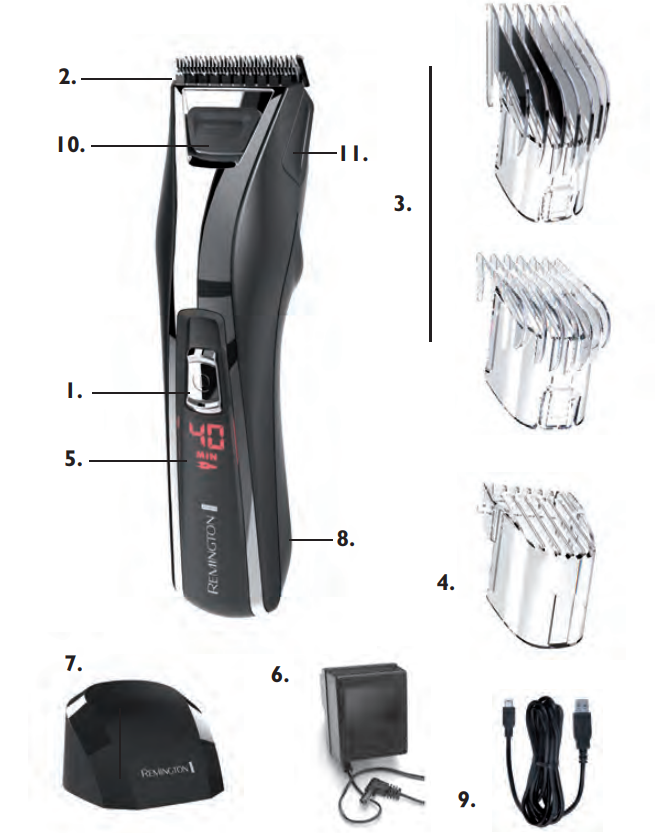
- On/Off switch
- Blade set
- 2 attachment guide combs
- Stubble comb (Only for HC5550 & HC5750)
- Digital Display (Only for HC5750)
- Charging adaptor
- Charging stand (Only for HC5750)
- Micro USB port
- Micro USB cable
- HHair-thinningmechanism
- Quick Wash release button
GETTING STARTED
CHARGING YOUR HAIRCLIPPER
- Before using your hair clipper for the first time, charge it for 14-16 hours. The charging display light will stay on after the battery is fully charged (HC5350 & HC5550). The digital display will stay on,, and the plug icon will stop flashing after the battery is fully charged (only for HC5750).
- Your clipper cannot be overcharged. However, if the product is not going to be used for an extended period of time (2-3 months), unplug it from the mains and store.
- Fully recharge your hair clipper when you would like to use it again.\
- To preserve the life of your batteries, let them run out every six months, then recharge for 14-16 hours.
CHARGING VIA STANDARD ELECTRICAL SOCKET
- Ensure the product is switched off.
- Connect the charging adaptor to the product and then to the mains. When charging, the LED indicator (HC5350 & HC5550) will illuminate,, and the digital display and plug icon (HC5750) will be displayed on the product during charging.
- Allow 14~16 hours for a complete charge.
USB CHARGING VIA PC
- Ensure the product is switched off.
- Connect your USB cable to the USB port on the PC.
- Connect the USB cable to your computer. The charging LED indicator (HC5350 & HC5550) will illuminate, or the digital display and plug icon (HC5750) will be displayed on the product during charging.
- Allow 14-16 hours for a complete charge.
CHARGING VIA CHARGING STAND (Only for HC5750)
- Ensure the product is switched off.
- Connect the charging adaptor to the charging stand and then to the mains.
- The digital display and plug icon will be displayed on the product during charging.
- Allow 14~16 hours for a complete charge.
CORDED USE
- Connect the charging adaptor to the product and then to the mains.
- When the cord is connected to the mains, a charging LED light (HC5350 & HC5550) or plug icon (HC5750) is displayed on the hairclipper.
- The charging LED light (HC5350 & HC5550) and plug icon (HC5750) will turn off when the unit is switched on.
CAUTION: Extended mains-only use will result in a reduction of battery life. WARNING: The hair clipper can not be operated in corded mode while connected to a PC via the USB port.
CORDLESS USE
- When the unit is switched on and fully charged, the product can be used in cordless mode for up to 40 minutes.
- The digital indicator (HC5750) will display the maximum usage time, which will decrease during usage.
- If the digital indicator displays between 0 – 5 minutes, the display will flash to indicate that the unit needs to be recharged.
HOW TO USE
BEFORE STARTING THE CUT
- Inspect the clipper,, making sure that it is free from hair and dirt.
- Seat the person so that their head is approximately at your eye level.
- Before cutting, always comb the hair so it is tangle-free and dry.
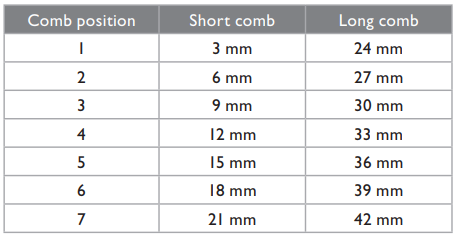
1mm length is achieved without any combs.
BATTERY REMOVAL
- The battery must be removed from the appliance before it is scrapped.
- The appliance must be disconnected from the supply mains when removing the battery. Ensure that the clipper is discharged of all power and disconnected from the mains.
- Lift or pry the USB port cover plate on the bottom of the clipper.
- Lift or pry the deco plate on the lower portion of the clipper and unscrew 1 screw located on the back housing of the clipper.
- Lift or pry the clipper halves apart, exposing the battery chamber.
- Lift or pry the USB connector and lift or pry the cover plate on the bottom of the battery chamber.
- Take out the battery and printed circuit board assembly from the battery chamber.
- Cut the tabs on both ends of the battery and remove it from the printed circuit board. The battery is to be disposed of safely.
Troubleshooting Guide for Remington Pro Power Hair Clipper HC5350
Common issues users may encounter with the Remington Pro Power Hair Clipper HC5350 include:
- Clipper not turning on: Ensure the clipper is fully charged via USB. Check the charging indicator light; if it doesn’t illuminate, confirm the charger and cable functionality.
- Blades not cutting smoothly: Use the Click N™ Wash feature to clean blades thoroughly. Blades are self-sharpening; however, remove hair buildup to maintain cutting efficiency.
- Battery drains quickly: Recharge fully and avoid over-discharge. For long-term storage, fully recharge, unplug, and recharge every 6 months to preserve battery health.
- Charging indicator light stays on: This is normal during charging. The light switches off once the unit is fully charged and switched on.
Preventive maintenance includes regular cleaning after use, storing the clipper dry, and avoiding extended battery depletion. The product comes with a 3-year limited warranty. For further assistance, Remington customer support can be contacted via their official website or hotline.
SERVICE AND WARRANTY
This product has been checked and is free of defects. We warrant this product against any defects that are due to faulty material or workmanship for 3 years from the original date of consumer purchase. If the product should become defective within the warranty period, we will repair any such defect or elect to replace the product or any part of it without charge, provided there is proof of purchase. This does not mean an extension of the warranty period.
In the case of a warranty, simply call the Remington® Service Center in your region.
- This warranty is offered over and above your normal statutory rights.
- The warranty shall apply in all countries in which our product was sold via an authorised dealer.
- This warranty does not include cutters, which are consumable parts. Also not covered is damage to the product by accident or misuse, abuse, alteration to the product,t or use inconsistent with the technical and/or safety instructions required. This warranty shall not apply if the product has been dismantled or repaired by a person not authorised by us.
Pros & Cons of Remington Pro Power Hair Clipper HC5350
- Pros:
- Titanium-coated self-sharpening blades provide precision and durability.
- Exclusive Click N™ Wash system simplifies cleaning and blade maintenance.
- Ergonomic design with reduced vibration enhances user comfort and control.
- Dual corded and cordless operation with convenient USB charging.
- Wide range of 15 lock-in length settings for versatile styling options.
- Competitive price offering excellent value for home grooming.
- Cons:
- Cordless runtime of 40 minutes may be limiting for extensive grooming sessions.
- Lacks some advanced features found in higher-end models, such as digital length display or memory lock.
- The USB charging cable is proprietary; losing it might require purchasing replacements from Remington.
Customer Reviews of Remington Pro Power Hair Clipper HC5350
Users generally praise the Remington Pro Power Hair Clipper HC5350 for its strong motor and smooth cutting performance. Many highlight the ease of cleaning thanks to the Click N™ Wash feature and the comfortable grip during use. The titanium blades receive accolades for lasting sharpness without oiling. Common complaints focus on the cordless battery life being somewhat short for users who prefer prolonged grooming sessions. Some customers also note that the charging cable is easy to misplace.
On average, the clipper scores around 4 out of 5 stars, with recommendations especially from home users seeking affordable, professional-quality hair clippers. Frequent buyers suggest keeping the comb attachments and charging accessories well-organized to avoid interruptions in use.
Overall, the Remington Pro Power Hair Clipper HC5350 is recommended for anyone wanting precise, easy-to-maintain grooming with reliable performance at a great price point.
Faqs
How do I set up the remington Pro Power Hair Clipper HC5350 for the first time?
What should I do if the remington Pro Power Hair Clipper HC5350 is not cutting smoothly?
Can I use different comb attachments with the remington Pro Power Hair Clipper HC5350?
How do I clean and maintain the remington Pro Power Hair Clipper HC5350?
Is the remington Pro Power Hair Clipper HC5350 suitable for both beard and haircut styling?
What safety precautions should I follow when using the remington Pro Power Hair Clipper HC5350?
How long does the battery last on the remington Pro Power Hair Clipper HC5350?
Can I use the remington Pro Power Hair Clipper HC5350 for sensitive skin?
More remington manuals
- How to Use: Remington Heritage Hair Clipper HC9100 User Manual
- Setup: Remington Wet & Dry Foil Shaver F5500AU Owner Manual
- How to Use: Remington Easy Fade Pro Hair Clipper HC550 User Manual
- Startup: Remington Pro Foil Shaver PF7500 Instruction Manual
- How to Use: Remington Precision Cut Hair Clipper HC5500 User Manual
- Usage: Remington Hair Straightener S9520 User Manual
Leave a Comment