
Setup: Remington MyGroom Hairclipper HC5100 User Manual
Content
Remington MyGroom Hairclipper HC5100
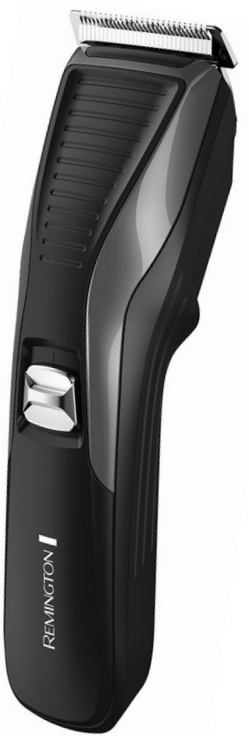
Introduction
The Remington MyGroom Hairclipper HC5100 is a premium grooming tool designed for men who value precision, performance, and versatility. With its powerful motor and high-quality stainless steel blades, this hair clipper delivers twice the cutting power of standard models, making it ideal for both home and travel use. Whether you’re shaping your hair, trimming facial hair, or maintaining a clean look, the HC5100 offers the flexibility to achieve your desired style with ease.
Key benefits include an adjustable comb with 12 length settings (1–23mm), self-sharpening blades for long-lasting sharpness, and a corded design for uninterrupted grooming sessions. The clipper is lightweight, travel-friendly, and features worldwide voltage compatibility, so you can use it anywhere. Suitable for all hair types, the Remington MyGroom Hairclipper HC5100 is perfect for men seeking a reliable, professional-grade grooming experience at home.
Available at major retailers and online stores, the Remington MyGroom Hairclipper HC5100 typically retails between RM150–RM200 in Malaysia, offering excellent value for money. With a 2-year warranty and local authority certification, it’s a trusted choice for everyday grooming needs.
Specifications of the Remington MyGroom Hairclipper HC5100
- Blade Type: Stainless steel, self-sharpening
- Motor: Pro Power motor for enhanced cutting performance
- Length Settings: 12 adjustable positions (1–23mm)
- Minimum Hair Length: 1mm (0.5mm without comb)
- Maximum Hair Length: 23mm
- Power Source: Corded (constant power), detachable cord
- Voltage: Worldwide voltage (100–240V)
- Accessories: Cleaning brush, lubricating oil, 1 comb guide
- Warranty: 2 years
- Weight: Lightweight for easy handling
- Travel Ready: Compact and suitable for travel
Compared to similar models, the Remington MyGroom Hairclipper HC5100 stands out with its superior motor power, wide range of length settings, and durable self-sharpening blades, making it a top choice for both casual and frequent users.
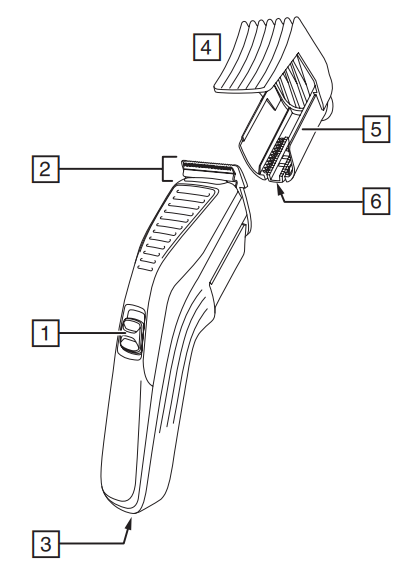
PARTS
- On / Off Switch
- Blade set
- Power Port
- Comb
- Setting scale
- Comb lock
- Adaptor (not shown)
INSTRUCTIONS FOR USE
TO ATTACH THE COMB
- Hold the comb with its teeth upward.
- Depress the comb lock.
- Slide it onto and along the clipper blade until the front of the comb firmly sits against the clipper blade.
TO REMOVE THE COMB
- Hold the clipper with the blades facing away from you.
- Depress the comb lock and firmly push the comb upward and away from the blades.
AJUSTING THE COMB
Depress the comb lock, then slide the comb up or down until the chosen marking on the setting scale is opposite the arrow on the body of the trimmer.
BEFORE STARTING THE CUT
- Inspect the clipper, making sure that it is free from hair and dirt.
- Seat the person so that their head is approximately at your eye level.
- Before cutting, always comb the hair so it is tangle-free and dry.
- For even cutting, allow the comb attachment/blade to cut its way through the hair. Do not force it through quickly.
STEP 1 – NAPE OF THE NECK
- Set the comb to 3mm or 6mm.
- Hold the clipper with the blade teeth pointing upwards. Begin starting at the centre of the head at the base of the neck.
- Slowly lift the clipper, working upwards and outwards through the hair, trimming just a little at a time.
STEP 2 – BACK OF THE HEAD
- With the comb set at 12mm or 18mm, cut the hair at the back of the head.
STEP 3 – SIDE OF THE HEAD
- Set the comb to 3mm or 6mm, trim sideburns, then change the setting to 9mm and continue to cut the top of the head.
STEP 4 – TOP OF THE HEAD
- For longer hair on top, use without a guide comb. Lift the hair on top of the head with a small hand comb. Cut over the hand comb with the hair lifter, or hold the hair between the fingers to lift it and cut it to the desired length.
- Always work from the back of the head.
STEP 5 – THE FINISHING TOUCHES
- Use the clipper without an attachment comb for close trimming around the base and sides of the neck.
- To produce a clean, an straight line at the sideburns, reverse the hair clipper. Place the reversed clipper at right angles to the head, tips of the blades lightly touching the skin, and then work downwards.
SHORT TAPERED STYLES – “FLAT TOPS” AND SHORT CUTS
- Hold the guide comb flat against the head and slowly move the clipper through the hair.
- Use the same procedure from the lower side to the upper side of the head. Then cut the hair against the direction in which it grows and level with the sides.
- To give a “flat top” look, the hair on top of the head must be cut over the top of a flat comb.
- Use a closer guide comb to taper the hair down to the neckline as desired.
CARE FOR YOUR HAIRCLIPPER
Your clipper is fitted with high-quality blades. To ensure long-lasting performance of your clipper, clean the blades and unit regularly. Always keep the attachment guide comb on the trimmer blade.
AFTER EACH USE
- Ensure the clipper is switched off and disconnected from the mains before cleaning.
- Brush the accumulated hair from the blades. Do not submerge the clipper in water.
- To clean the unit, wipe with a damp cloth and dry immediately.
- Place a few drops of cutter or sewing machine oil onto the blades. Wipe off excess oil.
CLEANING CAUTIONS
- Cleaning should be done with a soft brush, such as the brush supplied with the product.
- Do not rinse under water.
- Do not use harsh or corrosive cleaners on the units or their blades.
- Ensure the appliance is switched off and unplugged from the main outlet before cleaning.
Troubleshooting the Remington MyGroom Hairclipper HC5100
- Clipper won’t turn on: Check the power connection and ensure the cord is securely attached. Try a different outlet.
- Blades not cutting smoothly: Clean and lubricate blades using the included oil. Remove hair buildup with the cleaning brush.
- Uneven cutting: Ensure the comb guide is properly attached and blades are clean.
- Overheating: Allow the clipper to cool down after extended use. Avoid continuous operation for more than 30 minutes.
- No error codes: The HC5100 does not display error codes, but regular maintenance prevents most issues.
Preventive measures include regular cleaning, lubrication, and storing in a dry place. The 2-year warranty covers manufacturing defects. For support, contact Remington’s official distributor or visit their website for service centers and customer care.
Pros and Cons of the Remington MyGroom Hairclipper HC5100
Pros
- Powerful motor for fast, precise cutting
- 12 adjustable length settings for versatile styling
- Self-sharpening stainless steel blades for durability
- Corded design ensures constant power
- Travel-friendly with worldwide voltage compatibility
- 2-year warranty and local certification
Cons
- Not cordless, limiting mobility
- Only one comb guide included (additional combs sold separately)
- Not suitable for body grooming
The Remington MyGroom Hairclipper HC5100 offers excellent value for money, outperforming many budget clippers in cutting precision and build quality.
Customer Reviews for the Remington MyGroom Hairclipper HC5100
Users consistently rate the Remington MyGroom Hairclipper HC5100 4.5/5 stars, praising its powerful motor, sharp blades, and ease of use. Many highlight the wide range of length settings and the convenience of worldwide voltage for travel. Common complaints include the lack of a cordless option and the need to purchase additional combs for varied styles. Customers recommend this clipper for those seeking a reliable, professional-grade grooming tool at an affordable price. Frequent mentions include long-lasting performance and minimal maintenance requirements.
Faqs
How do I set up the remington MyGroom Hairclipper HC5100 for the first use?
What should I do if my remington MyGroom Hairclipper HC5100 is not cutting efficiently?
Can I use the remington MyGroom Hairclipper HC5100 for detailed styling and different hair lengths?
Is the remington MyGroom Hairclipper HC5100 suitable for travel and international use?
How do I maintain and clean the remington MyGroom Hairclipper HC5100 to extend its lifespan?
What are the main features that enhance the performance of the remington MyGroom Hairclipper HC5100?
Why does the remington MyGroom Hairclipper HC5100 have a corded design instead of cordless?
What troubleshooting steps can I take if the remington MyGroom Hairclipper HC5100 does not turn on?
More remington manuals
- How to Use: Remington PrecisionCut Hair Clipper HC5300 Instruction Manual
- Setup: Remington Hair Clipper HC335 User Manual
- Setup: Remington WETech Body Groomer BHT6250 User Manual
- Setup: Remington Apprentice Hair Clipper HC5018 User Manual
- Setup: Remington Hair Clipper HC5810 User Manual
- Setup: Remington QuickGroom Body Groomer BHT6450 User Manual
Leave a Comment