
How to Use: Remington ProPower Hair Clipper HC7170 User Manual
Content
Emington ProPower Hair Clipper HC7170
Introduction
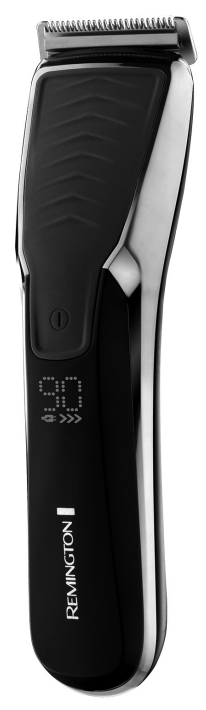
The Remington ProPower Hair Clipper HC7170 is a high-performance grooming tool designed for those seeking professional-level haircutting and styling at home. Equipped with a powerful Pro Power motor, this clipper offers double cutting performance, making it ideal for handling thick, coarse hair with ease. Its unique AcuAngle titanium-coated blades cut hair efficiently and cleanly, providing precise and reliable results for various hairstyles and beard grooming.
This clipper caters primarily to men who prefer to maintain their hairstyle or facial hair with precision, including barbershop enthusiasts and home users looking for versatility between coarse haircuts and delicate trimming. The device includes 17 length settings ranging from 0.5 mm to 44 mm, accommodating everything from close fades to longer trims.
With cordless operation supported by a lithium-ion battery offering up to 90 minutes of runtime, plus rapid 4-hour recharge and turbo boost mode, the HC7170 ensures convenience and uninterrupted styling sessions. Its waterproof design allows easy cleaning under running water, enhancing hygiene and durability. The Remington ProPower Hair Clipper HC7170 typically ranges between $60 to $90 and is widely available through online retailers and major electronics stores.
Technical Specifications
- Motor: Pro Power high-performance motor with dual-speed settings, including Turbo mode for thick hair
- Blades: Titanium-coated AcuAngle blades with advanced blade geometry for sharp, efficient cutting
- Length Settings: 17 precise length steps from 0.5 mm to 44 mm using SlideSelect adjustable combs with auto-lock
- Power Source: Rechargeable lithium-ion battery with 90 minutes cordless runtime and 4-hour fast charge
- Waterproof: Fully washable clipper head and body for easy maintenance
- Additional Tools: Includes cleaning brush and blade oil for optimal upkeep
- Weight & Design: Lightweight, ergonomic design for comfortable handling
- Performance Benchmark: Twice the cutting efficiency compared to standard clippers in the same price range
- Comparison: Outperforms many budget clippers by combining titanium blades and a dual-speed motor, while remaining more affordable than premium professional-grade models
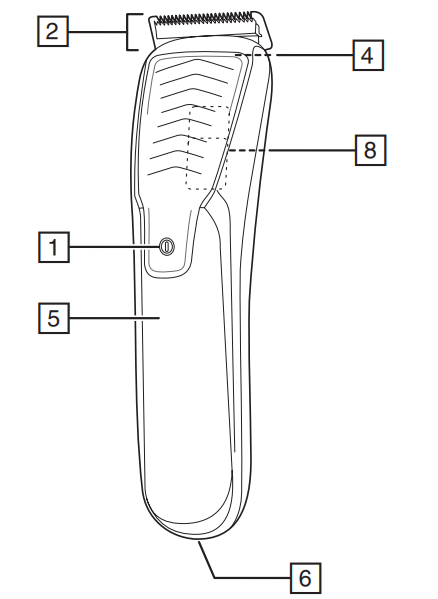
PARTS
- On/Off/Turbo Switch
- Blade set
- 2 attachment guide combs 1-21mm and 24- 44mm (not shown)
- Blade release button
- Digital display
- Micro USB port
- Adaptor (not shown)
- Slide select adjustable comb switch
INSTRUCTIONS FOR USE
BEFORE STARTING THE CUT
- Inspect the clipper,, making sure that it is free from hair and dirt.
- Seat the person so that their head is approximately at your eye level.
- Before cutting, always comb the hair so it is tangle-free and dry.
TO ATTACH A COMB
- Hold the comb with its teeth upward.
- To attach a comb, align the legs of the comb with the holes in the top of the clipper on each side of the blade and slide the legs into the trimmer until they click.
- To remove, firmly pull the comb straight up away from the clipper.
HAIR CLIPPER COMB SETTINGS
- The clipper comes with two adjustable combs, a short length adjustable comb (indicated by 1-21mm on the back of the comb) and a longer length adjustable comb (indicated by 24-44mm on the back of the comb).
- Please see the table below for the different cutting lengths available on each comb.
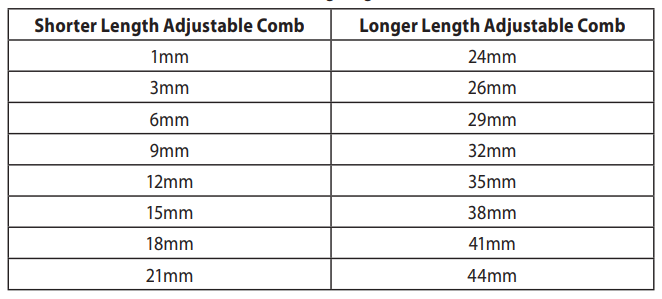
- On the slide select switch, there is a silver indicator which, when the short length adjustable comb is on the product, shows the corresponding length setting on the left of the slide select switch. On the other side of the slide, select switch H. There is another silver indicator which shows the corresponding length setting when the longer length adjustable comb is on the product. On the right side of the slide,, select the switch.
- To adjust the length settings, you must press the upper half of the slide select switch to release the locking mechanism, then apply force upwards on the slide select switch to increase the length setting. To decrease the length setting, gs press the upper part of the slide, select the switch down and slide downwards.
- Use the clipper without any fixed combs for trimming hair close to the skin.
- This will trim hair to 1mm. Holding the clipper so the blades are perpendicular to the skin will trim hair to 0.5mm.
INSTRUCTIONS FOR CUTTING HAIR
- To turn the product on or off, slide the switch. To locate the On/Off switch,, please refer to the key features section.
- For even cutting, allow the comb attachment/blade to cut its way through the hair. Do not force it through quickly. If you are cutting for the first time, start with the maximum comb attachment.
STEP 1 – NAPE OF THE NECK
- Set the comb to 3mm or 6mm.
- Hold the clipper with the blade teeth pointing upwards. Begin starting at the centre of the head at the base of the neck.
- Slowly lift the clipper, working upwards and outwards through the hair, trimming just a little at a time.
STEP 2 – BACK OF THE HEAD
- With the comb set at 12mm or 18mm, cut the hair at the back of the head.
STEP 3 – SIDE OF THE HEAD
- With the comb set at 3mm or 6mm, trim sideburns. Then change to the longer 9mm guide comb and continue to cut the top of the head.
STEP 4 – TOP OF THE HEAD
- Use the longer length comb attachment and set it to 24mm or 27 mm,m then cut hair on top of the head against the direction in which the hair normally grows.
- For longer hair on top, use the longer length comb attachment (24 – 44mm) to achieve the desired style.
- Always work from the back of the head.
STEP 5 – THE FINISHING TOUCHES
- Use the clipper without an attachment comb for close trimming around the base and sides of the neck.
- To produce a clean, an straight line at the sideburns, reverse the hair clipper.
- Place the reversed clipper at right angles to the head, tips of the blades lightly touching the skin,, and then work downwards.
AUTO TURBO SYSTEM
- Push the power button, and the appliance runs in Normal Mode. The Auto Turbo will automatically activate when the clipper senses it needs more power.
- To run in Turbo mode, hold down the power button for 2 seconds,s and the clipper will run in boost until it is turned off.
CARE FOR YOUR HAIRCLIPPER
- Your clipper is fitted with high-quality blades.
- To ensure the long-lasting performance of your clipper, clean the blades and unit regularly.
- Always keep the attachment guide comb on the trimmer blade.
AFTER EACH USE
- Ensure the appliance is switched off and unplugged from the mains before cleaning.
- Brush the accumulated hair from the blades and body of the clipper. Do not submerge the clipper in water.
- To clean the unit, wipe with a damp cloth and dry immediately.
- Place a few drops of cutter or sewing machine oil onto the blades. Wipe off excess oil.
WASHABLE BLADE CLEANING
This clipper is fully washable and therefore can be rinsed under a running tap. However, avoid getting the micro USB port wet.
- To remove the blades, ensure the unit is off. Press the blade release button on the back of the clipper where it meets the blade and push away from the clipper.
- To reattach once the blades are cleaned and dry, align the bottom of the blade with the bottom blade housing tab and slide the cartridge back into place until you hear a click.
- Do not run the entire unit under the tap; only the blade set is meant to be submerged in water.
- Place a few drops of cutter or sewing machine oil onto the blades. Wipe off excess oil.
EVERY SIX MONTHS
- Remove the 2 screws retaining the fixed blade with a screwdriver.
- Remove the blade set.
- Brush out hair from between the blades with a soft cleaning brush. Do not remove the lubricating grease from the blades. It is not necessary to remove the small moving blade from the unit.
- If the moving blade has been removed , this can be re-fitted by slotting the moving blade holder over the pin in the centre of the interior product head.
- The groove on the moving blade just below the teeth should rest on the plastic pressure arm, which rides inside the groove. The fixed blade should be assembled with the bevelled edge of the 2 screw holes facing outward and fixed with screws.
- Note that if the blades are not correctly aligned,d then cutting efficiency will be impaired. CLEANING CAUTIONS
- Do not use harsh or corrosive cleaners on the units or their blades.
- Ensure the appliance is switched off and unplugged from the main outlet before cleaning.
Troubleshooting Guide for Remington ProPower Hair Clipper HC7170
- Clipper won’t Turn On: Ensure the battery is charged fully. Connect to a power outlet for corded use. If the problem persists, reset by disconnecting the charger and holding the power button for 10 seconds.
- Motor Sounds Weak or Sluggish: Clean blades and remove trapped hair. Check battery level; recharge if needed. Use Turbo mode for dense hair.
- Blades Not Cutting Smoothly: Apply the included blade oil regularly. Clean blades thoroughly after each use. Replace blades if dull or damaged.
- Adjustment Comb Stuck or Difficult to Slide: Gently remove and clean the comb rails. Avoid forcing the adjustment button to prevent damage.
- Overheating: Use the clipper in intervals to avoid overheating. Ensure vents are not blocked. Allow the clipper to cool down before resuming.
- Preventive Measures: Always clean and oil blades post-use, charge fully before long sessions, and store in a dry place.
The Remington ProPower Hair Clipper HC7170 comes with a standard manufacturer's warranty covering defects, and customer support is accessible via Remington’s official website or helpline for technical assistance.
Pros & Cons of Remington ProPower Hair Clipper HC7170
Pros
- Powerful Motor: Dual-speed Pro Power motor with turbo boost handles thick hair effortlessly.
- Durable Titanium Blades: Long-lasting sharpness with efficient angled cutting for clean trims.
- Versatile Length Settings: 17 steps provide great styling flexibility from very short to medium hair lengths.
- Long Battery Life: Up to 90 minutes cordless runtime with fast 4-hour recharge.
- Waterproof Design: Easy to clean and maintain for hygiene and longevity.
Cons
- Adjustment Mechanism: Some users report difficulty operating the length adjustment slider initially.
- Price Point: Slightly higher than basic models, which may not appeal to budget-only buyers.
- Limited Accessories: Comes with basic cleaning tools but fewer styling attachments compared to premium kits.
Customer Reviews & Feedback on Remington ProPower Hair Clipper HC7170
Users generally praise the Remington ProPower Hair Clipper HC7170 for its robust cutting power and precise titanium blades, awarding it average star ratings of around 4 to 4.5 out of 5. Positive testimonials highlight fast cutting performance, long battery life, and ease of cleaning as major benefits.
Common complaints include occasional difficulty with the length adjustment slider and minor issues with blade noise during use. However, most customers agree the clipper offers excellent value for its price, recommending it for both personal grooming and light professional use.
Many reviewers emphasise the convenience of cordless operation and turbo mode for thick hair, making it a reliable choice for a wide range of haircutting needs.
Faqs
How do I properly set up the remington ProPower Hair Clipper HC7170 for the first use?
What should I do if my remington ProPower Hair Clipper HC7170 is not cutting hair evenly?
Can the blades of remington ProPower Hair Clipper HC7170 be removed or replaced?
How do I clean and maintain my remington ProPower Hair Clipper HC7170 to ensure long-lasting performance?
What are the key features of the remington ProPower Hair Clipper HC7170 that improve cutting efficiency?
Is the remington ProPower Hair Clipper HC7170 suitable for use on all hair types, including thick and coarse hair?
How do I optimize battery life and charging for the remington ProPower Hair Clipper HC7170?
What troubleshooting steps can I take if the remington ProPower Hair Clipper HC7170 does not turn on or stops working during use?
More remington manuals
- How to Use: Remington Touch Control Hair Clipper HC5960 User Manual
- Setup: Remington QuickCut Clipper HC4250 User Manual
- Setup: Remington X3 Power-X Series Hair Clipper Giftpack HC3000GP User Manual
- How to Use: Remington Body Hair Trimmer BHT100 User Manual
- Setup: Remington QuickGroom Body Groomer BHT6450 User Manual
- How to Use: Remington Vacuum Hair Clipper HC6550 User Manual
Leave a Comment