
How to Use: Remington Touch Control Hair Clipper HC5960 User Manual
Content
Remington Touch Control Hair Clipper HC5960
Introduction
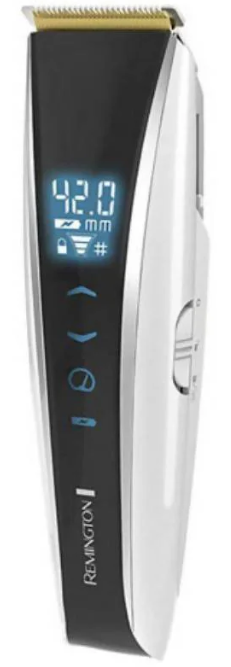
The Remington Touch Control Hair Clipper HC5960 is a state-of-the-art grooming tool designed to provide precision and ease for professional and home users alike. Featuring touch control technology, this clipper offers effortless operation with a modern interface that enhances user experience. Ideal for those seeking a sleek design combined with powerful cutting performance, it is perfect for detailed haircuts, trimming, and styling at home or in a salon setting.
Key benefits include its self-sharpening stainless steel blades that ensure consistent sharpness and close cuts without pulling, a rechargeable lithium battery for cordless convenience, and multiple length settings for versatile styling options. Its ergonomic design provides comfort during extended use, reducing hand fatigue. This clipper caters to a broad audience ranging from beginners to experienced stylists who value precision and convenience.
Available through various online retailers and specialty stores, the Remington Touch Control Hair Clipper HC5960 typically ranges from $40 to $70, offering excellent value given its advanced features and durable build. Its combination of innovative touch controls and reliable motor performance makes it a competitive choice in the mid-range hair clipper market.
Specifications of Remington Touch Control Hair Clipper HC5960
- Blade Type: Self-sharpening stainless steel blades for precise and smooth cutting
- Power Source: Rechargeable lithium-ion battery with cordless operation
- Run Time: Approximately 60 minutes of continuous use per charge
- Charging Time: Around 4 hours for a full charge
- Length Settings: Adjustable via touch control with multiple guide combs (from skin-close to 25mm)
- Motor: Powerful yet quiet motor for efficient cutting with minimal vibration
- Design: Ergonomic and lightweight for comfortable handling
- Additional Features: Lock motor on/off feature, easy-to-clean blade system
- Dimensions: Compact size suitable for travel and storage
Compared to similar products like the Remington Ultimate Precision Haircut Kit (HC3160), the HC5960 stands out with its innovative touch control interface and longer battery life, making it more user-friendly for precision styling and longer grooming sessions.
KEY FEATURES
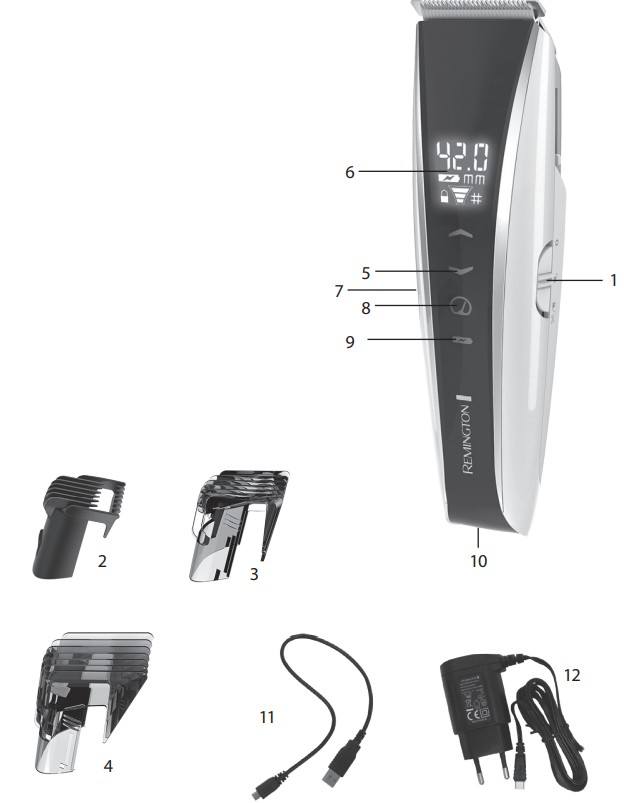
- 3-position slide switch (Off / On / Lock motor on)
- Stubble comb
- Motorised short-length comb
- Motorised long length comb
- Cutting length control
- Digital display for:
- Batterylevel
- Length setting
- Length unit of measure mm
- Lock/unlock
- Speed level
- Mode button
- Tri Boost System
- Battery icon
- Micro USB port
- Micro USB cable
- Adaptor
INSTRUCTIONS FOR USE
- Turn the product on by sliding the 3-position slide switch down to the middle position. This will turn the LCD on and enable height adjustments and boost adjustments to be made.
- Use the hair clipper without a comb attached for trimming hair close to the skin. This will trim hair to 1mm. Holding the blades perpendicular to the skin will trim hair to 0.5mm.
ADJUSTING THE TRIM INCREMENT LENGTH
- First select which hair comb: stubble comb, short length comb,, or long length comb for the length range desired.
- Stubble comb (1.5mm, #0.0), short length comb (3.0 – 23.0mm, #1.0 – 7.5), long length comb (22.0 – 42.0mm, #6.5 – 13.0).
To switch between mm mode to barbershop grade mode (#0.0), hold the mode button until the # symbol located on the right side of the screen underneath the length adjustment value changes to mm or from mm to #.
Note: If using the stubble comb, once the comb is attached, please press the mode button until it cycles to Range D. Once this is reached, 1.5mm should be displayed on the LCD in mm mode or in barbershop grade mode (#0.0). Please note that the stubble comb is fixed and will not move up and down when pressing the increment button.
- For the long length comb,, the adjustments can only be made in increments of 0.5. To set this, press the mode button until Range C is displayed on the LCD screen.
- For the short length comb,, there are 2 increment settings. Your clipper can be adjusted in either 0.1 or 0.5 increments. To switch between these, press the mode button until Range A is displayed for 0.1 increments or until Range B is displayed for 0.5 increments.
Note: If a red warning light is visible through the comb when installed, this is an indication that you are on the wrong range selection for that comb.
USING THE TOUCH SCREEN
- The motorised, short or long length comb can be adjusted to give you many different trim lengths, simply by pressing the arrows on the touch screen.
- Press and hold the arrow up to increase the cutting length and down to decrease it. The setting number will appear on the digital display.
- Select the desired boost level by pressing the boost button with the 3-position slide switch in the middle position. The display will indicate the level.
- Once the desired length and boost level have been selected,, slide the 3-position slide switch to the last position (the furthest down) to lock the cutting length and turn the motor on.
Note: Adjustments to length and boost can be done anytime the 3-position slide switch is set to the middle position. Adjust the cutting length and/or oost level by pressing the arrows or boost button on the touch screen.
Note: the motor will only run when the 3 3-position slide switch is set to lock, the last position (furthest down). This is to ensure the cutting length does ot adjust whilst you are cutting your hair.
Press and hold the battery icon at any time when the product is on to display the remaining battery time in minutes on the digital display.
CAUTION
NOTE: The comb must be attached to the appliance to use the hair n selector.
INSTRUCTIONS FOR CUTTING HAIR
- For even cutting, allow the comb attachment/blade to cut its way through the hair. Do not force it through quickly. If you are cutting for the first time, start with the maximum comb attachment.
STEP 1 – Nape of the neck
- Set the comb to 3mm or 6mm.
- Hold the clipper with the blade teeth pointing upwards. Begin starting at the centre of the head at the base of the neck.
- Slowly lift the clipper, working upwards and outwards through the hair, trimming just a little at a time.
STEP 2 – Back of the head
- With the comb set at 12mm or 18mm, cut the hair at the back of the head.
STEP 3 – Side of the head
- With the comb set at 3mm or 6mm, trim sideburns. Then change to the longer 9mm guide comb and continue to cut the top of the head.
STEP 4 – Top of the head
- Use the longer length comb attachment and set it to 24mm or 27mm, then cut hair on top of the head against the direction in which the hair normally grows.
- For longer hair on top, use the longer length comb attachment (24 – 42mm) to achieve the desired style.
- Always work from the back of the head.
STEP 5 – The finishing touches
- Use the clipper without an attachment comb for close trimming around the base and sides of the neck.
- To produce a clean,, straight line at the sideburns, reverse the hair clipper.
- Place the reversed clipper at right angles to the head, tips of the blades lightly touching the skin,, and then work downwards.
SHORT TAPERED STYLES – “FLAT TOPS” & SHORT CUTS
- Starting with the longest guide comb attached (24-42mm), cut from the back of the neck to the crown. Hold the guide comb flat against the head and slowly move the clipper through the hair.
- Use the same procedure from the lower side to the upper side of the head.
- Then cut the hair against the direction in which it grows and level with the sides.
- To give a “flat top” look, the hair on top of the head must be cut over the top of a flat comb.
- Use a closer guide comb to taper the hair down to the neckline as desired.
RESET INSTRUCTIONS
- You will never have to force a system reset under normal conditions. If the clipper experiences abnormal behaviour, such as low or high touch sensitivity,y or is subjected to electrostatic discharge disturbance, or is subjected to electrical fast transient/burst from the LV network, the system can be reset.
- Hold the mode button for 8 seconds with the product switched on and the 3-position slide switch set to the middle position, and the system will enter reset mode.
- The system will show 88.8mm, full battery, full lock, and full boost level.
- Ensure no objects, hands,, or fingers are near the touch buttons.
- Push the mode button once.
- The comb will travel down to its lowest setting, and the display will show the current battery level, lock status, and 1st boost level.
- Let the product sit until the screen dims . The product is now ready,.Turn it on and confirm proper function.
Troubleshooting for Remington Touch Control Hair Clipper HC5960
- Clipper won’t turn on: Ensure the battery is fully charged. Check if the lock motor switch is disengaged. If the problem persists, reset by turning the clipper off and on again.
- Blades not cutting smoothly: Clean blades with the provided brush and oil them regularly to maintain sharpness and prevent rust.
- Clipper overheating: Avoid prolonged use beyond the recommended 60 minutes. Allow the clipper to cool down before the next session.
- Touch controls unresponsive: Wipe the touch surface clean of dirt and moisture. Restart the clipper to reset the touch sensor.
- Error codes: No specific codes for this model; power or blade issues are diagnosed through the above steps.
- Preventive Measures: Regular blade maintenance and charging after every use prolongs device life.
The product includes a 5-year warranty covering manufacturing defects. For support, users can contact Remington customer service via their official website or hotline, ensuring prompt assistance for any technical issues or replacement needs.
Pros & Cons of Remington Touch Control Hair Clipper HC5960
- Pros:
- Innovative touch control for intuitive length adjustments
- Self-sharpening blades ensure long-lasting sharpness and smooth cuts
- Long battery life (up to 60 minutes) with cordless convenience
- Ergonomic and lightweight design reduces hand fatigue during use
- Quiet motor operation enhances comfort
- Comes with multiple guide combs for versatile styling
- Cons:
- Touch controls may be less responsive if not kept clean
- The charging time of approximately 4 hours may be lengthy for some users
- Not designed for extremely thick or coarse hair compared to professional-grade clippers
- Limited error diagnostics without specific codes
Overall, the Remington Touch Control Hair Clipper HC5960 delivers excellent value for money in its category, outperforming many standard corded clippers with enhanced features and cordless freedom. It compares favorably with other Remington models like the HC60A, offering added precision through touch controls and better battery efficiency.
Customer Reviews of Remington Touch Control Hair Clipper HC5960
Users frequently praise the Remington Touch Control Hair Clipper HC5960 for its ease of use, especially highlighting the smooth operation of the touch controls and the effective battery life. Many reviews emphasize the comfort of the ergonomic design and the quality of the blades that provide clean, consistent cuts without snagging.
Common complaints include occasional touch sensor lag when fingers are wet or dirty, and some users note the longer charging time as a minor inconvenience. Star ratings typically range between 4 and 4.5 out of 5, reflecting overall satisfaction and reliability. Customers recommend this clipper for home use and light professional trimming, citing it as a worthy investment for those seeking cordless grooming solutions with advanced control features.
Faqs
How do I set up the remington Touch Control Hair Clipper HC5960 for the first time?
What should I do if the remington Touch Control Hair Clipper HC5960 shows a red warning light?
How do I adjust the cutting length on the remington Touch Control Hair Clipper HC5960?
Can I use the remington Touch Control Hair Clipper HC5960 for detailed beard trimming?
What is the best way to maintain the remington Touch Control Hair Clipper HC5960 for long-term use?
Why won't the motor start on my remington Touch Control Hair Clipper HC5960?
Is the remington Touch Control Hair Clipper HC5960 compatible with all hair types?
How can I check the battery life on the remington Touch Control Hair Clipper HC5960?
More remington manuals
- Setup: Remington X3 Power-X Series Hair Clipper Giftpack HC3000GP User Manual
- How to Use: Remington ProPower Hair Clipper HC7170 User Manual
- Setup: Remington QuickGroom Body Groomer BHT6450 User Manual
- Setup: Remington QuickCut Clipper HC4250 User Manual
- Setup: Remington Apprentice Hair Clipper HC5018 User Manual
- How to Use: Remington Body Hair Trimmer BHT100 User Manual
Leave a Comment