
Sony SRS-XB100 Wireless Speaker User Manual
Content
Sony SRS-XB100 Wireless Speaker Manual and Product Guide
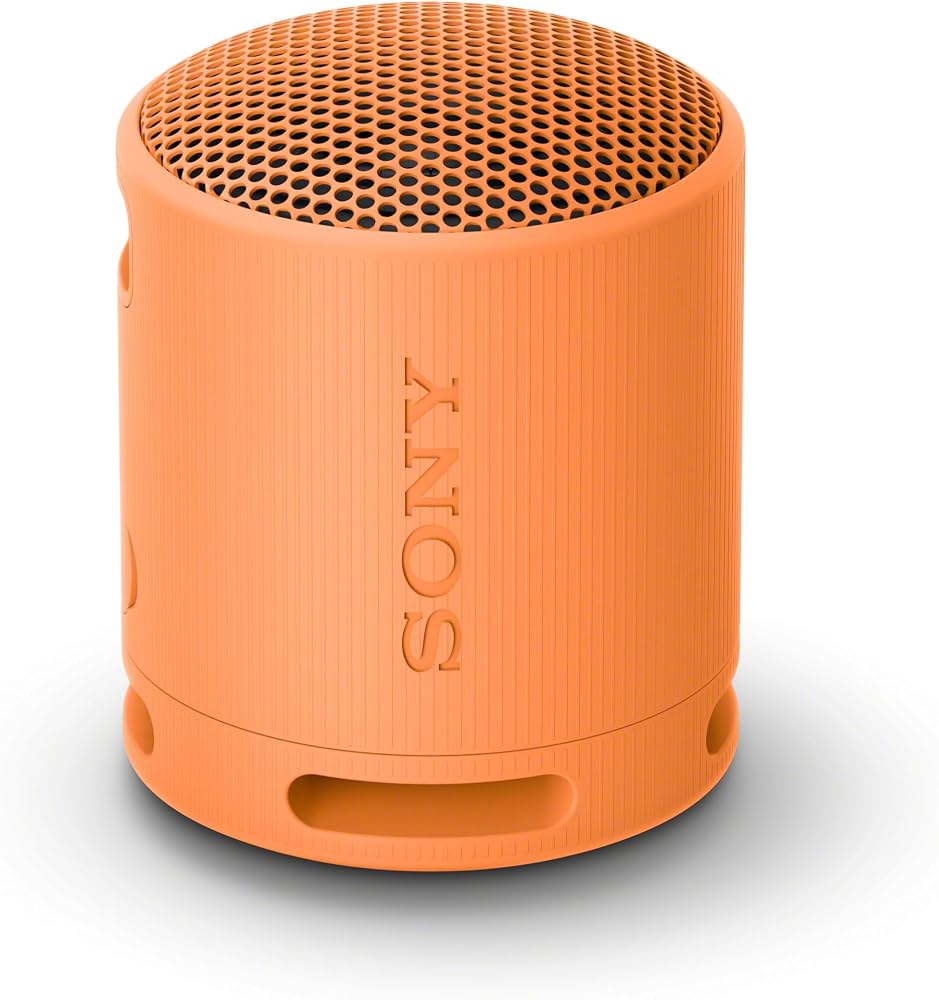
The sony SRS-XB100 Wireless Speaker is a compact portable Bluetooth speaker built for everyday listening, travel, and outdoor use. It combines a lightweight body with IP67 dust and water resistance, Bluetooth 5.3 connectivity, and a 16-hour battery life, making it a practical choice for users who want a small speaker that is easy to carry without sacrificing durability. The cylindrical design, included strap, and hands-free calling support make it especially appealing for commuters, travelers, students, and anyone who wants reliable sound on the go.
This model is positioned as an affordable entry-level portable speaker, with an estimated price range of about $50 to $60 depending on color, retailer, and seasonal discounts. It is widely available through Sony’s store and major electronics retailers in multiple regions. For buyers comparing small Bluetooth speakers, the sony SRS-XB100 Wireless Speaker stands out for its rugged build, simple controls, and balanced sound profile for personal listening, podcasts, calls, and light outdoor use.
Key Specifications of the Sony SRS-XB100 Wireless Speaker
- Speaker type: Full-range portable wireless speaker with mono output
- Connectivity: Bluetooth 5.3 with SBC and AAC codec support
- Battery life: Up to 16 hours on a full charge
- Charging: USB-C charging only
- Water and dust resistance: IP67 rating for dustproof and waterproof protection
- Weight: Approximately 274 g, making it easy to carry
- Dimensions: About 76 mm diameter x 95 mm height
- Microphone: Built-in mic for speakerphone calls
- Frequency range: 20 Hz to 20,000 Hz for wireless audio transmission
- Special features: Stereo Pair support, Sound Diffusion Processor, and carry strap
In practical use, the speaker is designed for close-range listening rather than room-filling audio. Compared with larger portable models such as the Sony SRS-XB13 or more feature-rich speakers in the same price class, the XB100 focuses on portability, durability, and ease of use rather than maximum loudness or deep bass. That makes it a strong option for compact travel audio and casual everyday playback.
Troubleshooting Sony SRS-XB100 Wireless Speaker Problems
If your speaker does not power on, first charge it with a USB-C cable and confirm the charging port is clean and dry. If Bluetooth will not connect, turn Bluetooth off and on again on your phone, then re-pair the speaker by removing the previous device entry and reconnecting from scratch. If audio cuts out, move closer to the source device and reduce interference from Wi-Fi routers, walls, or other wireless devices.
- No sound: Check volume on both the speaker and the phone or tablet.
- Won’t charge: Try another USB-C cable and a different power adapter.
- Bluetooth pairing failure: Reset the wireless connection and pair again.
- Poor sound quality: Make sure the speaker grille is unobstructed and the battery is adequately charged.
- Microphone issues: Ensure no app permissions are blocking call access.
This model does not typically display user-facing error codes, so most fixes are connection, charging, or reset related. To prevent issues, avoid charging the unit while it is wet, keep firmware updated through the Sony Music Center app when available, and store the speaker away from extreme heat. Sony support and warranty service are available through the official Sony support website, with product manuals, FAQs, and warranty documentation provided by region. For direct help, contact Sony customer support in your local country or through the retailer where the speaker was purchased.
Pros and Cons of the Sony SRS-XB100 Wireless Speaker
Pros
- Very compact and lightweight, ideal for travel, backpacks, and daily carry
- IP67 rating offers strong protection against dust, rain, and accidental submersion
- 16-hour battery life is excellent for a speaker this size
- USB-C charging adds convenience and modern compatibility
- Built-in microphone supports hands-free phone calls
- Simple controls make it beginner-friendly
- Good value for money for users who want a durable mini Bluetooth speaker
Cons
- Mono sound limits stereo immersion without pairing two units
- Bass output is modest compared with larger extra-bass speakers
- Lacks advanced EQ and premium app features found on higher-end models
- Not designed for large parties or filling big rooms
- No fast charging, so full charging takes several hours
For buyers comparing alternatives, the XB100 is better than many ultra-budget speakers in durability and battery efficiency, but users wanting louder output or deeper bass may prefer larger Sony models or competing speakers from JBL and Anker. As a compact everyday speaker, the sony SRS-XB100 Wireless Speaker delivers strong value where portability matters most.
Customer Reviews and Real-World Feedback
Customer feedback for the sony SRS-XB100 Wireless Speaker is generally positive, with many users praising its size, rugged build, and ease of use. Common praise includes clear vocals, reliable Bluetooth pairing, and impressive battery life for a speaker that fits in one hand. Many buyers rate it around 4 to 4.5 stars for travel and casual listening.
Frequent complaints focus on the limited bass response and the fact that it is not loud enough for larger gatherings. A typical user testimonial might sound like this: “Perfect for the beach and my desk setup. Small, durable, and easy to carry.” Another common reaction is: “Great for podcasts and background music, but not the best choice if you want booming sound.” For shoppers who value portability, durability, and everyday convenience over heavy bass, it is a highly recommended purchase.
Frequently Asked Questions About the Sony SRS-XB100
- Is the sony SRS-XB100 Wireless Speaker waterproof? Yes, it has an IP67 rating.
- How long does the battery last? Up to 16 hours per charge.
- Does it support phone calls? Yes, it includes a built-in microphone for hands-free calling.
- Can it pair with another speaker? Yes, it supports Stereo Pair mode.
- Is it good for travel? Yes, its small size and strap make it travel-friendly.
Faqs
How do I set up the sony SRS-XB100 Wireless Speaker for the first time?
Why is my sony SRS-XB100 Wireless Speaker not connecting to Bluetooth?
Can the sony SRS-XB100 Wireless Speaker connect to two devices at once?
How can I improve the sound quality and bass on the sony SRS-XB100 Wireless Speaker?
What should I do if the sony SRS-XB100 Wireless Speaker has low volume or distorted audio?
Is the sony SRS-XB100 Wireless Speaker compatible with iPhone, Android, Windows, and Mac?
How do I maintain and clean the sony SRS-XB100 Wireless Speaker safely?
What should I do if the sony SRS-XB100 Wireless Speaker battery drains too quickly?
More sony manuals
- Sony DSX-A415BT FM/AM Digital Media Player User Manual
- How to Use: Sony Multi Channel AV Receiver STR-AZ7000ES/STR-AZ5000ES/STR-AZ3000ES User Manual
- Sony XAV-AX3000 Av Receiver User Manual
- How to Use: Sony Wireless Speaker Ult Field 1 User Manual
- How to Use: Sony Ultra HD Blu-ray™ / DVD Player User Manual
- Setup: Sony Smartphone Xperia 5 User Manual
Leave a Comment