
Sony XAV-AX3000 Av Receiver User Manual
Content
sony XAV-AX3000 Av Receiver: Product Manual and Overview
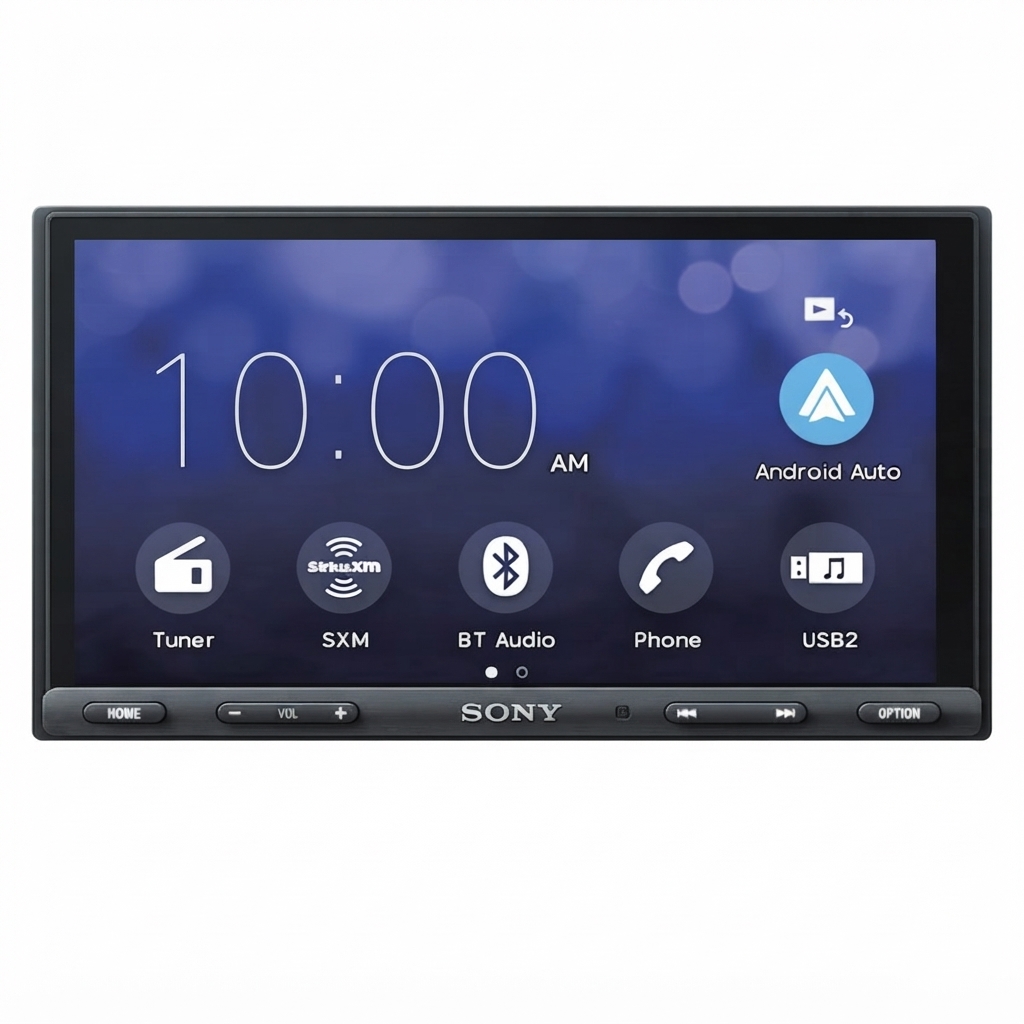
The sony XAV-AX3000 Av Receiver is a double-DIN media receiver designed for drivers who want a modern, smartphone-first infotainment upgrade without unnecessary complexity. Its 6.95-inch touchscreen, fast boot-up behavior, and support for Apple CarPlay and Android Auto make it a strong fit for daily commuters, road-trippers, rideshare drivers, and anyone replacing an older factory stereo with a more connected, user-friendly system. It combines touch control, voice-based smartphone integration, Bluetooth connectivity, rear camera input, and a 10-band graphic equalizer to deliver a practical in-car entertainment and navigation experience.
Key advantages include responsive smartphone mirroring, a clean interface, rear USB connectivity, three pre-outs for system expansion, and support for added sound tuning through Extra Bass and DSO audio enhancement. The unit is also a good match for users who want simple installation in compatible vehicles and a screen size that balances visibility with dashboard fitment. The sony XAV-AX3000 Av Receiver is typically positioned in the mid-range category, with an estimated price range of about $180 to $300 depending on retailer, region, and installation bundle. Availability is generally strong through major electronics stores, car audio specialists, and online marketplaces, though stock can vary by country and model region.
Troubleshooting for Sony XAV-AX3000 Car Stereo Problems
Common issues with the sony XAV-AX3000 Av Receiver usually involve smartphone connection delays, Bluetooth pairing failures, weak audio output, or a blank screen after installation. If Apple CarPlay or Android Auto becomes slow during extended use, disconnecting and reconnecting the phone often restores performance. If the unit does not power on, check the vehicle fuse, wiring harness, ignition lead, and ground connection before assuming a hardware fault. For sound issues, confirm that speaker wiring is correct and that mute, balance, fader, and source volume settings are not limiting output.
Some users may encounter generic display or communication warnings rather than detailed error codes. In those cases, restarting the head unit, reconnecting the USB cable, and updating firmware usually help. Preventive measures include using a high-quality USB cable, keeping the receiver firmware current, avoiding loose aftermarket wiring, and performing a full phone re-pair after major mobile operating system updates. Sony typically provides warranty support through regional service centers, and help is available through official customer support channels, product manuals, and authorized installers. For assistance, use Sony’s regional support website or the customer service number listed in the product warranty documentation.
Pros and Cons of the Sony XAV-AX3000 AV Receiver
Pros
- Excellent smartphone integration: Apple CarPlay and Android Auto make navigation, calls, and music easy to manage from the dashboard.
- Responsive touchscreen: The 6.95-inch display is bright, practical, and easy to read while driving.
- Good sound customization: A 10-band equalizer, Extra Bass, and DSO tuning improve everyday audio performance.
- Expandable system support: Three pre-outs and subwoofer output make it suitable for future speaker or amplifier upgrades.
- Strong value for money: It offers premium smartphone features at a lower cost than many fully loaded multimedia receivers.
Cons
- No AUX input: Users who rely on older wired devices may find connectivity limited.
- No advanced time alignment: Audiophiles may prefer a higher-end alternative with deeper tuning controls.
- Basic display resolution: The screen is functional, but not as sharp as newer premium units.
- Sound setup may feel simple: Competing models from Pioneer or Kenwood can offer more advanced DSP features.
Overall, the sony XAV-AX3000 Av Receiver delivers excellent value if the priority is reliable smartphone connectivity, easy usability, and solid upgrade potential rather than high-end audio processing.
Customer Reviews for Sony XAV-AX3000 Media Receiver
Customer feedback for the sony XAV-AX3000 Av Receiver is generally positive, with many buyers praising the easy interface, fast startup, and dependable CarPlay and Android Auto support. Typical ratings cluster around 4.3 out of 5 stars in user discussions and retailer reviews. One common compliment is that the system feels intuitive right after installation, especially for drivers upgrading from a factory radio.
Frequent complaints focus on the lack of AUX input, occasional smartphone connection hiccups, and the screen resolution being less refined than premium competitors. A typical testimonial would be: “Great sound upgrade and simple to use, but the screen could be sharper.” Another would be: “Perfect for daily driving and maps, but I wish it had more audio tuning options.” For most buyers, the recommendation is clear: choose this model if you want a dependable, user-friendly car stereo with modern connectivity and strong everyday performance.
Faqs
How do I set up sony XAV-AX3000 Av Receiver for the first time?
Why is my sony XAV-AX3000 Av Receiver not connecting to Bluetooth again after pairing once?
Which phones work best with sony XAV-AX3000 Av Receiver for Apple CarPlay and Android Auto?
How can I improve sound quality on sony XAV-AX3000 Av Receiver?
Why does sony XAV-AX3000 Av Receiver reboot or freeze during Apple CarPlay use?
Can sony XAV-AX3000 Av Receiver work with a rear-view camera and steering wheel controls?
What media files and audio formats does sony XAV-AX3000 Av Receiver support from USB?
How should I maintain sony XAV-AX3000 Av Receiver to keep it working properly?
More sony manuals
- Sony DSX-A415BT FM/AM Digital Media Player User Manual
- Sony SRS-XB100 Wireless Speaker User Manual
- How to Use: Sony Multi Channel AV Receiver STR-AZ7000ES/STR-AZ5000ES/STR-AZ3000ES User Manual
- How to Use: Sony Wireless Speaker Ult Field 1 User Manual
- How to Use: Sony Ultra HD Blu-ray™ / DVD Player User Manual
- Setup: Sony Smartphone Xperia 5 User Manual
Leave a Comment