
How to Setup: Startech Fitness S-TRx Treadmill S-TRc Treadmill User Manual
Content
Star Trac S-TRx Treadmill and S-TRc Treadmill Manual
Introduction
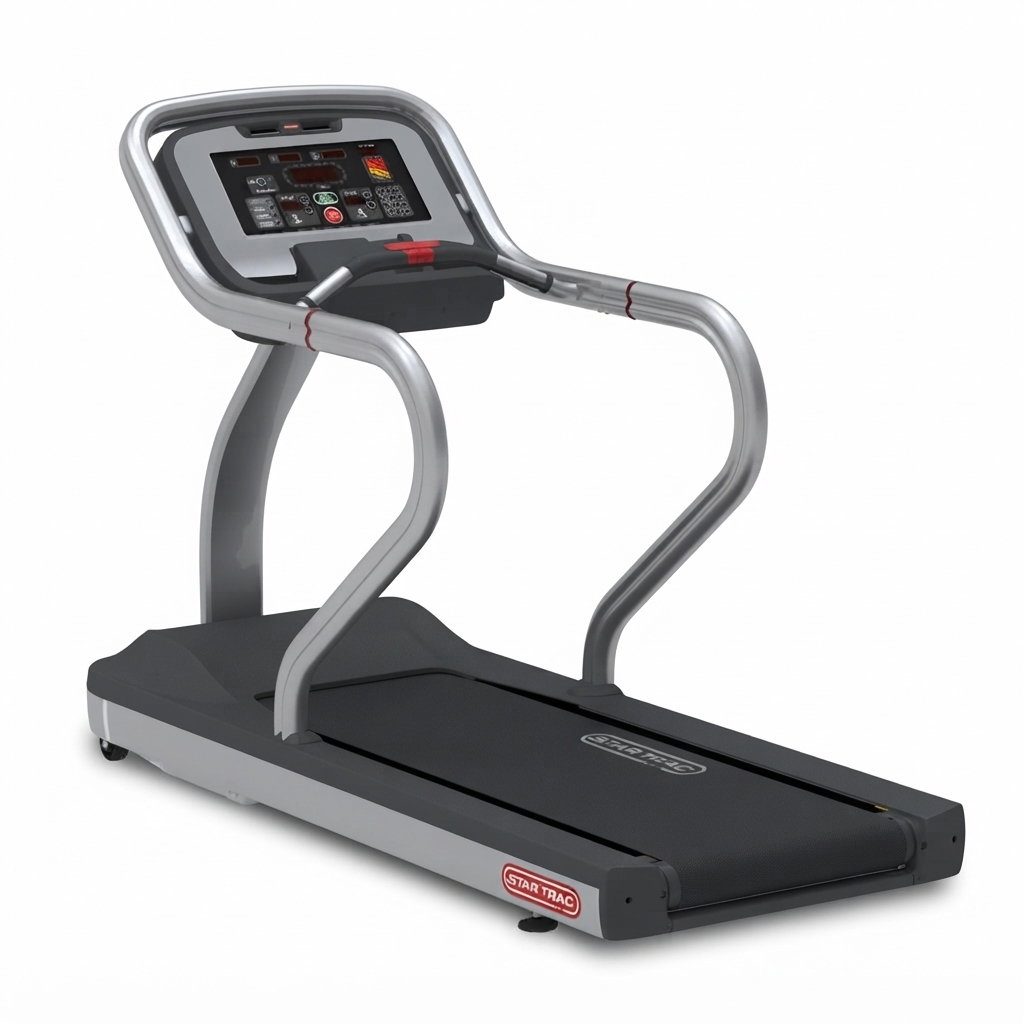
The Star Trac S-TRx Treadmill and S-TRc Treadmill are light-commercial cardio machines built for gyms, hotels, rehab spaces, and serious home users who want durable construction, smooth performance, and a true club-style running experience. The startech Fitness S-TRx Treadmill S-TRc Treadmill is widely recognized for its robust frame, responsive controls, and comfortable running deck, making it a practical choice for high-traffic training environments and long workout sessions.
These treadmills are designed to handle frequent use while still delivering a stable, low-impact stride. Key benefits include strong motor performance, wide speed and incline ranges, reliable heart-rate monitoring, and cushioned decks that help reduce joint stress. The S-TRx is often positioned as a more straightforward LED-console model, while the S-TRc typically adds a more advanced console experience and entertainment-ready features. Both models are suitable for walking, jogging, endurance running, and interval training.
For buyers comparing commercial-grade treadmills, the price range is typically in the mid-to-high thousands depending on condition, configuration, and whether the unit is new, refurbished, or used. Availability can vary because these models are often sold through specialty fitness equipment dealers, liquidation channels, or pre-owned marketplaces rather than standard big-box retail. The startech Fitness S-TRx Treadmill S-TRc Treadmill remains a strong option for buyers who want durability, serviceability, and dependable daily performance.
Specifications
- Motor: 3 HP DC on the S-TRx; the S-TRc is commonly paired with a stronger AC drive system for heavier commercial use.
- Speed range: 0.5 to 12.5 mph for versatile walking, jogging, and sprint workouts.
- Incline range: 0% to 15% for hill training and calorie-focused sessions.
- Running surface: approximately 60 in x 20 in to 60 in x 22 in depending on configuration.
- Weight capacity: up to 350 lb on many S-TRx configurations; S-TRc versions are often rated higher for commercial settings.
- Cushioning: triple-cell shock absorption system for improved comfort and reduced impact.
- Console: LED display on the S-TRx; S-TRc models often feature a more advanced user interface.
- Heart-rate monitoring: contact grips plus telemetry compatibility.
- Frame: powder-coated steel construction for long-term durability.
- Comparison: compared with many residential treadmills, these machines offer superior stability, stronger decks, and better heat management during long sessions.
Detailed Description
The startech Fitness S-TRx Treadmill S-TRc Treadmill is engineered for dependable running performance with a focus on comfort, serviceability, and commercial-grade reliability. The deck system uses a cushioned platform that helps absorb repeated foot strikes, which is especially valuable in gyms, hotels, and rehabilitation environments where users may train multiple times per day. The belt and rollers are designed to support smooth movement and reduce vibration, improving both user comfort and machine longevity.
In real-world use, these treadmills work well for steady-state cardio, interval sessions, incline walking, and endurance training. The wide speed range allows beginners to start slowly while advanced runners can push pace and incline in a controlled way. Build quality is one of the biggest strengths, with a heavy steel frame, durable side rails, and commercial-style components that are made to last. Users typically notice a stable feel underfoot, quieter operation than many worn residential units, and a console layout that is simple to learn.
For facilities needing a reliable treadmill that can handle repeated daily workouts, the S-TRx and S-TRc remain practical, proven options.
Setup Guide
Before setup, place the treadmill on a flat, stable surface with enough clearance on all sides for safe use. Because these units are heavy, use at least two people for moving and assembly. Verify that the electrical supply matches the machine’s power requirements before plugging it in. Always keep the treadmill on a dedicated circuit to prevent tripping breakers or damaging the motor.
- Unpack all parts and confirm that bolts, tools, and console components are included.
- Position the treadmill and level the feet before tightening hardware.
- Attach the console, handrails, and accessory holders according to the model layout.
- Connect the power cable and check the emergency stop function before first use.
- Test the belt at low speed, then verify incline movement and heart-rate sensors.
- Configure user settings such as language, weight units, and workout preferences if supported.
Troubleshooting during setup often involves loose wiring, incorrect power supply, or an unaligned walking belt. Safety warnings are essential: keep children away, never stand on a moving belt while adjusting settings, and stop immediately if you hear unusual grinding or belt slipping.
Troubleshooting
Common issues with the startech Fitness S-TRx Treadmill S-TRc Treadmill usually involve belt tracking, console errors, power interruptions, or heart-rate sensor problems. If the machine will not start, check the power cord, outlet, circuit breaker, and emergency stop key. If the belt drifts left or right, adjust rear roller tension in small increments until centered. If the speed feels inconsistent, inspect the belt for wear and confirm that the deck is properly lubricated if the model requires it.
- Console blank: check the power source and internal cable connections.
- Belt slipping: tighten tension gradually and inspect for wear.
- Incline not moving: reset power, then inspect incline motor connections.
- Heart-rate not reading: clean the contact grips and verify telemetry compatibility.
- Error messages: power-cycle the treadmill and consult the service manual for model-specific codes.
Preventive maintenance includes routine cleaning, periodic belt inspection, and checking fasteners for tightness. Warranty terms vary by seller and machine condition, especially on used units. For support, contact the Star Trac product support team or the authorized dealer that supplied the treadmill, and keep the model number and serial number ready when requesting help.
Pros and Cons
Pros
- Commercial-grade frame and durable build quality.
- Smooth running feel with effective cushioning for joint comfort.
- Wide incline and speed range for varied training plans.
- Reliable heart-rate monitoring for structured workouts.
- Good value for facilities that need long-term equipment.
Cons
- Heavy footprint requires dedicated space and careful delivery.
- Higher power demands than many home treadmills.
- Used units may need maintenance, belt replacement, or console repair.
- Fewer “smart” features than newer connected treadmills.
Compared with newer alternatives, the startech Fitness S-TRx Treadmill S-TRc Treadmill offers better durability and serviceability, but fewer app-based extras. For buyers who prioritize performance over flashy features, it remains a strong value.
Customer Reviews
Average user feedback often lands around 4 out of 5 stars for durability, comfort, and workout stability. Many owners praise the machine’s solid feel, smooth belt motion, and gym-quality construction. Common compliments include “feels like a true club treadmill” and “excellent for daily cardio without wobble.”
Frequent complaints tend to focus on size, weight, and maintenance needs. Some users mention that the treadmill is too heavy for easy relocation, while others note that older units may need belt adjustment or console servicing. Overall, buyers who need a long-lasting commercial treadmill tend to recommend it, especially for light-commercial or semi-professional use. If your priority is a durable, dependable treadmill rather than a compact smart model, this product is usually worth considering.
Faqs
How do I set up startech Fitness S-TRx Treadmill S-TRc Treadmill for the first time?
Why is my startech Fitness S-TRx Treadmill S-TRc Treadmill not starting when I press the power button?
How do I calibrate the incline and speed on startech Fitness S-TRx Treadmill S-TRc Treadmill?
What should I do if the belt on startech Fitness S-TRx Treadmill S-TRc Treadmill slips or feels uneven?
Which devices or apps are compatible with startech Fitness S-TRx Treadmill S-TRc Treadmill?
How can I improve workout performance on startech Fitness S-TRx Treadmill S-TRc Treadmill without causing extra wear?
How often should I clean and maintain startech Fitness S-TRx Treadmill S-TRc Treadmill?
What are the most common startech Fitness S-TRx Treadmill S-TRc Treadmill problems and quick fixes?
More startech manuals
Leave a Comment