
Setup: Swagtron Swagboard Hero Hoverboard Instruction Manual
Content
Swagtron Swagboard Hero Hoverboard
Introduction
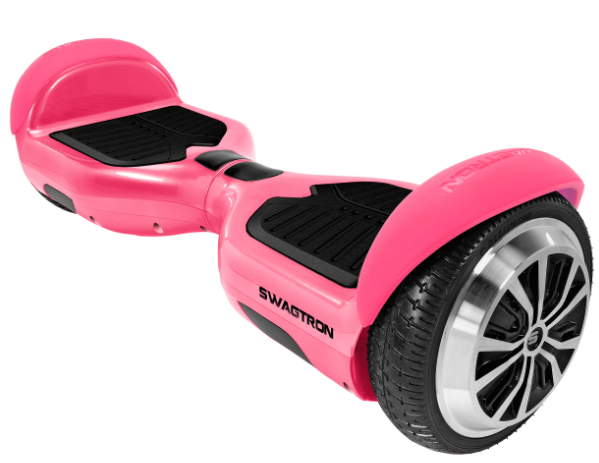
The Swagtron Swagboard Hero Hoverboard is a cutting-edge personal transportation device designed for both fun and practical use. Launched in 2020, this hoverboard is part of Swagtron's lineup of innovative mobility solutions. The Swagboard Hero is engineered to provide a smooth, stable, and safe riding experience. With its sleek design and robust build, it appeals to a wide range of users, from casual riders to more experienced enthusiasts.
The estimated price of the Swagtron Swagboard Hero Hoverboard is around $200-$300, making it an affordable option in the market. This hoverboard is intended for various purposes, including short commutes, recreational rides, and even as a fun way to explore new areas. It is suitable for users aged 8 and above, with a weight capacity of up to 220 pounds.
Swagtron, known for its commitment to safety and quality, ensures that the Swagboard Hero meets all necessary safety standards. It features UL2272 certification, which guarantees that the product has been tested and certified for safety against electrical and fire hazards.
PRODUCT FEATURES
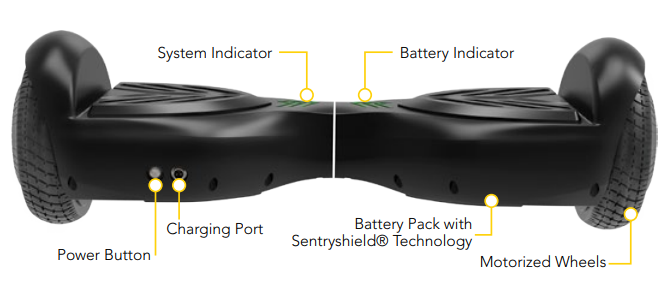
SWAGTRON SWAGBOARD HERO DIAGRAM
SWAGTRON SENTRYSHIELD
This technology is a multi-layered protection for your hoverboard. The HERO features incombustible body materials and utilizes a lithium-free battery pack that includes a Battery Management System. This system protects the battery against overvoltage, temperature increases, overcharging, overcurrent, and short-circuiting.
For more information on the battery specifications, see SECTION V.
BUILT-IN STARTUP BALANCING
The HERO has a built-in Startup Balancing feature, which may be turned on or off via the HERO itself. This feature enhances the unit’s self-balancing feature by further stabilizing the board and ensuring that the pedals always face up. By default, this feature is turned on. With this feature on, if the rider falls or otherwise dismounts the unit while moving over an incline, the unit may continue to move on its own as it attempts to balance, resulting in damage to others, surrounding obstacles, and/or the unit itself.
To turn the feature off, use the power button. While the unit is powering on, quickly press and release the power button a second time. You will hear a confirmation beep. Follow the same steps to turn the feature on again.
If you decide to use this feature, it is recommended to ride only on surfaces that are completely flat with stable terrain. When the unit is on and this feature is on, do not place your hands on or attempt to grasp the unit anywhere near the wheels or fenders. Doing so may cause the wheels to spin on their own for a brief moment. Always turn off the unit before lifting. Do not lift or carry the unit when this feature is on and the board is powered on.
Failure to adhere to these warnings and/or instructions could result in injuries,, including but not limited to: abrasions, lacerations, smashed fingers, rs and/or amputation of fingers, injury to others, and damage to surrounding objects.
HOW TO RIDE
RIDING INSTRUCTIONS
Before riding, equip yourself with suitable protective gear. Make sure the hoverboard is placed on a level surface and fully charged. See SECTION 5.1 for charging instructions.
- STEP 1. Press the power button to turn on the hoverboard.
STEP 2. The hoverboard will enter self-balancing mode. Step on one pedal, then quickly step on the second pedal with your other foot.
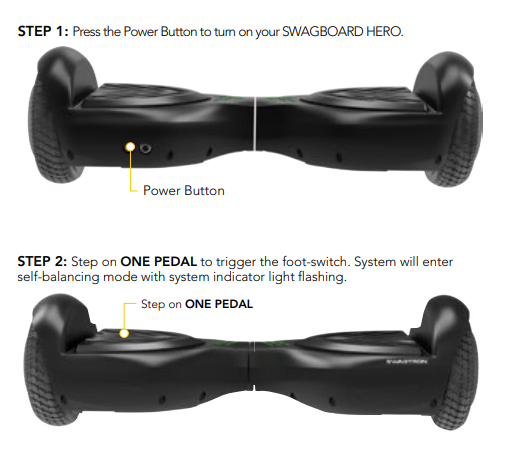
- STEP 3. Stand upright but relaxed and lean lightly in the direction you want to go. Do not make any sudden or jerky movements.
- If the hoverboard doesn’t seem to work, make sure your feet are centered on the pedals.
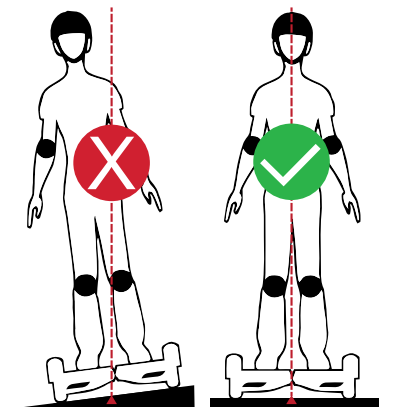
- Do not ride sideways across slopes.
- If the HERO does not start self-balancing automatically, the system indicator may light up and/or flash to indicate an error. DO NOT operate the HERO under these conditions. Turn the hoverboard off and back on again. If this fails to resolve the issue, recalibrate the hoverboard by following the instructions in SECTION 3.3
- If the system indicator shows an error while the hoverboard is on a slope, move it to level ground, then turn it off and back on again.
- Do not put anything else on the pedals other than your feet, as this could cause the hoverboard to lock or move on its own.
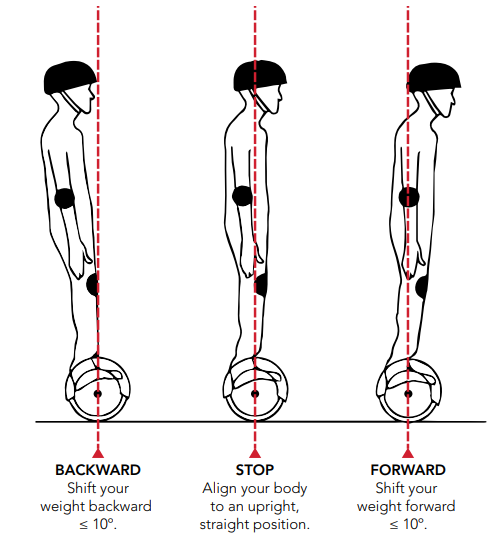
- Do not tilt forward or backward beyond 10°, as the unit may malfunction and/or you may fall off.
- Avoid uneven or rocky surfaces as well as steep slopes with inclines over 30° , as the HERO may not function properly.
- Never ride at high speeds, perform stunts, or turn abruptly without checking your surroundings.
- Do not carry passengers or heavy items while riding the hoverboard.
- Never ride in the rain, dark, or dimly lit areas.
- Never use your hoverboard to do anything that may cause personal injury or property damage.
- Never ride backwards for long distances or at high speed
- Never step off the hoverboard when it is in motion.
Do not operate your hoverboard near flammable vapor, liquids, materials, or other fire hazards.+ Do not ride the hoverboard while intoxicated or under the influence of alcohol, drugs, or any substance that may affect your judgment or ability to ride. You can be arrested for using a vehicle while under the influence.
FAILURE TO USE GOOD JUDGMENT AND HEED THE ABOVE WARNINGS INCREASES THE RISK OF SERIOUS INJURY OR, IN VERY RARE CASES, DEATH. USE WITH APPROPRIATE CAUTION AND SERIOUS ATTENTION TO SAFE OPERATION.
HOW IT WORKS
The HERO uses an internal gyroscope with acceleration sensors to move based on your center of gravity. Do not bend at the waist. The movement will be mostly in your ankles.
- MOVE FORWARD
Shift your weight forward to move directly ahead. - STOP
Return to an upright, straight position. - TURNING LEFT
Shift your weight slightly on the LEFT PEDAL to turn left. - TURNING RIGHT
Shift your weight slightly on the RIGHT PEDAL to turn right. - STEPPING OFF
With the hoverboard completely stopped, step back with your dominant foot, then quickly step off with the other foot. In general, it’s easier to step off the back of the hoverboard. Be careful when stepping off for the first time.
The SWAGTRON has an inertial dynamic stabilization system that keeps you upright. However, it will stop detecting you if you lean too far left or right or if you take a foot off of the board. Slow down before turning, or you will fall off and be injured.
- Avoid sudden turns while riding fast, as this may result in an accident.
- Do not step on the center pivot point of the SWAGBOARD HERO.
CALIBRATION
If your SWAGBOARD HERO seems to pull to the left or right during your ride, you may need to recalibrate its sensors. The calibration process requires a flat , stable surface and a level. Levels may be purchased separately at most hardware stores, or level apps may be downloaded with most smartphones.
- STEP 1. Turn off the hoverboard.
- STEP 2. Rotate both sides of the hoverboard so both pedals are level. Using a level tool is recommended for accuracy.
- STEP 3. With the hoverboard level, press and hold the power button for about 6 seconds, until you hear a single beep. The lights will begin flashing.
- STEP 4. Make sure the pedals are level, then press the power button again to turn the hoverboard off.
- STEP 5. Turn the hoverboard on and try riding to check calibration.
If the HERO is still not calibrated correctly, repeat steps to 6 or contact customer support for additional assistance.
SAFE RIDING TECHNIQUE
Although the HERO is designed with gyroscopic balancing technology, it’s still possible to fall off. Consider the following techniques and info to help ensure you have a safe, fun riding experience.
CAUTION
- Appropriate clothing and safety gear are highly recommended. During riding, knee pads, elbow pads, wrist braces, and an ASTM FF1492-approved helmet should be worn by all riders of all ages at all times.
- Do not wear anything that can drape over or get caught in/under the wheels.
- Wear flat, close-toed shoes to maintain flexibility and stability.
- When going through entryways, remember that you are 4.5 in (11 cm) taller while riding.
- Make sure your feet are always on the pedals. Taking your feet off the hoverboard while riding is incredibly dangerous.
- The hoverboard may not function if it flips upside down. To restore normal functionality, make sure it is level and right side up, then turn the hoverboard off and back on again.
- Ride on even pavement or smooth roads. Relax your legs while riding, knees slightly bent. This helps maintain balance when you encounter uneven ground.
- For your own safety and the safety of others, ride only at speeds you are comfortable with. Be ready to stop at any time.
- When riding near others, keep a safe distance to avoid collisions.
- Pay attention to your surroundings at all times. Your eyes are your best tools for safely avoiding obstacles and slippery surfaces.
- Ride in open spaces and flat areas. Avoid slopes or high traffic areas until you’re familiar with riding.
- Do not attempt to carry passengers. The HERO can only support the weight of one person at a time. When the maximum weight limit is exceeded, the hoverboard may sound an alarm , and/or the system indicator may show an error. Do not exceed the hoverboard’s weight limit.
- Remember, only ride where permitted. You MUST comply with state and local laws and give way to pedestrians.
BATTERY INFORMATION
CHARGING INSTRUCTIONS
Charge the hoverboard before using it.
- STEP 1. Make sure the hoverboard is powered off and connect the charger’s cables and adapter if needed.
- STEP 2. Plug the charger into a wall outlet (100V-240V; 50-60Hz), then plug the other end into the overboard.
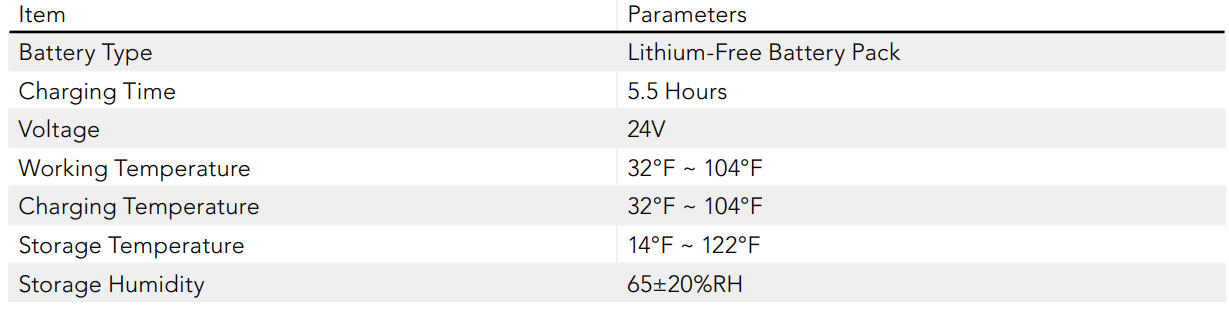
- STEP 3. Allow 5.5 hours for charging. The battery indicator may flash during charging and stop once charging is complete. Disconnect all cables once charging is finished.
- DO NOT, under any circumstances, use the hoverboard while it is charging or connected to the charger.
- The charging time is approximately 5.5 hours. Charging longer than that may affect battery life and/or performance.
- Use only the charger provided with your HERO. If you have lost or misplaced your charger, contact customer support to obtain a replacement. For the safety of yourself and others and to extend the battery’s life, please be sure to follow charging instructions.
SAFETY WARNINGS
Misusing the battery may cause the battery to get hot, rupture, or ignite and cause serious injury.
- Do not pierce, strike, or step on the battery. Do not subject the battery to strong impacts, intense pressure, or sharp objects.
- Do not expose the battery to water or any liquids, or allow the battery to get wet.
- If the battery voltage is too low or over-worked during operation, the SWAGBOARD HERO will power off after 15 seconds to protect the internal components from damage.
- Do not disassemble or modify the battery. The battery contains safety and protection technology that, if damaged, may cause the battery to generate heat, rupture , or ignite.
- Do not place the battery near fires, stoves, in direct sunlight,t or in other high-temperature locations. Do not use or store the battery inside cars in hot weather. Doing so may cause the battery to generate heat, rupture, or ignite. Using the battery in this manner may also result in a loss of performance and a shortened life expectancy.
- Do not place the batteries in microwave ovens, high-pressure containers, or on induction cookware.
- If the device is to be used by children, the caregiver should explain the contents of the user manual to the children. The caregiver should provide adequate supervision to ensure that the device is being used as explained in the user manual.
- Immediately discontinue use of the battery if, while using, charging, or storing the battery, the battery emits an unusual smell, feels hot, changes color, changes shape, or appears abnormal in any other way. If the battery leaks and the fluid gets into one’s eye, do not rub the eye. Rinse well with water and immediately seek medical care. If left untreated, the battery fluid could cause damage to the eye.
- When charging the battery, only use specific chargers and/or charging accessories provided by SWAGTRON.
- If a replacement is needed, contact customer support.
- Do not continue charging the battery if it does not recharge within the time specified in this user manual.
- Do not use or charge the battery in excessively hot or cold environments. Extreme temperatures may cause he battery to become hot, break, and/or deteriorate performance or life expectancy.
- Do not discharge the battery using any device other than the HERO.
- Please keep your charging environment clean and dry. If the charging port is damp or has any liquid on it, do
MAINTENANCE
- Proper maintenance ensures the best riding experience. Consider the following tips and information to keep your HERO running in top condition.
- Do not perform any maintenance when the power is on, or the battery is charging.
- Inspect your hoverboard after each ride, especially if you have traveled a long distances.
- Attempting to repair or modify your hoverboard can void all warranties. Only authorized repair centers may open and service the HERO. Contact customer support for assistance.
CLEANING
- The HERO may need cleaning after riding. See the following tips below.
- Make sure the hoverboard is completely powered off before cleaning.
- Check around the wheels and clear away any blockage if needed.
- Use a dry, non-abrasive cloth to gently remove debris or dust from the hoverboard’s shell.+ If needed, dampen a cloth with water or a mild cleaner and wipe off the hoverboard.
- Never use alcohol or ammonia-based cleaning solutions.
- Never spray liquid directly onto any part of the hoverboard.
- Do not allow any type of liquid to come in contact with the hoverboard’s electronic parts.
STORAGE
- Before storing the hoverboard, fully charge it to prevent battery over-discharge due to non-use.
- If storing the hoverboard for more than one month, discharge and recharge the battery every three months.+ Cover the hoverboard to protect it from dust. Do not store in a dusty environment, as, with all electronic devices, this may cause damage over time.
- DO NOT store the hoverboard in an unheated garage, shed, or other location with extreme temperatures.
SWAGTRON SWAGBOARD HERO SPECIFICATIONS
- Net Weight; 22 lb
- Dimensions: 24 x 7 x 7 in
- Chassis Height :1.18 in / 3 cm
- Pedal Height: 4.3 in / 10.9 cm
- Chassis Material:l Durable shell with UL-approved material
- Tire Material: Hard Rubber Tire
- Maximum Speed :6 mph / 9.7 km/h
- Turning Radius: 0°
- Climbing Capacity: 30°
- Maximum Load :155 lb / 70 kg
- Minimum Load: 44 lb / 20 kg
- Working Temperature: 32°F ~ 104°F (0°C ~ 40°C)
- Charging Temperature: 32°F ~ 109.4°F (0°C ~ 43°C)
- Power :110V – 240V
- Battery Type: Rechargeable Lithium-Free Battery
- Battery Shielding : Fire-Retardant Plastic Casing
- Charger Voltage :30.2Vdc, 0.5A
- Model PS20D302K0500UD manufactured by SHENZHEN FLYPOWER TECHNOLOGY CO LTD
- Input:100-240Vac,50/60Hz, Output:30.2Vdc, 500mA
90-DAY LIMITED HARDWARE WARRANTY
- Your SWAGTRON® Hoverboard (“Product”) includes a 90(ninety)-Day Limited Hardware Warranty (“Warranty”). The Warranty covers product defects in materials and workmanship under normal use. This Warranty is limited to residents of the United States (Excluding Hawaii,
- Alaska and US Territories) and Canada on, ly and is available only to original purchasers. This Warranty gives you specific legal rights, and you may also have other rights which vary from state to state.
- This Warranty starts on the date of your purchase and lasts for a 90(ninety-day) period (the “Warranty Period”). The Warranty Period is not extended if the Product is repaired or replaced. We may change the availability of this limited warranty at our discretion, but any changes will not be retroactive.
- Warranty services are provided by SWAGTRON®. If a hardware defect arises and a valid claim is received within the Warranty Period, at its option and to the extent permitted by law, SWAGTRON® will: (1) repair the hardware defect by using new or refurbished parts that are equivalent to new in performance and reliability; or (2) exchange the Product with a product that is new or refurbished which is substantially equivalent to the original product. This Warranty is for one replacement only of like-items and does not cover items out of production if the product is no longer made or stocked. This Warranty is not assignable or transferable. The original purchaser may call SWAGTRON’s toll-free number at 1-844-299-0625 for a service request.
- When a product or part is exchanged, any replacement item becomes your property, and the replaced item becomes SWAGTRON®’s property. This warranty only covers technical hardware defectiveness during the warranty period and under normal use conditions. SWAGTRON® does not warrant uninterrupted or error-free operation of this Product.
- Return shipping shall only be provided for Products dead on arrival (“DOA”) within 30 days of purchase only. All other returns/repairs shall require payment of shipping cost at a discounted rate to be determined as follows:
- SWAGTRON® E-Scooters, and Hoverboards shall be Twenty Dollars ($20)**
- SWAGTRON® K-Line shall be Eight Dollars ($8)**Shipping prices are subject to change with further notice.
- This Warranty does not cover any damage due to: (a) transportation; (b) storage; (c) improper use; (d) failure to follow the product instructions or to perform any preventive maintenance; (e) modifications; (f) unauthorized repair; (g) normal wear and tear( including but not limited to wearables and other consumable parts such as tires); or (h) external causes such as accidents, abuse, or other actions or events beyond our reasonable control.
- Important: Do not disassemble the Product. Disassembling the Product will void this Warranty. Only SWAGTRON® or a party expressly authorized by SWAGTRON® should perform service on this Product.
- DISCLAIMER OF WARRANTY: THE REMEDIES DESCRIBED ABOVE ARE YOUR SOLE AND EXCLUSIVE REMEDIES AND OUR ENTIRE LIABILITY FOR ANY BREACH OF THIS LIMITED WARRANTY. OUR LIABILITY SHALL UNDER NO CIRCUMSTANCES EXCEED THE ACTUAL
- AMOUNT PAID BY YOU FOR THE DEFECTIVE PRODUCT, NOR SHALL WE UNDER ANY CIRCUMSTANCES BE LIABLE FOR ANY CONSEQUENTIAL, INCIDENTAL, SPECIAL, OR PUNITIVE DAMAGES OR LOSSES, WHETHER DIRECT OR INDIRECT.
- SOME STATES DO NOT ALLOW THE EXCLUSION OR LIMITATION OF INCIDENTAL OR CONSEQUENTIAL DAMAGES, SO THE ABOVE LIMITATION OR EXCLUSION MAY NOT APPLY TO YOU.
- THE DURATION AND REMEDIES OF ALL IMPLIED WARRANTIES, INCLUDING WITHOUT LIMITATION THE WARRANTIES OF MERCHANTABILITY AND FITNESS FOR A PARTICULAR PURPOSE, E ARE LIMITED TO THE DURATION OF THIS EXPRESS LIMITED WARRANTY.
Troubleshooting
If the hoverboard is not turning on, check if the battery is fully charged or if there are any loose connections. For issues with balance or stability, ensure proper calibration and make sure you are standing correctly on the footpads.
If you experience any electrical issues or overheating, stop using the hoverboard immediately and contact Swagtron customer support.
Always follow safety instructions and wear protective gear such as helmets and knee pads when riding.
Pros & Cons
Pros:
- Safe and Reliable: UL2272 certified for electrical and fire safety.
- Long Battery Life: Up to 12 miles on a single charge.
- Comfortable Ride: Ergonomic design with non-slip footpads.
- Entertainment Features: Built-in Bluetooth speakers for music streaming.
- Affordable Price Point: Competitive pricing within the market.
Cons:
- Limited Top Speed: The Maximum speed of 7.5 mph may be too slow for some users.
- No Advanced Safety Features: Lack of advanced safety features l,ike collision detection.
- Weight Limitation: The maximum weight capacity of 220 pounds might be restrictive for heavier users.
Customer Reviews
Customers have generally praised the Swagtron Swagboard Hero Hoverboard for its ease of use, smooth ride, and durable construction. Many users appreciate the affordable price point compared to other high-end hoverboards in the market. However, some users have noted that the top speed could be higher and that there are limitations in terms of weight capacity.
Common complaints include issues with battery life over time and occasional connectivity problems with Bluetooth speakers.
Faqs
What is the maximum weight capacity of the Swagtron Swagboard Hero Hoverboard?
How long does it take to fully charge the battery?
Is the Swagtron Swagboard Hero Hoverboard safe to use?
What is the top speed of the Swagtron Swagboard Hero Hoverboard?
Can I use this hoverboard on different surfaces?
Does this hoverboard come with any additional accessories?
How do I calibrate my Swagtron Swagboard Hero Hoverboard?
Can children use this hoverboard?
What should I do if my hoverboard is not turning on?
Is there a warranty available for this product?
More swagtron manuals
Leave a Comment