
Tcl LINKHUB 4G LTE Wireless Router HH40L1 User Manual
Content
tcl LINKHUB 4G LTE Wireless Router HH40L1 Review and Product Manual
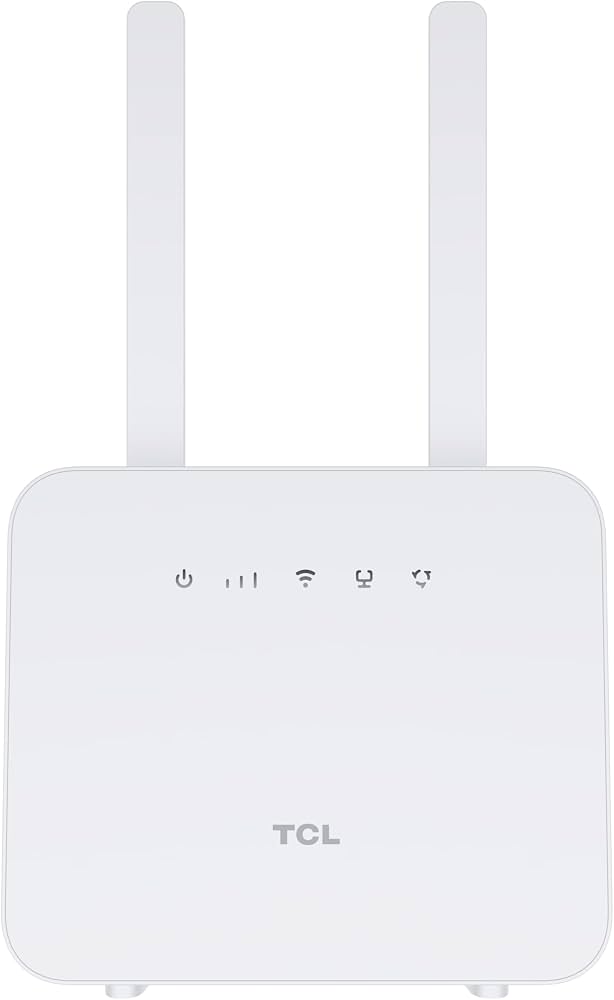
The tcl LINKHUB 4G LTE Wireless Router HH40L1 is a compact mobile broadband router designed for homes, small offices, and users who need reliable internet access without fixed-line service. It uses a 4G LTE Cat4 connection to deliver download speeds of up to 150 Mbps and upload speeds of up to 50 Mbps, making it suitable for everyday browsing, video streaming, online meetings, and light gaming. With support for up to 32 connected devices, this LTE wireless router is well suited for families, shared apartments, retail counters, and temporary workspaces that need simple plug-and-play connectivity.
One of the biggest advantages of the tcl LINKHUB 4G LTE Wireless Router HH40L1 is its flexibility. It supports a Micro-SIM card, includes 2.4 GHz Wi-Fi for broad compatibility, and offers an RJ11 telephone port for voice services in supported networks. A built-in 2000mAh battery provides backup power for short outages or mobile use, which adds convenience when internet access must remain available. This makes it a strong option for users in areas with limited fiber or DSL availability, as well as for people who want a backup internet connection. In many markets, the expected price range is roughly 8,500 to 9,200 DZD, depending on the seller and stock status. Availability can vary by region, but it is commonly sold through local electronics retailers and online marketplace listings.
tcl LINKHUB 4G LTE Wireless Router HH40L1 Specifications and Features
- Model: HH40L1, also sold in some markets as HH40L/HH40L2 variants
- Network support: 4G LTE Cat4, 3G, and 2G compatibility
- Peak LTE speed: Up to 150 Mbps download and 50 Mbps upload
- Wi-Fi standard: 802.11 b/g/n on the 2.4 GHz band
- Wi-Fi capacity: Up to 32 connected devices
- Antenna design: 2x2 MIMO on 2.4 GHz for stable sharing
- SIM support: Micro-SIM slot built in
- Voice support: RJ11 telephone port for home phone service on supported networks
- Battery: 2000mAh internal battery with short-term backup use
- Power: DC charger included, commonly 12V/1A in retail bundles
- Size: Compact desktop form factor with a white finish
In real-world use, performance depends heavily on signal strength, carrier quality, and network congestion. As a 4G LTE Cat4 router, the HH40L1 is built for dependable everyday speeds rather than premium throughput. Compared with dual-band LTE routers or 5G hotspots, it offers simpler operation and lower cost, but it does not match the raw speed or advanced Wi-Fi capacity of newer mesh and 5G alternatives.
Pros and Cons of the TCL LINKHUB HH40L1 4G LTE Router
Pros
- Easy setup: Insert a SIM card and connect quickly, making it ideal for non-technical users.
- Good value: Offers solid LTE internet access at a budget-friendly price point.
- Portable backup: The built-in battery helps keep Wi-Fi running during short power cuts.
- Device sharing: Supports up to 32 devices, which is useful for families and small teams.
- Voice feature: The RJ11 port adds extra utility for users who still need fixed-line calling.
Cons
- 2.4 GHz only: No 5 GHz band means more interference in crowded Wi-Fi environments.
- LTE Cat4 limits: Faster than basic 3G hardware, but slower than modern 4G+ and 5G routers.
- Battery life: The 2000mAh battery is useful for short outages, not extended off-grid use.
- Basic feature set: Lacks advanced networking tools found in premium home routers.
- Best for light-to-moderate use: Heavy streaming households or large offices may need a stronger alternative.
For users seeking an affordable LTE wireless router, the tcl LINKHUB 4G LTE Wireless Router HH40L1 delivers practical everyday performance and straightforward usability. Compared with stronger alternatives, it is best seen as a reliable entry-level mobile broadband solution rather than a high-end home networking device.
Customer Reviews for tcl LINKHUB 4G LTE Wireless Router HH40L1
Overall customer sentiment is generally positive, with many users rating the router around 4.2 out of 5 stars for ease of use, affordability, and stable basic connectivity. Buyers often praise the simple plug-and-play setup, compact size, and the convenience of using a SIM card for internet access without a fixed line. A common testimonial style comment is: “Works well for daily browsing and video calls, and setup took only a few minutes.”
Frequent complaints focus on the 2.4 GHz-only Wi-Fi band, modest battery capacity, and speed variation when the mobile signal is weak. Some users also mention that performance drops during peak carrier congestion, which is normal for a CAT4 LTE router. Most customers recommend it for home backup internet, small business use, and basic shared connectivity, while power users may prefer a dual-band or 5G model. If the goal is affordable, dependable mobile broadband, the tcl LINKHUB 4G LTE Wireless Router HH40L1 remains a practical purchase.
Faqs
How do I set up the tcl LINKHUB 4G LTE Wireless Router HH40L1 for the first time?
Why is my tcl LINKHUB 4G LTE Wireless Router HH40L1 not connecting to mobile data?
What devices are compatible with the tcl LINKHUB 4G LTE Wireless Router HH40L1?
How many devices can the tcl LINKHUB 4G LTE Wireless Router HH40L1 handle at once?
What speed can I expect from the tcl LINKHUB 4G LTE Wireless Router HH40L1 in real use?
How can I improve Wi‑Fi signal strength on the tcl LINKHUB 4G LTE Wireless Router HH40L1?
Does the tcl LINKHUB 4G LTE Wireless Router HH40L1 work without a power outlet?
How do I maintain the tcl LINKHUB 4G LTE Wireless Router HH40L1 for reliable performance?
More tcl manuals
Leave a Comment