
Tcl MW45V Mobile Wi-Fi Router User Manual
Content
TCL MW45V Mobile Wi-Fi Router: Compact 4G Connectivity for Life on the Move
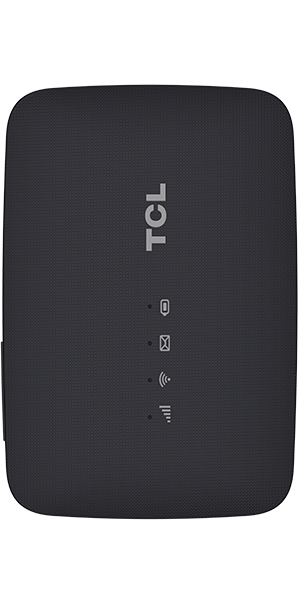
The TCL MW45V Mobile Wi-Fi Router is a portable 4G LTE hotspot designed for users who need reliable internet access anywhere, anytime. It creates a personal Wi-Fi network from a SIM card, making it a practical solution for travelers, remote workers, students, delivery drivers, and small teams who need a fast, flexible connection without relying on public Wi-Fi. With support for LTE Cat 4 speeds up to 150 Mbps download and 50 Mbps upload, the TCL MW45V Mobile Wi-Fi Router delivers enough bandwidth for everyday browsing, video streaming, messaging, file sharing, and light work tasks.
One of its biggest strengths is portability. The compact body, lightweight design, and built-in rechargeable battery make it easy to carry in a bag or pocket. It also supports multiple connected devices at once, which is ideal for families, shared workspaces, and on-the-go teams. Its simple interface, LED status indicators, and WPS button help users get online quickly with minimal setup. The device is especially appealing for people who need an affordable backup internet solution or a travel router for 4G coverage in supported regions.
In terms of price, the TCL MW45V Mobile Wi-Fi Router typically falls in the budget-to-mid-range category, with historical launch pricing around the equivalent of under $100 in many markets and commonly lower on resale or promotional offers. Availability varies by region and carrier, so buyers should check local mobile network compatibility before purchasing.
Detailed Specifications of TCL MW45V Mobile Wi-Fi Router
- 4G LTE Category 4 mobile hotspot with download speeds up to 150 Mbps and upload speeds up to 50 Mbps.
- Wi-Fi 802.11 b/g/n on the 2.4 GHz band, with wireless speeds up to 300 Mbps under ideal conditions.
- Supports up to 10 to 15 connected Wi-Fi devices depending on network conditions and region-specific configuration.
- Battery capacity around 2,150 mAh, with typical working time of up to 7 to 8 hours for web browsing and basic use.
- Compact form factor, weighing about 78 to 89 grams, making it suitable for travel and daily carry.
- Micro-SIM support and easy mobile broadband setup for use with compatible SIM cards.
- LED indicators for signal strength, Wi-Fi status, SMS notifications, and battery level.
- WPS button for quick secure pairing with compatible devices.
- USB-powered operation support, allowing use while charging in many scenarios.
- Typical LTE bands include B1, B3, B7, B8, and B20, which helps improve compatibility across many 4G networks.
Compared with similar entry-level portable Wi-Fi routers, the TCL MW45V Mobile Wi-Fi Router offers solid Cat 4 performance, decent battery life, and easier everyday usability. It is less advanced than dual-band or 5G mobile hotspots, but it remains a strong value choice for basic mobile internet needs.
Troubleshooting TCL MW45V Mobile Wi-Fi Router: Common Problems and Fixes
- No internet connection: Check that the SIM card is active, correctly inserted, and has mobile data enabled. Restart the router and verify signal strength.
- Weak Wi-Fi signal: Move closer to the device, reduce interference from walls and electronics, and reposition the router in an open area.
- Device cannot join Wi-Fi: Confirm the Wi-Fi password, restart both devices, and use the WPS button if supported by the client device.
- Battery drains quickly: Reduce the number of connected devices, disable unused sessions, and avoid keeping the router in high-temperature environments.
- SIM not detected: Remove and reinsert the SIM, confirm it is micro-SIM sized, and test the SIM in another compatible device if needed.
- Status lights behave unexpectedly: A flashing network or battery indicator often means weak signal, low battery, or a setup issue that can usually be cleared with a reset.
For prevention, keep firmware updated when available, store the router in a dry location, and charge it with a quality power source. Warranty terms vary by seller and region, so check the purchase documentation carefully. For official help, TCL support can be reached through its customer service channels, and mobile device support is commonly available by phone at 1-855-224-4228 during posted business hours in supported regions.
Pros and Cons of the TCL MW45V Mobile Wi-Fi Router
Pros
- Very portable and lightweight, making it easy to carry during travel or commuting.
- Simple setup with SIM-based mobile broadband and clear LED status indicators.
- Good everyday 4G LTE performance for browsing, messaging, streaming, and hotspot sharing.
- Supports multiple devices, which is useful for families and small teams.
- Affordable value compared with premium LTE and 5G portable routers.
- Battery-powered operation provides flexibility when a wall outlet is unavailable.
Cons
- Single-band 2.4 GHz Wi-Fi may be crowded in busy areas and is less advanced than dual-band routers.
- Not designed for heavy gaming, large office workloads, or demanding 5G use cases.
- Battery life is decent but not exceptional for all-day continuous use.
- Performance depends heavily on mobile coverage and carrier compatibility.
- Some alternatives offer larger batteries, dual-band Wi-Fi, or faster 5G speeds for only a higher price.
For users who want a low-cost mobile hotspot, the TCL MW45V Mobile Wi-Fi Router delivers strong value for money. Buyers needing faster speeds, broader Wi-Fi coverage, or premium multitasking should compare it with newer LTE-Advanced or 5G travel routers.
Customer Reviews of TCL MW45V Mobile Wi-Fi Router
Overall customer feedback tends to be positive, with many users rating the device around 4 out of 5 stars for portability, ease of use, and dependable everyday connectivity. Common praise focuses on the compact design, quick hotspot setup, and the convenience of using it as a travel router or backup internet source.
Typical complaints mention limited battery endurance during heavy use, slower speeds in weak coverage areas, and the absence of 5 GHz Wi-Fi. One frequent user comment is that it works best for mobile browsing and streaming rather than high-demand network tasks. Another common takeaway is that the TCL MW45V Mobile Wi-Fi Router is a smart buy for casual users, but power users may want a more advanced model.
Recommended for travelers, students, and remote workers who need simple, affordable, portable internet access.
Faqs
How do I set up the TCL MW45V Mobile Wi-Fi Router for the first time?
What should I do if my TCL MW45V Mobile Wi-Fi Router is not connecting to the internet?
How many devices can the TCL MW45V Mobile Wi-Fi Router support at the same time?
Which SIM cards and networks work with the TCL MW45V Mobile Wi-Fi Router?
How can I improve TCL MW45V Mobile Wi-Fi Router speed and signal strength?
How do I change the Wi-Fi name and password on the TCL MW45V Mobile Wi-Fi Router?
How long does the TCL MW45V Mobile Wi-Fi Router battery last, and how can I extend it?
How should I maintain and care for the TCL MW45V Mobile Wi-Fi Router?
More tcl manuals
Leave a Comment