
Tcl 501 Smartphone User Manual
Content
TCL 501 Smartphone: A Practical, Budget-Friendly Android Phone for Everyday Use
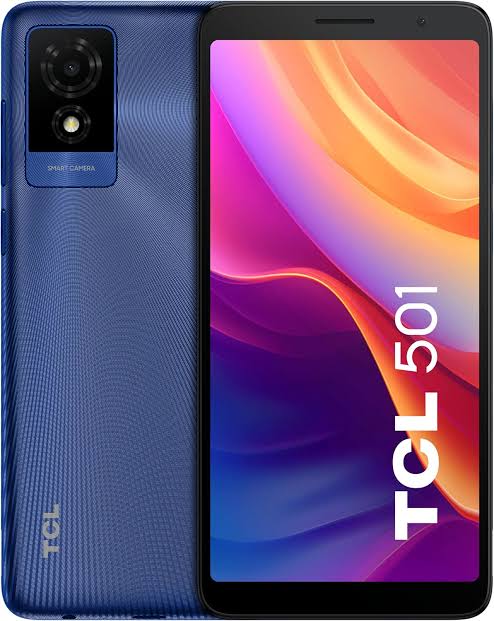
The TCL 501 Smartphone is a compact, entry-level Android device designed for users who want a simple, dependable phone without paying premium prices. With a 6.0-inch display, dual-SIM support, 4G connectivity, Android 14 Go edition, and a 3000mAh battery, it is built for calling, messaging, light app use, social media, and basic entertainment. The TCL 501 Smartphone is especially appealing to first-time smartphone owners, students, seniors, and budget-conscious buyers who need a straightforward mobile device for daily communication and essential tasks.
One of its strongest benefits is its balance of simplicity and practicality. The phone offers a clean Android experience, expandable storage, a USB-C port, a 3.5mm headphone jack, and support for modern wireless connectivity such as Wi-Fi and Bluetooth 5.1. Its compact size and lightweight build also make it comfortable to carry and use one-handed. In many markets, the TCL 501 is positioned in the low-cost segment, with an estimated price range of around $70 to $120 depending on region, retailer, and storage variant. Availability is generally strongest through online retailers, carrier stores, and select electronics outlets. If you are searching for an affordable Android phone with essential features and reliable day-to-day performance, the TCL 501 Smartphone is a solid option.
TCL 501 Smartphone Specifications and Key Features
- Display: 6.0-inch IPS LCD with 540 x 1092 resolution and 60Hz refresh rate
- Processor: MediaTek Helio G36 octa-core chipset
- Memory: 2GB RAM with 32GB internal storage
- Expandable storage: microSD support up to 1TB
- Operating system: Android 14 Go edition
- Rear camera: 5MP main camera
- Front camera: 2MP selfie camera
- Video recording: 1080p at 30fps
- Battery: 3000mAh removable battery
- Connectivity: 4G LTE, Wi-Fi dual-band, Bluetooth 5.1, USB-C, 3.5mm audio jack
- SIM support: Dual Nano-SIM
- Dimensions: 156.5 x 74.9 x 9.7 mm
- Weight: about 178.5 g
In performance terms, the TCL 501 Smartphone is best suited for light multitasking rather than heavy gaming or advanced content creation. Compared with similar budget phones, it stands out for its Android Go optimization and expandable storage, but it remains limited by its 2GB RAM. For users comparing affordable alternatives, it competes with other entry-level 4G phones that prioritize battery life and basic usability over high-end speed.
Detailed TCL 501 Smartphone Overview and Real-World Use
The TCL 501 Smartphone is designed around practicality rather than premium design. Its 6.0-inch IPS LCD panel provides a clear, readable viewing area for browsing, calling, reading messages, and watching short videos. The Helio G36 chipset handles everyday tasks such as mobile banking, chat apps, light web browsing, and navigation with reasonable efficiency. Android 14 Go edition helps improve responsiveness by reducing system overhead, which is particularly useful on a device with limited RAM.
In real-world use, the TCL 501 works well as a secondary phone, a starter smartphone, or a dependable backup device. Its dual-SIM capability is useful for separating work and personal numbers or using different mobile plans. The build quality is functional and sturdy rather than premium, with a straightforward plastic construction that keeps the device lightweight and affordable. User experience is centered on ease of use: the interface is simple, the physical size is manageable, and the included headphone jack and removable battery add convenience that many budget buyers still value. The TCL 501 Smartphone is ideal for users who want essential features with low maintenance and predictable performance.
TCL 501 Smartphone Setup Guide: How to Start Using It
Setting up the TCL 501 Smartphone is quick and beginner-friendly. Begin by inserting the Nano-SIM cards into the dual SIM tray and, if needed, adding a microSD card for extra storage. Next, charge the phone fully using the USB-C cable before first use. Power it on, then follow the on-screen prompts to select your language, connect to Wi-Fi, and sign in with your Google account.
During setup, you can choose backup options, set a screen lock such as PIN, pattern, or password, and enable Google services for app syncing and device recovery. After setup, pair Bluetooth accessories like wireless earbuds or a speaker through the connectivity menu. For safer use, avoid overcharging, do not expose the battery or phone to extreme heat, and use only compatible chargers. If the phone does not detect a SIM or SD card, remove and reinsert both carefully. For slow startup or app lag, restart the device and close unused apps. The TCL 501 Smartphone is straightforward to configure, making it suitable for users who want a hassle-free first-time smartphone experience.
Troubleshooting TCL 501 Smartphone Common Problems and Fixes
Most issues with the TCL 501 Smartphone are easy to solve. If the phone is running slowly, free up storage, close background apps, and restart the device. If calls or mobile data are not working, check whether airplane mode is off, confirm the SIM card is active, and verify that the APN settings match your carrier. If Wi-Fi is unstable, move closer to the router, forget the network, and reconnect.
Common camera issues usually improve after clearing app cache or restarting the phone. If the battery drains quickly, reduce screen brightness, disable unused wireless features, and check which apps are consuming power. There are no widely documented error codes for the TCL 501, but most Android warnings can be resolved by restarting the device, updating apps, or resetting network settings. Preventive care includes regular software updates, avoiding full battery depletion, and keeping the charging port clean. Warranty support depends on the retailer or carrier, so keep your receipt and device information ready. For help, contact the store where the phone was purchased or the official TCL support channel in your region.
TCL 501 Smartphone Pros and Cons
Pros
- Affordable price makes it accessible for budget buyers
- Android 14 Go edition improves efficiency on low hardware resources
- Dual SIM support is useful for personal and work use
- Expandable storage up to 1TB is excellent for a low-cost phone
- USB-C and 3.5mm jack add everyday convenience
- Compact design is comfortable for one-handed use
- Strong value for money compared with other entry-level 4G smartphones
Cons
- 2GB RAM limits heavy multitasking and demanding apps
- 5MP rear camera is basic for photography
- Low-resolution display is adequate but not sharp by modern standards
- 3000mAh battery is modest compared with many newer budget competitors
- Not suitable for gaming or power users
- Performance is slower than mid-range alternatives
Compared with similar entry-level smartphones, the TCL 501 offers a balanced feature set rather than standout speed. It is a better choice for simple everyday use than for users who want strong camera performance or advanced gaming power. For buyers focused on cost, convenience, and basic reliability, it delivers respectable value.
TCL 501 Smartphone Customer Reviews and User Feedback
Customer feedback for the TCL 501 Smartphone is generally positive among budget-focused buyers, with many users praising its affordability, compact size, and easy setup. Typical ratings fall around 3.8 to 4.2 out of 5 stars in user discussions and retail feedback. Reviewers often describe it as “good for calls, messages, and light browsing” and appreciate the expandable storage and headphone jack.
Common complaints include limited RAM, average camera quality, and slower performance when too many apps are open. Some users note that the display is acceptable for the price but not ideal for detailed video viewing. Purchase recommendations are strongest for first-time smartphone users, seniors, secondary phone buyers, and anyone needing a low-cost Android device for daily essentials. If you want a simple, practical, and affordable handset, the TCL 501 Smartphone is widely seen as a sensible buy.
Faqs
How do I set up the TCL 501 Smartphone for the first time?
Why is my TCL 501 Smartphone running slowly, and how can I speed it up?
Can the TCL 501 Smartphone use a microSD card for extra storage?
What should I do if the TCL 501 Smartphone battery drains too fast?
How do I fix a TCL 501 Smartphone that won’t connect to 4G or mobile data?
Is the TCL 501 Smartphone compatible with Wi‑Fi calling, Bluetooth accessories, and wired headphones?
How can I improve camera quality on the TCL 501 Smartphone?
How should I maintain and clean the TCL 501 Smartphone to keep it working well?
More tcl manuals
Leave a Comment