
Tcl Linkhub 5G CPE Router HH512V User Manual
Content
TCL LinkHub 5G CPE Router HH512V: Full Product Manual and Buying Guide
Introduction
The TCL LinkHub 5G CPE Router HH512V is a next-generation home internet solution designed for users who want fast, stable broadband without relying on fixed-line fiber or cable. Built around 5G Sub-6 GHz connectivity and Wi-Fi 6E wireless technology, the HH512V is positioned as a premium 5G home router for streaming, gaming, video conferencing, and whole-home connectivity. It supports dual-band wireless networking across 2.4 GHz, 5 GHz, and 6 GHz, making it a strong choice for households with multiple connected devices and demanding online activity.
One of the main advantages of the TCL LinkHub 5G CPE Router HH512V is its combination of high-speed mobile internet and modern Wi-Fi performance. It is well suited for remote workers, families, small offices, and users in areas where broadband infrastructure is limited or inconsistent. The router is also useful as a backup internet connection for business continuity. With support for SIM-based mobile access, hotspot functionality, and parental controls, it offers flexibility beyond a standard home router.
Estimated pricing typically falls in the mid-range to premium 5G router category, with market availability varying by region and retailer. In many markets, it is sold as a standalone 5G CPE router rather than a bundled carrier device. For buyers searching for a 5G router with Wi-Fi 6E, fast setup, and strong multi-device support, the TCL LinkHub 5G CPE Router HH512V is a compelling option.
Specifications of the TCL LinkHub 5G CPE Router HH512V
- Connectivity: 5G Sub-6 GHz mobile broadband with LTE fallback
- Wi-Fi standard: Wi-Fi 6E with support for 2.4 GHz, 5 GHz, and 6 GHz bands
- Peak wireless speed: Up to 3.6 Gbps class performance, depending on network conditions and device compatibility
- User capacity: Supports up to 32 connected users in typical retail specifications
- Use case: Home internet, gaming, video streaming, remote work, and hotspot sharing
- SIM support: Integrated SIM-based mobile network access
- Security and control: Parental controls and hotspot management features
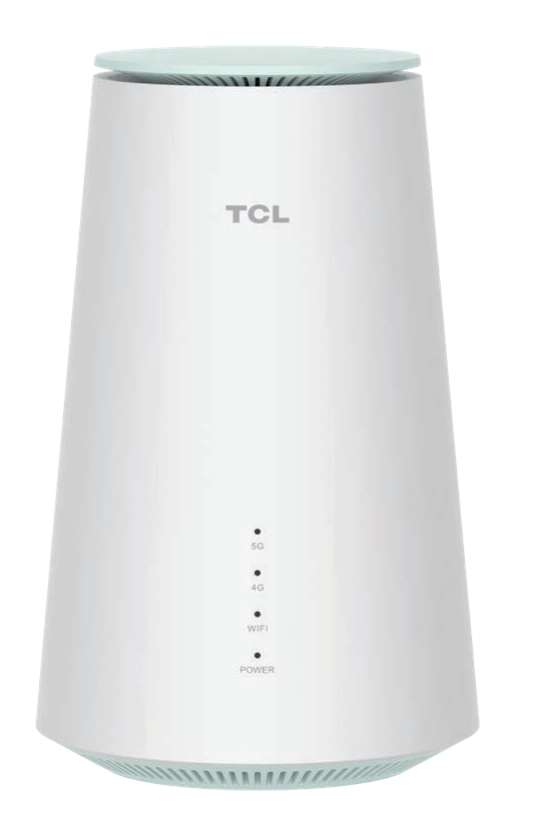
- Design: Compact white CPE router form factor for desktop placement
- Performance note: Some technical listings reference 5G speeds up to 3.47 Gbps, reflecting chipset and carrier conditions
Compared with standard 5G routers, the TCL LinkHub 5G CPE Router HH512V stands out for its Wi-Fi 6E support, which improves congestion handling in crowded homes. Against similar products from Huawei, TP-Link, or ZTE, it offers a strong balance of speed, modern wireless standards, and user-friendly home networking features. It is especially attractive for buyers who want a 5G CPE router with future-ready wireless compatibility.
Pros and Cons of the TCL LinkHub 5G CPE Router HH512V
Pros
- Fast 5G performance: Good fit for households that want broadband-like speeds without fixed-line installation.
- Wi-Fi 6E support: Better performance for newer devices and less interference on compatible networks.
- Multi-device handling: Suitable for families or shared spaces with phones, laptops, smart TVs, and consoles.
- Simple deployment: SIM-based setup can be quicker than waiting for fiber installation.
- Useful extras: Hotspot and parental controls add value for everyday home use.
Cons
- Carrier-dependent speed: Real-world performance varies heavily by 5G coverage and signal strength.
- Premium pricing: Usually costs more than basic 4G routers or entry-level home gateways.
- Availability varies: Stock and regional variants can differ by market.
- Not a fiber replacement everywhere: In strong fiber areas, wired broadband may still deliver more consistent latency for competitive gaming.
For value for money, the TCL LinkHub 5G CPE Router HH512V makes the most sense for users who can take advantage of 5G and Wi-Fi 6E together. If maximum wired-network stability is the priority, a fiber router or mesh system may be a better alternative. If portability matters more, a battery-powered mobile hotspot may offer more flexibility, but with lower home-network performance.
Customer Reviews and Real-World Feedback on the TCL LinkHub 5G CPE Router HH512V
Customer feedback for the TCL LinkHub 5G CPE Router HH512V is generally positive, especially among users who value speed and easy setup. Typical praise includes stable 5G reception in strong coverage areas, smooth 4K streaming, and reliable performance for multiple connected devices. A common rating pattern is around 4 out of 5 stars, reflecting strong performance with a few practical limitations.
Users often highlight the router’s convenience as a plug-and-play internet solution. Many say it works well for home offices, online classes, and family entertainment. Common complaints focus on signal variability in weaker 5G areas, occasional setup frustration with carrier SIM settings, and the higher price compared with standard routers. One frequent comment is that performance is excellent when the network is good, but results can drop sharply in poor coverage zones.
Recommended for buyers who want a 5G Wi-Fi 6E router for home use, especially where fixed broadband is unavailable or slow. For the best experience, check local 5G coverage before purchase and compare carrier compatibility carefully.
Is the TCL LinkHub 5G CPE Router HH512V Worth Buying?
The TCL LinkHub 5G CPE Router HH512V is a smart choice for users who need fast wireless internet, modern Wi-Fi 6E support, and a simple SIM-based setup. It is best suited to households, remote workers, and small offices that want a flexible 5G home router with strong everyday performance. If your location has solid 5G coverage, this model can deliver an excellent broadband alternative with fewer installation hassles.
For shoppers comparing 5G routers, the TCL LinkHub 5G CPE Router HH512V offers a strong mix of speed, convenience, and future-ready connectivity. It may not be the cheapest option, but it delivers enough features to justify its place among premium 5G CPE routers.
Faqs
How do I set up the TCL Linkhub 5G CPE Router HH512V for the first time?
What should I do if my TCL Linkhub 5G CPE Router HH512V is not getting a 5G connection?
Which devices are compatible with the TCL Linkhub 5G CPE Router HH512V?
How many devices can the TCL Linkhub 5G CPE Router HH512V handle at once?
How can I improve the speed and Wi-Fi performance of my TCL Linkhub 5G CPE Router HH512V?
Why is the TCL Linkhub 5G CPE Router HH512V Wi-Fi connected but the internet still not working?
Does the TCL Linkhub 5G CPE Router HH512V support parental controls and hotspot features?
How should I maintain and care for the TCL Linkhub 5G CPE Router HH512V for long-term reliability?
Tags
More tcl manuals
Leave a Comment