
Tcl 55P635 4K HDR TV User Manual
Content
TCL 55P635 4K HDR TV: Complete Product Manual and Buyer Guide
Introduction
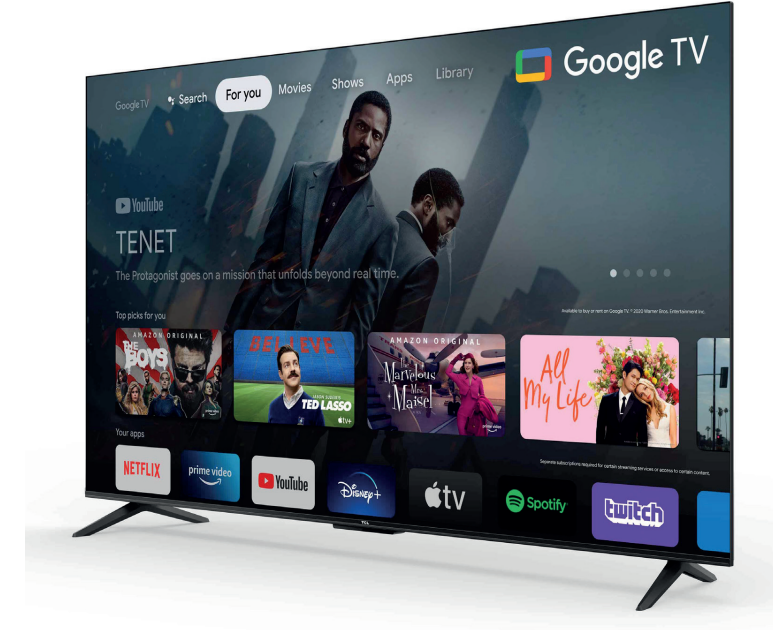
The TCL 55P635 4K HDR TV is a 55-inch smart television designed for users who want sharp Ultra HD picture quality, simple smart features, and strong value for money. With a 3840 x 2160 resolution, HDR10 and HLG support, and a bezel-less design, this model delivers a modern home entertainment experience for movies, streaming, sports, and casual gaming. The TCL 55P635 4K HDR TV is especially appealing to buyers looking for a reliable large-screen TV without paying premium-brand prices.
This model is a practical choice for living rooms, bedrooms, and secondary family spaces. It suits viewers who want easy access to streaming apps, clear 4K detail, and broad compatibility with common devices such as set-top boxes, game consoles, soundbars, and USB drives. The TV includes smart connectivity, HDMI ports, USB support, Wi-Fi, and Bluetooth, making it flexible for everyday use. Its 60 Hz refresh rate and wide 178-degree viewing angle help maintain a smooth and comfortable viewing experience from multiple seating positions.
For most markets, the estimated price range is typically around the budget-to-midrange category, often varying between about $250 and $450 depending on region, retailer, and promotional offers. Availability is generally good through electronics stores, online marketplaces, and TCL-authorized sellers. If you are comparing affordable 4K smart TVs, the TCL 55P635 4K HDR TV stands out as a balanced option that combines essential features, solid display quality, and broad compatibility in one streamlined package.
Specifications
- Display size: 55 inches / 139.7 cm visible diagonal
- Resolution: 3840 x 2160 pixels, 4K Ultra HD
- HDR formats: HDR10 and HLG
- Refresh rate: 60 Hz native performance
- Panel type: LED with direct-style backlighting and wide viewing support
- Viewing angle: 178 degrees horizontal and vertical
- Smart platform: Android TV / Google TV variant depending on region
- Audio: Dolby Audio support, typically 2.0-channel output
- Connectivity: 3 HDMI ports, including eARC on supported variants; USB, AV, optical audio, LAN, Wi-Fi, and Bluetooth
- Design: Metallic bezel-less or edgeless styling depending on market version
- Power use: Around 90W to 125W depending on regional specification
Compared with similar budget 55-inch 4K smart TVs, the TCL 55P635 offers strong essentials rather than premium extras. It is competitive against entry-level models from Hisense, Samsung Crystal UHD, and LG UHD series, especially when value, HDR support, and smart connectivity matter more than advanced gaming features or higher refresh rates.
Setup Guide: How to Install and Configure the TCL 55P635 4K HDR TV
Start by placing the TV on a stable surface or mounting it on a compatible wall bracket that matches the VESA pattern for your specific regional model. Keep ventilation space around the rear panel and avoid direct heat, moisture, or sunlight. Before powering on, connect the stand securely if you are using the tabletop setup.
Next, connect the power cable and press the power button on the remote. Follow the on-screen setup wizard to choose your language, region, Wi-Fi network, and Google or Android account. During initial setup, you can enable location services, install recommended apps, and scan for live TV channels if you are using an antenna, cable, or satellite source.
For external devices, use HDMI for game consoles, streaming boxes, and soundbars. If your soundbar supports enhanced audio return, connect it to the eARC-enabled HDMI port when available. Pair Bluetooth headphones or speakers through the sound settings menu. If the TV does not detect a device, check cable integrity, input selection, and HDMI compatibility. For picture adjustment, switch between standard, movie, sport, and eco modes to match your viewing environment.
Safety tip: never block ventilation slots, avoid overloaded power strips, and unplug the TV during thunderstorms or long periods of non-use. If the TV fails to boot, confirm the outlet is working and test a different power cable or socket before contacting support.
Troubleshooting
Common issues on the TCL 55P635 4K HDR TV are usually related to signal input, network setup, audio settings, or firmware. If the screen is black, verify that the correct HDMI source is selected and that the external device is powered on. If there is no sound, check mute settings, volume levels, and whether audio is being routed to a soundbar or Bluetooth device.
- No picture: Re-seat HDMI cables, change input source, or restart the TV and connected device.
- Wi-Fi disconnects: Move the router closer, reconnect the network, or reboot the modem and TV.
- Remote not responding: Replace batteries, remove obstructions, and re-pair Bluetooth remotes if needed.
- App crashes or freezes: Clear app cache, update system software, or reinstall the app.
- HDMI signal lost: Use a certified HDMI cable and confirm the output resolution is supported.
Some regional manuals reference service or support phone numbers, so contact the local TCL support center or the authorized retailer where the TV was purchased for warranty assistance. Keep your proof of purchase, serial number, and model information ready for faster service. Preventive care includes regular software updates, proper ventilation, and avoiding power interruptions from unstable outlets.
Pros & Cons
Pros
- Excellent value for a 55-inch 4K HDR smart TV
- Sharp Ultra HD resolution for streaming and movies
- HDR10 and HLG improve brightness and color range
- Multiple connectivity options for modern home setups
- Bezel-less design gives it a clean, premium look
- Good for everyday viewing, family use, and casual gaming
Cons
- 60 Hz refresh rate is not ideal for high-end gaming
- Sound is acceptable but better with an external soundbar
- Picture processing is solid, but not premium-tier
- Feature set may vary slightly by region
- Brightness and motion handling are more modest than higher-end TVs
The TCL 55P635 4K HDR TV is best for buyers who want a dependable large-screen display without overspending. Compared with premium alternatives, it sacrifices advanced gaming features, higher brightness, and stronger audio performance, but it delivers strong everyday value and reliable core functionality. For price-conscious shoppers, it remains one of the more practical 55-inch 4K options in its class.
Customer Reviews
Most users rate the TCL 55P635 around 4 out of 5 stars for its balance of price, size, and picture quality. Common praise includes crisp 4K detail, easy streaming access, attractive design, and simple setup. Many buyers describe it as a strong family TV and a smart choice for secondary rooms.
Frequent complaints usually mention average built-in sound, occasional lag in the smart interface, and limited gaming performance compared with faster premium models. A typical user comment might read: “Great picture for the price, but I added a soundbar for better movie nights.” Another common review theme is: “Perfect for streaming and everyday TV, especially if you want a budget-friendly 55-inch screen.”
For most households, this model is recommended when affordability and size matter more than top-end performance. If you want a solid 4K smart TV with good everyday results, the TCL 55P635 is a sensible purchase.
Faqs
How do I set up the TCL 55P635 4K HDR TV for the first time?
What picture settings should I use to get the best 4K HDR performance on the TCL 55P635 4K HDR TV?
Why is my TCL 55P635 4K HDR TV not showing HDR even though the content supports it?
How do I connect a gaming console to the TCL 55P635 4K HDR TV for low-lag gaming?
What should I do if the TCL 55P635 4K HDR TV has no picture but the sound works?
Can I use Chromecast, Bluetooth speakers, or voice control with the TCL 55P635 4K HDR TV?
How can I improve Wi-Fi streaming quality on the TCL 55P635 4K HDR TV?
How should I clean and maintain the TCL 55P635 4K HDR TV safely?
More tcl manuals
Leave a Comment