
Tcl LINKHUB 4G LTE Home Router HH42CV2 User Manual
Content
Introduction
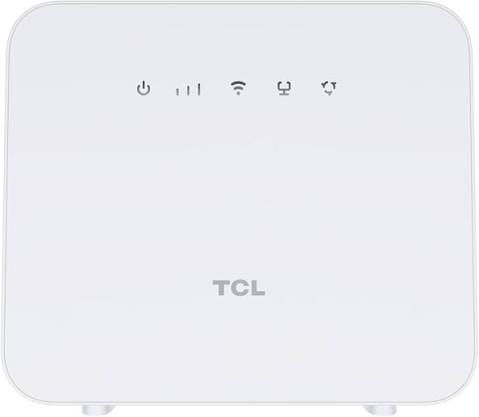
The tcl LINKHUB 4G LTE Home Router HH42CV2 is a compact fixed-wireless router designed to deliver internet access through a 4G LTE SIM card, making it a practical choice for homes, small offices, and backup connectivity. It is especially useful in locations where fiber or cable broadband is limited, expensive, or unavailable, and it also works well as a temporary internet solution for rentals, holiday homes, and mobile workspaces.
One of the main benefits of the tcl LINKHUB 4G LTE Home Router HH42CV2 is its simple plug-and-play design. Insert a compatible SIM card, connect power, and configure settings through the web interface. The router supports Wi‑Fi 4 on the 2.4 GHz band, wired LAN connectivity, and external antenna connections on some variants, giving users flexible coverage options for everyday browsing, streaming, video calls, and smart home devices.
This model is aimed at users who want a straightforward LTE router with stable performance and easy setup. It is a good fit for households with multiple connected devices, remote workers needing a dependable internet backup, and small businesses that need affordable connectivity. Estimated pricing typically falls in the budget-to-midrange category, often around the equivalent of $40 to $90 depending on region, bundle, and retailer availability. Availability varies by market, but the device is commonly sold through electronics stores, online marketplaces, and carrier bundles.
Specifications
Key technical specifications of the tcl LINKHUB 4G LTE Home Router HH42CV2
- Network type: 4G LTE Cat.4 with fallback to 3G in supported markets
- Mobile speeds: up to 150 Mbps download and up to 50 Mbps upload
- Wi‑Fi standard: 802.11 b/g/n on 2.4 GHz band
- Wireless speed: up to 300 Mbps on Wi‑Fi N
- Maximum connected users: up to 32 devices
- Ports: 2 x Ethernet ports, typically 10/100 Mbps, including LAN and LAN/WAN use
- SIM support: micro-SIM slot
- Power input: 12V/1A adapter
- Security: WPA/WPA2 support, with standard router access controls
- Memory: commonly listed with 256 MB RAM and 256 MB storage on some versions
In real-world use, the device is best suited for moderate household traffic rather than heavy gigabit-class workloads. Compared with a modern dual-band Wi‑Fi 5 or Wi‑Fi 6 LTE router, the HH42CV2 is simpler and more affordable, but it offers less wireless capacity, fewer advanced features, and no 5 GHz band. For users prioritizing value and basic LTE coverage, it remains a practical fixed wireless option.
Setup Guide: How to install and configure the HH42CV2
Setting up the tcl LINKHUB 4G LTE Home Router HH42CV2 is straightforward and usually takes only a few minutes. Start by placing the router in an open area with good signal reception, preferably near a window and away from thick walls or metal objects. Insert the micro-SIM card into the SIM slot, making sure it is oriented correctly and the SIM is active with the correct APN settings from your mobile provider.
Next, connect the power adapter and wait for the status lights to stabilize. Use a smartphone, laptop, or tablet to search for the default Wi‑Fi network name printed on the router label or included documentation. Join the network and open the router web interface in a browser to complete configuration. From there, you can change the Wi‑Fi name, set a strong password, adjust mobile data settings, and monitor signal strength.
For wired devices, connect an Ethernet cable to one of the LAN ports. If external antennas are supported on your unit, attach them only when the router is powered off and follow the manufacturer’s orientation guidance. Avoid placing the device near water, heat sources, or enclosed cabinets. If the internet does not connect, restart the router, verify the SIM card, and confirm that mobile data is enabled on the account.
Troubleshooting
Common problems and fixes for the tcl LINKHUB 4G LTE Home Router HH42CV2
- No internet access: Check whether the SIM card is active, correctly inserted, and not protected by a PIN code.
- Weak signal: Move the router closer to a window, reposition it, or use supported external antennas if available.
- Wi‑Fi not visible: Restart the router, confirm wireless is enabled in settings, and change the SSID if needed.
- Slow speeds: Test at different times of day, reduce the number of connected devices, and check the mobile network signal.
- Ethernet connection issue: Try another cable, another port, or reboot both the router and connected device.
- Login problem: Reset the admin password if you cannot access the web interface, then review default login details.
Common router error indicators usually relate to SIM status, mobile network registration, or signal quality rather than hardware failure. If the device repeatedly drops connection, update settings carefully, check APN configuration, and keep firmware current when updates are offered. Preventive maintenance includes placing the router in a ventilated spot, using a stable power source, and avoiding frequent unplugging.
Warranty coverage and support options vary by retailer and region. For help, check the product documentation, the seller’s support page, or TCL customer support in your country. If the unit is still under warranty, keep proof of purchase, the serial number, and a description of the issue ready before requesting service.
Pros & Cons
Balanced review of the tcl LINKHUB 4G LTE Home Router HH42CV2
Pros
- Easy setup with SIM-based plug-and-play internet access
- Good value for homes needing affordable LTE broadband
- Supports up to 32 connected devices for everyday use
- Compact design that fits well in apartments, offices, and temporary locations
- Useful as a backup internet connection when fixed broadband fails
Cons
- Only 2.4 GHz Wi‑Fi, which is less flexible than dual-band routers
- LTE Cat.4 speeds are suitable for basic use but not premium high-speed broadband
- Ethernet ports are limited and typically capped at 100 Mbps
- Fewer advanced features than newer LTE routers with app control or Wi‑Fi 6
- Performance depends heavily on mobile signal quality and carrier coverage
For value for money, the tcl LINKHUB 4G LTE Home Router HH42CV2 is strongest when used in areas with decent 4G coverage and moderate internet needs. Compared with premium alternatives, it sacrifices speed and radio flexibility, but it remains a sensible choice for users who want a reliable, low-complexity LTE router without paying extra for advanced features they may never use.
Customer Reviews
Customer feedback for the tcl LINKHUB 4G LTE Home Router HH42CV2 is generally mixed to positive, with many users praising its simple setup and dependable performance for light-to-moderate use. A common rating pattern is around 4 out of 5 stars for convenience and value, especially from users in rural areas or temporary housing.
Typical praise includes comments such as, “Installed in minutes and worked immediately with my SIM card,” and “Perfect as a backup router for home internet outages.” Common complaints mention limited Wi‑Fi range, slower speeds compared with fiber, and occasional signal instability in weak coverage areas.
Buyers who need an affordable LTE home router for basic browsing, streaming, and work calls will likely be satisfied. Users who need dual-band Wi‑Fi, gigabit Ethernet, or higher mobile throughput should consider newer LTE or 5G alternatives instead.
Faqs
How do I set up the TCL LINKHUB 4G LTE Home Router HH42CV2 for the first time?
What should I do if my TCL LINKHUB 4G LTE Home Router HH42CV2 is not connecting to the internet?
Which devices are compatible with the TCL LINKHUB 4G LTE Home Router HH42CV2?
How many devices can the TCL LINKHUB 4G LTE Home Router HH42CV2 support at once?
How can I improve Wi‑Fi speed on the TCL LINKHUB 4G LTE Home Router HH42CV2?
Can I use an Ethernet cable with the TCL LINKHUB 4G LTE Home Router HH42CV2?
What APN settings do I need for the TCL LINKHUB 4G LTE Home Router HH42CV2?
How should I maintain and care for the TCL LINKHUB 4G LTE Home Router HH42CV2?
More tcl manuals
Leave a Comment